Solved How do I get desktop icons to show?

Esterdotter

New member
Local time
11:59 PM
Messages
2
My screen recently moved icons for frequently used programs to the top of the page, and now I can't find how to show the desktop icons, or search "all programs."
 

My Computer My Computer

Computer type
Laptop
Computer Manufacturer/Model Number
Dell Inspiron 17
OS
Windows Professional
Browser
Chrome
Welcome, to show the icons of the desktop: they can be hidden, press right click on the desktop and then the context menu appears, in the penultima option says: show icons on the desktop turns on or off.
Through that menu you have the option to automatically organize the icons, either by name, size, type, date of modification and many more options.
If you do not find the program shortcuts. Go to the following path: C: \ Program Files or C: \ Program Files (x86) in them locate the program name, that folder is executable, right click and send to desktop.
 

My Computer My Computer

Computer type
Laptop
Computer Manufacturer/Model Number
HP
OS
Windows 7 Ultimate x64
CPU
AMD E-450 APU with Raedon(tm) HD Graphics (2 CPUs), ~1.6GHz
Motherboard
Hewlett-Packard
Memory
6 GB
Graphics Card(s)
AMD Raedon HD 6320 Graphics
Sound Card
High Definition Audio
Monitor(s) Displays
Monitor PnP Generic
Screen Resolution
1024 x 728 (32 bit) (60Hz)
Keyboard
HP Key
Mouse
Perfect Choice
Internet Speed
1 MB/S
Antivirus
Windows Defender
Browser
Google Chrome
The ideal thing to do would be to get into System Restore, and do a restore to a time before the problem happened.

If you can get into the Control Panel > System > System Protection (upper left corner of the window) > System restore.
And if some #%^$ has not shut off System Restore, go back to the last entry before the problem occurred.

I personally rely on System Restore so much that I have a script in my Startup Folder, that forces a new restore point every time I boot up my system.

Good Luck,
TechnoMage :cool:
 

My Computer My Computer

Computer type
PC/Desktop
Computer Manufacturer/Model Number
Various
OS
Win 7 Pro, SP1, x86, Win-11/Pro/64
CPU
AMD
Motherboard
Various
Memory
8GB Crucial
Graphics Card(s)
Various
Sound Card
OnBoard
Monitor(s) Displays
Acer 21.5"
Hard Drives
Crucial SSD, 500 GB
PSU
OEM
Case
SFF Slim Line Case
Cooling
OEM
Keyboard
eMachines
Mouse
Logitech Wireless
Internet Speed
varies
Antivirus
Windows Defender/Super Anti-Spyware
Browser
Firefox
Desktop Icon Settings

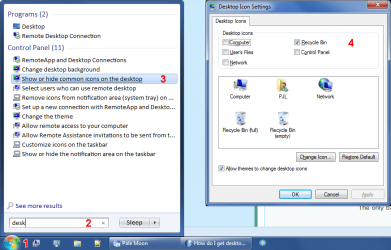
Try this:

  1. Open the Start Menu
  2. Start typing "desktop" into the Search box (no quotes)
  3. Choose "Show or hide common icons on the desktop"
  4. Choose the required icons

Desktop Icons.png
 

My Computer My Computer

Computer type
PC/Desktop
Computer Manufacturer/Model Number
n/a
OS
W7 Ultimate SP1, LM19.2 MATE, W10 Home 1703, W10 Pro 1703 VM, #All 64 bit
CPU
AMD Phenom II x6 1100T, 3.3 GHz
Motherboard
ASUS M4A88T-M/USB3 (AM3)
Memory
12GB DDR3 1333 G-Skill (4GB x 2), G-Skill (2GB x 2)
Graphics Card(s)
NVIDIA GeForce GTX 660
Sound Card
Realtek?
Monitor(s) Displays
Samsung S23B350
Screen Resolution
1920x1080
Hard Drives
WD Green 2TB (SATA), WD Green 3TB (SATA), WD Blue 4TB (SATA), WD Blue 6TB (SATA)
PSU
Cooler Master
Case
Antec GX300 Tower
Cooling
3x Antec TRICOOL 120mm Fans
Mouse
Wired Optical
Internet Speed
DSL
Antivirus
Avast
Browser
Pale Moon (64 bit)
Other Info
2018-12-27 Upgraded HDDs
2015-12-10 Upgraded case, graphics card, storage
2015-08-15 Upgraded motherboard & RAM
2015-07-15 Upgraded LM17.1 to LM17.2
Thank you

Thank you to the three responders. Cast's suggestion worked best for me.
How great to find this site!
Esterdotter.
 

My Computer My Computer

Computer type
Laptop
Computer Manufacturer/Model Number
Dell Inspiron 17
OS
Windows Professional
Browser
Chrome
Back
Top