
Home Page will NOT stay

huffman

New member
Pro User
Local time
6:33 PM
Messages
715
I just reinstalled Win 7 Pro and have it completely updated.

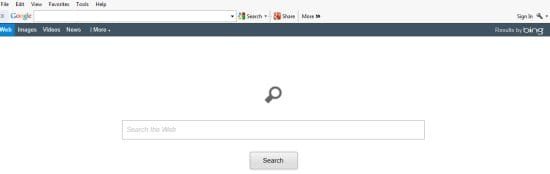
I have set my homepage to yahoo.com, but it keeps going back to
Search? everytime I open IE 10.

This shows where it reverts to:
homepage1.jpg

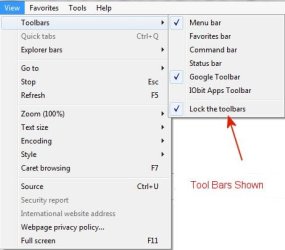
Here are the Toolbars I should have showing:
homepage2.jpg

How do I get IE10 to hold the homepage I have set?

Thank you
 

My Computer My Computer

At a glance

Windows 7 ProIntel(R) Pentium(R) Duel CPU E2200 2.20 Ghz4 gb 2.96 UsableOnboard
OS
Windows 7 Pro
CPU
Intel(R) Pentium(R) Duel CPU E2200 2.20 Ghz
Motherboard
GA-G41M-ES2L
Memory
4 gb 2.96 Usable
Graphics Card(s)
Onboard
Sound Card
Onboard
Hard Drives
2 - 1TB WD Sata Drives
First thing I might do is Disable google toolbar Helper I suppose because that is a google search page ?
Does it switch if you use the default About-Tabs page and boot ?
If still no joy Reset and delete personal settings/ your toolbars will still be available without re-downloading them.
 

My Computer My Computer

At a glance

Win-7-Pro64bit 7-H-Prem-64biti7-5930K 2nd i9-9940x both water blocked VRM'...Trident-z 3200C14 2nd Trident-z 3600C16EVGA 1080ti ftw3 2nd Titan Xp both water blocked
Computer type
PC/Desktop
Computer Manufacturer/Model Number
Custom assembled by me :}
OS
Win-7-Pro64bit 7-H-Prem-64bit
CPU
i7-5930K 2nd i9-9940x both water blocked VRM's too
Motherboard
ASUS SABERTOOTH X99 2nd ASUS x299 Apex
Memory
Trident-z 3200C14 2nd Trident-z 3600C16
Graphics Card(s)
EVGA 1080ti ftw3 2nd Titan Xp both water blocked
Sound Card
Built-in Realtek
Monitor(s) Displays
1-AOC G2460PG 24"G-Sync 144Hz/ 2nd 1-ASUS VG248QE 24" 144Hz
Screen Resolution
1920 x 1080 144Hz
Hard Drives
2-Samsung M.2 Evo & Evo Plus
2-Samsung 850 EVO 500GB SSD's/ 3-2.5 W.D. Black 1tb-&3-1tb/3-3.5 WD Black 1tb hdd's
PSU
EVGA SuperNOVA 1000-P2 2nd 1200-P2
Case
2-Corsair Obsidian Series 450D Black ATX Mid Tower
Cooling
Custom water loops
Keyboard
Logitech G710+/ 2nd Logitech G910
Mouse
2-RedDragon M901 Perdition 16400 dpi Gaming mouse = wired
Internet Speed
Comcast Ping 19ms 89.31mbps download speed 6.12mbps upload
Antivirus
Malwarebytes Pro/ Superantispyware Pro
Browser
FireFox & Pale moon
Other Info
2nd ASUS X299 Apex/Intel i9-9940x with Custom water loop/7H-Prem-x64/Corsair 450D case/Ram Trident-z 3600C16 4x8gb / Samsung970Evo plus 500gb SSD/Dual ssd EZ swap evo/PSU EVGA SuperNova 1200w-P2 80+Platinum/GPU Titan Xp /8-ML-140 on push-pull on 2-280GTX rads
Hey Huffman!
Something is on.
Pls search in your search engine : what is conduit.com?
Just copy the above sentence into the search box and get the results.
like this one
Remove Search.conduit.com Virus, removal instructions - 2 Spyware
www.2-spyware.com/remove-conduit-redirect-virus.html‎
Nov 21, 2012 – Conduit.com is an online search engline which has a browser toolbar, which supposedly is “powered by the community”. The search engine is.

and this one
why searchconduit.com is coming in google chrome - Forum
forum.precisesecurity.com › Computer Security‎
Dec 16, 2011 - 31 posts - 27 authors
I dont want searchconduit.com. I want www.google.com in my first page. While opening Google chrome, it shows searchconduit.com as the .

conduit.com.
Great page for redirecting for everyone!!!!!. Like me ad?
Use search engine to download the below.
Have you downloaded HijaakThis HJT yet?
Pls do.
Then download and run AdwCleaner.
 
Last edited:

My Computer My Computer

At a glance

Windows 7 Home Premium 64bitIntel Core 2 Duo T6600 2.2 GHz 800MHz4GBNvidia Geforce G105M
Computer type
Laptop
Computer Manufacturer/Model Number
Acer Aspire 4736G
OS
Windows 7 Home Premium 64bit
CPU
Intel Core 2 Duo T6600 2.2 GHz 800MHz
Motherboard
Intel PM65
Memory
4GB
Graphics Card(s)
Nvidia Geforce G105M
Hard Drives
Toshiba MK5055GSX 99FKS993S LBAS 976773167
Antivirus
AVG Free AV 2015
Browser
IE & Chrome

My Computer My Computer

At a glance

Windows 7 Home Premium 64bitIntel Core 2 Duo T6600 2.2 GHz 800MHz4GBNvidia Geforce G105M
Computer type
Laptop
Computer Manufacturer/Model Number
Acer Aspire 4736G
OS
Windows 7 Home Premium 64bit
CPU
Intel Core 2 Duo T6600 2.2 GHz 800MHz
Motherboard
Intel PM65
Memory
4GB
Graphics Card(s)
Nvidia Geforce G105M
Hard Drives
Toshiba MK5055GSX 99FKS993S LBAS 976773167
Antivirus
AVG Free AV 2015
Browser
IE & Chrome
I do appreciate the responses.

First off this is a brand new reinstall of Windows and homepage was good until I undated to IE10.

The home page that I don't want I think actually shows it is from Bing

homepage3.jpg

cyrilhubert I do not have Chrome installed.

I will do that search for "what is conduit.com?"

ThrashZone. I do have the Google Search Bar installed and that is my primary search engine but I am not sure what you mean by "Helper".

Looks like I have some work to do to fix this problem.
 

My Computer My Computer

At a glance

Windows 7 ProIntel(R) Pentium(R) Duel CPU E2200 2.20 Ghz4 gb 2.96 UsableOnboard
OS
Windows 7 Pro
CPU
Intel(R) Pentium(R) Duel CPU E2200 2.20 Ghz
Motherboard
GA-G41M-ES2L
Memory
4 gb 2.96 Usable
Graphics Card(s)
Onboard
Sound Card
Onboard
Hard Drives
2 - 1TB WD Sata Drives
Well huffman!
What a wild goose chase.
You can uninstall IE 10 or Bing but do make a system restore point manually before experimenting.
Use IE 9 as the default.
Conduit is a malware and page redirecting virus.
You can download and run HJT but do not download and run AdwCleaner since you are not infected.
HJT allows you to see what is there.
Goto here Browsers & Mail - Windows 7 Help Forums and search IE10 uninstall.

You can go here and the main index to browse for info http://www.bleepingcomputer.com/forums/t/493117/snap-do-removal/
 

My Computer My Computer

At a glance

Windows 7 Home Premium 64bitIntel Core 2 Duo T6600 2.2 GHz 800MHz4GBNvidia Geforce G105M
Computer type
Laptop
Computer Manufacturer/Model Number
Acer Aspire 4736G
OS
Windows 7 Home Premium 64bit
CPU
Intel Core 2 Duo T6600 2.2 GHz 800MHz
Motherboard
Intel PM65
Memory
4GB
Graphics Card(s)
Nvidia Geforce G105M
Hard Drives
Toshiba MK5055GSX 99FKS993S LBAS 976773167
Antivirus
AVG Free AV 2015
Browser
IE & Chrome
I did the search for "what is conduit.com?"

I got a lot of hits and it is definitely a virus.

I found the instructions on how to remove (all totally worthless).

How I got the virus; I have no idea. I have only been to a few web sites which have always been safe.

I may end up having to do another install of Windows just to get rid of it.

DAMN !!!!
 

My Computer My Computer

At a glance

Windows 7 ProIntel(R) Pentium(R) Duel CPU E2200 2.20 Ghz4 gb 2.96 UsableOnboard
OS
Windows 7 Pro
CPU
Intel(R) Pentium(R) Duel CPU E2200 2.20 Ghz
Motherboard
GA-G41M-ES2L
Memory
4 gb 2.96 Usable
Graphics Card(s)
Onboard
Sound Card
Onboard
Hard Drives
2 - 1TB WD Sata Drives
Google toolbar comes with Google toolbar helper,
If you click on the "X" on the left end of the Google toolbar you will get a popup to disable helper as well,
Or Open ie,
Use Alt+ type TA or Menubar/ Tools/ Manage add-ons,
Google toolbar helper will be listed/ I always have it disabled.
You can use these free tools to see if they find anything,
Manually Update them before running full scans,
Try not to use your computer while the scans are running, (one at a time of course).
http://www.malwarebytes.org/products/malwarebytes_free
http://www.superantispyware.com/?tag=SUPERANTISPYWARE

This one is the longest up to 4 hours, the others are only about 45 minutes,
http://www.microsoft.com/security/scanner/en-us/default.aspx
Uninstall unwanted toolbar or rough search engine,
http://answers.microsoft.com/en-us/ie/forum/ie9-windows_7/how-do-i-get-rid-of-an-unwanted-homepage/697cbb83-1459-4963-9996-aa7478c749a6
 

My Computer My Computer

At a glance

Win-7-Pro64bit 7-H-Prem-64biti7-5930K 2nd i9-9940x both water blocked VRM'...Trident-z 3200C14 2nd Trident-z 3600C16EVGA 1080ti ftw3 2nd Titan Xp both water blocked
Computer type
PC/Desktop
Computer Manufacturer/Model Number
Custom assembled by me :}
OS
Win-7-Pro64bit 7-H-Prem-64bit
CPU
i7-5930K 2nd i9-9940x both water blocked VRM's too
Motherboard
ASUS SABERTOOTH X99 2nd ASUS x299 Apex
Memory
Trident-z 3200C14 2nd Trident-z 3600C16
Graphics Card(s)
EVGA 1080ti ftw3 2nd Titan Xp both water blocked
Sound Card
Built-in Realtek
Monitor(s) Displays
1-AOC G2460PG 24"G-Sync 144Hz/ 2nd 1-ASUS VG248QE 24" 144Hz
Screen Resolution
1920 x 1080 144Hz
Hard Drives
2-Samsung M.2 Evo & Evo Plus
2-Samsung 850 EVO 500GB SSD's/ 3-2.5 W.D. Black 1tb-&3-1tb/3-3.5 WD Black 1tb hdd's
PSU
EVGA SuperNOVA 1000-P2 2nd 1200-P2
Case
2-Corsair Obsidian Series 450D Black ATX Mid Tower
Cooling
Custom water loops
Keyboard
Logitech G710+/ 2nd Logitech G910
Mouse
2-RedDragon M901 Perdition 16400 dpi Gaming mouse = wired
Internet Speed
Comcast Ping 19ms 89.31mbps download speed 6.12mbps upload
Antivirus
Malwarebytes Pro/ Superantispyware Pro
Browser
FireFox & Pale moon
Other Info
2nd ASUS X299 Apex/Intel i9-9940x with Custom water loop/7H-Prem-x64/Corsair 450D case/Ram Trident-z 3600C16 4x8gb / Samsung970Evo plus 500gb SSD/Dual ssd EZ swap evo/PSU EVGA SuperNova 1200w-P2 80+Platinum/GPU Titan Xp /8-ML-140 on push-pull on 2-280GTX rads
I dont see the use in toolbars, most of them cause so many issues.
 

My Computer My Computer

At a glance

Win 7 64bit
Computer type
PC/Desktop
Computer Manufacturer/Model Number
Dell at work - Home built at home
OS
Win 7 64bit
Hi huffman!
I apologise as I don't know if your system is really infected and for my random answer. You have to read this to determine if your system is really infected.
Taken from ESET at How do I know if my computer is infected with a virus or other malware? - ESET Knowledgebase

Symptoms of computer malware that affect the Internet:
•You may receive the error "Internet Explorer could not display the page" when attempting to access certain websites
•Your web browser (for example, Microsoft Internet Explorer, Mozilla Firefox, Google Chrome) freezes, hangs or is unresponsive
•Your web browser's default homepage is changed
•Access to Antivirus Software and Internet Security Solutions is blocked
•You get redirected to web pages other than the one you intended to go to
•You receive numerous web-browser pop-up messages
•Strange or unexpected toolbars appear at the top of your web browser


Then you must decide to destroy and clean the infection or reinstall again.
You first download HJT or directly download and run AdwCleaner.
 
Last edited:

My Computer My Computer

At a glance

Windows 7 Home Premium 64bitIntel Core 2 Duo T6600 2.2 GHz 800MHz4GBNvidia Geforce G105M
Computer type
Laptop
Computer Manufacturer/Model Number
Acer Aspire 4736G
OS
Windows 7 Home Premium 64bit
CPU
Intel Core 2 Duo T6600 2.2 GHz 800MHz
Motherboard
Intel PM65
Memory
4GB
Graphics Card(s)
Nvidia Geforce G105M
Hard Drives
Toshiba MK5055GSX 99FKS993S LBAS 976773167
Antivirus
AVG Free AV 2015
Browser
IE & Chrome
Back
Top