HomeGroup and wifi Home Network printer incompatability?

acksunny

New member
Local time
12:30 AM
Messages
13
Hi all,
New to Win 7 and have for the past couple of days been searching all over the WWW for answers and solutions to the following. I have been on countless discussion boards and tried everything that has been suggested, but I am no closer to finding solutions.

1) I am the only person in my household with a win 7 computer, so I would like to remove my laptop from the automatically generated (?) HomeGroup ( I sure did not set it up!) But no matter the suggested fix I end up with the same message: Windows could not remove this computer from the Home Group.

If there has been a suggested fix out there, i seem to have tried it. No luck.

My Brother wifi printer has worked just fine with my old laptop, my tablet and my smartphone, and which shows up in Devices and printers as the default, available, online printer, as well as in my network. I have installed and reinstalled the drivers and software 3 times now, and gone through all possible configurations and troubleshooting in addition to googling solutions... still seems unable to communicate with my laptop.

Which leads me to the following two questions:

Are HomeGroup and Home Network wifi printing in conflict with each other?
And does anyone have any proven, recent solutions for how to fix both above described issues?

Solid leads would be greatly appreciated so that I am able to get some sleep :D
 

My Computer My Computer

At a glance

Windows 7 Home PremiumIntel HD
Computer type
Laptop
Computer Manufacturer/Model Number
Acer Aspire E1-731-4699
OS
Windows 7 Home Premium
Graphics Card(s)
Intel HD
Antivirus
Panda
Browser
Chrome

My Computer My Computer

At a glance

Windows 7 Ultimate x64 SP1AMD Phenom 2 1090T2x8GB Kingston HyperX Fury Black 1600Mhz Unga...MSI GTX 970 Gaming 4G
Computer type
PC/Desktop
Computer Manufacturer/Model Number
Custom Build
OS
Windows 7 Ultimate x64 SP1
CPU
AMD Phenom 2 1090T
Motherboard
Gigabyte GA-890FXA-UD5
Memory
2x8GB Kingston HyperX Fury Black 1600Mhz Unganged
Graphics Card(s)
MSI GTX 970 Gaming 4G
Sound Card
Realtek On-Board HD 7.1 Audio / Logitech G35
Monitor(s) Displays
3xAcer GD245HQ
Screen Resolution
1920x1080
Hard Drives
Samsung 850 Pro 512GB SSD - OS /
WD Caviar Black SATA 3 - 1 TBx2 - Dynamic RAID 0 /
WD Caviar Green SATA 2 - 640GBx2 - Dynamic RAID 0 /
WD Caviar Green SATA 2 - 640GB - Internal Backup /
Seagate Barracude SATA 3 - 3TB - External Backup/ Sync
PSU
HighPower 1000W
Case
Cooler Master HAF 932
Cooling
Noctua NH-D14
Keyboard
Logitech G19
Mouse
Logitech G500
Internet Speed
100/4 Mbit Cable (100GB quota)
Antivirus
ZoneAlarm Extreme Security / MBAM Pro / MBAE Free / SAS Free
Browser
IE 11 - Firefox - Chrome
Other Info
Logitech F710/ G27/ G940/ Z5500 // TrackIR 5 // Nvidia 3D Surround Vision
Not so fast there! My laptop (Acer Aspire win 7 home premium) is spanking new (1 week old), and unless there is a ghost, I am the only person who has had her hands on it. Like I said I did not set up HomeGroup, so it must have come pre-set up. Unless there is another logical explanation.

Thank you for link to tutorial. yes- I had tried everything listed there except the very last suggestion: turn router off and then try to leave the HomeGroup.... which I have also now tried and still no luck; see the attached.

There seem to be a few people like myself out there who have tried all the fixes that work for others, but still have the same issue.

(Im)Patiently awaiting the magic fix- to both the HomeGroup and wifi printer issues.
 

Attachments

  • windows error message.png
    windows error message.png
    53.1 KB · Views: 2

My Computer My Computer

At a glance

Windows 7 Home PremiumIntel HD
Computer type
Laptop
Computer Manufacturer/Model Number
Acer Aspire E1-731-4699
OS
Windows 7 Home Premium
Graphics Card(s)
Intel HD
Antivirus
Panda
Browser
Chrome

My Computer My Computer

At a glance

Windows 7 Ultimate x64 SP1AMD Phenom 2 1090T2x8GB Kingston HyperX Fury Black 1600Mhz Unga...MSI GTX 970 Gaming 4G
Computer type
PC/Desktop
Computer Manufacturer/Model Number
Custom Build
OS
Windows 7 Ultimate x64 SP1
CPU
AMD Phenom 2 1090T
Motherboard
Gigabyte GA-890FXA-UD5
Memory
2x8GB Kingston HyperX Fury Black 1600Mhz Unganged
Graphics Card(s)
MSI GTX 970 Gaming 4G
Sound Card
Realtek On-Board HD 7.1 Audio / Logitech G35
Monitor(s) Displays
3xAcer GD245HQ
Screen Resolution
1920x1080
Hard Drives
Samsung 850 Pro 512GB SSD - OS /
WD Caviar Black SATA 3 - 1 TBx2 - Dynamic RAID 0 /
WD Caviar Green SATA 2 - 640GBx2 - Dynamic RAID 0 /
WD Caviar Green SATA 2 - 640GB - Internal Backup /
Seagate Barracude SATA 3 - 3TB - External Backup/ Sync
PSU
HighPower 1000W
Case
Cooler Master HAF 932
Cooling
Noctua NH-D14
Keyboard
Logitech G19
Mouse
Logitech G500
Internet Speed
100/4 Mbit Cable (100GB quota)
Antivirus
ZoneAlarm Extreme Security / MBAM Pro / MBAE Free / SAS Free
Browser
IE 11 - Firefox - Chrome
Other Info
Logitech F710/ G27/ G940/ Z5500 // TrackIR 5 // Nvidia 3D Surround Vision
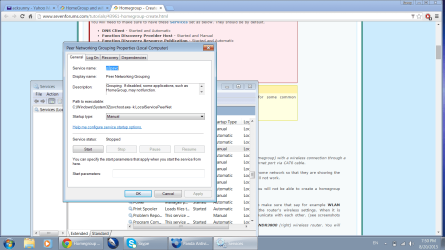
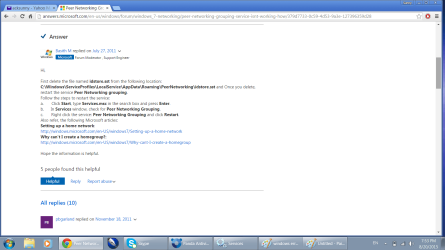
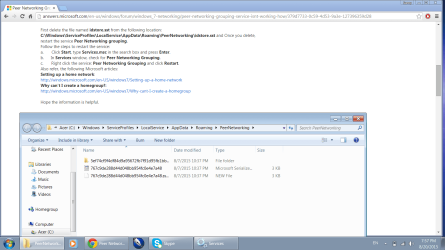
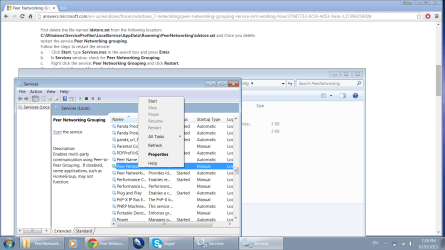
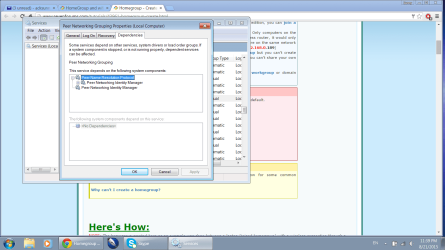
Thanks for clarifying and suggestions. And for the sake of keep trying to fix this, I went through the check list for settings for setting up HomeGroup. As before, the stumbling block is that the Peer Networking Grouping cannot be started. And the fix for that doesn't work (see screen shots).

In the last picture the Restart option is not active. Clicking Start did nothing.
 

Attachments

  • windows error message2.png
    windows error message2.png
    69.2 KB · Views: 2
  • windows error message2about.png
    windows error message2about.png
    59.7 KB · Views: 3
  • windows error message2about2.png
    windows error message2about2.png
    70.5 KB · Views: 2
  • windows error message2about3.png
    windows error message2about3.png
    81.4 KB · Views: 3
Last edited:

My Computer My Computer

At a glance

Windows 7 Home PremiumIntel HD
Computer type
Laptop
Computer Manufacturer/Model Number
Acer Aspire E1-731-4699
OS
Windows 7 Home Premium
Graphics Card(s)
Intel HD
Antivirus
Panda
Browser
Chrome
It is right behind the context menu on last screenshot but seems Peer Name Resolution Protocol is Automatic but not started. Right click the Peer Networking Grouping service and switch to Dependencies tab, it will list which other services are needed to be started for this one to start.
 

My Computer My Computer

At a glance

Windows 7 Ultimate x64 SP1AMD Phenom 2 1090T2x8GB Kingston HyperX Fury Black 1600Mhz Unga...MSI GTX 970 Gaming 4G
Computer type
PC/Desktop
Computer Manufacturer/Model Number
Custom Build
OS
Windows 7 Ultimate x64 SP1
CPU
AMD Phenom 2 1090T
Motherboard
Gigabyte GA-890FXA-UD5
Memory
2x8GB Kingston HyperX Fury Black 1600Mhz Unganged
Graphics Card(s)
MSI GTX 970 Gaming 4G
Sound Card
Realtek On-Board HD 7.1 Audio / Logitech G35
Monitor(s) Displays
3xAcer GD245HQ
Screen Resolution
1920x1080
Hard Drives
Samsung 850 Pro 512GB SSD - OS /
WD Caviar Black SATA 3 - 1 TBx2 - Dynamic RAID 0 /
WD Caviar Green SATA 2 - 640GBx2 - Dynamic RAID 0 /
WD Caviar Green SATA 2 - 640GB - Internal Backup /
Seagate Barracude SATA 3 - 3TB - External Backup/ Sync
PSU
HighPower 1000W
Case
Cooler Master HAF 932
Cooling
Noctua NH-D14
Keyboard
Logitech G19
Mouse
Logitech G500
Internet Speed
100/4 Mbit Cable (100GB quota)
Antivirus
ZoneAlarm Extreme Security / MBAM Pro / MBAE Free / SAS Free
Browser
IE 11 - Firefox - Chrome
Other Info
Logitech F710/ G27/ G940/ Z5500 // TrackIR 5 // Nvidia 3D Surround Vision
Thank you for following up on this, GoKay!
When checking the settings you referred to, I got the following results (see screen shots):

When trying to leave HomeGroup now, I still receive the message that Windows could not do it.

Peer Network Identity Manager is already stared and on automatic. Changing it to Manual did not seem to make a difference.
 

Attachments

  • peer networking grouping dependencies.png
    peer networking grouping dependencies.png
    64.3 KB · Views: 5
  • peer name resoloution protocol  error message.png
    peer name resoloution protocol error message.png
    93.5 KB · Views: 3
Last edited:

My Computer My Computer

At a glance

Windows 7 Home PremiumIntel HD
Computer type
Laptop
Computer Manufacturer/Model Number
Acer Aspire E1-731-4699
OS
Windows 7 Home Premium
Graphics Card(s)
Intel HD
Antivirus
Panda
Browser
Chrome

My Computer My Computer

At a glance

Windows 7 Ultimate x64 SP1AMD Phenom 2 1090T2x8GB Kingston HyperX Fury Black 1600Mhz Unga...MSI GTX 970 Gaming 4G
Computer type
PC/Desktop
Computer Manufacturer/Model Number
Custom Build
OS
Windows 7 Ultimate x64 SP1
CPU
AMD Phenom 2 1090T
Motherboard
Gigabyte GA-890FXA-UD5
Memory
2x8GB Kingston HyperX Fury Black 1600Mhz Unganged
Graphics Card(s)
MSI GTX 970 Gaming 4G
Sound Card
Realtek On-Board HD 7.1 Audio / Logitech G35
Monitor(s) Displays
3xAcer GD245HQ
Screen Resolution
1920x1080
Hard Drives
Samsung 850 Pro 512GB SSD - OS /
WD Caviar Black SATA 3 - 1 TBx2 - Dynamic RAID 0 /
WD Caviar Green SATA 2 - 640GBx2 - Dynamic RAID 0 /
WD Caviar Green SATA 2 - 640GB - Internal Backup /
Seagate Barracude SATA 3 - 3TB - External Backup/ Sync
PSU
HighPower 1000W
Case
Cooler Master HAF 932
Cooling
Noctua NH-D14
Keyboard
Logitech G19
Mouse
Logitech G500
Internet Speed
100/4 Mbit Cable (100GB quota)
Antivirus
ZoneAlarm Extreme Security / MBAM Pro / MBAE Free / SAS Free
Browser
IE 11 - Firefox - Chrome
Other Info
Logitech F710/ G27/ G940/ Z5500 // TrackIR 5 // Nvidia 3D Surround Vision
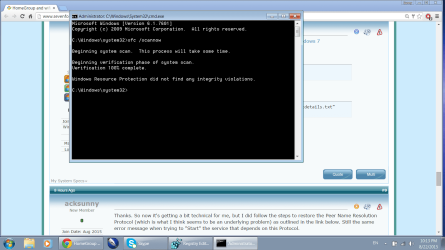
Thanks. So now it's getting a bit technical for me, but I did follow the steps to restore the Peer Name Resolution Protocol (which is what I think seems to be an underlying problem) as outlined in the link below. Still the same error message when trying to "Start" the service that depends on this Protocol.

Your two other suggestions... I just don't know where I am going with those. Like I said, a bit too technical for me!
 

My Computer My Computer

At a glance

Windows 7 Home PremiumIntel HD
Computer type
Laptop
Computer Manufacturer/Model Number
Acer Aspire E1-731-4699
OS
Windows 7 Home Premium
Graphics Card(s)
Intel HD
Antivirus
Panda
Browser
Chrome

My Computer My Computer

At a glance

Windows 7 Ultimate x64 SP1AMD Phenom 2 1090T2x8GB Kingston HyperX Fury Black 1600Mhz Unga...MSI GTX 970 Gaming 4G
Computer type
PC/Desktop
Computer Manufacturer/Model Number
Custom Build
OS
Windows 7 Ultimate x64 SP1
CPU
AMD Phenom 2 1090T
Motherboard
Gigabyte GA-890FXA-UD5
Memory
2x8GB Kingston HyperX Fury Black 1600Mhz Unganged
Graphics Card(s)
MSI GTX 970 Gaming 4G
Sound Card
Realtek On-Board HD 7.1 Audio / Logitech G35
Monitor(s) Displays
3xAcer GD245HQ
Screen Resolution
1920x1080
Hard Drives
Samsung 850 Pro 512GB SSD - OS /
WD Caviar Black SATA 3 - 1 TBx2 - Dynamic RAID 0 /
WD Caviar Green SATA 2 - 640GBx2 - Dynamic RAID 0 /
WD Caviar Green SATA 2 - 640GB - Internal Backup /
Seagate Barracude SATA 3 - 3TB - External Backup/ Sync
PSU
HighPower 1000W
Case
Cooler Master HAF 932
Cooling
Noctua NH-D14
Keyboard
Logitech G19
Mouse
Logitech G500
Internet Speed
100/4 Mbit Cable (100GB quota)
Antivirus
ZoneAlarm Extreme Security / MBAM Pro / MBAE Free / SAS Free
Browser
IE 11 - Firefox - Chrome
Other Info
Logitech F710/ G27/ G940/ Z5500 // TrackIR 5 // Nvidia 3D Surround Vision
Hi again,
Once I saw that black window I realized I had done this before when I followed another thread elsewhere... Everything seemed to be in order the first time, as it was again now. In other words I am not supposed to following with the second step, correct?
 

Attachments

  • scannow.png
    scannow.png
    54.5 KB · Views: 0

My Computer My Computer

At a glance

Windows 7 Home PremiumIntel HD
Computer type
Laptop
Computer Manufacturer/Model Number
Acer Aspire E1-731-4699
OS
Windows 7 Home Premium
Graphics Card(s)
Intel HD
Antivirus
Panda
Browser
Chrome
You are correct, no need to run the other command or attach.

Did you try the HomeGroup troubleshooter?
 

My Computer My Computer

At a glance

Windows 7 Ultimate x64 SP1AMD Phenom 2 1090T2x8GB Kingston HyperX Fury Black 1600Mhz Unga...MSI GTX 970 Gaming 4G
Computer type
PC/Desktop
Computer Manufacturer/Model Number
Custom Build
OS
Windows 7 Ultimate x64 SP1
CPU
AMD Phenom 2 1090T
Motherboard
Gigabyte GA-890FXA-UD5
Memory
2x8GB Kingston HyperX Fury Black 1600Mhz Unganged
Graphics Card(s)
MSI GTX 970 Gaming 4G
Sound Card
Realtek On-Board HD 7.1 Audio / Logitech G35
Monitor(s) Displays
3xAcer GD245HQ
Screen Resolution
1920x1080
Hard Drives
Samsung 850 Pro 512GB SSD - OS /
WD Caviar Black SATA 3 - 1 TBx2 - Dynamic RAID 0 /
WD Caviar Green SATA 2 - 640GBx2 - Dynamic RAID 0 /
WD Caviar Green SATA 2 - 640GB - Internal Backup /
Seagate Barracude SATA 3 - 3TB - External Backup/ Sync
PSU
HighPower 1000W
Case
Cooler Master HAF 932
Cooling
Noctua NH-D14
Keyboard
Logitech G19
Mouse
Logitech G500
Internet Speed
100/4 Mbit Cable (100GB quota)
Antivirus
ZoneAlarm Extreme Security / MBAM Pro / MBAE Free / SAS Free
Browser
IE 11 - Firefox - Chrome
Other Info
Logitech F710/ G27/ G940/ Z5500 // TrackIR 5 // Nvidia 3D Surround Vision
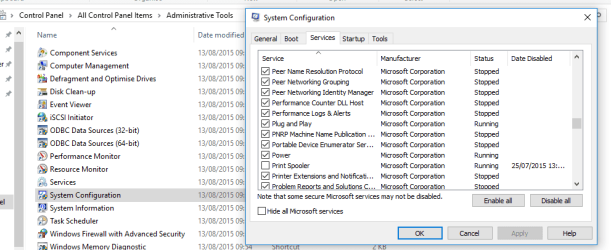
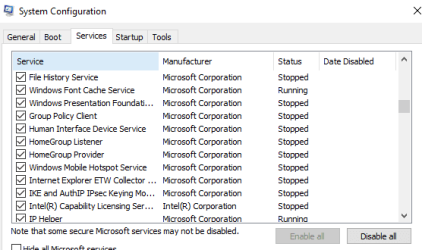
Can you check here, to see what your running at start-up.
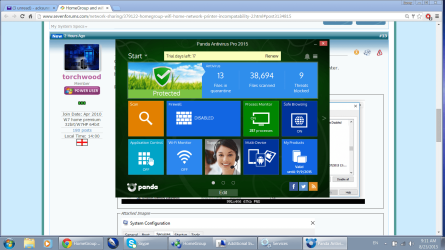
Does your AV panda come with a built in Firewall that is blocking the connection to your printer.
have you also updated your printers connect too options

Roy
 

Attachments

  • print.PNG
    print.PNG
    23.3 KB · Views: 0
  • print2.PNG
    print2.PNG
    8.3 KB · Views: 15

My Computer My Computer

At a glance

W7 home premium 32bit/W7HP 64bit/w10 tp insid...E5300 dual core3gbNvidia Geforce 7100 Nforce 630i
Computer type
PC/Desktop
Computer Manufacturer/Model Number
medionl/Aspire 6930G/acer x55a
OS
W7 home premium 32bit/W7HP 64bit/w10 tp insider ring
CPU
E5300 dual core
Motherboard
medion MS7366
Memory
3gb
Graphics Card(s)
Nvidia Geforce 7100 Nforce 630i
Monitor(s) Displays
avixc
Internet Speed
n (isp resticted to 72)
Antivirus
mse/pands
Browser
palemoon
Other Info
Belkin Fd7050 n USB using Railink RT2870 drivers, more upto date
Hello Torchwood,
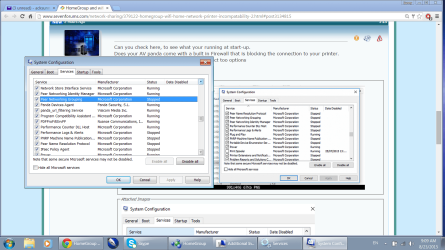
Thank you for your input. Panda firewall is disabled. See system configuration screen shot. I am not sure what you mean by the last suggestion or how I would go about doing that?
 

Attachments

  • Panda config.png
    Panda config.png
    134.9 KB · Views: 0
  • system config.png
    system config.png
    154.7 KB · Views: 3

My Computer My Computer

At a glance

Windows 7 Home PremiumIntel HD
Computer type
Laptop
Computer Manufacturer/Model Number
Acer Aspire E1-731-4699
OS
Windows 7 Home Premium
Graphics Card(s)
Intel HD
Antivirus
Panda
Browser
Chrome
As your printer is wifi linked it needs to pick up your network, on its control panel you can check it is seeing it.
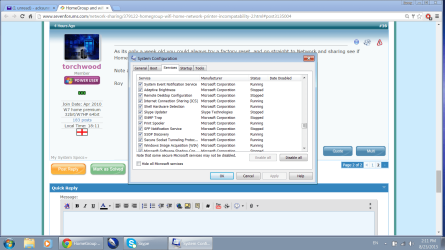
In my screenshot 2 you can see that print spooler is dissabled Yours needs to be enabled.
 

My Computer My Computer

At a glance

W7 home premium 32bit/W7HP 64bit/w10 tp insid...E5300 dual core3gbNvidia Geforce 7100 Nforce 630i
Computer type
PC/Desktop
Computer Manufacturer/Model Number
medionl/Aspire 6930G/acer x55a
OS
W7 home premium 32bit/W7HP 64bit/w10 tp insider ring
CPU
E5300 dual core
Motherboard
medion MS7366
Memory
3gb
Graphics Card(s)
Nvidia Geforce 7100 Nforce 630i
Monitor(s) Displays
avixc
Internet Speed
n (isp resticted to 72)
Antivirus
mse/pands
Browser
palemoon
Other Info
Belkin Fd7050 n USB using Railink RT2870 drivers, more upto date
As its only a week old you could always try a factory reset, and go straight to Network and sharing see if Homegroup is enabled.

Note as soon as you start the reset turn off WiFi.

Roy
 

My Computer My Computer

At a glance

W7 home premium 32bit/W7HP 64bit/w10 tp insid...E5300 dual core3gbNvidia Geforce 7100 Nforce 630i
Computer type
PC/Desktop
Computer Manufacturer/Model Number
medionl/Aspire 6930G/acer x55a
OS
W7 home premium 32bit/W7HP 64bit/w10 tp insider ring
CPU
E5300 dual core
Motherboard
medion MS7366
Memory
3gb
Graphics Card(s)
Nvidia Geforce 7100 Nforce 630i
Monitor(s) Displays
avixc
Internet Speed
n (isp resticted to 72)
Antivirus
mse/pands
Browser
palemoon
Other Info
Belkin Fd7050 n USB using Railink RT2870 drivers, more upto date
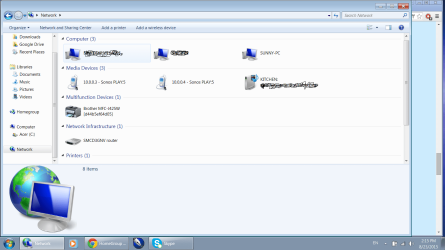
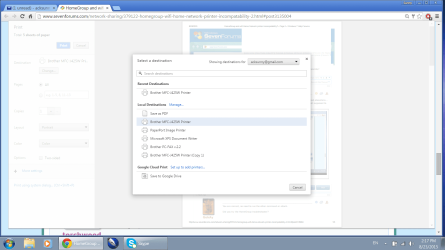
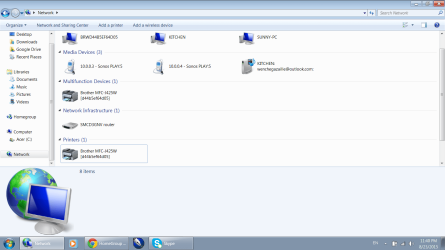
As far as I can see the print spooler is running; the Brother multi function device is showing on the network map (it is also shown separately as Brother printer), and when I hit print it defaults to that printer. It just never prints and I just keep getting print error messages.
When I carry the printer in to the room where the printer is located and connect via USB, it prints with no hesitation. I would just obviously like to be able to use wifi print.

Do you think there is a connection/ conflict with the HomeGroup issue and the wifi printing issue?

Although the PC is new, I hesitate to do a factory reset. Simply because many other people with the exact same problem(s) I have say it does not make a difference, and I have tried everything else that they have tried at this point.
 

Attachments

  • print spooler running.png
    print spooler running.png
    78.5 KB · Views: 0
  • network devices.png
    network devices.png
    73.7 KB · Views: 0
  • select destination.png
    select destination.png
    93.4 KB · Views: 1

My Computer My Computer

At a glance

Windows 7 Home PremiumIntel HD
Computer type
Laptop
Computer Manufacturer/Model Number
Acer Aspire E1-731-4699
OS
Windows 7 Home Premium
Graphics Card(s)
Intel HD
Antivirus
Panda
Browser
Chrome
Its possible, but im more interested in you last screenshot,
You cut the bottom OF, it shows another printer, has that got a tick in the green circle, if so then thats the default printer you need to change the default or remove it.

Roy
 

My Computer My Computer

At a glance

W7 home premium 32bit/W7HP 64bit/w10 tp insid...E5300 dual core3gbNvidia Geforce 7100 Nforce 630i
Computer type
PC/Desktop
Computer Manufacturer/Model Number
medionl/Aspire 6930G/acer x55a
OS
W7 home premium 32bit/W7HP 64bit/w10 tp insider ring
CPU
E5300 dual core
Motherboard
medion MS7366
Memory
3gb
Graphics Card(s)
Nvidia Geforce 7100 Nforce 630i
Monitor(s) Displays
avixc
Internet Speed
n (isp resticted to 72)
Antivirus
mse/pands
Browser
palemoon
Other Info
Belkin Fd7050 n USB using Railink RT2870 drivers, more upto date
Bottom part of the screen shot showing the Brother printer. None of the devices are checked off as default.
 

Attachments

  • Brother printer in network.png
    Brother printer in network.png
    65.3 KB · Views: 0

My Computer My Computer

At a glance

Windows 7 Home PremiumIntel HD
Computer type
Laptop
Computer Manufacturer/Model Number
Acer Aspire E1-731-4699
OS
Windows 7 Home Premium
Graphics Card(s)
Intel HD
Antivirus
Panda
Browser
Chrome
You need to go Control panel >> devices/printers where you can adjust/delete the Lower printer.

Roy
 

My Computer My Computer

At a glance

W7 home premium 32bit/W7HP 64bit/w10 tp insid...E5300 dual core3gbNvidia Geforce 7100 Nforce 630i
Computer type
PC/Desktop
Computer Manufacturer/Model Number
medionl/Aspire 6930G/acer x55a
OS
W7 home premium 32bit/W7HP 64bit/w10 tp insider ring
CPU
E5300 dual core
Motherboard
medion MS7366
Memory
3gb
Graphics Card(s)
Nvidia Geforce 7100 Nforce 630i
Monitor(s) Displays
avixc
Internet Speed
n (isp resticted to 72)
Antivirus
mse/pands
Browser
palemoon
Other Info
Belkin Fd7050 n USB using Railink RT2870 drivers, more upto date
Back
Top