Homegroup - Can't Join

recentrisk

New member
Local time
7:17 AM
Messages
27
Hello all! I have 2 brand new PCs with Win 7 installed, Ultimate on Desktop and Home on Laptop. Desktop is hooked into router, laptop is wireless.

I have created Homegroup on Desktop and tried to join from my laptop but it fails. I have checked the password, reset it 4 times just to be sure. I have made sure the correct home group settings are set on both. I have made sure the 4 services people have mentioned are running correctly. I can share a fold on my desktop and i can get to it from my laptop so i know the connectivity is there... I have also deleted the Homegroup a few times and tried redoing it.

What else should i look at?

thanks!
 

My Computer

OS
Win 7
This is what I did to test my homegroup: on my desktop, I created the homegroup. As soon as it was created, I went to my laptop and went to the homegroup page, and was informed that my other computer had created a homegroup, so I clicked on the join button, went through a few screens, typed the password, and everything was shared.

Is that what you did?

I already had a workgroup established, so I haven't tested if it would work with my computers on different workgroups.
 

My Computer

Computer Manufacturer/Model Number
Dell XPS 15 L502x
OS
Windows 7 Ultimate x64 SP1
CPU
Core i7-2670QM
Memory
8GB DDR3 PC3-10600
Graphics Card(s)
Intel HD Graphics 3000 + GeForce GT 540M
Screen Resolution
1920x1080
Hard Drives
1TB 5400RPM Seagate
Yes that is what I did... now that it doesn't work I have been following all the trouble shooting posts but I still cant get it to work.
 

My Computer

OS
Win 7
However I didnt do anything with Workgroups... would i had to have set that up? How can I tell if there is a workgroup setup?
 

My Computer

OS
Win 7
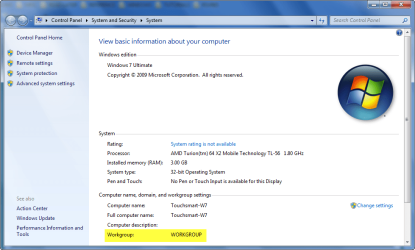
Windows will, by default name your Workgroup; WORKGROUP unless otherwise specified during installation. Chances are, if you don't know if you've set it up, it's WORKGROUP.
You can check the Workgroup name by clicking start > right click Computer > Properties.

12.png

You can also change the Workgroup name by (in the same window) clicking advanced system settings > Computer Name tab > Change.

Also make sure that the time is perfectly synchronised on both machines.
 

My Computer

Computer Manufacturer/Model Number
HP Touchsmart IQ771.uk
OS
Windows 7 Ultimate x64
CPU
AMD Turion(tm) 64 X2 Mobile Technology TL-56
Motherboard
ASUS Pheonix
Memory
3GB Nanya PC2-6400 DDR2-SDRAM SO-DIM (400MHz)
Graphics Card(s)
NVIDIA GeForce Go 7600 256MB GDDR3 SDRAM
Sound Card
High Definition Intergrated NVIDIA MCP51
Monitor(s) Displays
46" Sony Bravia HDTV
Screen Resolution
1600x1200
Hard Drives
1.5TB Samsug
320GB Seagate ST3320820AS - SATA 3Gb/s 8MB
500GB Maxtor Basics STM305003EHD301-RK
Internet Speed
↓6.32 Mb/s ↑0.35 Mb/s ↔26ms
Other Info
BIOS - American Megatrends Inc. 5.07
Ethernet Port - NVIDIA nForce 10/100/1000 Mbps
DVD Drive - TSSTcorp DVDR/RW TS-T632L
Got it... they are both defaulted to WORKGROUP i will double check the time
 

My Computer

OS
Win 7
The clocks are in sync... what next should i check?
 

My Computer

OS
Win 7
Back
Top