Homegroup networking problem

apex2000

New member
Local time
10:24 PM
Messages
18
Location
Northeast Thailand
I have two computers, both running Windows 7 Ultimate. They are linked by a wireless network through a TP-Link wireless router. The main computer is named 'Office', as that's where I use it. The second computer is called 'Class' and is situated in a room where I teach, adjacent to the office. My problem: The 'Office' computer is online 24/7. The 'Class' computer is only used when I am teaching. When I turn the 'Class' computer on, I can never connect to the 'Homegroup' without rebooting the 'Office' computer, which is really annoying. Many files that I use for teaching are on the 'Office' computer, so I need the 'Homegroup' connection. After a reboot of the 'Office' computer, everything works! How can I avoid having to reboot like this? Is there something wrong with the setup? Any advice would be very helpful, thank you.
 

My Computer

OS
Windows 7 Ultimate RTM X64
I will be glad to teamview your computers to see what is wrong with it.

I see that using a TP Link Wireless Router and being on This later well (Eastern Standard Time) United States... you are not exactly in the states are you... so i'll be more than happy to help you with it. I am pretty good messing with the IPv4 and IPv6.

Being that this is a out of the country router meaning non-dlink non-linksys non-netgear... (I am assuming) it will take me a little bit to look around to see your setup. Then I can work on that.

With teamviewer....I can see your desktop if you would like to do chat and you can follow instructions or I can have full access to your desktop as you watch. If you are intested.... here is the link to team viewer...


TeamViewer - Free Remote Access and Remote Desktop Sharing over the Internet

Thanks
Kevin
 

My Computer

Computer Manufacturer/Model Number
HP Pavilion Elite HPE-410f
OS
Windows 7 Ultimate x64
CPU
AMD Phenom x6 1045t
Motherboard
N/A
Memory
8 GB
Graphics Card(s)
ATI Radeon HD 5570
Sound Card
Realtek Highdefinition Audio / 5.1 Dolby Setup
Monitor(s) Displays
HP w2207h Widescreen
Screen Resolution
1680*1050
Hard Drives
1 TB (fixed), 320 Portable maxtor, Server Hard drives
PSU
350 Watt
Case
HP CASE
Cooling
Bass
Keyboard
Logitech MX 5500
Mouse
Logitech MX 5500
Internet Speed
ROAD RUNNER 16MB D/512 U
Thanks for the offer Kevin. Guess time might be a problem as I am in Thailand and you are in the States (Eastern Std Time). Just how many hours are we apart?

My router is TP-Link TD-W8901G and is a popular brand here in Thailand.

Please get back to me and we will try to arrange a teamview 'session'. Never done this before so it will be very interesting.

Have downloaded and installed TeamView already.

Thanks, Kevin. Looking forward to your reply.
 

My Computer

OS
Windows 7 Ultimate RTM X64
What antivirus are you using?

I had networking issues with 2 W7 machines, where in I setup a homegroup, but could not update files (could view okay) - found out that Norton is not compatible with W7 homregroups - found that McAfee & AVG were okay. If you do have Norton you need to uninstall, delete the homegroup and resetup again.
 

My Computer

Computer type
PC/Desktop
Computer Manufacturer/Model Number
self build
OS
XP Pro - Vista - windows 7 ultimate/64 - 8.1 - 10
CPU
q8400
Motherboard
ga-ep35c-ds3r
Memory
4gb
Graphics Card(s)
nvidia 7300
Sound Card
integrated
Monitor(s) Displays
LG 206
Hard Drives
Samsung evo 500ssd
samsung 320gb sata
wd 160gb pata
PSU
hiper 580
What antivirus are you using?

I had networking issues with 2 W7 machines, where in I setup a homegroup, but could not update files (could view okay) - found out that Norton is not compatible with W7 homregroups - found that McAfee & AVG were okay. If you do have Norton you need to uninstall, delete the homegroup and resetup again.

I am using ESET SS4 on both machines. I don't think that's the problem.
 

My Computer

OS
Windows 7 Ultimate RTM X64
About the only way this can happen is if you don't have the permissions set up correctly or Eset is causing the problem.
 

My Computer

Computer type
PC/Desktop
Computer Manufacturer/Model Number
Home built
OS
Windows 7 Ult, Windows 8.1 Pro,
CPU
Q9650-4.275GHz, E8600 4.5GHz, E6750-3.8GHz
Motherboard
Evga 780i FTW
Memory
G.Skill PC2 9600 1200Mhz 5 5 5 15 2T
Graphics Card(s)
GTX480
Sound Card
Asus Xonar D2
Monitor(s) Displays
HannsG
Screen Resolution
1680X1050
Hard Drives
GSkill Phoenix Pro 120GB SSD
PSU
ThermalTake Toughpower 1000Watt modular
Case
ThermalTake XaserV
Cooling
Xigmatek S1283
Keyboard
Logitech G15
Mouse
Logitech G9
Internet Speed
T1
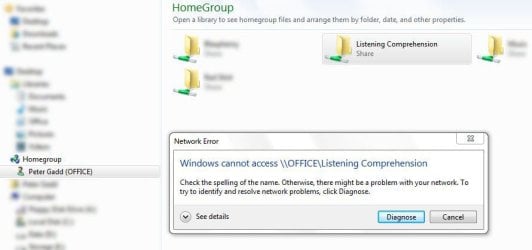
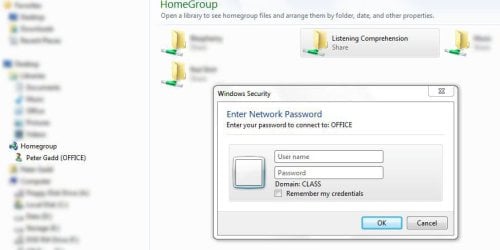
One thing that I forgot to mention in my original post was this: After booting the 'Class' computer, I can see the shared folders on the 'Office' computer in Explorer on the 'Class' computer. However, when I click on any one of the shared folders from the 'Class' machine, I always get an error as shown in the first image below. After rebooting the 'Office' machine, then clicking on one of the shared folders from the 'Class' machine, a dialog box comes up asking for the username and password. After entering the username and password, everything is fine - until tomorrow!
 

Attachments

  • Capture.JPG
    Capture.JPG
    47.5 KB · Views: 36
  • Capture 2.JPG
    Capture 2.JPG
    47.4 KB · Views: 30

My Computer

OS
Windows 7 Ultimate RTM X64
One thing that I forgot to mention in my original post was this: After booting the 'Class' computer, I can see the shared folders on the 'Office' computer in Explorer on the 'Class' computer. However, when I click on any one of the shared folders from the 'Class' machine, I always get an error as shown in the first image below. After rebooting the 'Office' machine, then clicking on one of the shared folders from the 'Class' machine, a dialog box comes up asking for the username and password. After entering the username and password, everything is fine - until tomorrow!

You do realize that the Homegroup networking feature is not made to work with a Domain?

I didn't realize you were using a Domain because you never metioned that until just now. So most likely that is the problem you are facing.

Read down the page a bit in the link below where it says....Note If your computer belongs to a domain, you won't be able to share files and printers with a homegroup, but you can still access files and printers shared by others.

Far as I'm concered problem solved cased closed.

http://windows.microsoft.com/en-us/windows7/Switching-between-your-home-and-workplace-networks
 
Last edited:

My Computer

Computer type
PC/Desktop
Computer Manufacturer/Model Number
Home built
OS
Windows 7 Ult, Windows 8.1 Pro,
CPU
Q9650-4.275GHz, E8600 4.5GHz, E6750-3.8GHz
Motherboard
Evga 780i FTW
Memory
G.Skill PC2 9600 1200Mhz 5 5 5 15 2T
Graphics Card(s)
GTX480
Sound Card
Asus Xonar D2
Monitor(s) Displays
HannsG
Screen Resolution
1680X1050
Hard Drives
GSkill Phoenix Pro 120GB SSD
PSU
ThermalTake Toughpower 1000Watt modular
Case
ThermalTake XaserV
Cooling
Xigmatek S1283
Keyboard
Logitech G15
Mouse
Logitech G9
Internet Speed
T1
Thanks for the offer Kevin. Guess time might be a problem as I am in Thailand and you are in the States (Eastern Std Time). Just how many hours are we apart?

My router is TP-Link TD-W8901G and is a popular brand here in Thailand.

Please get back to me and we will try to arrange a teamview 'session'. Never done this before so it will be very interesting.

Have downloaded and installed TeamView already.

Thanks, Kevin. Looking forward to your reply.


Send me a private message of your ID and Password for your computer.
and give me a time when is best for you, I am on the eastern standard time and I am usually up during the odd hours of the night which would make it daytime for you.

sorry for taking so long to get this post. I completely forgot about this...

You are 11 hours ahead of me... so whever is best for you tonight would be the best since I will be home and its sunday for you
 

My Computer

Computer Manufacturer/Model Number
HP Pavilion Elite HPE-410f
OS
Windows 7 Ultimate x64
CPU
AMD Phenom x6 1045t
Motherboard
N/A
Memory
8 GB
Graphics Card(s)
ATI Radeon HD 5570
Sound Card
Realtek Highdefinition Audio / 5.1 Dolby Setup
Monitor(s) Displays
HP w2207h Widescreen
Screen Resolution
1680*1050
Hard Drives
1 TB (fixed), 320 Portable maxtor, Server Hard drives
PSU
350 Watt
Case
HP CASE
Cooling
Bass
Keyboard
Logitech MX 5500
Mouse
Logitech MX 5500
Internet Speed
ROAD RUNNER 16MB D/512 U
Problem solved! It was the TP-Link Router at fault. bought a new Linksys WAG120N router , and everything is fine. Thanks for your time.
 

My Computer

OS
Windows 7 Ultimate RTM X64
Back
Top