Homegroup Not Working

cmckaycm

New member
Local time
9:40 PM
Messages
66
Location
United Kingdom
I was trying to use the homegroup but when I tried it on another computer with Windows 7 Home Premium, it didn't recognize it. Now, here is the worst.

I can't even leave the homegroup or change the password. Solved
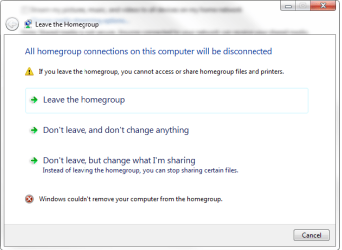

homegroup.png
 
Last edited by a moderator:

My Computer

Computer Manufacturer/Model Number
Custom Built
OS
Windows 7 Ultimate 32bit
CPU
AMD Athlon II X2 250
Motherboard
ASRock N68C-S UCC
Memory
2GB DDR3
Graphics Card(s)
Intergrated GPU
Sound Card
Intergrated HD Audio
Monitor(s) Displays
Belinea
Screen Resolution
1024 by 768
Hard Drives
Maxtor S TM3320613AS SATA 320GB 7200RPM 3.5" HDD
PSU
Compaq 100W PSU (might upgrade to 500W for performance)
Case
iCute Server/Gaming Case
Cooling
AMD CPU Cooler included with CPU
Keyboard
Genius USB Keyboard
Mouse
Microsoft Basic Optical Mouse v2.0
Internet Speed
10MBps
Other Info
BELKIN G Wireless Router (no internet access but used for intranet).
For that type of problem you can read the "Cannot Leave Homegroup" thread below which talks about fixing the same problem.

This will also fix problems related to joining the Homegroup, as it seems this is a big problem with wireless machines trying to join the Homegroup.

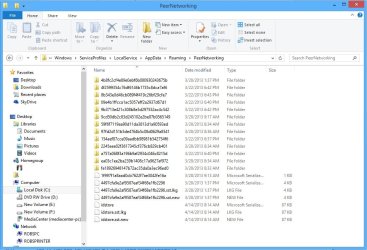
I will show you the more direct approach to fixing the problem here. This is another Windows 7 bug apparently so you need to remove some files from the Peer Networking folder in order to fix this problem.

In order to see the AppData folder you will need to go into Folder Options in the Control Panel and put a check mark to "Show Hidden Files and Folders".

The fix for this problem seems to be Deleting all files which reside in PeerNetworking "second picture" at> C:\windows\serviceProfiles\LocalService\AppData\Roaming\PeerNetworking

It's required that you do this on all Homegroup machines in the LAN. After this, you must also leave the Homegroup from all machines and create a new one. It sometimes works best to create the new Homegroup from the wireless machine and join from the wired machines.

Once everything at peer Networking Grouping is running you may also need to do this...

Start the Task Manager
Click on the service Tab
Find the "HomeGroupProvider"
and then stop the service.


You may need to go back into services and enable Peernetworking again after the fix. Don't forget to restart all machines making the adjustments.

http://www.sevenforums.com/network-sharing/55781-cannot-leave-homegroup.html
 

Attachments

  • services peer networking enabled set to automatic.PNG
    services peer networking enabled set to automatic.PNG
    26.6 KB · Views: 1,444
  • peer networking remove files name removed.jpg
    peer networking remove files name removed.jpg
    100.1 KB · Views: 13
Last edited:

My Computer

Computer type
PC/Desktop
Computer Manufacturer/Model Number
Home built
OS
Windows 7 Ult, Windows 8.1 Pro,
CPU
Q9650-4.275GHz, E8600 4.5GHz, E6750-3.8GHz
Motherboard
Evga 780i FTW
Memory
G.Skill PC2 9600 1200Mhz 5 5 5 15 2T
Graphics Card(s)
GTX480
Sound Card
Asus Xonar D2
Monitor(s) Displays
HannsG
Screen Resolution
1680X1050
Hard Drives
GSkill Phoenix Pro 120GB SSD
PSU
ThermalTake Toughpower 1000Watt modular
Case
ThermalTake XaserV
Cooling
Xigmatek S1283
Keyboard
Logitech G15
Mouse
Logitech G9
Internet Speed
T1
It worked and it left the homegroup.
 

My Computer

Computer Manufacturer/Model Number
Custom Built
OS
Windows 7 Ultimate 32bit
CPU
AMD Athlon II X2 250
Motherboard
ASRock N68C-S UCC
Memory
2GB DDR3
Graphics Card(s)
Intergrated GPU
Sound Card
Intergrated HD Audio
Monitor(s) Displays
Belinea
Screen Resolution
1024 by 768
Hard Drives
Maxtor S TM3320613AS SATA 320GB 7200RPM 3.5" HDD
PSU
Compaq 100W PSU (might upgrade to 500W for performance)
Case
iCute Server/Gaming Case
Cooling
AMD CPU Cooler included with CPU
Keyboard
Genius USB Keyboard
Mouse
Microsoft Basic Optical Mouse v2.0
Internet Speed
10MBps
Other Info
BELKIN G Wireless Router (no internet access but used for intranet).
I figured that it was the rogue file entry that was messing you up cmckaycm, I'm glad you have Homegroups working again. I will mark this as solved. :)
 

My Computer

Computer type
PC/Desktop
Computer Manufacturer/Model Number
Home built
OS
Windows 7 Ult, Windows 8.1 Pro,
CPU
Q9650-4.275GHz, E8600 4.5GHz, E6750-3.8GHz
Motherboard
Evga 780i FTW
Memory
G.Skill PC2 9600 1200Mhz 5 5 5 15 2T
Graphics Card(s)
GTX480
Sound Card
Asus Xonar D2
Monitor(s) Displays
HannsG
Screen Resolution
1680X1050
Hard Drives
GSkill Phoenix Pro 120GB SSD
PSU
ThermalTake Toughpower 1000Watt modular
Case
ThermalTake XaserV
Cooling
Xigmatek S1283
Keyboard
Logitech G15
Mouse
Logitech G9
Internet Speed
T1
I did all of that and still not working

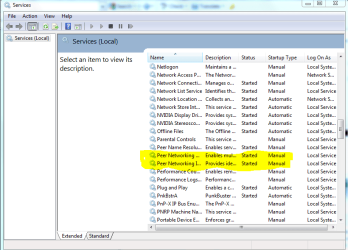
When I attempted to do the homegroup(start it) under services it was already stopped, and unable to start again, said error 1068 the dependency is missing or failed to start.

I have shut down ALL firewalls on the pc(windows is all Im running), shut down virus scans and yes I am joined in the homegroup... however, it will not let me leave to reset it and try to set it up again. I cannot change the password...all the same problems as the other person, however I cannot LEAVE and nor can I turn off the suggested services nor restart them.

the file you list, isnt listed there, the folder is empty!

Please help, this is a circle that never ends.
 

My Computer

Computer Manufacturer/Model Number
Gateway NV5935u
OS
windows 7 home premium 64 bit.
CPU
I5 430m
Motherboard
n/a
Memory
4GB
Hard Drives
500GB
there is a screen shot of the services you said that needed activated...I cannot even start the service..it's greyed out.
 

Attachments

My Computer

Computer Manufacturer/Model Number
Gateway NV5935u
OS
windows 7 home premium 64 bit.
CPU
I5 430m
Motherboard
n/a
Memory
4GB
Hard Drives
500GB
The solution regarding deleting (or rather renaming) the file idstore.sst worked for me at home

Thank you. Explorer now only displays favourites, and my computer. I have even managed to make my documents disappear. I am not sure how.

But alas the above does not work on my computer at work. Even after deleting the file, and stopping the processesI am told I can not leave the homegroup.

This could be that there are other computers on the networkhere on my work computer. Or it could be because I have defined the network as a home network and I can't change it to a work network due to the lack of a work network "policy."

I am given the option of selecting which files/folders are shared in the home group (none are selected) but I am told I can not leave.

The homegroup reminds me of Hotel California.
 

My Computer

Computer Manufacturer/Model Number
self built
OS
Windows 7 Home x64,
CPU
quad pentium
Memory
3GB
I didn't have the option to leave group and entering the new password didn't work. It kept saying this home group no longer exist.
I tried something and it worked. I disconnected from my router and went to control panel then clicked home group and it informed me that I wasn't connected to the network of course, but, there it was,"leave homegroup" I clicked that and was able to re establish my homegroup with the new password.
Now I just need to vacuum up all the hair I pulled out and fix the holes I made pounding my head on the wall.
 

My Computer

Computer Manufacturer/Model Number
me
OS
windows 7 64 bit
CPU
intel pentium dual core E5200 @ 2.5 Mhz
Motherboard
Dg33FB
Memory
6 gig
Graphics Card(s)
EVGA 8800 GTS
Sound Card
native
Monitor(s) Displays
acerAL2016W/Dell17"
Hard Drives
internal seagate 160, 320 and WD 500
External seagate 500
PSU
ultra 550
Case
ultra
Cooling
ultra
Keyboard
Logitech Illuminated
Mouse
Wacom Graphire 440CTE
Internet Speed
17Mpsdown 3.5Mps up
Antivirus
Avast free
Browser
IE, chrome firefox and Dragon
Other Info
Also 2 laptops but one runs 8.1
Back
Top