Homegroup - problem with sharing printers

porton

New member
Local time
9:41 PM
Messages
7
I have 3 desktop computers, 2 with an attached printer, 1 without. I want the 2 printers to be available to all 3 computers. Is this just a matter of turning both printers into network printers? If so, how do I do this, please?

I have somehow (without knowing how!) already done this with one of the printers but it only appears with "(Network)" after its name on one of the computers. If I try to add it as a network printer on the other computer, I get asked to supply a driver for it - which I don't understand because surely it only needs a driver on the machine to which it's connected.

Confused...
 

My Computer

Computer type
PC/Desktop
Computer Manufacturer/Model Number
Mesh
OS
Windows 7 Home Premium 32bit Service Pack 1
CPU
Intel Core2 Quad CPU Q9300 2.50Ghz
Motherboard
Asus P5K SE/EPU
Memory
8 Gb
Graphics Card(s)
NVidia GeForce 9600 GT
Hard Drives
Hitachi ATA - 2 x 500Gb
Antivirus
Bit Defender 2013
Browser
Firefox
Welcome porton, :)

Make sure the printers are marked as shared on the computer they are attached to.

Yes the other computers need to load the drivers for the printers that they will be shared with over the network.

Windows will usually be able to search for the need drivers. But in rare ocasions, I have had to physically connect the printer to the network computer to load the correct drivers. Hope this helps.
 

Attachments

  • network_options.JPG
    network_options.JPG
    73.4 KB · Views: 1
Last edited:

My Computer

Computer type
PC/Desktop
Computer Manufacturer/Model Number
Built them myself, Science Experiments !
OS
Win7 Enterprise, Win7 x86 (Ult 7600), Win7 x64 Ult 7600, TechNet RTM on AMD x64 (2.8Ghz)
CPU
AMD fx8350 4ghz, AMD-32 2400mhz, AMD-64 3200mhz, AMDx64 2.8G
Motherboard
SIS 755, ECS-K8M890M-M (Ult 7600), GigaByte & others
Memory
2gb, 4gb on the Ult 7600, 4gb on Technet RTM, 32gb on FX8350
Graphics Card(s)
Draw my own Graphics, several nVidia cards
Sound Card
on motherboard
Monitor(s) Displays
19" flat scr, 28" I-Inc widescr,22" Emprex Widescr, 23" Acer
Screen Resolution
1280 x 1024, 1440 x 900, 1920 x 1080
Hard Drives
6 pata Ide HD's & 2 Sata HD's
added 80gb external on Ult 7600 computer,
numerous extra 1tb, 2TB, 3Tb SATA HD's
A collection of ext HD Docks w/ HDs
PSU
430w, 550w, 600w, 700, 800, etc
Case
All Generic Full Towers
Cooling
Open Air & a few fans, some w/ colored LEDs
Keyboard
Compaq & Dell recycled from GoodWill
Mouse
Made in China Optical Wired Mouse
Internet Speed
Fast Cable InterNet
Antivirus
AVG Free on 24 different Desktops, NO Problems!
Browser
IE 8 is preferred, but use FireFox sometimes
Other Info
Linksys Routers, switches, & Hubs
Too Many USB Flash Drives to count, Biggest is 64GB !
Eight computers in my home network.
Sixteen computers at my business network.
Linked via TeamViewer !
Lots of old used spare computer parts everywhere!
Make sure the printers are marked as shared on the computer they are attached to.
Done, thank you.

Windows will usually be able to search for the need drivers. But in rare ocasions, I have had to physically connect the printer to the network computer to load the correct drivers. Hope this helps.
This is where things might get messy... I have only just installed Windows 7 on one of the machines (the one with the Xerox printer attached) and this was using the upgrade from Vista version of Windows 7. When I used Windows Update to find the correct driver for this printer it didn't come up with the right one (and neither did my own searches for one). In the end I bought Driver Detective and this found a driver that worked! The problem is that I have no idea where on my machine the driver lives and it's not practical to hook the printer up to the other computers (it weighs a ton!).

Thanks for your help so far!
 

My Computer

Computer type
PC/Desktop
Computer Manufacturer/Model Number
Mesh
OS
Windows 7 Home Premium 32bit Service Pack 1
CPU
Intel Core2 Quad CPU Q9300 2.50Ghz
Motherboard
Asus P5K SE/EPU
Memory
8 Gb
Graphics Card(s)
NVidia GeForce 9600 GT
Hard Drives
Hitachi ATA - 2 x 500Gb
Antivirus
Bit Defender 2013
Browser
Firefox
Just tried to add the Xerox to one of the other computers but Windows Update couldn't find a driver for it... And, as I said, I don't know where to look for it on the machine that has this printer attached to it.
 

My Computer

Computer type
PC/Desktop
Computer Manufacturer/Model Number
Mesh
OS
Windows 7 Home Premium 32bit Service Pack 1
CPU
Intel Core2 Quad CPU Q9300 2.50Ghz
Motherboard
Asus P5K SE/EPU
Memory
8 Gb
Graphics Card(s)
NVidia GeForce 9600 GT
Hard Drives
Hitachi ATA - 2 x 500Gb
Antivirus
Bit Defender 2013
Browser
Firefox
Can you move the network computer close to the Xerox Printer & connect or use a temporary long printer cable ?
 

Attachments

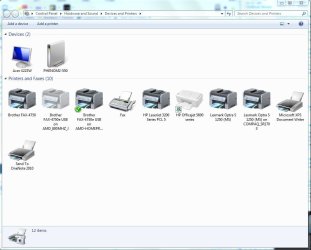
  • Network_Printers_snip.JPG
    Network_Printers_snip.JPG
    87.1 KB · Views: 2

My Computer

Computer type
PC/Desktop
Computer Manufacturer/Model Number
Built them myself, Science Experiments !
OS
Win7 Enterprise, Win7 x86 (Ult 7600), Win7 x64 Ult 7600, TechNet RTM on AMD x64 (2.8Ghz)
CPU
AMD fx8350 4ghz, AMD-32 2400mhz, AMD-64 3200mhz, AMDx64 2.8G
Motherboard
SIS 755, ECS-K8M890M-M (Ult 7600), GigaByte & others
Memory
2gb, 4gb on the Ult 7600, 4gb on Technet RTM, 32gb on FX8350
Graphics Card(s)
Draw my own Graphics, several nVidia cards
Sound Card
on motherboard
Monitor(s) Displays
19" flat scr, 28" I-Inc widescr,22" Emprex Widescr, 23" Acer
Screen Resolution
1280 x 1024, 1440 x 900, 1920 x 1080
Hard Drives
6 pata Ide HD's & 2 Sata HD's
added 80gb external on Ult 7600 computer,
numerous extra 1tb, 2TB, 3Tb SATA HD's
A collection of ext HD Docks w/ HDs
PSU
430w, 550w, 600w, 700, 800, etc
Case
All Generic Full Towers
Cooling
Open Air & a few fans, some w/ colored LEDs
Keyboard
Compaq & Dell recycled from GoodWill
Mouse
Made in China Optical Wired Mouse
Internet Speed
Fast Cable InterNet
Antivirus
AVG Free on 24 different Desktops, NO Problems!
Browser
IE 8 is preferred, but use FireFox sometimes
Other Info
Linksys Routers, switches, & Hubs
Too Many USB Flash Drives to count, Biggest is 64GB !
Eight computers in my home network.
Sixteen computers at my business network.
Linked via TeamViewer !
Lots of old used spare computer parts everywhere!
I've found the Xerox printer driver folder (so no need to connect computer and printer now!) and copied it to the network machine that I want to be able to use it. I've tried adding this printer as a network printer and Windows Update couldn't find a suitable driver. So I tried the manual install, supplying the location of the .inf file. but this raised the error "Windows cannot connect to the printer. Operation failed with error 0x00000214".
 

My Computer

Computer type
PC/Desktop
Computer Manufacturer/Model Number
Mesh
OS
Windows 7 Home Premium 32bit Service Pack 1
CPU
Intel Core2 Quad CPU Q9300 2.50Ghz
Motherboard
Asus P5K SE/EPU
Memory
8 Gb
Graphics Card(s)
NVidia GeForce 9600 GT
Hard Drives
Hitachi ATA - 2 x 500Gb
Antivirus
Bit Defender 2013
Browser
Firefox
Yes, I have seen that message before, also. Is the Xerox printer connected by a Parallel cable or USB cable ?
Seems to me I had to add a printer port, I think in Device Manager. It been a while since I did this.
 

My Computer

Computer type
PC/Desktop
Computer Manufacturer/Model Number
Built them myself, Science Experiments !
OS
Win7 Enterprise, Win7 x86 (Ult 7600), Win7 x64 Ult 7600, TechNet RTM on AMD x64 (2.8Ghz)
CPU
AMD fx8350 4ghz, AMD-32 2400mhz, AMD-64 3200mhz, AMDx64 2.8G
Motherboard
SIS 755, ECS-K8M890M-M (Ult 7600), GigaByte & others
Memory
2gb, 4gb on the Ult 7600, 4gb on Technet RTM, 32gb on FX8350
Graphics Card(s)
Draw my own Graphics, several nVidia cards
Sound Card
on motherboard
Monitor(s) Displays
19" flat scr, 28" I-Inc widescr,22" Emprex Widescr, 23" Acer
Screen Resolution
1280 x 1024, 1440 x 900, 1920 x 1080
Hard Drives
6 pata Ide HD's & 2 Sata HD's
added 80gb external on Ult 7600 computer,
numerous extra 1tb, 2TB, 3Tb SATA HD's
A collection of ext HD Docks w/ HDs
PSU
430w, 550w, 600w, 700, 800, etc
Case
All Generic Full Towers
Cooling
Open Air & a few fans, some w/ colored LEDs
Keyboard
Compaq & Dell recycled from GoodWill
Mouse
Made in China Optical Wired Mouse
Internet Speed
Fast Cable InterNet
Antivirus
AVG Free on 24 different Desktops, NO Problems!
Browser
IE 8 is preferred, but use FireFox sometimes
Other Info
Linksys Routers, switches, & Hubs
Too Many USB Flash Drives to count, Biggest is 64GB !
Eight computers in my home network.
Sixteen computers at my business network.
Linked via TeamViewer !
Lots of old used spare computer parts everywhere!
It's a USB connection.
 

My Computer

Computer type
PC/Desktop
Computer Manufacturer/Model Number
Mesh
OS
Windows 7 Home Premium 32bit Service Pack 1
CPU
Intel Core2 Quad CPU Q9300 2.50Ghz
Motherboard
Asus P5K SE/EPU
Memory
8 Gb
Graphics Card(s)
NVidia GeForce 9600 GT
Hard Drives
Hitachi ATA - 2 x 500Gb
Antivirus
Bit Defender 2013
Browser
Firefox
Back
Top