Homegroup, problem with the LanmanServer

preben

New member
Local time
12:09 AM
Messages
4
Location
Copenhagen
I have just installed a D-Link DIR-655 wireless router where my desktop pc - Acer Aspire M5800 with Windows 7 Home Premium 64 bit is hard wired to my router and my labtop pc - Acer Aspire 7715Z with Windows 7 Home Premium 64 bit is connected wireless.
Everything worked fine until I create a Homegroup, now it takes over 10 minutes when I booting my pc before connects to the network.
After examination of the cases it appears that the service “LanmanServer” hangs.
As soon as I disconnect the Homegroup, there is no problem with the LanmanServer and the pc is booting normally.
Is there anyone who can help?
 

My Computer

OS
windows 7 Home Premium 64 bit
I havn't heard of this exact problem yet so I would start by leaving the homegroup from both machines.
http://www.sevenforums.com/tutorials/43980-homegroup-leave.html?filter

After that I would recreate the Homegroup from the other machine this time and see if it works any differently.
http://www.sevenforums.com/tutorials/43961-homegroup-create.html?filter

If you are still having problems then I would check this Homegroup trouble shooting list and see if you can find any problems.

http://www.sevenforums.com/network-sharing/20211-homegroup-issues-3.html#post436715
 

My Computer

Computer type
PC/Desktop
Computer Manufacturer/Model Number
Home built
OS
Windows 7 Ult, Windows 8.1 Pro,
CPU
Q9650-4.275GHz, E8600 4.5GHz, E6750-3.8GHz
Motherboard
Evga 780i FTW
Memory
G.Skill PC2 9600 1200Mhz 5 5 5 15 2T
Graphics Card(s)
GTX480
Sound Card
Asus Xonar D2
Monitor(s) Displays
HannsG
Screen Resolution
1680X1050
Hard Drives
GSkill Phoenix Pro 120GB SSD
PSU
ThermalTake Toughpower 1000Watt modular
Case
ThermalTake XaserV
Cooling
Xigmatek S1283
Keyboard
Logitech G15
Mouse
Logitech G9
Internet Speed
T1
Thanks for your reply
I have already tried both of your proposals without it solved the problem.
When my computer after 10 minutes is logged on to the network works my Homegroup OK
I have verified that my McAfee Firewall is configured correctly and that all necessary ports are open
As soon as I disconnect the Homegroup, there is no problem with the LanmanServer and the pc is booting normally.
I still have access to my other computer on the network, without any changes in my router
 

My Computer

OS
windows 7 Home Premium 64 bit
Thanks for your reply
I have already tried both of your proposals without it solved the problem.
When my computer after 10 minutes is logged on to the network works my Homegroup OK
I have verified that my McAfee Firewall is configured correctly and that all necessary ports are open
As soon as I disconnect the Homegroup, there is no problem with the LanmanServer and the pc is booting normally.
I still have access to my other computer on the network, without any changes in my router
 

My Computer

OS
windows 7 Home Premium 64 bit
Most likely McAfee is causing the problem, unfortunately the only way to find out for sure is to uninstall McAfee completely from your system.
 
Last edited:

My Computer

Computer type
PC/Desktop
Computer Manufacturer/Model Number
Home built
OS
Windows 7 Ult, Windows 8.1 Pro,
CPU
Q9650-4.275GHz, E8600 4.5GHz, E6750-3.8GHz
Motherboard
Evga 780i FTW
Memory
G.Skill PC2 9600 1200Mhz 5 5 5 15 2T
Graphics Card(s)
GTX480
Sound Card
Asus Xonar D2
Monitor(s) Displays
HannsG
Screen Resolution
1680X1050
Hard Drives
GSkill Phoenix Pro 120GB SSD
PSU
ThermalTake Toughpower 1000Watt modular
Case
ThermalTake XaserV
Cooling
Xigmatek S1283
Keyboard
Logitech G15
Mouse
Logitech G9
Internet Speed
T1
Thank you for your suggestion, but I have no desire to uninstall McAfee so I drop using Homegroups and will use workgroups instead, it works fine with McAfee.
 

My Computer

OS
windows 7 Home Premium 64 bit
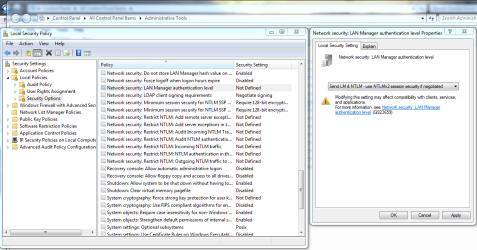
About the only option I can think of is to change the lanman server settings but this isn't typically required.

edit the Security options\Network security: LAN Manager authentication level policy and select Send LM & NTLM - Use NTLMv2 session security if negotiated. The picture below should help you get there.
 

Attachments

  • lanman security options.PNG
    lanman security options.PNG
    58.5 KB · Views: 710

My Computer

Computer type
PC/Desktop
Computer Manufacturer/Model Number
Home built
OS
Windows 7 Ult, Windows 8.1 Pro,
CPU
Q9650-4.275GHz, E8600 4.5GHz, E6750-3.8GHz
Motherboard
Evga 780i FTW
Memory
G.Skill PC2 9600 1200Mhz 5 5 5 15 2T
Graphics Card(s)
GTX480
Sound Card
Asus Xonar D2
Monitor(s) Displays
HannsG
Screen Resolution
1680X1050
Hard Drives
GSkill Phoenix Pro 120GB SSD
PSU
ThermalTake Toughpower 1000Watt modular
Case
ThermalTake XaserV
Cooling
Xigmatek S1283
Keyboard
Logitech G15
Mouse
Logitech G9
Internet Speed
T1
Back
Top