Solved Homegroup Setup O.K. - now Computer won't Sleep

rcanino

New member
Member
VIP
Local time
5:11 PM
Messages
123
Location
Wash Heights, NYC
Hey guys - wondering if anyone has run into this problem...

I have a workstation and a laptop connected via a Homegroup.

Now that I got it working properly the workstation refuses to go into Sleep Mode. The monitors go dark, Windows goes into a suspend state - but the fans keep spinning.

I've tried a number of solutions using the powercfg utility - including adding registry entries to "Allow remote opens" and the other ideas on this site:

(iBoyd) » Windows 7 Power Management: Fixing PC Insomnia

(very worthwhile read imo - great site. unfortunately none of the ideas fixed my "insomnia" problem)

I've tried changing my Power Profile to allow sleep after 1 minute, I've stopped media streaming on the Homegroup advanced options... nothing changes.

I would really appreciate any thoughts you can share...Thanks!
 

My Computer My Computer

Computer type
PC/Desktop
OS
Win7 Pro 64-bit sp1
CPU
core i7 980X
Motherboard
MSI Big-Bang XPower X58
Memory
G.Skill 4Gx3 F3-10666CL9T-12GBRL (x2)
Graphics Card(s)
EVGA 06G-P4-3787-KR
Monitor(s) Displays
HP LP2475w (x2)
Screen Resolution
3840x1200
Hard Drives
Crucial RealSSD CTFDDAC128MAG-1G1 (boot drive);
Crucial m4 128GB;
Samsung 1TB HD103SJ 32M 7200rpm (x2);
WD Black WD2002FAEX 2TB (x2)
PSU
Corsair CMPSU-850HX
Case
HAF X
Cooling
Intel DBX-B (stock)
2 days, almost 200 views and zero replies...

No one has had any issues with Stand-by (Sleep) after creating a Homegroup? That is very surprising...
 

My Computer My Computer

Computer type
PC/Desktop
OS
Win7 Pro 64-bit sp1
CPU
core i7 980X
Motherboard
MSI Big-Bang XPower X58
Memory
G.Skill 4Gx3 F3-10666CL9T-12GBRL (x2)
Graphics Card(s)
EVGA 06G-P4-3787-KR
Monitor(s) Displays
HP LP2475w (x2)
Screen Resolution
3840x1200
Hard Drives
Crucial RealSSD CTFDDAC128MAG-1G1 (boot drive);
Crucial m4 128GB;
Samsung 1TB HD103SJ 32M 7200rpm (x2);
WD Black WD2002FAEX 2TB (x2)
PSU
Corsair CMPSU-850HX
Case
HAF X
Cooling
Intel DBX-B (stock)
Hello,

Do you have any remote access software install on the PC? For example, logmein forces your PC to stay awake.

Have you checked your change advanced power settings within Power Options?

Dave
 

My Computer My Computer

Computer type
PC/Desktop
Computer Manufacturer/Model Number
Custom
OS
Windows 7 Ultimate x64
CPU
Intel Core i7 2600K (O/C 4.7GHz)
Motherboard
Asus ROG Maximus IV Extreme-Z - Intel Z68 Chipset
Memory
8GB Corsair Vengeance LP, DDR3, 1600Mhz
Graphics Card(s)
Nvidia GTX 460 Graphics Card
Sound Card
Onboard
Monitor(s) Displays
Dell E228WFP
Hard Drives
2 x 500GB Samsung SpinPoint Drives (1 for OS, 1 for Data and Apps)
PSU
CoolerMaster 1000W
Case
CoolerMaster HAF
Cooling
Air
Internet Speed
Fibre - 60MB Down, 30MB Up
Antivirus
ESET NOD32 Antivirus
Thank you for your reply Dave.

There are no remote log-ins or access on either machine and "Allow remote assistance" is disabled.

I used to use a Custom Profile in the Power Options - it's basically the High Performance option but I set everything to Never turn off, Never Sleep, etc. everything that can be set that way. Before the Homegroup I was able to use this Custom Profile and Sleep/Standby no problem.

Once I got the HG running Sleep/Standby stopped working. So the first things I changed were in Power Options. I changed "Never" back to 10 minutes or whatever, "Allow Sleep," etc., all the obvious things I could see. I changed all the Advanced Options to allow Sleep, even when streaming media. Nothing helps.

I also changed some not-so-obvious things in powercfg (unhiding "allow remote opens"). I've set the machine to Sleep after 1 minute, tested it, no luck.

The OS obeys the command and the displays go dark - but the HW doesn't respond at all.

(btw I disabled Hibernation soon after the first POST. I don't use it; I don't like the large file on my system drive)

I know it's a complicated issue - lots of variables - I'd really appreciate your help!
 

My Computer My Computer

Computer type
PC/Desktop
OS
Win7 Pro 64-bit sp1
CPU
core i7 980X
Motherboard
MSI Big-Bang XPower X58
Memory
G.Skill 4Gx3 F3-10666CL9T-12GBRL (x2)
Graphics Card(s)
EVGA 06G-P4-3787-KR
Monitor(s) Displays
HP LP2475w (x2)
Screen Resolution
3840x1200
Hard Drives
Crucial RealSSD CTFDDAC128MAG-1G1 (boot drive);
Crucial m4 128GB;
Samsung 1TB HD103SJ 32M 7200rpm (x2);
WD Black WD2002FAEX 2TB (x2)
PSU
Corsair CMPSU-850HX
Case
HAF X
Cooling
Intel DBX-B (stock)
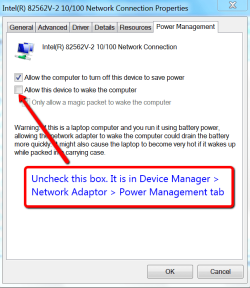
try this:
 

Attachments

  • 2011-10-27_1606.png
    2011-10-27_1606.png
    28.6 KB · Views: 29

My Computer My Computer

Computer Manufacturer/Model Number
HP, Dell, Gateway, Toshiba - 4 laptops and 2 desktops
OS
Vista, Windows7, Mint Mate, Zorin, Windows 8
CPU
from 1.6GHz Duo to i7
Monitor(s) Displays
2x HP w2207
Hard Drives
5x HDD, 7x SSD, 12x Externals
Keyboard
with trackball - no mices
Mouse
Trackball mice
Internet Speed
DSL 6000
In addition to WHS's comments, make sure that your Anti-Virus isnt running a scan when idle or something silly like that.

Dave
 

My Computer My Computer

Computer type
PC/Desktop
Computer Manufacturer/Model Number
Custom
OS
Windows 7 Ultimate x64
CPU
Intel Core i7 2600K (O/C 4.7GHz)
Motherboard
Asus ROG Maximus IV Extreme-Z - Intel Z68 Chipset
Memory
8GB Corsair Vengeance LP, DDR3, 1600Mhz
Graphics Card(s)
Nvidia GTX 460 Graphics Card
Sound Card
Onboard
Monitor(s) Displays
Dell E228WFP
Hard Drives
2 x 500GB Samsung SpinPoint Drives (1 for OS, 1 for Data and Apps)
PSU
CoolerMaster 1000W
Case
CoolerMaster HAF
Cooling
Air
Internet Speed
Fibre - 60MB Down, 30MB Up
Antivirus
ESET NOD32 Antivirus
thanks guys -

Yes I had already made sure nothing was "allowed" to wake the computer in Dev Mngr. I don't have any Avast scans scheduled.

This problem started right after setting up the Homegroup; something about the Homegroup is causing the workstation to disregard the Sleep function.

I can wipe out the Homegroup and see if the machine will go into Sleep/Standby, the way it used to. But I'm sure it will.

There is a good read about "PC Insomnia" and I followed nearly every recommendation. There were a few I couldn't quite follow - registry keys I didn't have. I tried creating them and then following the advice but I'm not sure I created them correctly. I backed-up the original keys so I could revert if I had to.

If you're interested here's the link:
(iBoyd) » Windows 7 Power Management: Fixing PC Insomnia

Thanks again for your replies.
 

My Computer My Computer

Computer type
PC/Desktop
OS
Win7 Pro 64-bit sp1
CPU
core i7 980X
Motherboard
MSI Big-Bang XPower X58
Memory
G.Skill 4Gx3 F3-10666CL9T-12GBRL (x2)
Graphics Card(s)
EVGA 06G-P4-3787-KR
Monitor(s) Displays
HP LP2475w (x2)
Screen Resolution
3840x1200
Hard Drives
Crucial RealSSD CTFDDAC128MAG-1G1 (boot drive);
Crucial m4 128GB;
Samsung 1TB HD103SJ 32M 7200rpm (x2);
WD Black WD2002FAEX 2TB (x2)
PSU
Corsair CMPSU-850HX
Case
HAF X
Cooling
Intel DBX-B (stock)
Just one long shot - close all windows before you go into sleep.
 

My Computer My Computer

Computer Manufacturer/Model Number
HP, Dell, Gateway, Toshiba - 4 laptops and 2 desktops
OS
Vista, Windows7, Mint Mate, Zorin, Windows 8
CPU
from 1.6GHz Duo to i7
Monitor(s) Displays
2x HP w2207
Hard Drives
5x HDD, 7x SSD, 12x Externals
Keyboard
with trackball - no mices
Mouse
Trackball mice
Internet Speed
DSL 6000
One More

In the same place WHS suggested there is another setting.
Go --> Device Manager --> Adapters --> Advanced Tab --> Scroll to wake up capabilities -->

If you are not using Wake on Lan select "None"
If you are using Wake on Lan and your rigs are networked select "Magic Packet and Pattern Match" This choice is and/or between the two.

If you have two or more adapters all of them should be set accordingly to their use. I have two adapters and am only using one. I disable the one I am not using.
 

My Computer My Computer

Computer Manufacturer/Model Number
BGC (Bob's Garage Crew)
OS
win 7 X64 Ultimate SP1
CPU
I3770K
Motherboard
Asus P8Z77-V Deluxe
Memory
G Skill F3-14900CL9-4GBXL x 4
Graphics Card(s)
NVIDIA GeForce GTX670 + Intel 4000
Sound Card
Realtek HD 5.1 (MOB)
Monitor(s) Displays
Asus VW224T (1)
Screen Resolution
1920 x 1080
Hard Drives
SATA Corsair Force GT 2.5" 180GB (System) Sata 3
OCZ Vertex3 120GB
OCZ Vertex 2 120GB 2.5" SATA II
ST31000524AS 1000.2GB
WD15EARS (External)
PSU
CoolerMaster 1000 Watt
Case
CoolerMaster HAF X
Cooling
CPU -- CoolerMaster 520N
Keyboard
MS Wireless 3000 V2
Mouse
MS Wireless 3000 V2
Internet Speed
Cable
Antivirus
Norton Internet Security
Browser
IE9
Other Info
AMI Bios 1805
OC'd 3%
Thanks you guys - I will try that.

On the workstation I have 2 adapters and I'm only using 1. I'll figure out which is which and disable the one I'm not using.

On the laptop I have 2 adapters and I'm only using 1. I'm not using the wireless adapter so I will disable that.

re: my network (if I understand the term) - I have a Homegroup with those 2 computers on it, which are both wired to a router. I can share files between them no problem. There's also a 3rd computer that's not part of the Homegroup. It receives a wireless signal from the router. It belongs to someone else in the house.

I honestly don't know if I'm using Wake On LAN (networking confuses me as you see). I don't think so, I can't think of a need for it. I just want the Homegroup to function properly (which it is) and to be able to put the workstation to Sleep.

On both adapters in the workstation "Shutdown Wake-On-LAN" is enabled. Is that the the one I should disable?

There are no other WOL settings except for a "WOL & Shutdown Link Speed," which is set to "10Mbps First." "Wake on Magic Packet" and "Wake on Pattern Match" are both enabled. "Network Address" is "not present" on both.

Network Adapters (drivers are up-to-date):
Workstation: RealTek PCIe Family Controller
Laptop: Atheros

Thanks for your help you guys. Oh btw I tried closing everything before going to Sleep mode but I got the same results - OS sleeps, the monitors go dark but the fans keep spinning. Thanks again for your suggestions - can you clarify the "Shutdown Wake-On-LAN" thing? Thanks a lot!
 

My Computer My Computer

Computer type
PC/Desktop
OS
Win7 Pro 64-bit sp1
CPU
core i7 980X
Motherboard
MSI Big-Bang XPower X58
Memory
G.Skill 4Gx3 F3-10666CL9T-12GBRL (x2)
Graphics Card(s)
EVGA 06G-P4-3787-KR
Monitor(s) Displays
HP LP2475w (x2)
Screen Resolution
3840x1200
Hard Drives
Crucial RealSSD CTFDDAC128MAG-1G1 (boot drive);
Crucial m4 128GB;
Samsung 1TB HD103SJ 32M 7200rpm (x2);
WD Black WD2002FAEX 2TB (x2)
PSU
Corsair CMPSU-850HX
Case
HAF X
Cooling
Intel DBX-B (stock)

My Computer My Computer

Computer type
PC/Desktop
Computer Manufacturer/Model Number
Custom
OS
Windows 7 Ultimate x64
CPU
Intel Core i7 2600K (O/C 4.7GHz)
Motherboard
Asus ROG Maximus IV Extreme-Z - Intel Z68 Chipset
Memory
8GB Corsair Vengeance LP, DDR3, 1600Mhz
Graphics Card(s)
Nvidia GTX 460 Graphics Card
Sound Card
Onboard
Monitor(s) Displays
Dell E228WFP
Hard Drives
2 x 500GB Samsung SpinPoint Drives (1 for OS, 1 for Data and Apps)
PSU
CoolerMaster 1000W
Case
CoolerMaster HAF
Cooling
Air
Internet Speed
Fibre - 60MB Down, 30MB Up
Antivirus
ESET NOD32 Antivirus
Wake on Lan (WOL)

I'll post you a link for definition of WOL.

Wake-on-LAN - Wikipedia, the free encyclopedia

If you are not waking your computers via the network you should not need WOL. Therefore you can disable it on your adapters. By waking I mean if you are at one rig and you want to access files on the other rig and it is in "sleep" you have to send a WOL signal to access it. If they are both awake you don't need the WOL signal. Never the less a path forward for you would to be get all the settings correct so that your rigs will sleep. Then if you want wake on lan you can find the correct setting for that.

Also Dave's idea to check the bios is appropriate. You will probably find power settings relating the the different sleep states such as S1, S2, S3 etc.
 
Last edited:

My Computer My Computer

Computer Manufacturer/Model Number
BGC (Bob's Garage Crew)
OS
win 7 X64 Ultimate SP1
CPU
I3770K
Motherboard
Asus P8Z77-V Deluxe
Memory
G Skill F3-14900CL9-4GBXL x 4
Graphics Card(s)
NVIDIA GeForce GTX670 + Intel 4000
Sound Card
Realtek HD 5.1 (MOB)
Monitor(s) Displays
Asus VW224T (1)
Screen Resolution
1920 x 1080
Hard Drives
SATA Corsair Force GT 2.5" 180GB (System) Sata 3
OCZ Vertex3 120GB
OCZ Vertex 2 120GB 2.5" SATA II
ST31000524AS 1000.2GB
WD15EARS (External)
PSU
CoolerMaster 1000 Watt
Case
CoolerMaster HAF X
Cooling
CPU -- CoolerMaster 520N
Keyboard
MS Wireless 3000 V2
Mouse
MS Wireless 3000 V2
Internet Speed
Cable
Antivirus
Norton Internet Security
Browser
IE9
Other Info
AMI Bios 1805
OC'd 3%
Thanks you guys. I'm not sure if I should disable WOL right now. For the purposes of simplifying things maybe I should. But it would be nice to have that functionality.

I updated my BIOS months ago to the latest for the board. All went well and I was able to Sleep for months afterward. I disabled Hibernation soon after the first POST.

In the BIOS I've always run S1 and never had an issue. I will double-check everything to make sure.

I did Clear CMOS recently. I had updated the RealTek Network Adapter and was getting this annoying "Press Shift+F10 to configure" message during POST. Once I cleared CMOS it went away.. But I reset all the power options to my normal setup.

My "normal setup" in the BIOS includes "Wake up Event by" and the choices are BIOS or OS. I've always had it set to BIOS. Could that be causing the issue? Should it be set to the OS?

I'm looking thru the BIOS now - on the workstation - and I see one more thing that may be pertinent: the "Resume S3..." choices. There are 5 in total:

Resume S3 By USB Device - Enabled
Resume S3/S5 By PS/2 Keyboard - disabled
Resume S3/S5 By PS/2 Mouse - disabled
Resume By PCI-E Device - disabled
Resume By RTC Alarm - disabled

Those settings have always allowed me to Sleep prior to setting up the Homegroup. Strange how there's no mention of S1... but like I say they've always worked before.

Thanks again for the links and for your help - I appreciate it very much.
 
Last edited:

My Computer My Computer

Computer type
PC/Desktop
OS
Win7 Pro 64-bit sp1
CPU
core i7 980X
Motherboard
MSI Big-Bang XPower X58
Memory
G.Skill 4Gx3 F3-10666CL9T-12GBRL (x2)
Graphics Card(s)
EVGA 06G-P4-3787-KR
Monitor(s) Displays
HP LP2475w (x2)
Screen Resolution
3840x1200
Hard Drives
Crucial RealSSD CTFDDAC128MAG-1G1 (boot drive);
Crucial m4 128GB;
Samsung 1TB HD103SJ 32M 7200rpm (x2);
WD Black WD2002FAEX 2TB (x2)
PSU
Corsair CMPSU-850HX
Case
HAF X
Cooling
Intel DBX-B (stock)
Update: Still won't Sleep

I disabled the adapters I'm not using.
I disabled Shutdown Wake-On-LAN, Pattern Match and Magic Packet.

sure wish I could figure this out...
 

My Computer My Computer

Computer type
PC/Desktop
OS
Win7 Pro 64-bit sp1
CPU
core i7 980X
Motherboard
MSI Big-Bang XPower X58
Memory
G.Skill 4Gx3 F3-10666CL9T-12GBRL (x2)
Graphics Card(s)
EVGA 06G-P4-3787-KR
Monitor(s) Displays
HP LP2475w (x2)
Screen Resolution
3840x1200
Hard Drives
Crucial RealSSD CTFDDAC128MAG-1G1 (boot drive);
Crucial m4 128GB;
Samsung 1TB HD103SJ 32M 7200rpm (x2);
WD Black WD2002FAEX 2TB (x2)
PSU
Corsair CMPSU-850HX
Case
HAF X
Cooling
Intel DBX-B (stock)
Off the Wall

I don't see what kind of mouse you are using. If it is a wireless laser mouse If you have a strong desk light it could be inhibiting sleep mode. Just trying to help.
 

My Computer My Computer

Computer Manufacturer/Model Number
BGC (Bob's Garage Crew)
OS
win 7 X64 Ultimate SP1
CPU
I3770K
Motherboard
Asus P8Z77-V Deluxe
Memory
G Skill F3-14900CL9-4GBXL x 4
Graphics Card(s)
NVIDIA GeForce GTX670 + Intel 4000
Sound Card
Realtek HD 5.1 (MOB)
Monitor(s) Displays
Asus VW224T (1)
Screen Resolution
1920 x 1080
Hard Drives
SATA Corsair Force GT 2.5" 180GB (System) Sata 3
OCZ Vertex3 120GB
OCZ Vertex 2 120GB 2.5" SATA II
ST31000524AS 1000.2GB
WD15EARS (External)
PSU
CoolerMaster 1000 Watt
Case
CoolerMaster HAF X
Cooling
CPU -- CoolerMaster 520N
Keyboard
MS Wireless 3000 V2
Mouse
MS Wireless 3000 V2
Internet Speed
Cable
Antivirus
Norton Internet Security
Browser
IE9
Other Info
AMI Bios 1805
OC'd 3%
Thanks HH - no suggestion is a bad one. However, the workstation used to Sleep just fine before I setup the Homegroup.

I have a feeling the solution is somewhere in the Power Plan Options.

POWERCFG (from the CLI) has excellent diagnostic tools but at this point I've learned everything I can from them. Unfortunately I don't have the expertise to fully evaluate all of the results. The ones I do understand haven't help me pinpoint the solution.

Anyway, thanks for replying and if you think of something else please don't hesitate to post it. I welcome any advice on this problem, and I'm grateful to you all for taking the time to help.

ps - if anyone knows POWERCFG I would really like to ask you a couple questions. Thanks!
 

My Computer My Computer

Computer type
PC/Desktop
OS
Win7 Pro 64-bit sp1
CPU
core i7 980X
Motherboard
MSI Big-Bang XPower X58
Memory
G.Skill 4Gx3 F3-10666CL9T-12GBRL (x2)
Graphics Card(s)
EVGA 06G-P4-3787-KR
Monitor(s) Displays
HP LP2475w (x2)
Screen Resolution
3840x1200
Hard Drives
Crucial RealSSD CTFDDAC128MAG-1G1 (boot drive);
Crucial m4 128GB;
Samsung 1TB HD103SJ 32M 7200rpm (x2);
WD Black WD2002FAEX 2TB (x2)
PSU
Corsair CMPSU-850HX
Case
HAF X
Cooling
Intel DBX-B (stock)
Next

While you are contemplating your next move, run sfc /scannow at an elevated command prompt to see if your have any corrupted files.

I was about to suggest powercfg at an elevated command prompt but you posted you have done that?

One trick i have seen work is to set something to default and let it save then change things to what you want. In other words set your current power plan by clicking "set to default" then reboot. and try to get it to sleep.
 

My Computer My Computer

Computer Manufacturer/Model Number
BGC (Bob's Garage Crew)
OS
win 7 X64 Ultimate SP1
CPU
I3770K
Motherboard
Asus P8Z77-V Deluxe
Memory
G Skill F3-14900CL9-4GBXL x 4
Graphics Card(s)
NVIDIA GeForce GTX670 + Intel 4000
Sound Card
Realtek HD 5.1 (MOB)
Monitor(s) Displays
Asus VW224T (1)
Screen Resolution
1920 x 1080
Hard Drives
SATA Corsair Force GT 2.5" 180GB (System) Sata 3
OCZ Vertex3 120GB
OCZ Vertex 2 120GB 2.5" SATA II
ST31000524AS 1000.2GB
WD15EARS (External)
PSU
CoolerMaster 1000 Watt
Case
CoolerMaster HAF X
Cooling
CPU -- CoolerMaster 520N
Keyboard
MS Wireless 3000 V2
Mouse
MS Wireless 3000 V2
Internet Speed
Cable
Antivirus
Norton Internet Security
Browser
IE9
Other Info
AMI Bios 1805
OC'd 3%
Last edited:

My Computer My Computer

Computer Manufacturer/Model Number
BGC (Bob's Garage Crew)
OS
win 7 X64 Ultimate SP1
CPU
I3770K
Motherboard
Asus P8Z77-V Deluxe
Memory
G Skill F3-14900CL9-4GBXL x 4
Graphics Card(s)
NVIDIA GeForce GTX670 + Intel 4000
Sound Card
Realtek HD 5.1 (MOB)
Monitor(s) Displays
Asus VW224T (1)
Screen Resolution
1920 x 1080
Hard Drives
SATA Corsair Force GT 2.5" 180GB (System) Sata 3
OCZ Vertex3 120GB
OCZ Vertex 2 120GB 2.5" SATA II
ST31000524AS 1000.2GB
WD15EARS (External)
PSU
CoolerMaster 1000 Watt
Case
CoolerMaster HAF X
Cooling
CPU -- CoolerMaster 520N
Keyboard
MS Wireless 3000 V2
Mouse
MS Wireless 3000 V2
Internet Speed
Cable
Antivirus
Norton Internet Security
Browser
IE9
Other Info
AMI Bios 1805
OC'd 3%
Thanks again H -

I've run the powercfg commands again -

lastwake reported "USB Composite Device" and that's my mouse/keyboard - as expected

-devicequery wake_armed reported the Logitech keyboard/mouse - again, as expected

the -energy report listed 14 "errors" but none of them appear related to preventing Standby.

NVIDIA released another driver for my GTX 470 so I'll update that now...otherwise, I don't know what else I can do besides what you suggested, going back to a default Power Profile, deleting the Homegroup and starting over.

I've run the sfc utility and no problems were reported.

One question - do you enable S1 or S3 in your BIOS? I always heard S3 was unstable and that most users preferred using S1.

Thanks again for your help!
 

My Computer My Computer

Computer type
PC/Desktop
OS
Win7 Pro 64-bit sp1
CPU
core i7 980X
Motherboard
MSI Big-Bang XPower X58
Memory
G.Skill 4Gx3 F3-10666CL9T-12GBRL (x2)
Graphics Card(s)
EVGA 06G-P4-3787-KR
Monitor(s) Displays
HP LP2475w (x2)
Screen Resolution
3840x1200
Hard Drives
Crucial RealSSD CTFDDAC128MAG-1G1 (boot drive);
Crucial m4 128GB;
Samsung 1TB HD103SJ 32M 7200rpm (x2);
WD Black WD2002FAEX 2TB (x2)
PSU
Corsair CMPSU-850HX
Case
HAF X
Cooling
Intel DBX-B (stock)
S3 is the preferred sleep state. That's what should be enabled in BIOS if you want to use hibernation and sleep.
 

My Computer My Computer

Computer Manufacturer/Model Number
Dell XPS 15 L502x
OS
Windows 7 Ultimate x64 SP1
CPU
Core i7-2670QM
Memory
8GB DDR3 PC3-10600
Graphics Card(s)
Intel HD Graphics 3000 + GeForce GT 540M
Screen Resolution
1920x1080
Hard Drives
1TB 5400RPM Seagate
Back
Top