
Homegroup

tbernstein

Veteran computer geek
I have just upgraded a second machine to win7 on my little home network.
It immediately offered me the chance to start a homegroup. So I did.
But the machine I upgraded first can't join it. It says I have to install IPv6 first.
But IPv6 is running.
I can see shared files and folders across the network.
 
Last edited:

My Computer

Computer Manufacturer/Model Number
Mesh PC
OS
Win 7
CPU
Intel core 2 duo
Memory
4 gig
Hard Drives
1 x250 gig
1 x 500 gig
Mouse
MS lasermouse 5000 -'cos it scrolls smoothly, no wheel click
Internet Speed
10mb - cable
Other Info
The mouse took most research. I hate that click on the wheel, this one has the old fashioned smooth wheel. There aren't many about.
Go to Network and Sharing Center. Click on local area connection, then click properties. Is there a check next to Internet Protocol Version 6 (TCP/IPv6)?

If not, put one there and click ok.
 

My Computer

Computer Manufacturer/Model Number
self built
OS
7600.20510 x86
CPU
P4 550 3.4 GHz HT running at 3.5 GHz
Motherboard
MSI PM8M3-V (MS-7211 v1.x) Micro-ATX mainboard
Memory
OCZ 2 GB(2x1GB) DDR400mHz running @ 414 mHz
Graphics Card(s)
HIS Radeon HD 3850 IceQ 3 Turbo HDMI Dual DL-DVI AGP
Sound Card
MOTU Traveler firewire studio interface 192 kHz 24 bit
Monitor(s) Displays
22" widescreen Acer X223W LCD, 17" Compaq P75 CRT
Screen Resolution
1680x1050 and 1280x1024
Hard Drives
SATA I x2 WD, 400 GB and 120 GB, SATA 2 WD Caviar Black 1 TB
PSU
350W generic
Case
Cybertronpc, it glows blue
Cooling
stock cpu fan, Ice-Q 3 gpu and system, many case fans
Keyboard
Logitch Classical Keyboard 200
Mouse
Logitech Mediaplay cordless
Internet Speed
1792/448 kbits/sec
Other Info
SATA II PCI fake RAID adapter, 1 GB Readyboost, original ATI Remote Wonder (even works with WMC perfectly), Logitech Rumblepad 2 game controller x2
Yes maybe

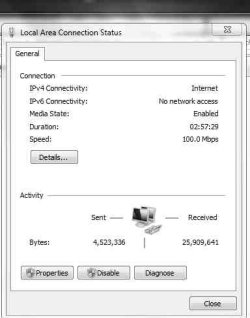
The IPv6 is ticked. But I notice that in the "general" tab it says "no network connection" for IPv6.
And on the "advanced" section it has only IPv4 references. :confused:
 

Attachments

  • ScreenShot001.jpg
    ScreenShot001.jpg
    14.8 KB · Views: 14
Last edited:

My Computer

Computer Manufacturer/Model Number
Mesh PC
OS
Win 7
CPU
Intel core 2 duo
Memory
4 gig
Hard Drives
1 x250 gig
1 x 500 gig
Mouse
MS lasermouse 5000 -'cos it scrolls smoothly, no wheel click
Internet Speed
10mb - cable
Other Info
The mouse took most research. I hate that click on the wheel, this one has the old fashioned smooth wheel. There aren't many about.
i have the same problem with my win7x64. and also my network wont show under "My computer" - "network".
 

My Computer

Computer Manufacturer/Model Number
Asus F3SV
OS
Win 7 x 64
CPU
Duo T7300
Memory
4GB
Graphics Card(s)
nvida GeForce 8600m GS 256MB
Monitor(s) Displays
15,4" WSXGA+
Hard Drives
160GB
Case
Laptop
Turn off any antivirus software you have running before you try again, most AV programs have not been updated to allow for MS,s new network connection methods.
You may find that when you turn your AV back on you'll loose conectivity again.
 

My Computer

OS
Windows 7 Pro X64
CPU
Intel core I7 950 3.06GHZ CPU
Motherboard
ASUS P6X58D Premium LGA1366 X58
Memory
12Gb Corsair TR3X3G1600C8D 1600MHz 8-8-8-24-2T
Graphics Card(s)
2 X MSI Cyclone GTX460 1Gb Oc 840/3800
Sound Card
Realtek HD
Monitor(s) Displays
2 x HP 2159m monitors 1920 x 1080
Screen Resolution
1920 x 1080
Hard Drives
Intel X25-M 160Gb SSD
2 x Seagate Baracuda 750Gb @ 7200rpm
PSU
Corsair HX1000W
Case
Cooler Master Storm Sniper Black Mesh
Cooling
Corsair H70 Water cooling
Keyboard
Logitech
Mouse
Logitech
Internet Speed
ADSL 2+
It detected the other computer on the Homegroup. But still insists that IPv6 isn't enabled soit can't connect.
It also thinks that I have Comodo firewall running, which I don't! It's not even on my machine. I use Windows firewall!
 

My Computer

Computer Manufacturer/Model Number
Mesh PC
OS
Win 7
CPU
Intel core 2 duo
Memory
4 gig
Hard Drives
1 x250 gig
1 x 500 gig
Mouse
MS lasermouse 5000 -'cos it scrolls smoothly, no wheel click
Internet Speed
10mb - cable
Other Info
The mouse took most research. I hate that click on the wheel, this one has the old fashioned smooth wheel. There aren't many about.
Did you do an in-place upgrade, or did you do a clean install of 7? If you did an in-place upgrade, did you happen to have Comodo installed (or any other third party security suite)?
 

My Computer

Computer Manufacturer/Model Number
Dell XPS 15 L502x
OS
Windows 7 Ultimate x64 SP1
CPU
Core i7-2670QM
Memory
8GB DDR3 PC3-10600
Graphics Card(s)
Intel HD Graphics 3000 + GeForce GT 540M
Screen Resolution
1920x1080
Hard Drives
1TB 5400RPM Seagate
It was in-place upgrade - but Comodo wasn't on the system pior.It still isn't on the system.
I did have it,once. A while ago.
But not now.

I've searched the registry and can fnd no trace.
I've been through the computer, by searching and manually. There is no trace.
I use ccleaner and Glary Utilities.
It doesn't appear as a service.
It doesn't appear in any startup location.
I assume there's a binary that references it in some magical way.
And that still doesn't mean that that is what's casuing this problem.
i.e. that IPv6 is running and Windows doesn't believe that it is.

I have ad-aware and Avast installed. I treid disabling Avast, as noted already.
I'll try turning off Windows firewall, but I dont expect that to make any difference.

I'm so mystified.
 

My Computer

Computer Manufacturer/Model Number
Mesh PC
OS
Win 7
CPU
Intel core 2 duo
Memory
4 gig
Hard Drives
1 x250 gig
1 x 500 gig
Mouse
MS lasermouse 5000 -'cos it scrolls smoothly, no wheel click
Internet Speed
10mb - cable
Other Info
The mouse took most research. I hate that click on the wheel, this one has the old fashioned smooth wheel. There aren't many about.
It was in-place upgrade - but Comodo wasn't on the system pior.It still isn't on the system.
I did have it,once. A while ago.
But not now.

I am a huge fan of upgrades but a system has to be in mint condition to begin with for it to be successful.

Best thing here in this case is a clean install right on top of where Windows is now. The installer will place everything currently there into a Windows.old folder at root, so you will not lose a single file.

Just do not format anything and you'll be fine.
 

My Computer

Computer Manufacturer/Model Number
self built
OS
7600.20510 x86
CPU
P4 550 3.4 GHz HT running at 3.5 GHz
Motherboard
MSI PM8M3-V (MS-7211 v1.x) Micro-ATX mainboard
Memory
OCZ 2 GB(2x1GB) DDR400mHz running @ 414 mHz
Graphics Card(s)
HIS Radeon HD 3850 IceQ 3 Turbo HDMI Dual DL-DVI AGP
Sound Card
MOTU Traveler firewire studio interface 192 kHz 24 bit
Monitor(s) Displays
22" widescreen Acer X223W LCD, 17" Compaq P75 CRT
Screen Resolution
1680x1050 and 1280x1024
Hard Drives
SATA I x2 WD, 400 GB and 120 GB, SATA 2 WD Caviar Black 1 TB
PSU
350W generic
Case
Cybertronpc, it glows blue
Cooling
stock cpu fan, Ice-Q 3 gpu and system, many case fans
Keyboard
Logitch Classical Keyboard 200
Mouse
Logitech Mediaplay cordless
Internet Speed
1792/448 kbits/sec
Other Info
SATA II PCI fake RAID adapter, 1 GB Readyboost, original ATI Remote Wonder (even works with WMC perfectly), Logitech Rumblepad 2 game controller x2
Yes, I did think of that.
It's a cost benefit analysis.
Benefit:
I may be able to get the homegroup working, which won't give me a lot more than I already have through conventional networking. It'd be nice though.
Cost:
1.) I'd have to reinstall all the software, including MS Money, which would need a download of an essential patch, which I can't get cos MS don't support it anymore. :mad:
2.) My wife would kill me
3.) It still might not work
4.) It's much more satisfying to find a solution.
 

My Computer

Computer Manufacturer/Model Number
Mesh PC
OS
Win 7
CPU
Intel core 2 duo
Memory
4 gig
Hard Drives
1 x250 gig
1 x 500 gig
Mouse
MS lasermouse 5000 -'cos it scrolls smoothly, no wheel click
Internet Speed
10mb - cable
Other Info
The mouse took most research. I hate that click on the wheel, this one has the old fashioned smooth wheel. There aren't many about.
Honestly, a solution may not happen easily for you. You have to have intricate knowledge of where installers place their files around the system, have to know how to scour the registry for obvious and not-so-obvious keys, go through the users folders making sure there are no signs, check the system32 folder....and after all that, Windows is still going to think you're using Comodo.

A user is your position only has 2 real choices.

Clean install or forget Homegroup and use classic networking, which is the "better way" anyhow.
 

My Computer

Computer Manufacturer/Model Number
self built
OS
7600.20510 x86
CPU
P4 550 3.4 GHz HT running at 3.5 GHz
Motherboard
MSI PM8M3-V (MS-7211 v1.x) Micro-ATX mainboard
Memory
OCZ 2 GB(2x1GB) DDR400mHz running @ 414 mHz
Graphics Card(s)
HIS Radeon HD 3850 IceQ 3 Turbo HDMI Dual DL-DVI AGP
Sound Card
MOTU Traveler firewire studio interface 192 kHz 24 bit
Monitor(s) Displays
22" widescreen Acer X223W LCD, 17" Compaq P75 CRT
Screen Resolution
1680x1050 and 1280x1024
Hard Drives
SATA I x2 WD, 400 GB and 120 GB, SATA 2 WD Caviar Black 1 TB
PSU
350W generic
Case
Cybertronpc, it glows blue
Cooling
stock cpu fan, Ice-Q 3 gpu and system, many case fans
Keyboard
Logitch Classical Keyboard 200
Mouse
Logitech Mediaplay cordless
Internet Speed
1792/448 kbits/sec
Other Info
SATA II PCI fake RAID adapter, 1 GB Readyboost, original ATI Remote Wonder (even works with WMC perfectly), Logitech Rumblepad 2 game controller x2
Honestly, a solution may not happen easily for you. You have to have intricate knowledge of where installers place their files around the system, have to know how to scour the registry for obvious and not-so-obvious keys, go through the users folders making sure there are no signs, check the system32 folder....and after all that, Windows is still going to think you're using Comodo.

A user is your position only has 2 real choices.

Clean install or forget Homegroup and use classic networking, which is the "better way" anyhow.

I'm afraid I have to agree with the clean install route, as much as it will make your life difficult. The fact that your system thinks it has Comodo installed and you cannot find out why is, I believe, indicative of deeper problems that cannot be cured by other than slicking the system and staring over (and not going with the Homegroup option.)

Try to back up all your current stuff, using something like GFI Backup - Free backup software for Windows - GFI Backup Home Edition to make the transition as painless as possible. (It does a great job, BTW.)
 

My Computer

Computer Manufacturer/Model Number
Gateway, Toshiba Laptop, and Home Brew
OS
Windows 7 x64 HP, Windows 7 HP, Windows 7 Ult
CPU
Intel I3, Cerelon, Pentium 4 @ 3Ghz
Motherboard
Intel, Intel, Asus
Memory
8G, 3G, 3G
Graphics Card(s)
On-board Intel, On-board nVidia, nVIDIA card
Sound Card
on-board, on-board, SoundBlaster
Monitor(s) Displays
Hannspree HF237, Toshiba, SyncMaster 931B
Screen Resolution
default (all)
Hard Drives
1T internal, 320G internal, 160G internal, 1T networked
PSU
300w, unk, 650w
Case
black, black, grey
Cooling
air (all)
Keyboard
standard wired (all)
Mouse
standard wired (all)
Internet Speed
6M down, 768K up
Other Info
Home LAN through Linksys hub to 4 port and wireless switch/router. Networked HP 2600n. Wife's computer running Windows 7, and spare laptop running Ubuntu "Karmic Kola" (9.10).
I must admit, the "quit while I'm ahead" option may be best.
 

My Computer

Computer Manufacturer/Model Number
Mesh PC
OS
Win 7
CPU
Intel core 2 duo
Memory
4 gig
Hard Drives
1 x250 gig
1 x 500 gig
Mouse
MS lasermouse 5000 -'cos it scrolls smoothly, no wheel click
Internet Speed
10mb - cable
Other Info
The mouse took most research. I hate that click on the wheel, this one has the old fashioned smooth wheel. There aren't many about.

My Computer

Computer Manufacturer/Model Number
Gateway, Toshiba Laptop, and Home Brew
OS
Windows 7 x64 HP, Windows 7 HP, Windows 7 Ult
CPU
Intel I3, Cerelon, Pentium 4 @ 3Ghz
Motherboard
Intel, Intel, Asus
Memory
8G, 3G, 3G
Graphics Card(s)
On-board Intel, On-board nVidia, nVIDIA card
Sound Card
on-board, on-board, SoundBlaster
Monitor(s) Displays
Hannspree HF237, Toshiba, SyncMaster 931B
Screen Resolution
default (all)
Hard Drives
1T internal, 320G internal, 160G internal, 1T networked
PSU
300w, unk, 650w
Case
black, black, grey
Cooling
air (all)
Keyboard
standard wired (all)
Mouse
standard wired (all)
Internet Speed
6M down, 768K up
Other Info
Home LAN through Linksys hub to 4 port and wireless switch/router. Networked HP 2600n. Wife's computer running Windows 7, and spare laptop running Ubuntu "Karmic Kola" (9.10).
SORTED!!!!!

I found a reference in the MS knowledge base.
You won't believe this.
You have to set the disabled items registry key to 0
But..... if it hasn't got one ( mine didn't) you have to create one first and then set it to zero!!!!!!

Or in Microsoft speak - if nothing is disabled everything is disabled unless you tell it that nothing is disabled.

In technical terms;
regedit
hkey-local machine\system\currentcontrolset\services\tcpip6\parameters
Then you have to set the DisabledComponents Dword to 0
And if there isn't a disabledcomponents dword you have to create one and then set it to zero???????

Which, since we users shouldn't be dragging our hands in the entrails of the registry, rather suggests a bug in the OS somewhere.
I'm fairly used to playing that game.
But the sort of ordinary user who actually needs the homegroups probably wouldn't want to try this.
 

My Computer

Computer Manufacturer/Model Number
Mesh PC
OS
Win 7
CPU
Intel core 2 duo
Memory
4 gig
Hard Drives
1 x250 gig
1 x 500 gig
Mouse
MS lasermouse 5000 -'cos it scrolls smoothly, no wheel click
Internet Speed
10mb - cable
Other Info
The mouse took most research. I hate that click on the wheel, this one has the old fashioned smooth wheel. There aren't many about.
As I've posted in a different thread, HOMEGROUP is ONLY for people who don't understand how sharing and how permissions work.
 

My Computer

Computer Manufacturer/Model Number
Dell XPS 8300
OS
Win7 x64
CPU
Intel(R) Core(TM) i7-2600 CPU @ 3.40GHz
Memory
16GB Dual-Channel
Graphics Card(s)
NVIDIA GeForce GTS 450
Monitor(s) Displays
Viewsonic VX2753mh-LED 27" HDMI
Screen Resolution
1920x1080
...In which case they'd have no chance of sorting out this problem.
:cry:

Oh and in the nature of networks - you get a range of users, from savvy to newbie. Or parents and children. Some can sort permissions, some not. But in a home network or small office, all need to be able to do sharing as and when needed.
 

My Computer

Computer Manufacturer/Model Number
Mesh PC
OS
Win 7
CPU
Intel core 2 duo
Memory
4 gig
Hard Drives
1 x250 gig
1 x 500 gig
Mouse
MS lasermouse 5000 -'cos it scrolls smoothly, no wheel click
Internet Speed
10mb - cable
Other Info
The mouse took most research. I hate that click on the wheel, this one has the old fashioned smooth wheel. There aren't many about.
Back
Top