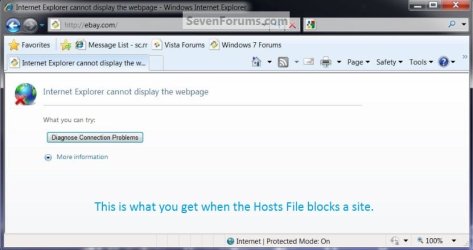
Hosts File : Use in Windows 7 / Vista

How to Access and Use the Hosts File in Vista, Windows 7, and Windows 8
This will give you the basics on how to use the Windows Hosts File, it's not very complicated but it's up to each individual to find additional information and put it to good use to suite your needs.

   Note
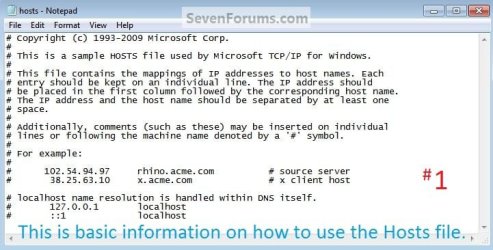
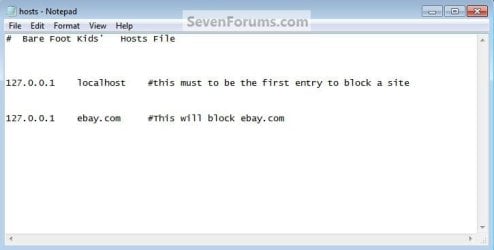
To block a site this "127.0.0.1 localhost" (without the quotes) must be the first entry in the Hosts File, you can add any comments to the file using this ( # ) symbol at the front of the comment; each entry needs its own line and there must be at least 1 space between the IP address and the host name; this info can be viewed in the #1 snip below of the default Windows 7 Hosts File.
Some sites have more than one IP address so to completely block a specific site you may need to add more than one entry to completely block such sites.
   Tip
As any additions / changes to the Hosts File can / will be removed using a System Restore point dated before the work was done with the file, it may be a good idea to create Restore Points before and after any changes are made to the Hosts File, see the tutorial at the link below.

System Restore Point - Create

It would also be advisable to clear the DNS Resolver Cache whenever you finish working with the Hosts File, open an elevated command window and type "ipconfig /flushdns" (without the quotes) and hit enter.
Let's get started!


Option One

Block a Site


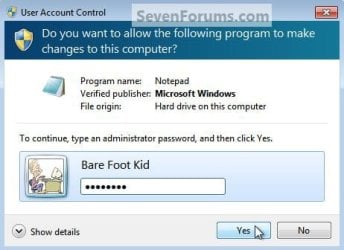
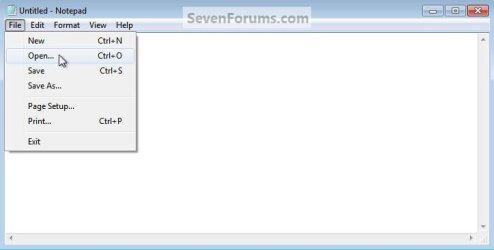
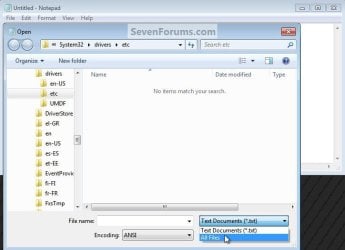
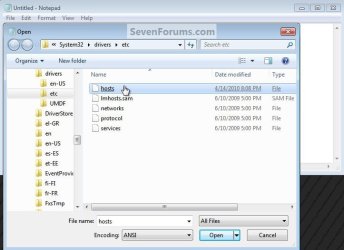
1) In the Windows start menu search box type "notepad" (without the quotes) right click the entry and select "Run as Administrator" then enter your user credentials for the UAC prompt and click yes to open notepad. In notepad at "File" select "Open" then browse to C:\Windows\System32\drivers\etc in the window that opens select "All Files" then "hosts" then click "Open" to open the default Windows Hosts File location.
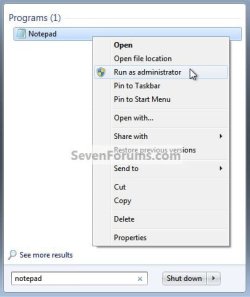
Notepad Runas.jpg
UAC_Notepad.jpg
Notepad_Open.jpg
Browse.jpg
Select.jpg
2) The #1 snip below is the default Windows 7 Hosts File that opens, as you can see with the use of this ( # ) symbol, Windows does not "read" any of the default information in the file, so it's up to you whether to delete it all or not but it may be useful to leave it there for future reference. Hosts_Info.jpg
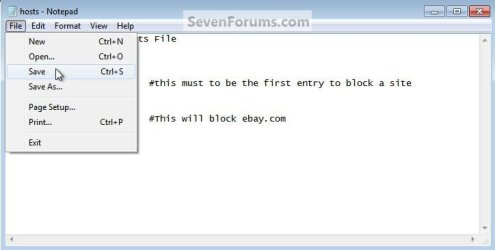
3) If I wanted to block access to ebay.com, the first entry in the file would need to be 127.0.0.1 localhost on its own line, on the next line I would add 127.0.0.1 ebay.com with at least 1 space between the IP address and the host name; then back at "File" select "Save" then "Exit" to close notepad. Hosts_Block.jpg
Hosts_Save.jpg
ebay.jpg


Option Two

Re-direct a Site


If I wanted to re-direct ebay.com to sevenforums.com I would add the IP address for sevenforums.com on its own line seperated by at least 1 space then ebay.com, and if I wanted to add comments I would put them after the # symbol; then at "File" select "Save" then "Exit" to close notepad. Hosts Re-direct.jpg


Option Three

Ping a Site


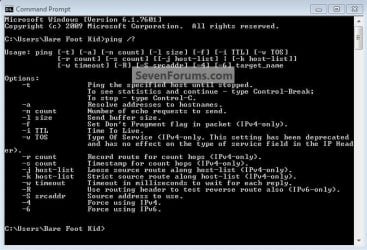
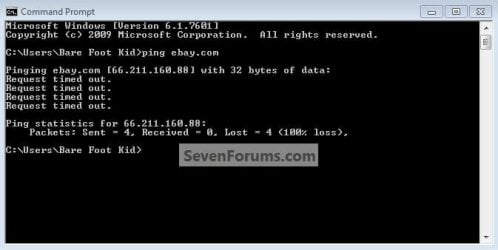
To ping a site to get the IP address, open a command window (it doesn't have to be elevated) type "ping ebay.com" then hit enter, as you can see in the snip there's one of the IP addresses for ebay.com; those are common ping commands in the "Code" box below. Ping_ebay.jpg
Code:
Microsoft Windows [Version 6.1.7601]
Copyright (c) 2009 Microsoft Corporation.  All rights reserved.
 
C:\Users\Bare Foot Kid>ping /?
 
Usage: ping [-t] [-a] [-n count] [-l size] [-f] [-i TTL] [-v TOS]
            [-r count] [-s count] [[-j host-list] | [-k host-list]]
            [-w timeout] [-R] [-S srcaddr] [-4] [-6] target_name
 
Options:
    -t             Ping the specified host until stopped.
                   To see statistics and continue - type Control-Break;
                   To stop - type Control-C.
    -a             Resolve addresses to hostnames.
    -n count       Number of echo requests to send.
    -l size        Send buffer size.
    -f             Set Don't Fragment flag in packet (IPv4-only).
    -i TTL         Time To Live.
    -v TOS         Type Of Service (IPv4-only. This setting has been deprecated
                   and has no effect on the type of service field in the IP Head
er).
    -r count       Record route for count hops (IPv4-only).
    -s count       Timestamp for count hops (IPv4-only).
    -j host-list   Loose source route along host-list (IPv4-only).
    -k host-list   Strict source route along host-list (IPv4-only).
    -w timeout     Timeout in milliseconds to wait for each reply.
    -R             Use routing header to test reverse route also (IPv6-only).
    -S srcaddr     Source address to use.
    -4             Force using IPv4.
    -6             Force using IPv6.
Enjoy :)
 

Attachments

  • Ping 2.jpg
    Ping 2.jpg
    50.2 KB · Views: 49
Last edited by a moderator:
Gotcha. Thanks much! That does make it very handy.
 

My Computer My Computer

At a glance

Windows 7 Ultimate 32 bitIntel(R) Pentium(R) 4 CPU 3.00GHz2.50 GB RAMNVIDIA GeForce 7600 GS
Computer Manufacturer/Model Number
Home built
OS
Windows 7 Ultimate 32 bit
CPU
Intel(R) Pentium(R) 4 CPU 3.00GHz
Motherboard
ASUS P4P800-VM Motherboard Chipset: Intel 865G + ICH5
Memory
2.50 GB RAM
Graphics Card(s)
NVIDIA GeForce 7600 GS
Sound Card
SoundMax Integrated Digital Audio (Chip)
Monitor(s) Displays
ViewSonic VX 1962 wm
Screen Resolution
1680 X 1050
Hard Drives
Seagate Barracuda 7200.10 80 GB
ST380215A ATA Device 18.6 GB
Western Digital "My Book" external hard drive 750 GB
Cooling
Fan based
Keyboard
Microsoft Comfort Curve Keyboard 2000 v10 USB
Mouse
Logitec optic USB
Internet Speed
3.01 Mb/s download 0.64 Mb/s upload
When did this become a rule?

No discussion of ad blocking software - Websites cost money to run and blocking ads is no more than theft of service, if you dont like a sites ads then dont use the site.
 

My Computer My Computer

At a glance

Windows 7 UltimateIntel Q95504x2GB HyperXATI HD3850 512
Computer Manufacturer/Model Number
Asus P5B
OS
Windows 7 Ultimate
CPU
Intel Q9550
Motherboard
Asus P5B
Memory
4x2GB HyperX
Graphics Card(s)
ATI HD3850 512
Sound Card
Creative X-Fi Platinum
Monitor(s) Displays
Samsung 50 / Samsung 24
Screen Resolution
1920*1080 / 1920*1200
Hard Drives
Multiple RAID volumes
PSU
ThermalTake ToughPower
Case
Armor
Cooling
Liquid
Keyboard
$6 2.4 gHz desktop
Internet Speed
Just this side of fast enough.
I don't know; but I can certainly understand the reasoning.
 

My Computer My Computer

At a glance

Windows 7 Ultimate 32 bitIntel(R) Pentium(R) 4 CPU 3.00GHz2.50 GB RAMNVIDIA GeForce 7600 GS
Computer Manufacturer/Model Number
Home built
OS
Windows 7 Ultimate 32 bit
CPU
Intel(R) Pentium(R) 4 CPU 3.00GHz
Motherboard
ASUS P4P800-VM Motherboard Chipset: Intel 865G + ICH5
Memory
2.50 GB RAM
Graphics Card(s)
NVIDIA GeForce 7600 GS
Sound Card
SoundMax Integrated Digital Audio (Chip)
Monitor(s) Displays
ViewSonic VX 1962 wm
Screen Resolution
1680 X 1050
Hard Drives
Seagate Barracuda 7200.10 80 GB
ST380215A ATA Device 18.6 GB
Western Digital "My Book" external hard drive 750 GB
Cooling
Fan based
Keyboard
Microsoft Comfort Curve Keyboard 2000 v10 USB
Mouse
Logitec optic USB
Internet Speed
3.01 Mb/s download 0.64 Mb/s upload
From the "Edit" it seems it was implemented 3 weeks ago, I agree with the rule as well.
 

My Computer My Computer

At a glance

W 7 64-bit UltimateIntel Q9550 Yorkfield8GB Dominator 8500C5DATI : XFX 5870
Computer Manufacturer/Model Number
* BFK Customs *
OS
W 7 64-bit Ultimate
CPU
Intel Q9550 Yorkfield
Motherboard
ASUS P5Q Pro
Memory
8GB Dominator 8500C5D
Graphics Card(s)
ATI : XFX 5870
Sound Card
Realtek HD Audio 7-1
Monitor(s) Displays
1x 47" LCD HDMI & 3x 26" LCD HDMI
Screen Resolution
1920x1080P & 1920x1200
Hard Drives
1x 80GB Intel X25-M G2 SSD : 1x 500GB & 1x 640GB WD Caviar Black(s)
PSU
Corsair 620HX
Case
Cooler Master RC-690
Cooling
Tuniq Tower 120, 2x 140mm and 3x 120mm case fans
Keyboard
Microsoft 500
Mouse
Razer Diamondback 3G
Internet Speed
14 Mb/s
Other Info
1x Koutech 3Gb/s SATA HDD Hot Swap Rack
This pertains to guests logged on to the site... members dont see the ads... ;)
 

My Computer My Computer

At a glance

64-bit Windows 8.1 ProCore(TM) i5 CPU 4330 Haswell @ 3.20GHz12.00 GBIntel(R) HD Graphics
Computer type
PC/Desktop
Computer Manufacturer/Model Number
LENOVO K450 @3.0GHZ
OS
64-bit Windows 8.1 Pro
CPU
Core(TM) i5 CPU 4330 Haswell @ 3.20GHz
Motherboard
LENOVO
Memory
12.00 GB
Graphics Card(s)
Intel(R) HD Graphics
Sound Card
Intel HD integtrated
Monitor(s) Displays
HP 25' ISP Monitor
Screen Resolution
1900/1020
Hard Drives
(1) ST1000DM003-1CH162 (2) Generic STORAGE DEVICE USB Device (3) Generic STORAGE DEVICE USB Device
Internet Speed
100mb down/10mb up
Good work Ted.
 

My Computer My Computer

At a glance

Windows® 8 Pro (64-bit)Intel® Core™ i5 Processor 2467M (1.60GHz, 3MB...6GB DDR3 System Memory at 1,333MHz (on BD 4GB...AMD Radeon™ HD7550M 1GB DDR3 (Ext. Graphic)
Computer Manufacturer/Model Number
Samsung NP530U4B-S02IN
OS
Windows® 8 Pro (64-bit)
CPU
Intel® Core™ i5 Processor 2467M (1.60GHz, 3MB L3 Cache)
Motherboard
Samsung Electronics
Memory
6GB DDR3 System Memory at 1,333MHz (on BD 4GB + 2GB x 1)
Graphics Card(s)
AMD Radeon™ HD7550M 1GB DDR3 (Ext. Graphic)
Sound Card
Realtek High Definition Audio
Monitor(s) Displays
35.56cm (14.0) SuperBright 300nit HD LED Display
Screen Resolution
1366x768
Hard Drives
1TB S-ATA II Hard Drive (5400RPM) with ExpressCache 16GB SSD
Internet Speed
sucks
Antivirus
Microsoft Security Essentials
Browser
Google Chrome (Sync enabled)
Thanks Dinesh! :)
 

My Computer My Computer

At a glance

W 7 64-bit UltimateIntel Q9550 Yorkfield8GB Dominator 8500C5DATI : XFX 5870
Computer Manufacturer/Model Number
* BFK Customs *
OS
W 7 64-bit Ultimate
CPU
Intel Q9550 Yorkfield
Motherboard
ASUS P5Q Pro
Memory
8GB Dominator 8500C5D
Graphics Card(s)
ATI : XFX 5870
Sound Card
Realtek HD Audio 7-1
Monitor(s) Displays
1x 47" LCD HDMI & 3x 26" LCD HDMI
Screen Resolution
1920x1080P & 1920x1200
Hard Drives
1x 80GB Intel X25-M G2 SSD : 1x 500GB & 1x 640GB WD Caviar Black(s)
PSU
Corsair 620HX
Case
Cooler Master RC-690
Cooling
Tuniq Tower 120, 2x 140mm and 3x 120mm case fans
Keyboard
Microsoft 500
Mouse
Razer Diamondback 3G
Internet Speed
14 Mb/s
Other Info
1x Koutech 3Gb/s SATA HDD Hot Swap Rack
What exactly does this mean?

# localhost name resolution is handle within DNS itself.
# 127.0.0.1 localhost
# ::1 localhost


is handle?
Or handled?

How do I block sites with the DNS?

Without removing the "#" I have listening UDP ports on all my connections leading to "0www.wixawin.com", the first blocked site in my hosts file.

So without removing the "#" I'm screwing myself.

So how do I block sites via "localhost name resolution is handle within DNS itself."

Whatever that means.
 
Last edited by a moderator:

My Computer My Computer

At a glance

Windows 7 SP1 Ultimate 64bitAMD Phenom II X4 940OCZ PC8500 Platinum 4GBSapphire HD4870 1GB 256-bit GDDR5
Computer Manufacturer/Model Number
ME!
OS
Windows 7 SP1 Ultimate 64bit
CPU
AMD Phenom II X4 940
Motherboard
ASUS M4A79 Deluxe (BIOS 3603)
Memory
OCZ PC8500 Platinum 4GB
Graphics Card(s)
Sapphire HD4870 1GB 256-bit GDDR5
Sound Card
HT Omega Claro
Monitor(s) Displays
ViewSonic G220fb still rocks
Screen Resolution
1600x1200@85hz
Hard Drives
160GB Seagate 7200.10 Sata
150GB WD Raptor 10,000rpm Sata
PSU
Corsair TX950W
Cooling
Zalman 9700NT
Keyboard
Logitech Standard
Mouse
Microsoft SideWinder
Internet Speed
5.26MB down 0.86MB up
Other Info
APC BackUps 900VA
Isn't there a better way than the hosts file to block domains? I remember it being inefficient. And if you add a lot of stuff in there it will slow down the system.

I would have imagined that the firewall could do it. But it I only saw an option to block IP adresses.
 

My Computer My Computer

At a glance

Windows 7 amd64
OS
Windows 7 amd64
This thread is very old and If you wish to receive answers you would be better off creating your own New Thread
 

My Computers My Computers

  • At a glance

    Windows 11 Pro x64 [Latest Release and Releas...Ryzen 9 5950X, 3.8 - 5.2 MHz64GB [2 x 32GB] DDR4 3200MHz4GB NVIDIA GEFORCE GTX 1650 Ti
    Computer type
    PC/Desktop
    Computer Manufacturer/Model Number
    ChillBlast - Custom to my design
    OS
    Windows 11 Pro x64 [Latest Release and Release Preview]
    CPU
    Ryzen 9 5950X, 3.8 - 5.2 MHz
    Motherboard
    Asus Prime X570-Pro
    Memory
    64GB [2 x 32GB] DDR4 3200MHz
    Graphics Card(s)
    4GB NVIDIA GEFORCE GTX 1650 Ti
    Sound Card
    On-board SPDIF to 5.1 System + HDMI [5.1 system]
    Monitor(s) Displays
    32" UHD 32 Bit HDR Monitor + 43" UHD 4K 32Bit HDR TV
    Screen Resolution
    2 x 3840 x 2160 @60Hz
    Hard Drives
    1TB M2 SSD OS, 500GB Fast Access SSD, 2 x 8TB Data + Various Externals from 1TB to 4TB, 10TB NAS
    PSU
    NZXT C750 80 PLUS Gold 750W Modular PSU
    Case
    Workstation Case [Matt Black]
    Cooling
    NZXT Kraken X63 280mm CPU Cooler +2x Quiet Case fans
    Keyboard
    Logitech Wireless MX Keys & K400 + others
    Mouse
    Logitech Wireless MX Master 3S
    Internet Speed
    920 MB Down 50 MB Up
    Antivirus
    BitDefender Total Security Pro
    Browser
    Chrome (always run latest Non-Beta)
    Other Info
    Also run ...
    Laptop - Quad 8GB - Windows 10 Pro x64
    Nexus 7 Android tablet x2
    Samsung 10.2" tablet
    Blackview TAB 8 4G Android Tablet c/w Keyboard
    Wacom Intuos Pro Medium Pen Pad
    Wacom Intuos Pro Small Pen Pad
    Wacom Expresskeys Remote
    Loopdeck+ Graphics Controller
    Shuttle Pro v2 Control
  • At a glance

    Windows 11 Pro x64 Latest RPIntel I7 10750H 5.0GHz32GB [2x16GB] DDR4 2933 MHznVidia GTX1650Ti 4 GB GDDR6
    Computer type
    Laptop
    System Manufacturer/Model Number
    Dell XPS 17 10750H
    OS
    Windows 11 Pro x64 Latest RP
    CPU
    Intel I7 10750H 5.0GHz
    Motherboard
    Dell XPS
    Memory
    32GB [2x16GB] DDR4 2933 MHz
    Graphics Card(s)
    nVidia GTX1650Ti 4 GB GDDR6
    Sound Card
    Stock [Realtek] 4 Speaker
    Monitor(s) Displays
    17" IPS UHD+ Infinity Edge Touchscreen
    Screen Resolution
    3840 x 2400
    Hard Drives
    2TB M2 NVMe, 4TB External + various 500GB & 1TB External NVMe (also have access to spinner HDD from
    PSU
    Stock
    Case
    Stock XPS Aluminium & Carbon Fibre
    Cooling
    Stock - Active Fan Control
    Keyboard
    Backlit + Various Logitech
    Mouse
    Stock Track Pad + Logitech MX Trackball
    Internet Speed
    72 MB Down 18MB Up
    Browser
    Chrome
    Other Info
    Also run ...
    Laptop - Quad 8GB - Windows 10 Pro x64
    Nexus 7 Android tablet x2
    10.2" tablet
    Sony Z3 Android Smartphone
    Wacom Intuos Pro Medium Pen Pad
    Wacom Intuos Pro Small Pen Pad
    Wacom Expresskeys Remote
    Loopdeck+ Graphics Controller
    Shuttle Pro v2 Control Pad
    10TB NAS

My Computers My Computers

  • At a glance

    Windows 11 Pro x64 [Latest Release and Releas...Ryzen 9 5950X, 3.8 - 5.2 MHz64GB [2 x 32GB] DDR4 3200MHz4GB NVIDIA GEFORCE GTX 1650 Ti
    Computer type
    PC/Desktop
    Computer Manufacturer/Model Number
    ChillBlast - Custom to my design
    OS
    Windows 11 Pro x64 [Latest Release and Release Preview]
    CPU
    Ryzen 9 5950X, 3.8 - 5.2 MHz
    Motherboard
    Asus Prime X570-Pro
    Memory
    64GB [2 x 32GB] DDR4 3200MHz
    Graphics Card(s)
    4GB NVIDIA GEFORCE GTX 1650 Ti
    Sound Card
    On-board SPDIF to 5.1 System + HDMI [5.1 system]
    Monitor(s) Displays
    32" UHD 32 Bit HDR Monitor + 43" UHD 4K 32Bit HDR TV
    Screen Resolution
    2 x 3840 x 2160 @60Hz
    Hard Drives
    1TB M2 SSD OS, 500GB Fast Access SSD, 2 x 8TB Data + Various Externals from 1TB to 4TB, 10TB NAS
    PSU
    NZXT C750 80 PLUS Gold 750W Modular PSU
    Case
    Workstation Case [Matt Black]
    Cooling
    NZXT Kraken X63 280mm CPU Cooler +2x Quiet Case fans
    Keyboard
    Logitech Wireless MX Keys & K400 + others
    Mouse
    Logitech Wireless MX Master 3S
    Internet Speed
    920 MB Down 50 MB Up
    Antivirus
    BitDefender Total Security Pro
    Browser
    Chrome (always run latest Non-Beta)
    Other Info
    Also run ...
    Laptop - Quad 8GB - Windows 10 Pro x64
    Nexus 7 Android tablet x2
    Samsung 10.2" tablet
    Blackview TAB 8 4G Android Tablet c/w Keyboard
    Wacom Intuos Pro Medium Pen Pad
    Wacom Intuos Pro Small Pen Pad
    Wacom Expresskeys Remote
    Loopdeck+ Graphics Controller
    Shuttle Pro v2 Control
  • At a glance

    Windows 11 Pro x64 Latest RPIntel I7 10750H 5.0GHz32GB [2x16GB] DDR4 2933 MHznVidia GTX1650Ti 4 GB GDDR6
    Computer type
    Laptop
    System Manufacturer/Model Number
    Dell XPS 17 10750H
    OS
    Windows 11 Pro x64 Latest RP
    CPU
    Intel I7 10750H 5.0GHz
    Motherboard
    Dell XPS
    Memory
    32GB [2x16GB] DDR4 2933 MHz
    Graphics Card(s)
    nVidia GTX1650Ti 4 GB GDDR6
    Sound Card
    Stock [Realtek] 4 Speaker
    Monitor(s) Displays
    17" IPS UHD+ Infinity Edge Touchscreen
    Screen Resolution
    3840 x 2400
    Hard Drives
    2TB M2 NVMe, 4TB External + various 500GB & 1TB External NVMe (also have access to spinner HDD from
    PSU
    Stock
    Case
    Stock XPS Aluminium & Carbon Fibre
    Cooling
    Stock - Active Fan Control
    Keyboard
    Backlit + Various Logitech
    Mouse
    Stock Track Pad + Logitech MX Trackball
    Internet Speed
    72 MB Down 18MB Up
    Browser
    Chrome
    Other Info
    Also run ...
    Laptop - Quad 8GB - Windows 10 Pro x64
    Nexus 7 Android tablet x2
    10.2" tablet
    Sony Z3 Android Smartphone
    Wacom Intuos Pro Medium Pen Pad
    Wacom Intuos Pro Small Pen Pad
    Wacom Expresskeys Remote
    Loopdeck+ Graphics Controller
    Shuttle Pro v2 Control Pad
    10TB NAS
Isn't there a better way than the hosts file to block domains? I remember it being inefficient. And if you add a lot of stuff in there it will slow down the system.

I would have imagined that the firewall could do it. But it I only saw an option to block IP adresses.
Having a large HOSTS file does not slow the "system" down - because the "system" does not need to read or deal with the HOSTS file*. For the most part, only apps that need to resolve web addresses will access the HOSTS file.

*This assumes that the operating system's DNS Client service has been disabled.

Some apps (like IE) will use a bit more RAM - because the entire HOSTS file is read (and held in memory) by the app.

The HOSTS file was not designed to block stuff. It was designed to do just the opposite (before there were DNS servers). There are more efficient ways to block domains, but this forum's rules prevent us from talking about them :-(

The tutorial suggests using 127.0.0.1 as the IP address to use when blocking a domain. Starting with Windows 8.1, it is probably better to use 0.0.0.0 to block a domain. All zeros will work with earlier versions of Windows too.
 

My Computer My Computer

At a glance

W7 Pro SP1 64biti78GBIntel HD Graphics
Computer type
Laptop
Computer Manufacturer/Model Number
Employer provided Dell Latitude
OS
W7 Pro SP1 64bit
CPU
i7
Memory
8GB
Graphics Card(s)
Intel HD Graphics
Hard Drives
crappy SSD
Antivirus
Employer mandated Symantec Endpoint Protection
Browser
Pale Moon 64bit, IE11 64bit & Chrome 64bit
Isn't there a better way than the hosts file to block domains? I remember it being inefficient. And if you add a lot of stuff in there it will slow down the system.

I would have imagined that the firewall could do it. But it I only saw an option to block IP adresses.
Having a large HOSTS file does not slow the "system" down - because the "system" does not need to read or deal with the HOSTS file*. For the most part, only apps that need to resolve web addresses will access the HOSTS file.

*This assumes that the operating system's DNS Client service has been disabled.

Some apps (like IE) will use a bit more RAM - because the entire HOSTS file is read (and held in memory) by the app.

The HOSTS file was not designed to block stuff. It was designed to do just the opposite (before there were DNS servers). There are more efficient ways to block domains, but this forum's rules prevent us from talking about them :-(

The tutorial suggests using 127.0.0.1 as the IP address to use when blocking a domain. Starting with Windows 8.1, it is probably better to use 0.0.0.0 to block a domain. All zeros will work with earlier versions of Windows too.
I was thinking it slows down networking.

What on earth do you mean by the forum rules prevent talking about blocking domains? Why?

Why is it only better since 8.1? 0.0.0.0 wasn't invented between 8 and 8.1, right? What changed?
 

My Computer My Computer

At a glance

Windows 7 amd64
OS
Windows 7 amd64
> I was thinking it slows down networking.
A lot has been written on the speed impact of using a large HOSTS file and alternative (more efficient) ways to block domains. Unfortunately, I cannot link to that info.


> What on earth do you mean by the forum rules prevent talking about blocking domains? Why?
See rule #13:
http://www.sevenforums.com/misc.php?do=showrules

In the past, I have tried to post a link to websites that talk about ways to manage the HOSTS file and those links were automatically changed/removed by this forum's software. I understand the reason for the rule, but much of the discussion about blocking domains is for security reasons. I block lots of malicious domains.

> Why is it only better since 8.1? 0.0.0.0 wasn't invented between 8 and 8.1, right? What changed?
127.0.0.1 and 0.0.0.0 worked equally well for decades. Microsoft changed the TCP loop back interface in W8.1. It is better to use 0.0.0.0 from now on - however, there are some security apps that don't like 0.0.0.0. Try 0.0.0.0 and see how it works for you.
 

My Computer My Computer

At a glance

W7 Pro SP1 64biti78GBIntel HD Graphics
Computer type
Laptop
Computer Manufacturer/Model Number
Employer provided Dell Latitude
OS
W7 Pro SP1 64bit
CPU
i7
Memory
8GB
Graphics Card(s)
Intel HD Graphics
Hard Drives
crappy SSD
Antivirus
Employer mandated Symantec Endpoint Protection
Browser
Pale Moon 64bit, IE11 64bit & Chrome 64bit
Back
Top