How Can i get my HDMI to Actually Work?

NovaWWE

New member
Local time
6:01 AM
Messages
23
Location
Australia
Okay so heres the thing,

My TV is a 42' Conia CPDP4290 Plasma, It only has 1 HDMI Port,
My System Specs for my Desktop are:
-AMD FX 8150 3.6ghz 8-Core
-12Gb Ram
-Nvidia gtx560 2gb
-2Tb HD
-Asrock 880amh/U353 (I think thats the mobo)

And heres the problem, i cant seem to connect the HDMI up to my TV (yes my tv is on the HDMI channel) and it only has 1 port on my TV, but my Xbox seems to work fine? just not my PC it really annoying, :sarc: even when i go into the Nvidia Controll Panel it doesnt even pick up the HDMI connection.


Btw no i dont have a DVI, im currently only running it off a VGA Cable
 

My Computer My Computer

At a glance

64, Windows 7 Home PremiumAMD FX 8150 3.6ghz 8-Core12GBNvidia GTX 560 2gb
Computer Manufacturer/Model Number
Custom
OS
64, Windows 7 Home Premium
CPU
AMD FX 8150 3.6ghz 8-Core
Motherboard
Asrock 880AMH/U353
Memory
12GB
Graphics Card(s)
Nvidia GTX 560 2gb
Hard Drives
2 TB HDD
How exactly are you going from the pc to the tv. By that I mean both ends of the cable.
 

My Computer My Computer

At a glance

Windows 10 Pro x64Intel Core i7 6700KGSkill TridentZ RGB 16GB 3600 16-16-16-36EVGA GTX 980 Ti SC x2
Computer type
PC/Desktop
Computer Manufacturer/Model Number
Skylake Special #666
OS
Windows 10 Pro x64
CPU
Intel Core i7 6700K
Motherboard
Asus Sabertooth Z170 Mark 1
Memory
GSkill TridentZ RGB 16GB 3600 16-16-16-36
Graphics Card(s)
EVGA GTX 980 Ti SC x2
Sound Card
Realtek High Definition
Monitor(s) Displays
AOC G2460PG
Screen Resolution
1920 x 1080 144Hz
Hard Drives
Samsung 860 Pro 256GB, Seagate Barracuda 4TB x2
PSU
EVGA 1000 P2, EVGA White Custom Braided Cables
Case
Corsair Vengeance C70 Gunmetal Black
Cooling
Corsair H100i v2, Corsair ML120 x2, Thermal Grizzly Kryonaut
Keyboard
Logitech G910 Orion Spectrum
Mouse
Logitech G700s
Internet Speed
Verizon Fios Quantum Gateway 75/75
Antivirus
Windows Defender, Malwarebytes Free 3.8.3
Browser
Chrome
Other Info
Corsair SP120 x4, LG Blu-ray Drive, Durabrand HT-395 100 Watt Dolby Digital Amp, Corsair H2100 Wireless 7.1 Headset
How exactly are you going from the pc to the tv. By that I mean both ends of the cable.

Connecting them in the HDMI ports? how else?

on my Desktop i have two HDMI ports one down the Bottom and Up the Top, ive connected one end of the HDMI cable in the Bottom port and the other end in the Single HDMI output/input thing in my Plasma
 

My Computer My Computer

At a glance

64, Windows 7 Home PremiumAMD FX 8150 3.6ghz 8-Core12GBNvidia GTX 560 2gb
Computer Manufacturer/Model Number
Custom
OS
64, Windows 7 Home Premium
CPU
AMD FX 8150 3.6ghz 8-Core
Motherboard
Asrock 880AMH/U353
Memory
12GB
Graphics Card(s)
Nvidia GTX 560 2gb
Hard Drives
2 TB HDD
Well when you said u were running off the vga you confused me. The only thing I could tell you is disconnect the vga and reboot.
 

My Computer My Computer

At a glance

Windows 10 Pro x64Intel Core i7 6700KGSkill TridentZ RGB 16GB 3600 16-16-16-36EVGA GTX 980 Ti SC x2
Computer type
PC/Desktop
Computer Manufacturer/Model Number
Skylake Special #666
OS
Windows 10 Pro x64
CPU
Intel Core i7 6700K
Motherboard
Asus Sabertooth Z170 Mark 1
Memory
GSkill TridentZ RGB 16GB 3600 16-16-16-36
Graphics Card(s)
EVGA GTX 980 Ti SC x2
Sound Card
Realtek High Definition
Monitor(s) Displays
AOC G2460PG
Screen Resolution
1920 x 1080 144Hz
Hard Drives
Samsung 860 Pro 256GB, Seagate Barracuda 4TB x2
PSU
EVGA 1000 P2, EVGA White Custom Braided Cables
Case
Corsair Vengeance C70 Gunmetal Black
Cooling
Corsair H100i v2, Corsair ML120 x2, Thermal Grizzly Kryonaut
Keyboard
Logitech G910 Orion Spectrum
Mouse
Logitech G700s
Internet Speed
Verizon Fios Quantum Gateway 75/75
Antivirus
Windows Defender, Malwarebytes Free 3.8.3
Browser
Chrome
Other Info
Corsair SP120 x4, LG Blu-ray Drive, Durabrand HT-395 100 Watt Dolby Digital Amp, Corsair H2100 Wireless 7.1 Headset
Go to Control Panel\All Control Panel Items\Display\Screen Resolution and click Detect. what you're doing is adding a display so you will have to then choose from the options, Extend, clone, etc. BTW, have the TV on and connected.
 

My Computer My Computer

At a glance

Windows 7 Ultimate X64 SP1Intel i5-2550K, Differing ~4.4-4.8GHz No buil...16GB G.Skill Sniper 1866MHz @ 2133MHz 2x8GBASUS GTX650TIB-DC2OC-2GD5, (650TI Boost)
Computer type
PC/Desktop
Computer Manufacturer/Model Number
Home Built Desktop By DataTech
OS
Windows 7 Ultimate X64 SP1
CPU
Intel i5-2550K, Differing ~4.4-4.8GHz No built in GPU
Motherboard
ASUS P8Z68-V PRO/GEN3
Memory
16GB G.Skill Sniper 1866MHz @ 2133MHz 2x8GB
Graphics Card(s)
ASUS GTX650TIB-DC2OC-2GD5, (650TI Boost)
Sound Card
Onboard Realtek 5-1
Monitor(s) Displays
Samsung P2570HD
Screen Resolution
1920x1080
Hard Drives
Samsung 840 Pro 256GB SSD for OS, 500GB Seagate Constellation (Enterprise drive) for Data
PSU
Corsair HX650W
Case
Inwin Dragon Rider
Cooling
Hyper 212 EVO w/two Noctua fans, push-pull, @1300 RPM
Keyboard
E-Z Eyes, bright yellow keys with large characters
Mouse
steelseries SENSEI Laser Pro Gaming
Internet Speed
48-51Mbs Mbs down, 11 Mbs up Xfinity Cable
Antivirus
Norton Internet Security 2013
Browser
IE 10, Opera, Pale Moon if needed
Other Info
4 case fans, LG BluRay-RE, ASUS DVD-RW, Mr. Fusion power supply, 1.21 gigawatts.
Go to Control Panel\All Control Panel Items\Display\Screen Resolution and click Detect. what you're doing is adding a display so you will have to then choose from the options, Extend, clone, etc. BTW, have the TV on and connected.

I click Detect and it comes up Avalible Display output on: NVIDIA Geforce GTX 560
 

My Computer My Computer

At a glance

64, Windows 7 Home PremiumAMD FX 8150 3.6ghz 8-Core12GBNvidia GTX 560 2gb
Computer Manufacturer/Model Number
Custom
OS
64, Windows 7 Home Premium
CPU
AMD FX 8150 3.6ghz 8-Core
Motherboard
Asrock 880AMH/U353
Memory
12GB
Graphics Card(s)
Nvidia GTX 560 2gb
Hard Drives
2 TB HDD
And then? :confused:
 

My Computer My Computer

At a glance

Windows 7 Ultimate X64 SP1Intel i5-2550K, Differing ~4.4-4.8GHz No buil...16GB G.Skill Sniper 1866MHz @ 2133MHz 2x8GBASUS GTX650TIB-DC2OC-2GD5, (650TI Boost)
Computer type
PC/Desktop
Computer Manufacturer/Model Number
Home Built Desktop By DataTech
OS
Windows 7 Ultimate X64 SP1
CPU
Intel i5-2550K, Differing ~4.4-4.8GHz No built in GPU
Motherboard
ASUS P8Z68-V PRO/GEN3
Memory
16GB G.Skill Sniper 1866MHz @ 2133MHz 2x8GB
Graphics Card(s)
ASUS GTX650TIB-DC2OC-2GD5, (650TI Boost)
Sound Card
Onboard Realtek 5-1
Monitor(s) Displays
Samsung P2570HD
Screen Resolution
1920x1080
Hard Drives
Samsung 840 Pro 256GB SSD for OS, 500GB Seagate Constellation (Enterprise drive) for Data
PSU
Corsair HX650W
Case
Inwin Dragon Rider
Cooling
Hyper 212 EVO w/two Noctua fans, push-pull, @1300 RPM
Keyboard
E-Z Eyes, bright yellow keys with large characters
Mouse
steelseries SENSEI Laser Pro Gaming
Internet Speed
48-51Mbs Mbs down, 11 Mbs up Xfinity Cable
Antivirus
Norton Internet Security 2013
Browser
IE 10, Opera, Pale Moon if needed
Other Info
4 case fans, LG BluRay-RE, ASUS DVD-RW, Mr. Fusion power supply, 1.21 gigawatts.

My Computer My Computer

At a glance

64, Windows 7 Home PremiumAMD FX 8150 3.6ghz 8-Core12GBNvidia GTX 560 2gb
Computer Manufacturer/Model Number
Custom
OS
64, Windows 7 Home Premium
CPU
AMD FX 8150 3.6ghz 8-Core
Motherboard
Asrock 880AMH/U353
Memory
12GB
Graphics Card(s)
Nvidia GTX 560 2gb
Hard Drives
2 TB HDD
HDMI cable, one end connected to 560 HDMI output, the other to the TV's HDMI input? TV won't display PC output. I have no answer for that. :(
 

My Computer My Computer

At a glance

Windows 7 Ultimate X64 SP1Intel i5-2550K, Differing ~4.4-4.8GHz No buil...16GB G.Skill Sniper 1866MHz @ 2133MHz 2x8GBASUS GTX650TIB-DC2OC-2GD5, (650TI Boost)
Computer type
PC/Desktop
Computer Manufacturer/Model Number
Home Built Desktop By DataTech
OS
Windows 7 Ultimate X64 SP1
CPU
Intel i5-2550K, Differing ~4.4-4.8GHz No built in GPU
Motherboard
ASUS P8Z68-V PRO/GEN3
Memory
16GB G.Skill Sniper 1866MHz @ 2133MHz 2x8GB
Graphics Card(s)
ASUS GTX650TIB-DC2OC-2GD5, (650TI Boost)
Sound Card
Onboard Realtek 5-1
Monitor(s) Displays
Samsung P2570HD
Screen Resolution
1920x1080
Hard Drives
Samsung 840 Pro 256GB SSD for OS, 500GB Seagate Constellation (Enterprise drive) for Data
PSU
Corsair HX650W
Case
Inwin Dragon Rider
Cooling
Hyper 212 EVO w/two Noctua fans, push-pull, @1300 RPM
Keyboard
E-Z Eyes, bright yellow keys with large characters
Mouse
steelseries SENSEI Laser Pro Gaming
Internet Speed
48-51Mbs Mbs down, 11 Mbs up Xfinity Cable
Antivirus
Norton Internet Security 2013
Browser
IE 10, Opera, Pale Moon if needed
Other Info
4 case fans, LG BluRay-RE, ASUS DVD-RW, Mr. Fusion power supply, 1.21 gigawatts.
Hi. Got the same issue here. I have 32" Toshiba LCD TV. I'm just able to connect it through D-Sub cable. It has 2 HDMI port. I've never been able to make it work with My laptop (ASUS 42 series). Though the laptop alternate setting was able to detect it, but I got only a snapshot then the screen goes blank.

Lately I just heard maybe it was due to HDMI class and HDMI types of cable incompatibility. So then I just gave it up. Let D-Sub connector plus audio jack do the job.
 

My Computers My Computers

  • At a glance

    Windows 11 PrereleaseCORE i5 1040016GBGTX 750Ti
    Computer type
    PC/Desktop
    Computer Manufacturer/Model Number
    MSI
    OS
    Windows 11 Prerelease
    CPU
    CORE i5 10400
    Motherboard
    MSI H510M Pro
    Memory
    16GB
    Graphics Card(s)
    GTX 750Ti
    Sound Card
    Realtek HD Integrated
    Monitor(s) Displays
    Samsung Curved 24"; Samsung TV 50"
    Screen Resolution
    1920 x 1080
    Hard Drives
    Vi-Gen NVMe 256GB
    WD 3 TB
    Seagate 2 TB
    Seagate 4TB
    PSU
    Power Striker
    Case
    VBR
    Cooling
    Conventional
    Keyboard
    Logitech Wireless
    Mouse
    Logitech Wireless
    Internet Speed
    2MBPs
  • At a glance

    BigSurCore i58 GB
    Computer type
    Laptop
    System Manufacturer/Model Number
    Apple MacBook
    OS
    BigSur
    CPU
    Core i5
    Memory
    8 GB
    Monitor(s) Displays
    13 "
    Screen Resolution
    1366 x 768
    Hard Drives
    SSD 256 GB
Go to Control Panel\All Control Panel Items\Display\Screen Resolution and click Detect. what you're doing is adding a display so you will have to then choose from the options, Extend, clone, etc. BTW, have the TV on and connected.

I click Detect and it comes up Avalible Display output on: NVIDIA Geforce GTX 560

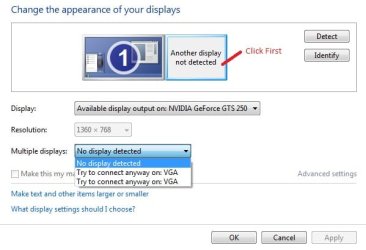
Does it look like the attached image?
Do you have "Try to connect anyway on: HDMI"? Try that if you do.
 

Attachments

  • Displays.jpg
    Displays.jpg
    28.2 KB · Views: 88

My Computer My Computer

At a glance

Windows 7 Ultimate x64Intel Pentium Dual Core E5200 2.5GHz (3.77GHz...Corsair 4GB DDR2 (4x1GB CM2X1024-6400C4)Palit GeForce GTS 250 (1024MB)
Computer Manufacturer/Model Number
Self built
OS
Windows 7 Ultimate x64
CPU
Intel Pentium Dual Core E5200 2.5GHz (3.77GHz OC)
Motherboard
Asus P5Q-E
Memory
Corsair 4GB DDR2 (4x1GB CM2X1024-6400C4)
Graphics Card(s)
Palit GeForce GTS 250 (1024MB)
Sound Card
On Board (ADI AD2000B 8ch HD)
Monitor(s) Displays
Samsung 32in LCD TV
Screen Resolution
1360x768
Hard Drives
2 x 1TB Samsung 103SJ (Raid0)
2 x External 500GB Samsung 502IJ (NexStar 3 HD Enclosures)
PSU
550W Antec Neo HE 550
Case
Antec P180
Cooling
Xigmatex Red Scorpion CPU Cooler. 3x120mm Fans
Keyboard
Logitech MX5000 Laser (Combo)
Mouse
Logitech MX5000 Laser (Combo)
Internet Speed
ADSL2+ (avg 10 Mbps Down, 0.80 Mbps up)
Other Info
Gigabyte GN-WP01GS 54g Wireless Lan Card
Back
Top