How can I make my Excel 2000 invoice template work?

jberenyi

New member
Member
Local time
10:27 PM
Messages
47
I have put some serious hours into to trying to make this invoice template work with Windows 7. It came originally with Office 97 and Office 2000 and was designed by Village Software for Excel usage. What is nice about it is that it has a visual basic database attached to it to track fields of data on the invoice. I have tried everything to make this darn thing work and I really need it for my business. The file names that I copied over to Windows 7 are:

INVDB.XLS
TMPLTNUM.XLS
WZTEMPLT.XLS

I pasted these files into location C:/Program Files (x86)/Microsoft Office/Office12/Library as many on the net have suggested in XP (except it would be Office11). I have successfully performed this feat in XP but not Windows 7. Keep in mind that I did change the file location of INVDB.XLS in the template but everytime I try to save the file it says "cannot locate INVDB.XLS". I also do not get the number toolbar to sequentially increase the invoice number.

Has anyone successfully made this awesome template work on their Windows 7?
 

My Computer My Computer

OS
Windows 7 X64 Home Premium
CPU
Intel Core i5 Socket 1156
Motherboard
Asus P7P55D
Memory
Mushkin Blackline 4Gb 996679
Graphics Card(s)
EVGA 9500GT
Monitor(s) Displays
Dell 1900FP
Hard Drives
Western Digital 640Gb Black Caviar
PSU
Antec 500W
Case
Cooler Master
Keyboard
IBM KB8923 (the best)
Mouse
Microsoft
Internet Speed
12Gb/sec

My Computer My Computer

OS
Windows 7 X64 Home Premium
CPU
Intel Core i5 Socket 1156
Motherboard
Asus P7P55D
Memory
Mushkin Blackline 4Gb 996679
Graphics Card(s)
EVGA 9500GT
Monitor(s) Displays
Dell 1900FP
Hard Drives
Western Digital 640Gb Black Caviar
PSU
Antec 500W
Case
Cooler Master
Keyboard
IBM KB8923 (the best)
Mouse
Microsoft
Internet Speed
12Gb/sec
Hi all
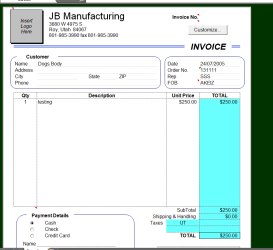
It works fine in Office 2010 (at least from what I can see).

You have to 1) open in compatability mode
2) enable macros
3) disable some "protected content".

Office 2010 will "Convert" the template without a problem

enc image


I had to use an ACCESS 2010 DB as I don't have a Visual Basic DB - incidentally did you ever consider converting the EXCEL sheet to ACCESS and run your invoicing program from ACCESS DB (ACCESS 2010 is included in Office 2010).

Works fine -- use import facilty within ACCESS.

BTW the advantage in using a DB for invoices rather than spreadsheets is you can run a whole series of reports on it and it makes calculations for TAX etc really simple -- and of course submitting tax docs to relevanmt authorities.

Things like Addresses can be linked to customer number etc so inputting data / creating invoices would be so much quicker as well.

You can also run reports against services delivered to customers, outstanding amunts etc etc.

I'd use your template as a basis and convert to a DB system.

Cheers
jimbo
 

Attachments

  • invoice.png
    invoice.png
    15.8 KB · Views: 820

My Computer My Computer

Computer type
PC/Desktop
Computer Manufacturer/Model Number
Custom built, several laptops HP/ASUS
OS
Linux CENTOS 7 / various Windows OS'es and servers
CPU
Intel i7 Intel i5
Memory
8GB, 16GB
Graphics Card(s)
On Motherboard
Sound Card
Realtek HD audio
Monitor(s) Displays
Apple Cinema display, Samsung LCD
Screen Resolution
1920 X 1080
Hard Drives
4 X 1TB SATA
Mouse
Toshiba wireless laser
Internet Speed
> 20MB up
Hello Jimbo,

I am so jealous! So did you actually try to save the template as a worksheet in Excel and not get any warning? I can open up the invoice too but saving it is another story. Also, I have done everything in your list of requirements except disabling some "protected content". Elaborate on this one. That could be my problem. Your signature file says you are running XP. How about Windows 7? That could also be the issue for me.
 
Last edited:

My Computer My Computer

OS
Windows 7 X64 Home Premium
CPU
Intel Core i5 Socket 1156
Motherboard
Asus P7P55D
Memory
Mushkin Blackline 4Gb 996679
Graphics Card(s)
EVGA 9500GT
Monitor(s) Displays
Dell 1900FP
Hard Drives
Western Digital 640Gb Black Caviar
PSU
Antec 500W
Case
Cooler Master
Keyboard
IBM KB8923 (the best)
Mouse
Microsoft
Internet Speed
12Gb/sec
Hi there
I was running Ms Office 2010 Beta with W7 X-64 Enterprise. Download and install the trial -- but it should work on Office 2007 as well.

Must update the sig if it still says XP.

BTW it also works on other W7 versions.

Download your own file -- change the name from .XLT to .xls and then try again.

Cheers
jimbo
 

My Computer My Computer

Computer type
PC/Desktop
Computer Manufacturer/Model Number
Custom built, several laptops HP/ASUS
OS
Linux CENTOS 7 / various Windows OS'es and servers
CPU
Intel i7 Intel i5
Memory
8GB, 16GB
Graphics Card(s)
On Motherboard
Sound Card
Realtek HD audio
Monitor(s) Displays
Apple Cinema display, Samsung LCD
Screen Resolution
1920 X 1080
Hard Drives
4 X 1TB SATA
Mouse
Toshiba wireless laser
Internet Speed
> 20MB up
Jimbo,

Do me a favor and send me your working invoice template and invdb.xls file. Tell me where you located each file in Windows 7 and I will try it out. Send files to jberenyi AT yahoo DOT com
 
Last edited:

My Computer My Computer

OS
Windows 7 X64 Home Premium
CPU
Intel Core i5 Socket 1156
Motherboard
Asus P7P55D
Memory
Mushkin Blackline 4Gb 996679
Graphics Card(s)
EVGA 9500GT
Monitor(s) Displays
Dell 1900FP
Hard Drives
Western Digital 640Gb Black Caviar
PSU
Antec 500W
Case
Cooler Master
Keyboard
IBM KB8923 (the best)
Mouse
Microsoft
Internet Speed
12Gb/sec
Still waiting for your help Jimbo. Could really use it.
 

My Computer My Computer

OS
Windows 7 X64 Home Premium
CPU
Intel Core i5 Socket 1156
Motherboard
Asus P7P55D
Memory
Mushkin Blackline 4Gb 996679
Graphics Card(s)
EVGA 9500GT
Monitor(s) Displays
Dell 1900FP
Hard Drives
Western Digital 640Gb Black Caviar
PSU
Antec 500W
Case
Cooler Master
Keyboard
IBM KB8923 (the best)
Mouse
Microsoft
Internet Speed
12Gb/sec
I still could use some help on this one Jimbo or anyone else.
 

My Computer My Computer

OS
Windows 7 X64 Home Premium
CPU
Intel Core i5 Socket 1156
Motherboard
Asus P7P55D
Memory
Mushkin Blackline 4Gb 996679
Graphics Card(s)
EVGA 9500GT
Monitor(s) Displays
Dell 1900FP
Hard Drives
Western Digital 640Gb Black Caviar
PSU
Antec 500W
Case
Cooler Master
Keyboard
IBM KB8923 (the best)
Mouse
Microsoft
Internet Speed
12Gb/sec
HELP!
 

My Computer My Computer

OS
Windows 7 X64 Home Premium
CPU
Intel Core i5 Socket 1156
Motherboard
Asus P7P55D
Memory
Mushkin Blackline 4Gb 996679
Graphics Card(s)
EVGA 9500GT
Monitor(s) Displays
Dell 1900FP
Hard Drives
Western Digital 640Gb Black Caviar
PSU
Antec 500W
Case
Cooler Master
Keyboard
IBM KB8923 (the best)
Mouse
Microsoft
Internet Speed
12Gb/sec
Hi there
I'll have another go later -- I'm doing a few things at the moment however -- and sitting waiting for Non Existant flights at Manchester Airport UK is not much Fun -- even the Beer at the bar is running low -- now that is bad -- delayed flights I can live with -- but NO BEER deliveries -- that's just CRIMINAL.

Cheers
jimbo
 

My Computer My Computer

Computer type
PC/Desktop
Computer Manufacturer/Model Number
Custom built, several laptops HP/ASUS
OS
Linux CENTOS 7 / various Windows OS'es and servers
CPU
Intel i7 Intel i5
Memory
8GB, 16GB
Graphics Card(s)
On Motherboard
Sound Card
Realtek HD audio
Monitor(s) Displays
Apple Cinema display, Samsung LCD
Screen Resolution
1920 X 1080
Hard Drives
4 X 1TB SATA
Mouse
Toshiba wireless laser
Internet Speed
> 20MB up
Back
Top