Hi
I want my PC to hibernate when I press shutdown ( exactly shutdown button ) but I don't know how can I modify something like registry or group policy... to achieve my goal.
Is there any way to do that ?
Thanks in advance
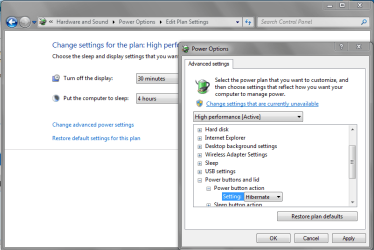
You can do this via Power Options in Control Panel.
Start > Control Panel > Search for Power Options > Edit Power Settings > Change Advanced Power Settings.
Then scroll down to 'Power buttons and lid' Then from the drop down menu click Hibernate.
Attachments
Capture.PNG
27.2 KB
· Views: 1
My Computer
Computer type
PC/Desktop
Computer Manufacturer/Model Number
Zoostorm
OS
Windows 8.1
CPU
Intel Core i5 3450 @ 3.10GHz
Motherboard
Intel Core i5-33
Memory
16GB
Graphics Card(s)
NVIDIA GeForce GTX 650
Sound Card
NVIDIA High Definition Audio
Screen Resolution
1920x1080 & 1024x768
Hard Drives
WDC WD20EZRX-00D8PB0
Manufacturer Western Digital
Heads 16
Cylinders 243,201
Tracks 62,016,255
Sectors 3,907,024,065
SATA type SATA-III 6.0Gb/s
Device type Fixed
ATA Standard ACS2
Serial Number WD-WCC4M0100262
LBA Size 48-bit LBA
Thanks for your answer
there is some choices for "Shutdown Button" in start menu such as "restart" "sleep" and so on... I know that I can change the main title of the button to one of the choices that I mentioned earlier but I want to basically change the shutdown command not only the button so if I click the "Shutdown" button in start menu it will run the hibernate command in deed.
So, instead of the 'Shut down' button showing you want 'Hibernate' button to show instead so it's two clicks to hibernate?
My Computer
Computer type
PC/Desktop
Computer Manufacturer/Model Number
Zoostorm
OS
Windows 8.1
CPU
Intel Core i5 3450 @ 3.10GHz
Motherboard
Intel Core i5-33
Memory
16GB
Graphics Card(s)
NVIDIA GeForce GTX 650
Sound Card
NVIDIA High Definition Audio
Screen Resolution
1920x1080 & 1024x768
Hard Drives
WDC WD20EZRX-00D8PB0
Manufacturer Western Digital
Heads 16
Cylinders 243,201
Tracks 62,016,255
Sectors 3,907,024,065
SATA type SATA-III 6.0Gb/s
Device type Fixed
ATA Standard ACS2
Serial Number WD-WCC4M0100262
LBA Size 48-bit LBA
Windows 11 Pro x64 [Latest Release and Release Preview]
CPU
Ryzen 9 5950X, 3.8 - 5.2 MHz
Motherboard
Asus Prime X570-Pro
Memory
64GB [2 x 32GB] DDR4 3200MHz
Graphics Card(s)
4GB NVIDIA GEFORCE GTX 1650 Ti
Sound Card
On-board SPDIF to 5.1 System + HDMI [5.1 system]
Monitor(s) Displays
32" UHD 32 Bit HDR Monitor + 43" UHD 4K 32Bit HDR TV
Screen Resolution
2 x 3840 x 2160 @60Hz
Hard Drives
1TB M2 SSD OS, 500GB Fast Access SSD, 2 x 8TB Data + Various Externals from 1TB to 4TB, 10TB NAS
PSU
NZXT C750 80 PLUS Gold 750W Modular PSU
Case
Workstation Case [Matt Black]
Cooling
NZXT Kraken X63 280mm CPU Cooler +2x Quiet Case fans
Keyboard
Logitech Wireless MX Keys & K400 + others
Mouse
Logitech Wireless MX Master 3S
Internet Speed
920 MB Down 50 MB Up
Antivirus
BitDefender Total Security Pro
Browser
Chrome (always run latest Non-Beta)
Other Info
Also run ...
Laptop - Quad 8GB - Windows 10 Pro x64
Nexus 7 Android tablet x2
Samsung 10.2" tablet
Blackview TAB 8 4G Android Tablet c/w Keyboard
Wacom Intuos Pro Medium Pen Pad
Wacom Intuos Pro Small Pen Pad
Wacom Expresskeys Remote
Loopdeck+ Graphics Controller
Shuttle Pro v2 Control
Computer type
Laptop
System Manufacturer/Model Number
Dell XPS 17 10750H
OS
Windows 11 Pro x64 Latest RP
CPU
Intel I7 10750H 5.0GHz
Motherboard
Dell XPS
Memory
32GB [2x16GB] DDR4 2933 MHz
Graphics Card(s)
nVidia GTX1650Ti 4 GB GDDR6
Sound Card
Stock [Realtek] 4 Speaker
Monitor(s) Displays
17" IPS UHD+ Infinity Edge Touchscreen
Screen Resolution
3840 x 2400
Hard Drives
2TB M2 NVMe, 4TB External + various 500GB & 1TB External NVMe (also have access to spinner HDD from
PSU
Stock
Case
Stock XPS Aluminium & Carbon Fibre
Cooling
Stock - Active Fan Control
Keyboard
Backlit + Various Logitech
Mouse
Stock Track Pad + Logitech MX Trackball
Internet Speed
72 MB Down 18MB Up
Browser
Chrome
Other Info
Also run ...
Laptop - Quad 8GB - Windows 10 Pro x64
Nexus 7 Android tablet x2
10.2" tablet
Sony Z3 Android Smartphone
Wacom Intuos Pro Medium Pen Pad
Wacom Intuos Pro Small Pen Pad
Wacom Expresskeys Remote
Loopdeck+ Graphics Controller
Shuttle Pro v2 Control Pad
10TB NAS
Alternative:
Right click Task Bar > Preferences > Start Menu > Power Button Options > from the drop down menu select 'Hibernate'
My Computer
Computer type
PC/Desktop
Computer Manufacturer/Model Number
Zoostorm
OS
Windows 8.1
CPU
Intel Core i5 3450 @ 3.10GHz
Motherboard
Intel Core i5-33
Memory
16GB
Graphics Card(s)
NVIDIA GeForce GTX 650
Sound Card
NVIDIA High Definition Audio
Screen Resolution
1920x1080 & 1024x768
Hard Drives
WDC WD20EZRX-00D8PB0
Manufacturer Western Digital
Heads 16
Cylinders 243,201
Tracks 62,016,255
Sectors 3,907,024,065
SATA type SATA-III 6.0Gb/s
Device type Fixed
ATA Standard ACS2
Serial Number WD-WCC4M0100262
LBA Size 48-bit LBA
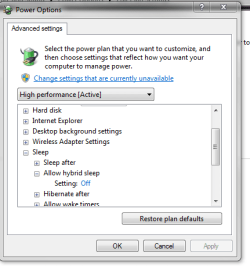
This Power Button is the physical button on the system, the hibernate option is missing from the Start menu "Power Button", if the hybrid sleep option is active, but appears if this is off
Windows 11 Pro x64 [Latest Release and Release Preview]
CPU
Ryzen 9 5950X, 3.8 - 5.2 MHz
Motherboard
Asus Prime X570-Pro
Memory
64GB [2 x 32GB] DDR4 3200MHz
Graphics Card(s)
4GB NVIDIA GEFORCE GTX 1650 Ti
Sound Card
On-board SPDIF to 5.1 System + HDMI [5.1 system]
Monitor(s) Displays
32" UHD 32 Bit HDR Monitor + 43" UHD 4K 32Bit HDR TV
Screen Resolution
2 x 3840 x 2160 @60Hz
Hard Drives
1TB M2 SSD OS, 500GB Fast Access SSD, 2 x 8TB Data + Various Externals from 1TB to 4TB, 10TB NAS
PSU
NZXT C750 80 PLUS Gold 750W Modular PSU
Case
Workstation Case [Matt Black]
Cooling
NZXT Kraken X63 280mm CPU Cooler +2x Quiet Case fans
Keyboard
Logitech Wireless MX Keys & K400 + others
Mouse
Logitech Wireless MX Master 3S
Internet Speed
920 MB Down 50 MB Up
Antivirus
BitDefender Total Security Pro
Browser
Chrome (always run latest Non-Beta)
Other Info
Also run ...
Laptop - Quad 8GB - Windows 10 Pro x64
Nexus 7 Android tablet x2
Samsung 10.2" tablet
Blackview TAB 8 4G Android Tablet c/w Keyboard
Wacom Intuos Pro Medium Pen Pad
Wacom Intuos Pro Small Pen Pad
Wacom Expresskeys Remote
Loopdeck+ Graphics Controller
Shuttle Pro v2 Control
Computer type
Laptop
System Manufacturer/Model Number
Dell XPS 17 10750H
OS
Windows 11 Pro x64 Latest RP
CPU
Intel I7 10750H 5.0GHz
Motherboard
Dell XPS
Memory
32GB [2x16GB] DDR4 2933 MHz
Graphics Card(s)
nVidia GTX1650Ti 4 GB GDDR6
Sound Card
Stock [Realtek] 4 Speaker
Monitor(s) Displays
17" IPS UHD+ Infinity Edge Touchscreen
Screen Resolution
3840 x 2400
Hard Drives
2TB M2 NVMe, 4TB External + various 500GB & 1TB External NVMe (also have access to spinner HDD from
PSU
Stock
Case
Stock XPS Aluminium & Carbon Fibre
Cooling
Stock - Active Fan Control
Keyboard
Backlit + Various Logitech
Mouse
Stock Track Pad + Logitech MX Trackball
Internet Speed
72 MB Down 18MB Up
Browser
Chrome
Other Info
Also run ...
Laptop - Quad 8GB - Windows 10 Pro x64
Nexus 7 Android tablet x2
10.2" tablet
Sony Z3 Android Smartphone
Wacom Intuos Pro Medium Pen Pad
Wacom Intuos Pro Small Pen Pad
Wacom Expresskeys Remote
Loopdeck+ Graphics Controller
Shuttle Pro v2 Control Pad
10TB NAS