How connect a Dell Latitude E6510 laptop to the net?

VenusandMars

New member
Local time
8:26 AM
Messages
9
Location
Sweden
Hi,

I just bought a Dell Latitude E6510 laptop and now I wonder how to set it up for internet access. I have a desktop PC and so I know that my connection is good.

I tried just connecting it via the RJ45 socket on the PC, thinking it would configure itself once it sensed a live connection, but no go.

I cannot imagine that it is sold without the necessary hard- and software as it is no more than a couple of years old, but maybe it needs setting up?

The spec sheet says, under Connectivity:

10/100/1000 Gigabit Ethernet 56K v924 Internal Modem (Optional)

which I take to mean that the modem is not necessarily installed as a matter of course but, like I said above - who buys a PC in, say, 2008 and doesn't get internet connectivity in the deal?

I happened to have an ST Lab 10/100 Base TX USB to Ethernet adapter that I tried before posting this, but Windows didn't find a driver for it so I got one from driverscollection.com but didn't get a 'second chance' to install it manually although I had installed the driver and rebooted the PC.

I then ran Device Manager to see what I could see and, not surprisingly, there were unknown, driverless ethernet adapter entries galore.

I then uninstalled those (the ones with an exclamation mark inside a yellow triangle) until I had a 'clean slate', then did a 'rescan for newly installed hardware' - no go.

Then I did the same on my desktop PC. That is, I didn't uninstall any drivers but plugged in the ST-Lab adapter, did a 'rescan for newly installed hardware', let Windows fail, then double-clicked the device name (the newly 'discovered' ST-Lab adapter) and when prompted, pointed Windows to the folder containing the 32-bit Vista driver (they almost always work on Windows 7 and were my only choice anyway) after having first received an assurance that: "It's best to let Windows install device drivers automatically".

Now Windows could not find the driver which I had downloaded myself, per its own Help-page instructions and then pointed it to, solemnly announcing: "Windows could not find driver software for your device.

Well, duh! In my opinion, Windows couldn't find six o' clock at five thirty, or find a driver if hit on the head by it, or so it seems at times like this.

"It's best to let Windows install device drivers automatically". What a joke! Hilarious! Seriously, though, it makes one envy Linux and Mac OS users.

As always, any and all help is very much appreciated. Thank you.

Kindest regards,
Goran
 

Attachments

My Computer My Computer

At a glance

Windows 7
OS
Windows 7
The "10/100/1000 Gigabit Ethernet 56K v924 Internal Modem (Optional)" is actually 2 separate specs.
10/100/1000 Gigabit Ethernet means the laptop has a wired network card that allows the laptop to be hardwired directly to either a DSL or cable modem, or hardwired directly to a router which is in turn hardwired to a DSL or cable modem.
56K v924 Internal Modem (Optional) means the laptop can be ordered with an internal dialup modem as an option.
Your laptop also apparently comes with a wireless network card for wireless Internet connectivity.

Normally, a router is required to connect 2 separate computers to the Internet.
A standard(wired) router allows both computers to be hardwired to the router's LAN ports.
A wireless router allows both computers to be either hardwired to 2 of the router's LAN ports, or one can be hardwired and the other configured to connect wirelessly, or both can be configured to connect wirelessly(assuming both have wireless network cards).

If you already have a router configured for Internet access, then to connect a 2nd computer to the Internet, go to Windows Help, type internet in the search box, select "Set up a second internet connection", and follow the instructions.

If you do not have a router, then you need to install one. They normally come with setup instructions.
 

My Computer My Computer

At a glance

windows 7
OS
windows 7
Hi,
I then ran Device Manager to see what I could see and, not surprisingly, there were unknown, driverless ethernet adapter entries galore.

I then uninstalled those (the ones with an exclamation mark inside a yellow triangle) until I had a 'clean slate', then did a 'rescan for newly installed hardware' - no go.
Goran

Download all the missing drivers for your Notebook from here:
Dell - Support
 

My Computer My Computer

At a glance

ME/XP/Vista/Win7
OS
ME/XP/Vista/Win7
What happens if you connect the notebook with the ethernet cable directly to the modem - if that works, then all you need is either an ethernet switch (for wired connection) or a router for wireless connection.
 

My Computer My Computer

At a glance

Vista, Windows7, Mint Mate, Zorin, Windows 8from 1.6GHz Duo to i7
Computer Manufacturer/Model Number
HP, Dell, Gateway, Toshiba - 4 laptops and 2 desktops
OS
Vista, Windows7, Mint Mate, Zorin, Windows 8
CPU
from 1.6GHz Duo to i7
Monitor(s) Displays
2x HP w2207
Hard Drives
5x HDD, 7x SSD, 12x Externals
Keyboard
with trackball - no mices
Mouse
Trackball mice
Internet Speed
DSL 6000
The "10/100/1000 Gigabit Ethernet 56K v924 Internal Modem (Optional)" is actually 2 separate specs.
10/100/1000 Gigabit Ethernet means the laptop has a wired network card that allows the laptop to be hardwired directly to either a DSL or cable modem, or hardwired directly to a router which is in turn hardwired to a DSL or cable modem.
56K v924 Internal Modem (Optional) means the laptop can be ordered with an internal dialup modem as an option.
Your laptop also apparently comes with a wireless network card for wireless Internet connectivity.

Normally, a router is required to connect 2 separate computers to the Internet.
A standard(wired) router allows both computers to be hardwired to the router's LAN ports.
A wireless router allows both computers to be either hardwired to 2 of the router's LAN ports, or one can be hardwired and the other configured to connect wirelessly, or both can be configured to connect wirelessly(assuming both have wireless network cards).

If you already have a router configured for Internet access, then to connect a 2nd computer to the Internet, go to Windows Help, type internet in the search box, select "Set up a second internet connection", and follow the instructions.

If you do not have a router, then you need to install one. They normally come with setup instructions.
Thank you ski. I do have a router (an old D-Link DI-604) that has performed well so far; It allows my stationary ASUS and HP Pavilion to share a broadband connection.
I tried using that at first, but it wouldn't recognize the Dell even though I know how to set it up using the wizard or else strongarm it (manual configuration).

I then connected the Ethernet cable directly to the Dell, same difference.
So, I don't think the router's the problem though that would have been preferable.
 

My Computer My Computer

At a glance

Windows 7
OS
Windows 7
You're welcome.

Did you try different RJ45 cables to connect the laptop to the router?

Did you try a different router LAN port?

Did Device Manager say the ethernet network adapter is "working properly"?

Did you enter the router's encryption passphrase(assuming it has one) during the laptop's network setup?

If those are ok and your router is configured for DHCP, then make sure the laptop is configured to obtain an IP address and a DNS server address automatically.

If that's ok, then it's possible the laptop's wired network card may either not be properly seated, or it may be DOA.
 

My Computer My Computer

At a glance

windows 7
OS
windows 7
I have a Dell laptopwhich did the same thing when I got it, used too.After trying connections at home and work with several cables, it turned out to be the ethernet port. Check inside the port to make sure all the tiny wires are down in their little slots. That's what was wrong with mine.
 

My Computer My Computer

At a glance

Windows 7 Ultimate X64 SP1Intel i5-2550K, Differing ~4.4-4.8GHz No buil...16GB G.Skill Sniper 1866MHz @ 2133MHz 2x8GBASUS GTX650TIB-DC2OC-2GD5, (650TI Boost)
Computer type
PC/Desktop
Computer Manufacturer/Model Number
Home Built Desktop By DataTech
OS
Windows 7 Ultimate X64 SP1
CPU
Intel i5-2550K, Differing ~4.4-4.8GHz No built in GPU
Motherboard
ASUS P8Z68-V PRO/GEN3
Memory
16GB G.Skill Sniper 1866MHz @ 2133MHz 2x8GB
Graphics Card(s)
ASUS GTX650TIB-DC2OC-2GD5, (650TI Boost)
Sound Card
Onboard Realtek 5-1
Monitor(s) Displays
Samsung P2570HD
Screen Resolution
1920x1080
Hard Drives
Samsung 840 Pro 256GB SSD for OS, 500GB Seagate Constellation (Enterprise drive) for Data
PSU
Corsair HX650W
Case
Inwin Dragon Rider
Cooling
Hyper 212 EVO w/two Noctua fans, push-pull, @1300 RPM
Keyboard
E-Z Eyes, bright yellow keys with large characters
Mouse
steelseries SENSEI Laser Pro Gaming
Internet Speed
48-51Mbs Mbs down, 11 Mbs up Xfinity Cable
Antivirus
Norton Internet Security 2013
Browser
IE 10, Opera, Pale Moon if needed
Other Info
4 case fans, LG BluRay-RE, ASUS DVD-RW, Mr. Fusion power supply, 1.21 gigawatts.
You're welcome.

1 Did you try different RJ45 cables to connect the laptop to the router?

2 Did you try a different router LAN port?

3 Did Device Manager say the ethernet network adapter is "working properly"?

4 Did you enter the router's encryption passphrase(assuming it has one) during the laptop's network setup?

5 If those are ok and your router is configured for DHCP, then make sure the laptop is configured to obtain an IP address and a DNS server address automatically.

6 If that's ok, then it's possible the laptop's wired network card may either not be properly seated, or it may be DOA.

1: No, but the one I tried is a known, good cable, works (daily) on the PC I write this on

2: I connected it directly to my incoming ehernet cable

3: Yes, I ran Device Manager and, not surprisingly, there were unknown, driverless ethernet adapter entries

4: Not applicable

5: Right*

6: DOA sounds about right!*

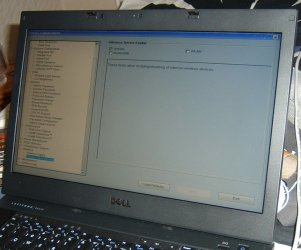
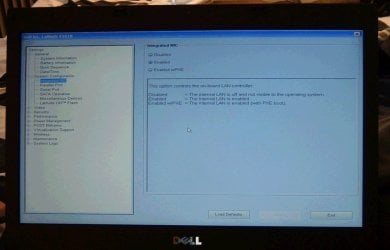
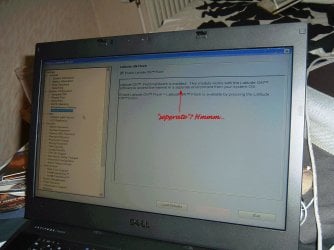
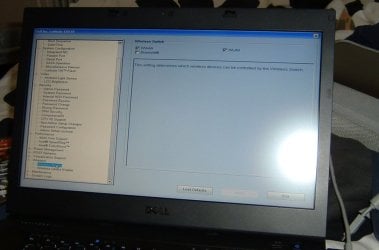
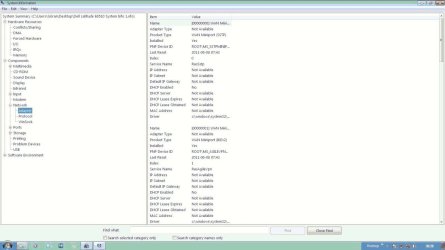
*I took a screenshot of the BIOS settings and a few Speccy-screens of the relevant pages.
If you have any patience left, I ask you to please look at them as they probably tell you much more than they do me.

Thank you for hanging in there with me ;) I really appreciate it!

Oops - wrong pictures - will post the correct ones asap...
...and here they are.
 

Attachments

  • DELL_Latitude_System Information_General.jpg
    DELL_Latitude_System Information_General.jpg
    102.3 KB · Views: 19
  • DELL_Latitude_System Information_Integrated_NIC.jpg
    DELL_Latitude_System Information_Integrated_NIC.jpg
    74.6 KB · Views: 25
  • DELL_Latitude_System Information_Latitude_ON_Flashl.jpg
    DELL_Latitude_System Information_Latitude_ON_Flashl.jpg
    349.6 KB · Views: 37
  • DELL_Latitude_System Information_Wireless_Switch.jpg
    DELL_Latitude_System Information_Wireless_Switch.jpg
    72.9 KB · Views: 19
  • DELL_Latitude_System_Information_Network_Adapter.jpg
    DELL_Latitude_System_Information_Network_Adapter.jpg
    75.4 KB · Views: 28
Last edited:

My Computer My Computer

At a glance

Windows 7
OS
Windows 7
I have a Dell laptopwhich did the same thing when I got it, used too.After trying connections at home and work with several cables, it turned out to be the ethernet port. Check inside the port to make sure all the tiny wires are down in their little slots. That's what was wrong with mine.
Hello Britton. Yes, at this point it certainly looks like you're right. I just uploaded some pic's of the setup; there seems to me nothing wrong in there.
Do you see anything wrong?
Cheers.
 
Last edited:

My Computer My Computer

At a glance

Windows 7
OS
Windows 7
I can't tell from those pics, but it says your NIC in Enabled. You'll need to look inside the physical Ethernet port to see if those little wires are in place or even present.
Also How to upload screen shots
 

My Computer My Computer

At a glance

Windows 7 Ultimate X64 SP1Intel i5-2550K, Differing ~4.4-4.8GHz No buil...16GB G.Skill Sniper 1866MHz @ 2133MHz 2x8GBASUS GTX650TIB-DC2OC-2GD5, (650TI Boost)
Computer type
PC/Desktop
Computer Manufacturer/Model Number
Home Built Desktop By DataTech
OS
Windows 7 Ultimate X64 SP1
CPU
Intel i5-2550K, Differing ~4.4-4.8GHz No built in GPU
Motherboard
ASUS P8Z68-V PRO/GEN3
Memory
16GB G.Skill Sniper 1866MHz @ 2133MHz 2x8GB
Graphics Card(s)
ASUS GTX650TIB-DC2OC-2GD5, (650TI Boost)
Sound Card
Onboard Realtek 5-1
Monitor(s) Displays
Samsung P2570HD
Screen Resolution
1920x1080
Hard Drives
Samsung 840 Pro 256GB SSD for OS, 500GB Seagate Constellation (Enterprise drive) for Data
PSU
Corsair HX650W
Case
Inwin Dragon Rider
Cooling
Hyper 212 EVO w/two Noctua fans, push-pull, @1300 RPM
Keyboard
E-Z Eyes, bright yellow keys with large characters
Mouse
steelseries SENSEI Laser Pro Gaming
Internet Speed
48-51Mbs Mbs down, 11 Mbs up Xfinity Cable
Antivirus
Norton Internet Security 2013
Browser
IE 10, Opera, Pale Moon if needed
Other Info
4 case fans, LG BluRay-RE, ASUS DVD-RW, Mr. Fusion power supply, 1.21 gigawatts.
If your router is configured for DHCP(assigns IP addresses automatically), then open Control Panel/Network and Sharing Center, click on Local Area Connection/Properties, make sure Internet Protocol Version 4 has a check mark by it, double click on it, and make sure "Obtain an IP address automatically" and "Obtain DNS server address automatically" are checked.

If your router is configured to assign IP adresses manually, then you will have to check "Use the following IP address" and "Use the following DNS server addresses" in the above location, and manually assign the various addresses for each.

Also, if your router is configured for "MAC Address Filtering", then you will have to obtain your laptop network card's MAC address in System Information, and enter it in your router's online configuration.
If your laptop came with a wireless(Wi-Fi) network card, then do the same for it.
 

My Computer My Computer

At a glance

windows 7
OS
windows 7
Unless it's wireless, your isp may require you to open a second connection thru them. I know when i had Cox cable they had to open a second port for wife's computer. Just something to think about. Wireless is no pr;oblem if your router supports it.
 

My Computer My Computer

At a glance

Windows 7 Home Premium 64 bitIntel Core 2 quad Extreme Q9770 @ 3.2 GHz4x2 GB Muskin 1600 MHz ramNVidia GTX 250
Computer Manufacturer/Model Number
Dell XPS 730
OS
Windows 7 Home Premium 64 bit
CPU
Intel Core 2 quad Extreme Q9770 @ 3.2 GHz
Memory
4x2 GB Muskin 1600 MHz ram
Graphics Card(s)
NVidia GTX 250
Sound Card
Soundblaster X-Fi Fatality Champion
Monitor(s) Displays
2 Dell 2007WFP Ultrascans
Screen Resolution
3360 x 1050
Hard Drives
WD Black 1TB sata, 2-WD Black 500 sata, 2-Seagate 500 Go external
PSU
1000 Watt
Cooling
air
Keyboard
MS Natrual Keyboard Pro
Mouse
Logitech Wireless Trackball
Internet Speed
DSL Elite
Back
Top