How do connect 2 desktops to each other using a x-over cable?

mjackson

New member
Local time
4:54 PM
Messages
6
Hi, first post here so please go easy on me.

I have 2 desktop PC's, one has a wireless internet connection and a network card installed. The other PC has no wireless internet connection but it does have a network card installed.

:geek:

My aim is to connect both PC's network cards using a homegroup and cross-over cable so that I can transfer files from one PC to the other.
 

My Computer My Computer

At a glance

Windows 7 Home PremiumAMD Phenom quad core4GB
Computer type
PC/Desktop
Computer Manufacturer/Model Number
Acer
OS
Windows 7 Home Premium
CPU
AMD Phenom quad core
Memory
4GB
Hard Drives
500GB
300GB
Browser
Opera
Welcome to the forum. You dont want to use homegroup as it needs ipv6 which makes it complicated. Dont you have a router you can use to connect thats simpler. Failing that you will need to set each pc to have a fixed ip as there is no dhcp server so pc1 set to 10.0.0.1 subnet 255.255.255.0 second pc set to 10.0.0.2 same subnet connect the cable and then share folders you want giving perrmisions to everyone dont use a folder in the profiles as the perrmisions on those folder have a deny on them
 

My Computer My Computer

At a glance

win 8 32 bit
Computer type
PC/Desktop
OS
win 8 32 bit
Thanks for the speedy reply, I should have provided more detail but was worried about complicating the overall aim.

I have 1 router which allows multiple wireless internet connections, static IP assigned by the service provider.

My main PC uses this router via a wireless adapter and the network shows up as HOME NETWORK.

I tried connecting the second PC to the main PC using the x-over cable and assigned two different static IP addresses to each Ethernet adapter under the IPV4 settings. Both PC's could see each other as sharing was enabled with network discovery on.

The Ethernet connection was listed as a Public network on the main PC.

However it did not allow full access and I am sure that it needs something more.
 

My Computer My Computer

At a glance

Windows 7 Home PremiumAMD Phenom quad core4GB
Computer type
PC/Desktop
Computer Manufacturer/Model Number
Acer
OS
Windows 7 Home Premium
CPU
AMD Phenom quad core
Memory
4GB
Hard Drives
500GB
300GB
Browser
Opera
It's much easier to connect two PCs using a router with Ethernet. You can set specific permissions to allow and which drives to be allowed to be accessed by another PC connected on the local network.
 

My Computer My Computer

At a glance

Windows 7 Home Premium 64-BITAMD A8 7200P8GB 1600mhzRadeon R5 (APU) + Radeon R5 M230 2GB Dual Gra...
Computer type
PC/Desktop
Computer Manufacturer/Model Number
ASUS X550ZE
OS
Windows 7 Home Premium 64-BIT
CPU
AMD A8 7200P
Motherboard
N/A
Memory
8GB 1600mhz
Graphics Card(s)
Radeon R5 (APU) + Radeon R5 M230 2GB Dual Graphics
Sound Card
Realtek ALC269 with SonicMaster
Monitor(s) Displays
Laptop Display
Screen Resolution
1920 x 1080 @60hz
Hard Drives
WDC WD50 00LPVX-80V0TT0 (500GB)
PSU
Laptop Charger
Mouse
ARMAGGEDON TEXTRON SCORPION 7
Internet Speed
100 mbps DOWN / 50 mbps UP
Antivirus
Windows Defender
Browser
Mozzila FireFox, Valve Steam in-game internet browser
Unfortunately the router is downstairs so an unsightly cable run is out of the question. This is what I see in Network and sharing centre:

38075290762_3eaba9f70d_b.jpg


If I click on the multiple networks then I see the other PC (FAMILY-PC):

24254377508_5b1ce1b27d_o.jpg


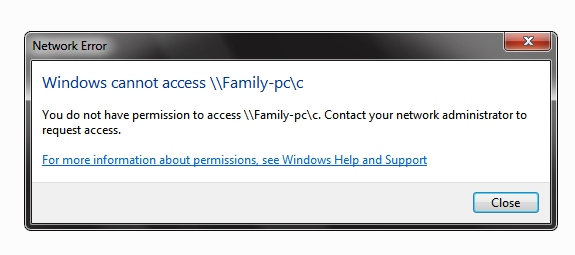
This is also the same from the FAMILY-PC. Yet I get this error message appear when I try and go further:

38075290822_8612a53a4e_o.jpg
 

My Computer My Computer

At a glance

Windows 7 Home PremiumAMD Phenom quad core4GB
Computer type
PC/Desktop
Computer Manufacturer/Model Number
Acer
OS
Windows 7 Home Premium
CPU
AMD Phenom quad core
Memory
4GB
Hard Drives
500GB
300GB
Browser
Opera
First you need to set up a shared folder an give everyone permission the network needs to be private. It's simpler if you login to both pcs with same name and password
 

My Computer My Computer

At a glance

win 8 32 bit
Computer type
PC/Desktop
OS
win 8 32 bit
Thanks for the reply, I want to be able to transfer folders and files freely between both computers and not just a single shared/public folder.
 

My Computer My Computer

At a glance

Windows 7 Home PremiumAMD Phenom quad core4GB
Computer type
PC/Desktop
Computer Manufacturer/Model Number
Acer
OS
Windows 7 Home Premium
CPU
AMD Phenom quad core
Memory
4GB
Hard Drives
500GB
300GB
Browser
Opera
To share all you have to use the hidden admin share c$ so you have to map a drive and provide admin password
 

My Computer My Computer

At a glance

win 8 32 bit
Computer type
PC/Desktop
OS
win 8 32 bit
And that's where you have bamboozled me with science :doh:
 

My Computer My Computer

At a glance

Windows 7 Home PremiumAMD Phenom quad core4GB
Computer type
PC/Desktop
Computer Manufacturer/Model Number
Acer
OS
Windows 7 Home Premium
CPU
AMD Phenom quad core
Memory
4GB
Hard Drives
500GB
300GB
Browser
Opera
:confused:

Still unable to connect.
 

My Computer My Computer

At a glance

Windows 7 Home PremiumAMD Phenom quad core4GB
Computer type
PC/Desktop
Computer Manufacturer/Model Number
Acer
OS
Windows 7 Home Premium
CPU
AMD Phenom quad core
Memory
4GB
Hard Drives
500GB
300GB
Browser
Opera
Back
Top