Solved add unallocated space on one hdd (Extend greyed out)

quackchung

New member
Local time
11:24 AM
Messages
10
Location
Liverpool England
Hi all

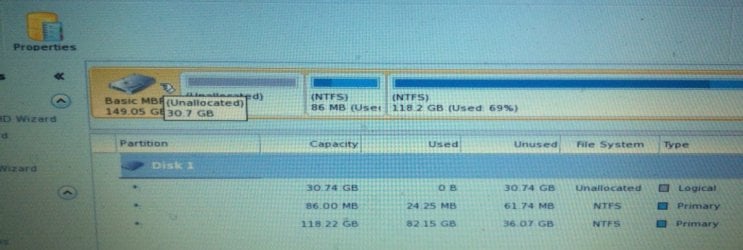
I've just got rid of my Samsung recovery partition data and made the space unallocated. I want to add this free space to the C;\Drive partition, but the extend option on the context menu for C is greyed out.

I assume it's because there is a tiny partition in-between the other two, please see image.
unallocated space to be taken up by C, Drive.jpg

Could someone give me some advice on how to do this please?
 

Attachments

  • unallocated space to be taken up by C, Drive.jpg
    unallocated space to be taken up by C, Drive.jpg
    48.1 KB · Views: 3

My Computer My Computer

At a glance

windows 7 Professional 32bitceleron r dual core
Computer type
PC/Desktop
Computer Manufacturer/Model Number
samsung
OS
windows 7 Professional 32bit
CPU
celeron r dual core
My Computer My Computer

At a glance

Vista, Windows7, Mint Mate, Zorin, Windows 8from 1.6GHz Duo to i7
Computer Manufacturer/Model Number
HP, Dell, Gateway, Toshiba - 4 laptops and 2 desktops
OS
Vista, Windows7, Mint Mate, Zorin, Windows 8
CPU
from 1.6GHz Duo to i7
Monitor(s) Displays
2x HP w2207
Hard Drives
5x HDD, 7x SSD, 12x Externals
Keyboard
with trackball - no mices
Mouse
Trackball mice
Internet Speed
DSL 6000

My Computer My Computer

At a glance

Windows 7 Home Premium SP1, 64-bitIntel Skylake i5-6600K, not overclocked8 GB HyperX DDR4-2666 (2 x 4 GB)none; graphics are integrated on CPU
Computer type
PC/Desktop
Computer Manufacturer/Model Number
Ignatz Special; 4 speed manual gearbox; factory air conditioning; one of one
OS
Windows 7 Home Premium SP1, 64-bit
CPU
Intel Skylake i5-6600K, not overclocked
Motherboard
AsRock Z170M Extreme 4, micro ATX
Memory
8 GB HyperX DDR4-2666 (2 x 4 GB)
Graphics Card(s)
none; graphics are integrated on CPU
Sound Card
onboard: Realtek ALC1150; external: USB Behringer UF0-202
Monitor(s) Displays
Dell S2340M 23 inch IPS
Screen Resolution
1600 x 900
Hard Drives
System: Crucial MX100 series SSD, 128 GB;
Data: Samsung Spinpoint 103SJ, 1 TB;
Backup: WD Caviar Green WD30EZRX-00D8PB0, 3 TB
PSU
Rosewill SilentNight 500 watt fanless, semi-modular
Case
Antec Solo II
Cooling
Noctua NH-U12S; Noctua F12 intake, Noctua S12A exhaust
Keyboard
Microsoft 200 6JH-00001 USB
Mouse
Dell or Microsoft optical wired; USB
Antivirus
Microsoft Security Essentials and Malwarebytes Premium
Browser
Pale Moon
Other Info
All fans PWM; speeds at idle: CPU circa 500 rpm; intake circa 600 rpm; exhaust circa 600 rpm; CPU temps 27 idle and 47 C load in a warm room (27 C/81 F) when running Intel Extreme Tuning Utility stress test.
Ignatz, since he wants to extend the C partition, he has to use the bootable CD - I think.
 

My Computer My Computer

At a glance

Vista, Windows7, Mint Mate, Zorin, Windows 8from 1.6GHz Duo to i7
Computer Manufacturer/Model Number
HP, Dell, Gateway, Toshiba - 4 laptops and 2 desktops
OS
Vista, Windows7, Mint Mate, Zorin, Windows 8
CPU
from 1.6GHz Duo to i7
Monitor(s) Displays
2x HP w2207
Hard Drives
5x HDD, 7x SSD, 12x Externals
Keyboard
with trackball - no mices
Mouse
Trackball mice
Internet Speed
DSL 6000
Ignatz, since he wants to extend the C partition, he has to use the bootable CD - I think.

You might be right. Or does the regular version just make the change on the next boot, like checkdisk?

I'm not sure either.
 

My Computer My Computer

At a glance

Windows 7 Home Premium SP1, 64-bitIntel Skylake i5-6600K, not overclocked8 GB HyperX DDR4-2666 (2 x 4 GB)none; graphics are integrated on CPU
Computer type
PC/Desktop
Computer Manufacturer/Model Number
Ignatz Special; 4 speed manual gearbox; factory air conditioning; one of one
OS
Windows 7 Home Premium SP1, 64-bit
CPU
Intel Skylake i5-6600K, not overclocked
Motherboard
AsRock Z170M Extreme 4, micro ATX
Memory
8 GB HyperX DDR4-2666 (2 x 4 GB)
Graphics Card(s)
none; graphics are integrated on CPU
Sound Card
onboard: Realtek ALC1150; external: USB Behringer UF0-202
Monitor(s) Displays
Dell S2340M 23 inch IPS
Screen Resolution
1600 x 900
Hard Drives
System: Crucial MX100 series SSD, 128 GB;
Data: Samsung Spinpoint 103SJ, 1 TB;
Backup: WD Caviar Green WD30EZRX-00D8PB0, 3 TB
PSU
Rosewill SilentNight 500 watt fanless, semi-modular
Case
Antec Solo II
Cooling
Noctua NH-U12S; Noctua F12 intake, Noctua S12A exhaust
Keyboard
Microsoft 200 6JH-00001 USB
Mouse
Dell or Microsoft optical wired; USB
Antivirus
Microsoft Security Essentials and Malwarebytes Premium
Browser
Pale Moon
Other Info
All fans PWM; speeds at idle: CPU circa 500 rpm; intake circa 600 rpm; exhaust circa 600 rpm; CPU temps 27 idle and 47 C load in a warm room (27 C/81 F) when running Intel Extreme Tuning Utility stress test.
In any case, the CD is the safe route.
 

My Computer My Computer

At a glance

Vista, Windows7, Mint Mate, Zorin, Windows 8from 1.6GHz Duo to i7
Computer Manufacturer/Model Number
HP, Dell, Gateway, Toshiba - 4 laptops and 2 desktops
OS
Vista, Windows7, Mint Mate, Zorin, Windows 8
CPU
from 1.6GHz Duo to i7
Monitor(s) Displays
2x HP w2207
Hard Drives
5x HDD, 7x SSD, 12x Externals
Keyboard
with trackball - no mices
Mouse
Trackball mice
Internet Speed
DSL 6000
autoplay?

Hi guys thanks for the replies.

I downloaded the iso file in the top link "mini tool partition wizard" it downloaded "pwfree9.iso"

I then mounted it using gizmo and ticked "autoplay afterwards" but it doesn't. There's no .exe file to start the program so I can burn a cd/dvd bootable disc using the program.

I even burnt the iso image and tried accessing an ,exe from disc with no joy either!

What am I doing wrong?...Thanks
 

My Computer My Computer

At a glance

windows 7 Professional 32bitceleron r dual core
Computer type
PC/Desktop
Computer Manufacturer/Model Number
samsung
OS
windows 7 Professional 32bit
CPU
celeron r dual core
You have to boot the PC with the burnt CD. Shut the PC off and on power-on tap F12 or ESC or whatever it says on the splash screen to change the temporary boot sequence. The select the CD/DVD reader with the up/down keys and hit Enter. When the PW screen comes on, select the left side - see picture.
 

Attachments

  • 2015-03-07_1408.png
    2015-03-07_1408.png
    88.8 KB · Views: 0

My Computer My Computer

At a glance

Vista, Windows7, Mint Mate, Zorin, Windows 8from 1.6GHz Duo to i7
Computer Manufacturer/Model Number
HP, Dell, Gateway, Toshiba - 4 laptops and 2 desktops
OS
Vista, Windows7, Mint Mate, Zorin, Windows 8
CPU
from 1.6GHz Duo to i7
Monitor(s) Displays
2x HP w2207
Hard Drives
5x HDD, 7x SSD, 12x Externals
Keyboard
with trackball - no mices
Mouse
Trackball mice
Internet Speed
DSL 6000
not working

Hi

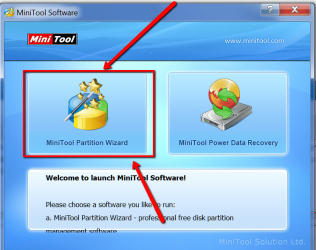
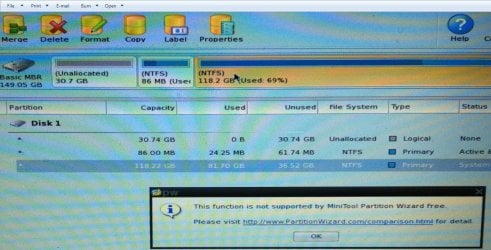
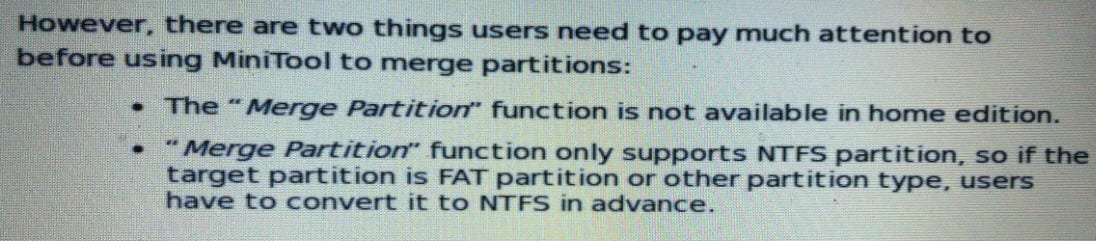
I booted up with the disc but got stuck, as I guessed I had to merge the partitions together, but the prog says it won't work with "Home"! Please see images. (Looks as if I have to pay for the program:cry:
 

Attachments

  • mini tool interface.jpg
    mini tool interface.jpg
    44.5 KB · Views: 2
  • merge not allowed.jpg
    merge not allowed.jpg
    139.4 KB · Views: 1
  • merge not available in home.jpg
    merge not available in home.jpg
    56.1 KB · Views: 0

My Computer My Computer

At a glance

windows 7 Professional 32bitceleron r dual core
Computer type
PC/Desktop
Computer Manufacturer/Model Number
samsung
OS
windows 7 Professional 32bit
CPU
celeron r dual core
The unallocated space is NOT a partition.

You want to ADD that space to a partition.

You aren't trying to MERGE anything.

Explore the menus to discover how to add space to or expand a partition, NOT merge.
 

My Computer My Computer

At a glance

Windows 7 Home Premium SP1, 64-bitIntel Skylake i5-6600K, not overclocked8 GB HyperX DDR4-2666 (2 x 4 GB)none; graphics are integrated on CPU
Computer type
PC/Desktop
Computer Manufacturer/Model Number
Ignatz Special; 4 speed manual gearbox; factory air conditioning; one of one
OS
Windows 7 Home Premium SP1, 64-bit
CPU
Intel Skylake i5-6600K, not overclocked
Motherboard
AsRock Z170M Extreme 4, micro ATX
Memory
8 GB HyperX DDR4-2666 (2 x 4 GB)
Graphics Card(s)
none; graphics are integrated on CPU
Sound Card
onboard: Realtek ALC1150; external: USB Behringer UF0-202
Monitor(s) Displays
Dell S2340M 23 inch IPS
Screen Resolution
1600 x 900
Hard Drives
System: Crucial MX100 series SSD, 128 GB;
Data: Samsung Spinpoint 103SJ, 1 TB;
Backup: WD Caviar Green WD30EZRX-00D8PB0, 3 TB
PSU
Rosewill SilentNight 500 watt fanless, semi-modular
Case
Antec Solo II
Cooling
Noctua NH-U12S; Noctua F12 intake, Noctua S12A exhaust
Keyboard
Microsoft 200 6JH-00001 USB
Mouse
Dell or Microsoft optical wired; USB
Antivirus
Microsoft Security Essentials and Malwarebytes Premium
Browser
Pale Moon
Other Info
All fans PWM; speeds at idle: CPU circa 500 rpm; intake circa 600 rpm; exhaust circa 600 rpm; CPU temps 27 idle and 47 C load in a warm room (27 C/81 F) when running Intel Extreme Tuning Utility stress test.
Try this:
 

Attachments

  • 2015-03-07_1957.png
    2015-03-07_1957.png
    37.3 KB · Views: 0

My Computer My Computer

At a glance

Vista, Windows7, Mint Mate, Zorin, Windows 8from 1.6GHz Duo to i7
Computer Manufacturer/Model Number
HP, Dell, Gateway, Toshiba - 4 laptops and 2 desktops
OS
Vista, Windows7, Mint Mate, Zorin, Windows 8
CPU
from 1.6GHz Duo to i7
Monitor(s) Displays
2x HP w2207
Hard Drives
5x HDD, 7x SSD, 12x Externals
Keyboard
with trackball - no mices
Mouse
Trackball mice
Internet Speed
DSL 6000
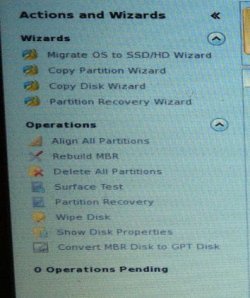
Ok thanks. there was a wizard to recover a partition but I guessed that wasn't it either, didn't really notice any words to that effect but I'll have another look. I thought merging was adding that unallocated space to the C:\ drive partition!!!

Just copied these options below, would you have an idea which path to take thanks?
 

Attachments

  • other options.jpg
    other options.jpg
    33.8 KB · Views: 0
  • wizard options.jpg
    wizard options.jpg
    27.7 KB · Views: 9

My Computer My Computer

At a glance

windows 7 Professional 32bitceleron r dual core
Computer type
PC/Desktop
Computer Manufacturer/Model Number
samsung
OS
windows 7 Professional 32bit
CPU
celeron r dual core
my program doesn't look like yours! I did get it from the provided link too...:confused:

JUST noticed my prog had a move resize option. so I'll have a go at that thanks
 

My Computer My Computer

At a glance

windows 7 Professional 32bitceleron r dual core
Computer type
PC/Desktop
Computer Manufacturer/Model Number
samsung
OS
windows 7 Professional 32bit
CPU
celeron r dual core
You are at the disk level. You have to highlight the partition you want to extend to get the options I posted.
 

My Computer My Computer

At a glance

Vista, Windows7, Mint Mate, Zorin, Windows 8from 1.6GHz Duo to i7
Computer Manufacturer/Model Number
HP, Dell, Gateway, Toshiba - 4 laptops and 2 desktops
OS
Vista, Windows7, Mint Mate, Zorin, Windows 8
CPU
from 1.6GHz Duo to i7
Monitor(s) Displays
2x HP w2207
Hard Drives
5x HDD, 7x SSD, 12x Externals
Keyboard
with trackball - no mices
Mouse
Trackball mice
Internet Speed
DSL 6000
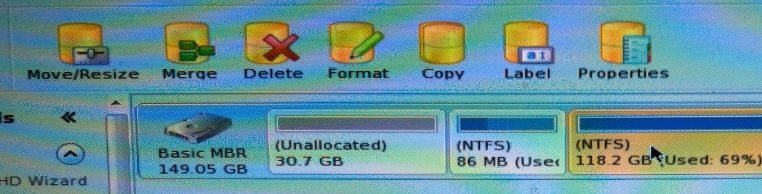
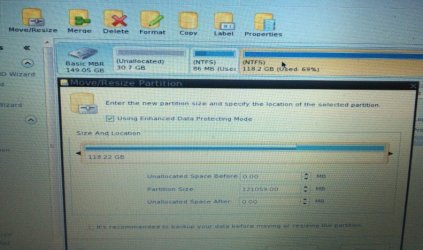
Yeah I noticed when highlighting the unallocated space there was no options to resize/join/add them options only appear on the C drive, even then it looks as if you can only shrink this partition...Please see images.

I've downloaded fix my pc set up exe. Should I install and try that prog?
 

Attachments

  • resize option on c drive.jpg
    resize option on c drive.jpg
    66.6 KB · Views: 0
  • no resize option on unallocated.jpg
    no resize option on unallocated.jpg
    64.1 KB · Views: 0

My Computer My Computer

At a glance

windows 7 Professional 32bitceleron r dual core
Computer type
PC/Desktop
Computer Manufacturer/Model Number
samsung
OS
windows 7 Professional 32bit
CPU
celeron r dual core
I've downloaded fix my pc set up exe. Should I install and try that prog?
That would be a fast way to brick your system. Get rid of that program asap.

Why don't you do what I posted - any reason.
 

My Computer My Computer

At a glance

Vista, Windows7, Mint Mate, Zorin, Windows 8from 1.6GHz Duo to i7
Computer Manufacturer/Model Number
HP, Dell, Gateway, Toshiba - 4 laptops and 2 desktops
OS
Vista, Windows7, Mint Mate, Zorin, Windows 8
CPU
from 1.6GHz Duo to i7
Monitor(s) Displays
2x HP w2207
Hard Drives
5x HDD, 7x SSD, 12x Externals
Keyboard
with trackball - no mices
Mouse
Trackball mice
Internet Speed
DSL 6000
Hi WHS I seen the Fix my pc set up exe with on of the replies and thought that was the same version of program that you were referencing to. Anyhow I've got rid of that now.

Sorry for being dumb but hopefully you can see my above images of the program interface I'm using and it is different from yours when I highlight the c drive partition it gives me options to resize with a slide bar but I couldn't see any "extend option so I was confused. The unallocated when highlighted gives no options.
Could you be more specific as to what I must do using my images as a reference please? or is your version purchased?
 

My Computer My Computer

At a glance

windows 7 Professional 32bitceleron r dual core
Computer type
PC/Desktop
Computer Manufacturer/Model Number
samsung
OS
windows 7 Professional 32bit
CPU
celeron r dual core
I'll check back tomorrow as it late here in England and I've just got home from a GIG. Thanks responders...:sleepy:
 

My Computer My Computer

At a glance

windows 7 Professional 32bitceleron r dual core
Computer type
PC/Desktop
Computer Manufacturer/Model Number
samsung
OS
windows 7 Professional 32bit
CPU
celeron r dual core
Sorted

Doh!...Just tried once more before bed and "extend" showed up as one of the options this time!!!
Tiredness I guess. Once again thank you for the very kind replies. Good luck, good health and good night to you all.:rolleyes:
 

My Computer My Computer

At a glance

windows 7 Professional 32bitceleron r dual core
Computer type
PC/Desktop
Computer Manufacturer/Model Number
samsung
OS
windows 7 Professional 32bit
CPU
celeron r dual core
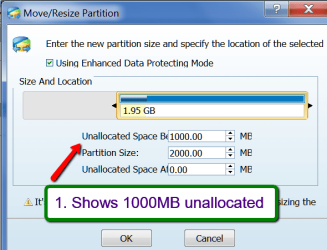
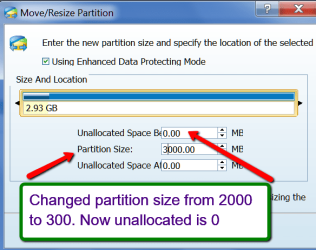
Highlight the partition to which you want to add the unallocated space. If you have "Move/Resize partition on the left, follow my picture show.

This was my initial setup. 1000MB (1GB) unallocated space and a small partition with 1.95GB. This is a disk management picture.


2015-03-07_2258.png

Now I am in Partition Wizard and highlighted the T (Test) partition and clicked on 'Move/Resize partition' on the left.

2015-03-07_2256.png

Now I added the 1000MB unallocated space to the 2000MB of the T partition by changing the number from 2000 to 3000.

2015-03-07_2302.png

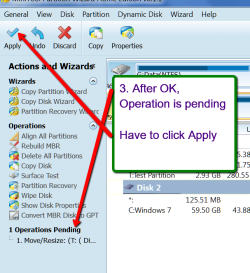
Now you have to OK the operation and do what the next picture shows => APPLY

2015-03-07_2304.png

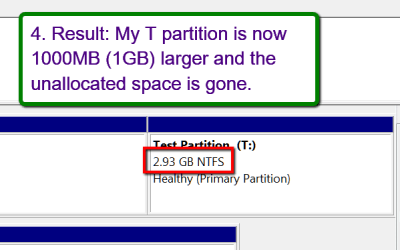
Now My disk management shows that the T partition is 1000MB (1GB) larger and there is no more unallocated space.

2015-03-07_2307.png
 

My Computer My Computer

At a glance

Vista, Windows7, Mint Mate, Zorin, Windows 8from 1.6GHz Duo to i7
Computer Manufacturer/Model Number
HP, Dell, Gateway, Toshiba - 4 laptops and 2 desktops
OS
Vista, Windows7, Mint Mate, Zorin, Windows 8
CPU
from 1.6GHz Duo to i7
Monitor(s) Displays
2x HP w2207
Hard Drives
5x HDD, 7x SSD, 12x Externals
Keyboard
with trackball - no mices
Mouse
Trackball mice
Internet Speed
DSL 6000
Back
Top