How do I change to wireless? No wireless option, no wireless adapter

Klaidas

New member
Local time
2:44 AM
Messages
6
So, I've been using Ethernet for a while now to access the internet on my PC. I never really use it because I'm always using wireless, but few months back my wireless just suddenly stopped working so I've been using an Ethernet cable ever since.

Anyway, I wanna get back to using wireless but the problem is: I don't know how. I have no wireless adapters and no wireless option to set up a new wireless connection.

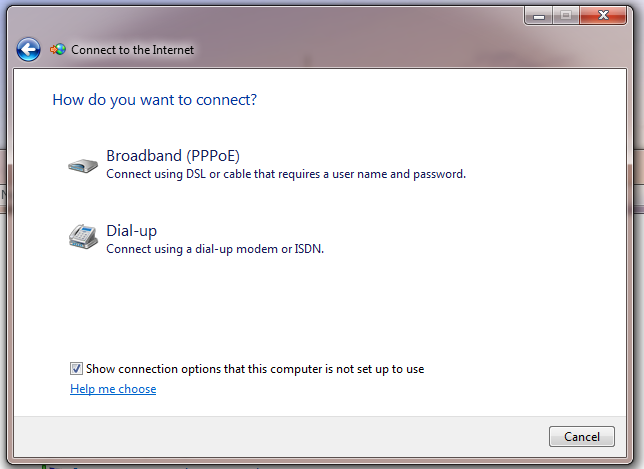
I go into: Control Panel\Network and Internet\Network and Sharing Center > Set up a New Connection or Network > Connect to the Internet > But, the only option I get are Broadband (PPPoE) or Dial-Up. Shouldn't a wireless option be here?

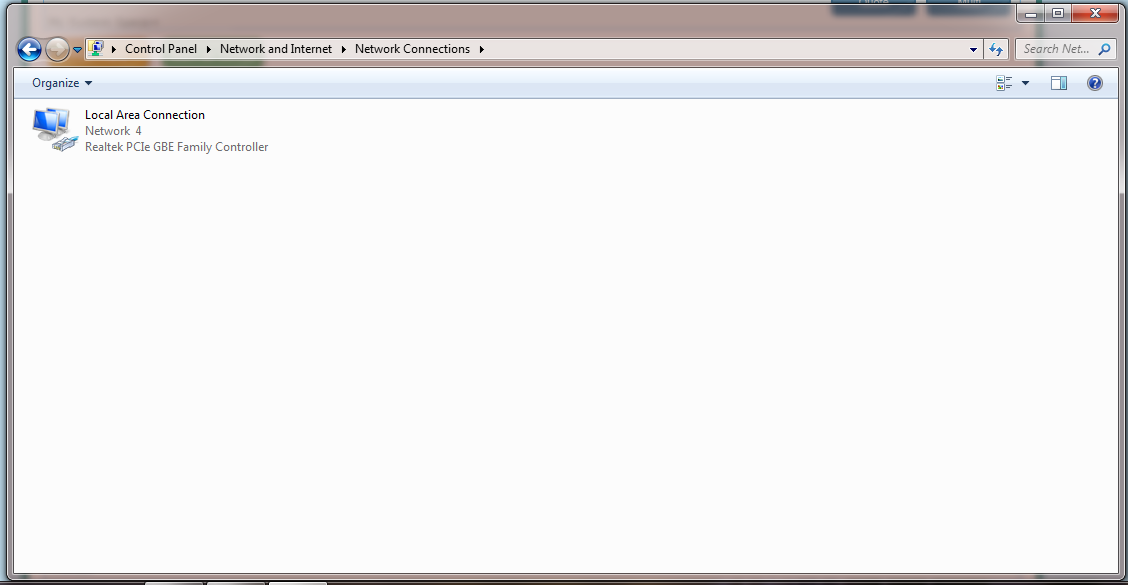
I then look to: Control Panel\Network and Internet\Network Connections but there's only one icon there: Local Area Connection and that's my Ethernet cable which I'm using right now. Shouldn't there be a lot more here?

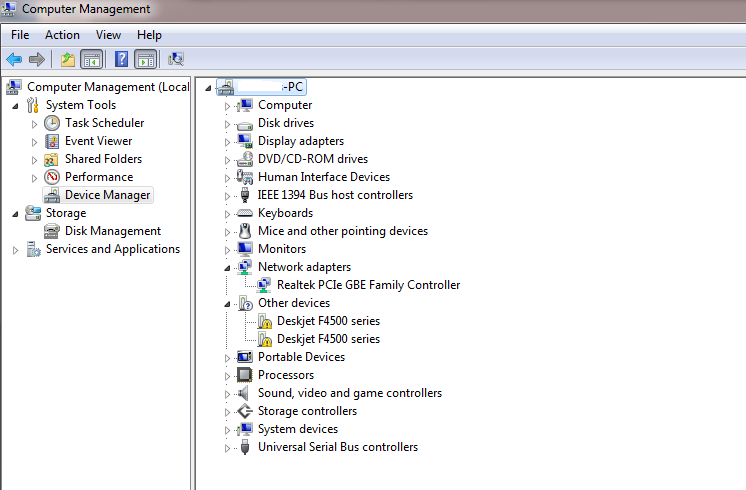
I've gone into Device Manager and checked my Network adapters but there's only one: Realtek PCIe GBE Family Controller. My other PC (literally, the exact same PC to this one) in the room next door works fine and has got a bunch of other adapters, I have no idea what's happened to this.

Yeah, I'm a newbie to this. Basically, I want to start using a wireless connection but I have no idea how.
 

My Computer My Computer

At a glance

Windows 6 Home Premium 64bit
Computer type
PC/Desktop
OS
Windows 6 Home Premium 64bit
What is the make and model of the PC? Is it a laptop? Is there by any chance a switch that turns the wifi on/off?

If the wifi worked in the past and suddenly stopped working, I would suspect that the adapter failed but it could also be switched off or the driver got corrupted or otherwise disabled somehow.
 

My Computer My Computer

At a glance

W10 Pro desktop, W11 laptop, W11 Pro tablet (...3.7Ghz 8700K i7, i7-11800H, i7-1065G716G desktop, 16G laptop, 4G tabletAMD Radeon RX580, RTX 3060, Intel Iris Plus
Computer type
PC/Desktop
Computer Manufacturer/Model Number
Home Built desktop, Dell G15 5511 Gaming laptop,MS Surface Pro 7 tablet
OS
W10 Pro desktop, W11 laptop, W11 Pro tablet (all 64-bit)
CPU
3.7Ghz 8700K i7, i7-11800H, i7-1065G7
Motherboard
ASUS TUF Z370-Pro Gaming in desktop
Memory
16G desktop, 16G laptop, 4G tablet
Graphics Card(s)
AMD Radeon RX580, RTX 3060, Intel Iris Plus
Sound Card
High Definition Audio (Built-in to mobo)
Monitor(s) Displays
Samsung U32J59 32" (2x), 15.6", 12"
Screen Resolution
3840x2160, 3840x2160, 1920x1080, 2160x1440
Hard Drives
500G SSD for OS; 2T, 10T & 15T HDDs for Data on Desktop, 1TB SSD laptop, 128G SSD tablet.
PSU
Corsair CX 750M
Case
Antec 100
Cooling
CM 212+
Keyboard
IBM Model M - used continuously since 1986
Mouse
Microsoft Pro IntelliMouse
Internet Speed
400M down 8M up
Antivirus
Windows Defender
Browser
FireFox
Other Info
Built my first computer (8Mhz 8088cpu, 640K RAM, 20MB HDD, 2 360K floppy drives) in 1985 and have been building them for myself, relatives and friends ever since.
You need to have either a router with Wireless radio or an access point if your modem has router functionality. You also need a wireless adapter for your desktop.

After setting up the wireless on the access point (e.g. SSID radio type, channel width, encryption), your desktop with a USB or PCIE wireless adapter will automatically see the broadcast radio and you should be able to connect wirelessly.
 

My Computer My Computer

At a glance

Windows 7 Professional x64 SP1Intel® Pentium® 4 @ 2.26 GHz, Intel Core i7-2...512MB Dual channel DDR SDRAM @ 400MHz 2.5-3-3...Intel 82865G, Nvidia GeForce 520M Graphics
Computer type
Laptop
Computer Manufacturer/Model Number
Dell Optiplex SX270, Lenovo Z470
OS
Windows 7 Professional x64 SP1
CPU
Intel® Pentium® 4 @ 2.26 GHz, Intel Core i7-2670QM @ 2.20 GH
Motherboard
Dell, Lenovo
Memory
512MB Dual channel DDR SDRAM @ 400MHz 2.5-3-3-7, 8 GB DDR3
Graphics Card(s)
Intel 82865G, Nvidia GeForce 520M Graphics
Sound Card
SoundMax Integrated Audio, Integrated HD Audio
Monitor(s) Displays
LG W1952
Screen Resolution
1440x900, 1366 x 768
Hard Drives
40 GB 2.5" IDE 4200 RPM HDD, 500 GB 5400 RPM Sata 1.5 + 32 GB SSD
PSU
Dell 145 Watt, Lenovo 120 Watt Power Adapter
Case
Optiplex SX270 Small Form Factor, Laptop
Cooling
Dell Proprietary Air Cooling, Stock laptop cooling
Keyboard
Dell SK-8125 USB Keyboard
Mouse
Dell PS/2 2 button ball mouse with wheel scroll
Internet Speed
300 Mbit down / 20 Mbps up Time Warner Cable
Antivirus
MSE, Malwarebytes Scanner
Browser
Internet (Aizawa) Explorer 11
Other Info
Running Windows Server 2012 Datacenter on a virtual machine to run Metro Apps.
What is the make and model of the PC? Is it a laptop? Is there by any chance a switch that turns the wifi on/off?

If the wifi worked in the past and suddenly stopped working, I would suspect that the adapter failed but it could also be switched off or the driver got corrupted or otherwise disabled somehow.

It's not a laptop, no. And there's no on/off switch for Wi-Fi.

You need to have either a router with Wireless radio or an access point if your modem has router functionality. You also need a wireless adapter for your desktop.

After setting up the wireless on the access point (e.g. SSID radio type, channel width, encryption), your desktop with a USB or PCIE wireless adapter will automatically see the broadcast radio and you should be able to connect wirelessly.

Man, either I didn't get a word of that or you're over complicating things. I don't think this is a complicated problem, simply put it, I think that some of my drivers just got deleted or failed somehow. My PC in the next room, which is IDENTICAL to this one works fine, Wi-Fi is fine and I looked at all the drivers installed under Network Adapters and I have about 6 there. On this PC, however, I only have one driver installed. I swear, if these PC's are identical the drivers, software, etc should also be identical but that's not the case. I have a wireless router downstairs and that works absolutely fine, there's 2 iPads, 4 iPhones and 3 MacBook Air's connected to the router and it works completely OK. So, I doubt this is a problem with the router.

It's gotta be a problem with some of the drivers, but I just can't figure it out. Shall I take a screenshot some screenshots so you guys get a better idea of the problem?

thanks though
 

My Computer My Computer

At a glance

Windows 6 Home Premium 64bit
Computer type
PC/Desktop
OS
Windows 6 Home Premium 64bit
Again I ask, what is the make and model of the PC? Without knowing the make and model of the PC, there's no way to help you find drivers for it.
 

My Computer My Computer

At a glance

W10 Pro desktop, W11 laptop, W11 Pro tablet (...3.7Ghz 8700K i7, i7-11800H, i7-1065G716G desktop, 16G laptop, 4G tabletAMD Radeon RX580, RTX 3060, Intel Iris Plus
Computer type
PC/Desktop
Computer Manufacturer/Model Number
Home Built desktop, Dell G15 5511 Gaming laptop,MS Surface Pro 7 tablet
OS
W10 Pro desktop, W11 laptop, W11 Pro tablet (all 64-bit)
CPU
3.7Ghz 8700K i7, i7-11800H, i7-1065G7
Motherboard
ASUS TUF Z370-Pro Gaming in desktop
Memory
16G desktop, 16G laptop, 4G tablet
Graphics Card(s)
AMD Radeon RX580, RTX 3060, Intel Iris Plus
Sound Card
High Definition Audio (Built-in to mobo)
Monitor(s) Displays
Samsung U32J59 32" (2x), 15.6", 12"
Screen Resolution
3840x2160, 3840x2160, 1920x1080, 2160x1440
Hard Drives
500G SSD for OS; 2T, 10T & 15T HDDs for Data on Desktop, 1TB SSD laptop, 128G SSD tablet.
PSU
Corsair CX 750M
Case
Antec 100
Cooling
CM 212+
Keyboard
IBM Model M - used continuously since 1986
Mouse
Microsoft Pro IntelliMouse
Internet Speed
400M down 8M up
Antivirus
Windows Defender
Browser
FireFox
Other Info
Built my first computer (8Mhz 8088cpu, 640K RAM, 20MB HDD, 2 360K floppy drives) in 1985 and have been building them for myself, relatives and friends ever since.
Again I ask, what is the make and model of the PC? Without knowing the make and model of the PC, there's no way to help you find drivers for it.

My bad, I forgot to throw that in.

HP-Pavilion WE168AA-ABU p6325uk
 

My Computer My Computer

At a glance

Windows 6 Home Premium 64bit
Computer type
PC/Desktop
OS
Windows 6 Home Premium 64bit
Here's a link to HP's support page for that computer where you can download the driver for the wifi adapter. HP Pavilion p6325uk Desktop PC Drivers & Downloads | HP® Support

If the driver won't install or reports that it can't find the Ralink 802.11n Wireless LAN Card, it may be that your card has failed. In that case, you could get a USB wifi adapter to replace it or purchase another internal card but the USB would be the easiest solution.
 

My Computer My Computer

At a glance

W10 Pro desktop, W11 laptop, W11 Pro tablet (...3.7Ghz 8700K i7, i7-11800H, i7-1065G716G desktop, 16G laptop, 4G tabletAMD Radeon RX580, RTX 3060, Intel Iris Plus
Computer type
PC/Desktop
Computer Manufacturer/Model Number
Home Built desktop, Dell G15 5511 Gaming laptop,MS Surface Pro 7 tablet
OS
W10 Pro desktop, W11 laptop, W11 Pro tablet (all 64-bit)
CPU
3.7Ghz 8700K i7, i7-11800H, i7-1065G7
Motherboard
ASUS TUF Z370-Pro Gaming in desktop
Memory
16G desktop, 16G laptop, 4G tablet
Graphics Card(s)
AMD Radeon RX580, RTX 3060, Intel Iris Plus
Sound Card
High Definition Audio (Built-in to mobo)
Monitor(s) Displays
Samsung U32J59 32" (2x), 15.6", 12"
Screen Resolution
3840x2160, 3840x2160, 1920x1080, 2160x1440
Hard Drives
500G SSD for OS; 2T, 10T & 15T HDDs for Data on Desktop, 1TB SSD laptop, 128G SSD tablet.
PSU
Corsair CX 750M
Case
Antec 100
Cooling
CM 212+
Keyboard
IBM Model M - used continuously since 1986
Mouse
Microsoft Pro IntelliMouse
Internet Speed
400M down 8M up
Antivirus
Windows Defender
Browser
FireFox
Other Info
Built my first computer (8Mhz 8088cpu, 640K RAM, 20MB HDD, 2 360K floppy drives) in 1985 and have been building them for myself, relatives and friends ever since.
I prefer USB Wi-Fi adapters over internal cards because they are easily replaced and don't eat up a PCI-e slot I might need for something else. They also don't have attached antennas to get in the way and, if better range is needed, they can be connected by a short cable, allowing them to be located on top of a rig or high up on a wall (a cable and base comes with most of them now).
 

My Computer My Computer

At a glance

Win 7 Ultimate 64 bitIntel i7-3930KKingston HyperX Genesis 32GB Kit (8x4GB Modul...MSI R7850 Twin Frozr 2GD5/OC Radeon HD 7850 2...
Computer type
PC/Desktop
Computer Manufacturer/Model Number
Custom Build
OS
Win 7 Ultimate 64 bit
CPU
Intel i7-3930K
Motherboard
ASUS P9X79 WS
Memory
Kingston HyperX Genesis 32GB Kit (8x4GB Modules) 1600MHz DDR
Graphics Card(s)
MSI R7850 Twin Frozr 2GD5/OC Radeon HD 7850 2GB 256-bit GDDR
Sound Card
Asus Xonar Essence STX
Monitor(s) Displays
3x Asus VG248QE 24", Vizio 32" TV
Screen Resolution
1920 x 1080, ?
Hard Drives
Samsung 128GB 840 Pro SSD (1),
Samsung 4TB 850 EVO SSDs (4)
Samsung 4TB 850 EVO SSDs (16) external backup drives used in 2.5" hot swap bays in the computer.
PSU
Corsair HX750w
Case
Antec Two Hundred v2 (modified)
Cooling
Cooler Master GeminII S524 120mm (fan replaced with a 140mm)
Keyboard
Logitech G510s
Mouse
Logitech M525 (two in use)
Internet Speed
=< 32Mbps down, 8Mbps up
Antivirus
AVAST!, MBAM, SAS, Spybot S&D (all but MBAM free) Glary Util
Browser
IE11
Other Info
LSI 9211-8i HBA card (8 SATA III ports), 2.5" & 3.5" Hot Swap Bays, HooToo HT-CR001 PCI-E to USB 3.0 Internal Hub + 6 Slot Card Reader, and LG Model CH12LS28 BD-ROM Optical Drive. Also, ScanSnap S1500 ADF duplexing scanner, Canon 9000F flat bed scanner, Corsair SP2500 2.1 speakers, Samsung CLP 415nw laser color printer, Cyberpower PP2200SW UPS
I installed the drivers posted above but nothing has changed.

q5T452E.png


I'm assuming that since installing those drivers and the fact there still is no wireless option and nothing seems to have changed that my card has failed, right?
 

My Computer My Computer

At a glance

Windows 6 Home Premium 64bit
Computer type
PC/Desktop
OS
Windows 6 Home Premium 64bit
Do you see the wifi adapter in Device Manager? If the drivers installed with no error messages then your card should be OK.

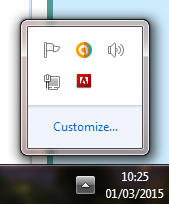
Do you see an icon in the System Tray showing ascending bars? The bars might be grey like in the 2nd pic because you're not connected to the internet yet.
wf.jpg
nwf.jpg
 

My Computer My Computer

At a glance

W10 Pro desktop, W11 laptop, W11 Pro tablet (...3.7Ghz 8700K i7, i7-11800H, i7-1065G716G desktop, 16G laptop, 4G tabletAMD Radeon RX580, RTX 3060, Intel Iris Plus
Computer type
PC/Desktop
Computer Manufacturer/Model Number
Home Built desktop, Dell G15 5511 Gaming laptop,MS Surface Pro 7 tablet
OS
W10 Pro desktop, W11 laptop, W11 Pro tablet (all 64-bit)
CPU
3.7Ghz 8700K i7, i7-11800H, i7-1065G7
Motherboard
ASUS TUF Z370-Pro Gaming in desktop
Memory
16G desktop, 16G laptop, 4G tablet
Graphics Card(s)
AMD Radeon RX580, RTX 3060, Intel Iris Plus
Sound Card
High Definition Audio (Built-in to mobo)
Monitor(s) Displays
Samsung U32J59 32" (2x), 15.6", 12"
Screen Resolution
3840x2160, 3840x2160, 1920x1080, 2160x1440
Hard Drives
500G SSD for OS; 2T, 10T & 15T HDDs for Data on Desktop, 1TB SSD laptop, 128G SSD tablet.
PSU
Corsair CX 750M
Case
Antec 100
Cooling
CM 212+
Keyboard
IBM Model M - used continuously since 1986
Mouse
Microsoft Pro IntelliMouse
Internet Speed
400M down 8M up
Antivirus
Windows Defender
Browser
FireFox
Other Info
Built my first computer (8Mhz 8088cpu, 640K RAM, 20MB HDD, 2 360K floppy drives) in 1985 and have been building them for myself, relatives and friends ever since.
Nope, I don't see that. Here are some screenshots. At the moment I'm using ethernet.

m9cUJzc.png

LrDZOp7.png

This is the only driver I have in network adapters, on my other PC which is the same as this one (literally the same) network adapters is full of a bunch of other drivers
vSFy5g8.png
 

My Computer My Computer

At a glance

Windows 6 Home Premium 64bit
Computer type
PC/Desktop
OS
Windows 6 Home Premium 64bit
You won't see the wifi icon in the system tray while the ethernet cable is plugged in. However, since there is no wifi adapter listed in Device Manager, that's irrelevant.

I find it strange that when you installed the driver for the wifi adapter that you didn't receive any error messages.

At this point, I would recommend getting a USB wifi adapter.
 

My Computer My Computer

At a glance

W10 Pro desktop, W11 laptop, W11 Pro tablet (...3.7Ghz 8700K i7, i7-11800H, i7-1065G716G desktop, 16G laptop, 4G tabletAMD Radeon RX580, RTX 3060, Intel Iris Plus
Computer type
PC/Desktop
Computer Manufacturer/Model Number
Home Built desktop, Dell G15 5511 Gaming laptop,MS Surface Pro 7 tablet
OS
W10 Pro desktop, W11 laptop, W11 Pro tablet (all 64-bit)
CPU
3.7Ghz 8700K i7, i7-11800H, i7-1065G7
Motherboard
ASUS TUF Z370-Pro Gaming in desktop
Memory
16G desktop, 16G laptop, 4G tablet
Graphics Card(s)
AMD Radeon RX580, RTX 3060, Intel Iris Plus
Sound Card
High Definition Audio (Built-in to mobo)
Monitor(s) Displays
Samsung U32J59 32" (2x), 15.6", 12"
Screen Resolution
3840x2160, 3840x2160, 1920x1080, 2160x1440
Hard Drives
500G SSD for OS; 2T, 10T & 15T HDDs for Data on Desktop, 1TB SSD laptop, 128G SSD tablet.
PSU
Corsair CX 750M
Case
Antec 100
Cooling
CM 212+
Keyboard
IBM Model M - used continuously since 1986
Mouse
Microsoft Pro IntelliMouse
Internet Speed
400M down 8M up
Antivirus
Windows Defender
Browser
FireFox
Other Info
Built my first computer (8Mhz 8088cpu, 640K RAM, 20MB HDD, 2 360K floppy drives) in 1985 and have been building them for myself, relatives and friends ever since.
Do you have any recommendations for brands when looking for a USB adapter? Also, are you certain buying one will fix the issue?

Thanks for everything.
 

My Computer My Computer

At a glance

Windows 6 Home Premium 64bit
Computer type
PC/Desktop
OS
Windows 6 Home Premium 64bit
No specific brands to recommend but here's a link to a bunch, any of which should do the job for you. Wireless Adapters, USB 2.0 - Newegg.com

Unfortunately, whenever trying to troubleshoot something from afar through a forum, there is no certainty that can be given. Hopefully, if you buy a USB adapter and it doesn't work for you the place where you bought it from will allow you to return it.

I am fairly confident it will work for you but cannot give 100% certainty.
 

My Computer My Computer

At a glance

W10 Pro desktop, W11 laptop, W11 Pro tablet (...3.7Ghz 8700K i7, i7-11800H, i7-1065G716G desktop, 16G laptop, 4G tabletAMD Radeon RX580, RTX 3060, Intel Iris Plus
Computer type
PC/Desktop
Computer Manufacturer/Model Number
Home Built desktop, Dell G15 5511 Gaming laptop,MS Surface Pro 7 tablet
OS
W10 Pro desktop, W11 laptop, W11 Pro tablet (all 64-bit)
CPU
3.7Ghz 8700K i7, i7-11800H, i7-1065G7
Motherboard
ASUS TUF Z370-Pro Gaming in desktop
Memory
16G desktop, 16G laptop, 4G tablet
Graphics Card(s)
AMD Radeon RX580, RTX 3060, Intel Iris Plus
Sound Card
High Definition Audio (Built-in to mobo)
Monitor(s) Displays
Samsung U32J59 32" (2x), 15.6", 12"
Screen Resolution
3840x2160, 3840x2160, 1920x1080, 2160x1440
Hard Drives
500G SSD for OS; 2T, 10T & 15T HDDs for Data on Desktop, 1TB SSD laptop, 128G SSD tablet.
PSU
Corsair CX 750M
Case
Antec 100
Cooling
CM 212+
Keyboard
IBM Model M - used continuously since 1986
Mouse
Microsoft Pro IntelliMouse
Internet Speed
400M down 8M up
Antivirus
Windows Defender
Browser
FireFox
Other Info
Built my first computer (8Mhz 8088cpu, 640K RAM, 20MB HDD, 2 360K floppy drives) in 1985 and have been building them for myself, relatives and friends ever since.
Back
Top