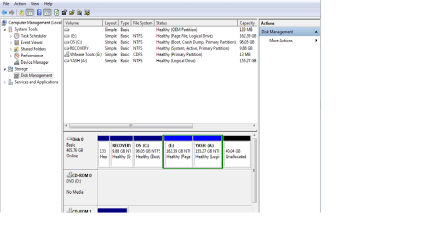
Solved How do i expand my c drive??????

ok i got it. should i backup my data, just in case?


That would be a good idea; first extend D: to include the unallocated space to its right so you will have enough to resize the left side of D: to create unallocated space there to extend C: into.
 

My Computer My Computer

At a glance

W 7 64-bit UltimateIntel Q9550 Yorkfield8GB Dominator 8500C5DATI : XFX 5870
Computer Manufacturer/Model Number
* BFK Customs *
OS
W 7 64-bit Ultimate
CPU
Intel Q9550 Yorkfield
Motherboard
ASUS P5Q Pro
Memory
8GB Dominator 8500C5D
Graphics Card(s)
ATI : XFX 5870
Sound Card
Realtek HD Audio 7-1
Monitor(s) Displays
1x 47" LCD HDMI & 3x 26" LCD HDMI
Screen Resolution
1920x1080P & 1920x1200
Hard Drives
1x 80GB Intel X25-M G2 SSD : 1x 500GB & 1x 640GB WD Caviar Black(s)
PSU
Corsair 620HX
Case
Cooler Master RC-690
Cooling
Tuniq Tower 120, 2x 140mm and 3x 120mm case fans
Keyboard
Microsoft 500
Mouse
Razer Diamondback 3G
Internet Speed
14 Mb/s
Other Info
1x Koutech 3Gb/s SATA HDD Hot Swap Rack
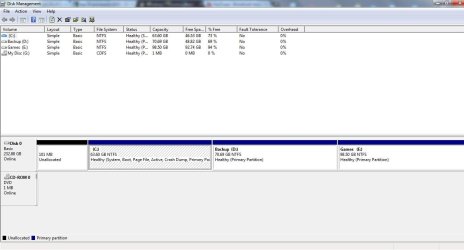
Well, finally, the problem is solved, I guess:


Capture.JPG

Just one more thing to be sure: As you can see, the 101 MB partition is labeled to be 'Unallocated' instead of the usual 'System Reserved'. Is this a problem? If yes, how do I convert it to a 'System Reserved' partition?
 

My Computer My Computer

At a glance

Windows 7 Ultimate~240 GBATI Radeon
Computer Manufacturer/Model Number
TOSHIBA Satellite Pro L510
OS
Windows 7 Ultimate
Memory
~240 GB
Graphics Card(s)
ATI Radeon
You cannot (re)create the System Reserved partition as things are now as you currently have 3 Primary partitions and that is the total number Primary partitions allowed by Windows, the Windows "System" boot files will only function from a Primary partition.

Though you could use the outline in Option Three of this tutorial to use Partition Wizard to convert the D: or the E: partition to an Extended partition/ Logical drive so the SysResv could be (re)created as a Primary partition, ; do not convert C: to an Extended / Logical because then Windows will not boot at all.
 

My Computer My Computer

At a glance

W 7 64-bit UltimateIntel Q9550 Yorkfield8GB Dominator 8500C5DATI : XFX 5870
Computer Manufacturer/Model Number
* BFK Customs *
OS
W 7 64-bit Ultimate
CPU
Intel Q9550 Yorkfield
Motherboard
ASUS P5Q Pro
Memory
8GB Dominator 8500C5D
Graphics Card(s)
ATI : XFX 5870
Sound Card
Realtek HD Audio 7-1
Monitor(s) Displays
1x 47" LCD HDMI & 3x 26" LCD HDMI
Screen Resolution
1920x1080P & 1920x1200
Hard Drives
1x 80GB Intel X25-M G2 SSD : 1x 500GB & 1x 640GB WD Caviar Black(s)
PSU
Corsair 620HX
Case
Cooler Master RC-690
Cooling
Tuniq Tower 120, 2x 140mm and 3x 120mm case fans
Keyboard
Microsoft 500
Mouse
Razer Diamondback 3G
Internet Speed
14 Mb/s
Other Info
1x Koutech 3Gb/s SATA HDD Hot Swap Rack
You cannot (re)create the System Reserved partition as things are now as you currently have 3 Primary partitions and that is the total number Primary partitions allowed by Windows, the Windows "System" boot files will only function from a Primary partition.

Though you could use the outline in Option Three of this tutorial to use Partition Wizard to convert the D: or the E: partition to an Extended partition/ Logical drive so the SysResv could be (re)created as a Primary partition, ; do not convert C: to an Extended / Logical because then Windows will not boot at all.

ok, i got you, but now that we've come to it, tell me, would it be really worth it to have a SysResv partition? i mean, do i face any serious problem if i don't do so? or are there any special benefits of having a SysResv?
 

My Computer My Computer

At a glance

Windows 7 Ultimate~240 GBATI Radeon
Computer Manufacturer/Model Number
TOSHIBA Satellite Pro L510
OS
Windows 7 Ultimate
Memory
~240 GB
Graphics Card(s)
ATI Radeon
The main benefits are if you're using Windows 7 Ultimate and you use the Windows 7 Backup and Restore and BitLocker programs the SysResv is necessary and it adds a link in the F8 Safe Mode startup screen to the WinRE Recovery Console, but the decision is up to you whether you add the SysResv partition back.
 

My Computer My Computer

At a glance

W 7 64-bit UltimateIntel Q9550 Yorkfield8GB Dominator 8500C5DATI : XFX 5870
Computer Manufacturer/Model Number
* BFK Customs *
OS
W 7 64-bit Ultimate
CPU
Intel Q9550 Yorkfield
Motherboard
ASUS P5Q Pro
Memory
8GB Dominator 8500C5D
Graphics Card(s)
ATI : XFX 5870
Sound Card
Realtek HD Audio 7-1
Monitor(s) Displays
1x 47" LCD HDMI & 3x 26" LCD HDMI
Screen Resolution
1920x1080P & 1920x1200
Hard Drives
1x 80GB Intel X25-M G2 SSD : 1x 500GB & 1x 640GB WD Caviar Black(s)
PSU
Corsair 620HX
Case
Cooler Master RC-690
Cooling
Tuniq Tower 120, 2x 140mm and 3x 120mm case fans
Keyboard
Microsoft 500
Mouse
Razer Diamondback 3G
Internet Speed
14 Mb/s
Other Info
1x Koutech 3Gb/s SATA HDD Hot Swap Rack
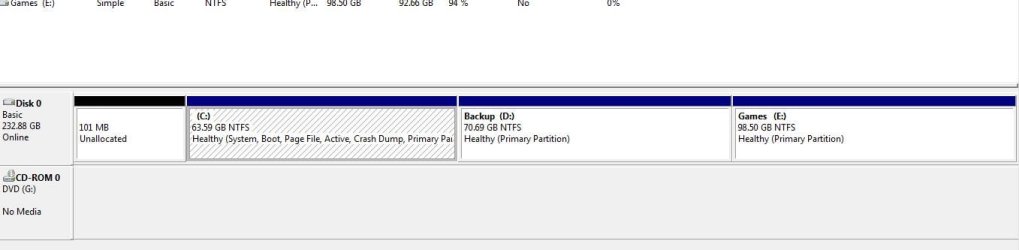
What is on the D Backup partition, the Factory Recovery image? Does it still run? Have you made the Recovery Disks? How to use the Toshiba HDD Recovery Utility

Even though D is 77% empty it may have greyed out Extend in Disk Mgmt because it contains the Factory Recovery Image. If you've made the disks and don't care about having Recovery remain on the HD, you can always delete it using Diskpart or free Partition Wizard bootable CD then extend C into D's space.

If you don't' use the Games on E you could also delete that to regain its space, assuming it's a factory-preinstalled Games partition and not your own Games storage.

If you have any questions, please post them back. If you want us to take a look at what's on D and E, unhide Hidden Files in Control Panel>Folder Options>View then post back a screenshot of the file contents.

what do u exactly mean by factory recovery image? is it an app(ie can i find it in the D: drive)? i'm ready to reduce both D: and E: drives by ~20GB each, to create the an unallocated volume.

Perhaps you should have waited for my answer as the Factory Recovery image is what is used to run Factory Recovery from boot. If that Backup partition came that way from factory then the 20gb on it was likely the Recovery image and it may not run now after you've shrunk it so much. This is why it is important to have made the Factory Recovery Disks first.

How exactly did you recover or reinstall Win7 earlier?

You can test it now by cueing up Factory Recovery by tapping the key given to run it from boot. If it won't run then you can delete it if you made the Recovery disks.

Of course if this is a partition you made yourself you could have just said so.
 
What is on the D Backup partition, the Factory Recovery image? Does it still run? Have you made the Recovery Disks? How to use the Toshiba HDD Recovery Utility

Even though D is 77% empty it may have greyed out Extend in Disk Mgmt because it contains the Factory Recovery Image. If you've made the disks and don't care about having Recovery remain on the HD, you can always delete it using Diskpart or free Partition Wizard bootable CD then extend C into D's space.

If you don't' use the Games on E you could also delete that to regain its space, assuming it's a factory-preinstalled Games partition and not your own Games storage.

If you have any questions, please post them back. If you want us to take a look at what's on D and E, unhide Hidden Files in Control Panel>Folder Options>View then post back a screenshot of the file contents.

what do u exactly mean by factory recovery image? is it an app(ie can i find it in the D: drive)? i'm ready to reduce both D: and E: drives by ~20GB each, to create the an unallocated volume.

Perhaps you should have waited for my answer as the Factory Recovery image is what is used to run Factory Recovery from boot. If that Backup partition came that way from factory then the 20gb on it was likely the Recovery image and it may not run now after you've shrunk it so much. This is why it is important to have made the Factory Recovery Disks first.

How exactly did you recover or reinstall Win7 earlier?

You can test it now by cueing up Factory Recovery by tapping the key given to run it from boot. If it won't run then you can delete it if you made the Recovery disks.

Of course if this is a partition you made yourself you could have just said so.

no, i did restart it and it is working fine. does this image have any specific path?
 

My Computer My Computer

At a glance

Windows 7 Ultimate~240 GBATI Radeon
Computer Manufacturer/Model Number
TOSHIBA Satellite Pro L510
OS
Windows 7 Ultimate
Memory
~240 GB
Graphics Card(s)
ATI Radeon
Please answer the questions asked so we can help you resolve this.

How did you recover Win7 as you stated you did? Did you run Factory Recovery or the Recovery Disks?

Are D and E partitions you created or did they come with the laptop, and if so were they rewritten by the REcovery you said you did?

You say you restarted and "it's" working fine in response to my suggestion to try cueing up factory recovery to see if it will run. How far did you get in the process?

Please post back a screenshot of the contents of D and E, if necessary after unhiding Hidden Files in Control Panel>Folder Options>View.
 
Please answer the questions asked so we can help you resolve this.

How did you recover Win7 as you stated you did? Did you run Factory Recovery or the Recovery Disks?

Are D and E partitions you created or did they come with the laptop, and if so were they rewritten by the REcovery you said you did?

You say you restarted and "it's" working fine in response to my suggestion to try cueing up factory recovery to see if it will run. How far did you get in the process?

Please post back a screenshot of the contents of D and E, if necessary after unhiding Hidden Files in Control Panel>Folder Options>View.

i used a recovery disc which i downloaded from the web.

no, D was already there. so was E, but it was deleted by mistake and then recreated by me. i don't know whether they were rewritten. how do i figure that out?

"You say you restarted and "it's" working fine in response to my suggestion to try cueing up factory recovery to see if it will run. How far did you get in the process?"
no, i didn't run Factory Recovery(i don't have a factory recovery disc and recovered my comp as stated above). by 'it' i meant the D: drive.
 

My Computer My Computer

At a glance

Windows 7 Ultimate~240 GBATI Radeon
Computer Manufacturer/Model Number
TOSHIBA Satellite Pro L510
OS
Windows 7 Ultimate
Memory
~240 GB
Graphics Card(s)
ATI Radeon
It sounds like you downloaded and used a Win7 Installation DVD to clean reinstall to C. This is not referred to as a Recovery Disk here. A Recovery Disk(s) is the disk set provided by the manufacturer or made off of the Recovery Partition after PC purchase which is used to Restore to factory condition along with all of the preinstalled junk which comes from the factory.

I was trying to help you figure out if the 20gb on D:Backup is the factory Recovery Partition, which is run from boot as the first choice method to Factory Recover - the Recovery disks should only be used for backup.

But if Factory Recovery will not run from boot as you say then you can delete the D and E partitions as desired to extend C, after backing up any data you have on them.

You can also use free Partition Wizard bootable CD to Resize D from the left to make room to Extend C into it.
 

My Computer My Computer

At a glance

Windows 7 Ultimate~240 GBATI Radeon
Computer Manufacturer/Model Number
TOSHIBA Satellite Pro L510
OS
Windows 7 Ultimate
Memory
~240 GB
Graphics Card(s)
ATI Radeon
:party: :party: :party: :party: :party: :party: :party: :party: :party: :party: :party: :party: :party: :party: :party: :party: :party: :party: :party: :party: :party: :party: :party: :party: :party: :party: :party: :party: :party: :party: :party: :party: :party: :party: :party: :party: :party: :party: :party: :party: :party: :party: :party: :party: :party: :party: :party: :party: :party: :party: :party: :party: :party: :party: :party: :party: :party: :party: :party: :party: :party: :party: :party: :party: :party: :party: :party: :party: :party: :party: :party: :party: :party: :party: :party: :party: :party: :party: :party: :party: :party: :party: :party: :party: :party: :party: :party: :party: :party: :party: :party: :party: :party: :party: :party: :party: :party: :party: :party: :party: :party: :party: :party: :party: :party: :party: :party: :party: :party: :party: :party: :party: :party: :party: :party: :party: :party: :party: :party: :party: :party: :party: :party: :party: :party: :party: :party: :party: :party: :party:

THNX GUYS!!!
 

My Computer My Computer

At a glance

Windows 7 Ultimate~240 GBATI Radeon
Computer Manufacturer/Model Number
TOSHIBA Satellite Pro L510
OS
Windows 7 Ultimate
Memory
~240 GB
Graphics Card(s)
ATI Radeon
Well done, you got there in the end.

I gather you are rather pleased - are we all invited to your party? :)

Thanks for the feedback.
 

My Computer My Computer

At a glance

Windows 7 Ultimate SP1 64-BitIntel Core i7 870 @ 2.93GHz8Gb Dual-Channel DDR3 @ 664MHznVidia GeForce GTX 460 1024MB dedicated RAM
Computer Manufacturer/Model Number
HP Pavilion Elite 495UK
OS
Windows 7 Ultimate SP1 64-Bit
CPU
Intel Core i7 870 @ 2.93GHz
Motherboard
MSI 2A9C (CPU1)
Memory
8Gb Dual-Channel DDR3 @ 664MHz
Graphics Card(s)
nVidia GeForce GTX 460 1024MB dedicated RAM
Sound Card
Realtek HD Audio
Monitor(s) Displays
HP2310i
Screen Resolution
1920 x 1080
Hard Drives
1x1954GB Hitachi HDS22020ALA 330 (RAID), 1x1954GB Hitachi External for backup and storage
PSU
460W
Case
HP Elite
Cooling
Air cooled
Keyboard
Logitech K750 solar-powered keyboard
Mouse
Logitech Wireless M180 mouse
Internet Speed
2Mb
Other Info
Pure Avanti Flow Internet Radio with iPod Dock, 64Gb iPod, HP USB Speakers, Sony MDR-V500 Headphones, Sony Vaio F-Series Laptop
sry for the late reply...
you bet you are!
most welcome!
 

My Computer My Computer

At a glance

Windows 7 Ultimate~240 GBATI Radeon
Computer Manufacturer/Model Number
TOSHIBA Satellite Pro L510
OS
Windows 7 Ultimate
Memory
~240 GB
Graphics Card(s)
ATI Radeon
Locked extend volume

My problem is same as piezoelectron but i have changed it to dynamic or something. My laptop is working fine but just cannot extend the c drive I have unallocated space with me and I have tried many of the tools plz help. I dont want to format or lose my data..
Plzzzz plzzzzz
 

Attachments

  • scrnsht.png
    scrnsht.png
    22.9 KB · Views: 4

My Computer My Computer

At a glance

Windows 7 Home Premium 64bit2.4 GHz 4 cores4gb RAMATI 1 gb
Computer type
Laptop
Computer Manufacturer/Model Number
DELL
OS
Windows 7 Home Premium 64bit
CPU
2.4 GHz 4 cores
Motherboard
Intel
Memory
4gb RAM
Graphics Card(s)
ATI 1 gb
Hard Drives
500 gb
That whole drive needs to be redone, why do you have a partition named A ?

First thing you need to do is get your data off the machine and onto something else, before you start playing with it.

Let us know when you`re ready and we`ll be glad to help you out. Meanwhile watch the video Greg posted a few times. Partition Wizard is a great tool and we recommend using the boot cd to make any partition changes, it never fails.

Partition Wizard Bootable CD allows user to manage partition directly with partition manager bootable CD.

DO NOT try to make a 4th partition with windows, it will turn your disk to dynamic, you don`t want that.
 

My Computer My Computer

At a glance

Windows 10 Pro x64Intel Core i7 6700KGSkill TridentZ RGB 16GB 3600 16-16-16-36EVGA GTX 980 Ti SC x2
Computer type
PC/Desktop
Computer Manufacturer/Model Number
Skylake Special #666
OS
Windows 10 Pro x64
CPU
Intel Core i7 6700K
Motherboard
Asus Sabertooth Z170 Mark 1
Memory
GSkill TridentZ RGB 16GB 3600 16-16-16-36
Graphics Card(s)
EVGA GTX 980 Ti SC x2
Sound Card
Realtek High Definition
Monitor(s) Displays
AOC G2460PG
Screen Resolution
1920 x 1080 144Hz
Hard Drives
Samsung 860 Pro 256GB, Seagate Barracuda 4TB x2
PSU
EVGA 1000 P2, EVGA White Custom Braided Cables
Case
Corsair Vengeance C70 Gunmetal Black
Cooling
Corsair H100i v2, Corsair ML120 x2, Thermal Grizzly Kryonaut
Keyboard
Logitech G910 Orion Spectrum
Mouse
Logitech G700s
Internet Speed
Verizon Fios Quantum Gateway 75/75
Antivirus
Windows Defender, Malwarebytes Free 3.8.3
Browser
Chrome
Other Info
Corsair SP120 x4, LG Blu-ray Drive, Durabrand HT-395 100 Watt Dolby Digital Amp, Corsair H2100 Wireless 7.1 Headset
Back
Top