How do I find preinstalled program's executable from the Start Menu

StupidUser

New member
Member
VIP
Local time
1:57 PM
Messages
109
I have a new Windows 7 Professional machine, on which Adobe Reader is preinstalled. A program I'm using (called TeXnicCenter, if you must know), is calling some program called Nitro to view the PDF files it creates. I want to change that to Reader, which means I need to find its executable.

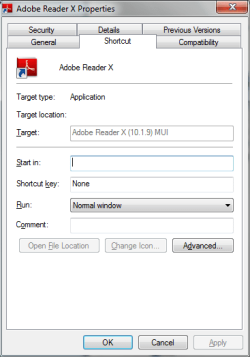
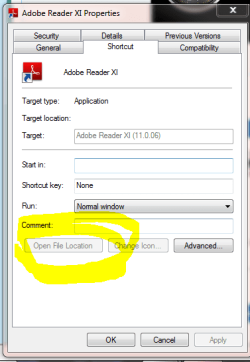
Start Menu has a shortcut to Reader. I have opened that shortcut's properties box. However, it does not tell me where it's pointing to.

I've had this type of problem in the past. I don't just want to know where Reader is installed (I do want to know that, though). How do I find where Reader is installed from the Start Menu's shortcut? Why is the location hidden?

I have found the Program Files (x86)/Adobe directory. But I it is a rather large tree and I haven't found the correct executable. This is another reason I want to use the shortcut. It point me right to the correct executable. Why would MS even bother to hide this info?
 

My Computer

Computer type
PC/Desktop
Computer Manufacturer/Model Number
Lenovo/2757CTO Thinkpad W700
OS
Microsoft Windows 7 Professional 64-bit 7601 Multiprocessor Free Service Pack 1
CPU
AMD A6-5350M APU with Radeon(tm) HD Graphics
Motherboard
LENOVO 20B20011US
Memory
16.00 GB
Graphics Card(s)
AMD Radeon HD 8450G
Sound Card
(1) AMD High Definition Audio Device (2) Conexant 20671 Sm
Monitor(s) Displays
??
Screen Resolution
1366 x 768 x 32 bits (4294967296 colors) @ 60 Hz
Hard Drives
HGST HTS 545032A7E380 SATA Disk Device
Mouse
Microsoft Optical Wheel Mouse
Other Info
BIOS: Ver 1.00PARTTBLX
a simple way to find the actual exe file is to click on start, start typing the programs name (in this case I would go with Adobe) right click on that listing and choose Open File location which will then show you exactly where the exe is.

With that out of the way are you trying to set the default of PDF files back to adobe instead of nitro? If so go to where you saved a pdf right click and choose properties. click on the Change icon next to opens with. Adobe should be in that list. if not the browse to the file location you found from above.
 

My Computer

Computer type
PC/Desktop
Computer Manufacturer/Model Number
Custom Build MPCBS AMII
OS
Windows 7 Professional x64
CPU
AMD Athlon II x4 3.00 GHz
Motherboard
MSI GF615M-p33
Memory
16GB Kingston DDR3
Graphics Card(s)
Nvidia 8600 (dual DVI out for 2 monitors)
Sound Card
Onboard
Monitor(s) Displays
Acer H233H 23", ASUS 23"
Screen Resolution
1366 x 768
Hard Drives
(2) WD Blue 1 TB 3 partitions, (1) Seagate 7200 500GB with 2 partitions for useless and frequently deleted data Looking forward do an ssd for os soon.
PSU
Corsair 1100Watt
Case
Apevia HAF
Cooling
HAF AMD High Profile Heat sink and fan
Keyboard
wireless Logitech
Mouse
wireless Logitech
Internet Speed
16 mbps
Antivirus
eSet, AVG, Clam and Clamwin (depends on machine)
Browser
Firefox
Other Info
(9) Win 7 machines all x64 (POS Updated to Windows 7 pro YEA), (4) Linux machines x64 and x86 including a v3000 compaq lappy brought back to life with Mint 9 used to scan drives, (1) Linux Machine dual boot XP Pro (for testing and destroying), (1) Win 7 pro x64/Win 8.1 Lenovo Laptop Dual Boot.
On my Win 8 X64 system, Adobe Reader is in

"C:\Program Files (x86)\Adobe\Reader 10.0\Reader\AcroRd32.exe"

Should be the same in Windows 7. If you have 32 bit then I think it would be:

"C:\Program Files\Adobe\Reader 10.0\Reader\AcroRd32.exe"

One easy way to find it is to open a PDF with Adobe, then start Task Manager, right click on Adobe Reader and select Open file location.
 

My Computer

Computer type
PC/Desktop
Computer Manufacturer/Model Number
Lenovo IdeaCenter 450
OS
Windows 10 Pro X64
CPU
Intel Quad Core i7-4770 @ 3.4Ghz
Memory
16.0GB PC3-12800 DDR3 SDRAM 1600 MHz
Graphics Card(s)
Intel Integrated HD Graphics
Sound Card
Realtek HD Audio
Monitor(s) Displays
HP 22" LCD
Screen Resolution
1680 x 1050
Hard Drives
250GB Samsung EVO SATA-3 SSD
2TB Seagate ST2000DM001 SATA-2
1.5TB Seagate ST3150041AS SATA
Keyboard
Dell USB
Mouse
Lenovo USB
Internet Speed
Cable via Road Runner 3MB Upload, 30MB Download
Antivirus
Windows Defender, MBAM Pro, MBAE
Browser
Seamonkey
Other Info
UEFI/GPT
PLDS DVD-RW DH16AERSH
Typing "Adobe" and "Reader" in the start menu did find the program (not sure why). In fact, Reader doesn't look like it's on the menu anymore. I installed a reader update in the 15 minutes between our posts and that seems to have taken it out of the Start Menu. And that seems to have removed the Reader icon from the Start Menu.

But I do get your idea. I tried it with another program. It still took me to the shortcut in the start menu which, if it existed for Reader, would still not be showing me the executable's location.

I am not trying to set Reader as my PDF default. It's already set that way. I am trying to get TXC to use Reader (instead of Nitro) to open PDF files. TXC has tabs of settings for sending different commands to the PDF viewer of choise. I am trying to set those.
 

My Computer

Computer type
PC/Desktop
Computer Manufacturer/Model Number
Lenovo/2757CTO Thinkpad W700
OS
Microsoft Windows 7 Professional 64-bit 7601 Multiprocessor Free Service Pack 1
CPU
AMD A6-5350M APU with Radeon(tm) HD Graphics
Motherboard
LENOVO 20B20011US
Memory
16.00 GB
Graphics Card(s)
AMD Radeon HD 8450G
Sound Card
(1) AMD High Definition Audio Device (2) Conexant 20671 Sm
Monitor(s) Displays
??
Screen Resolution
1366 x 768 x 32 bits (4294967296 colors) @ 60 Hz
Hard Drives
HGST HTS 545032A7E380 SATA Disk Device
Mouse
Microsoft Optical Wheel Mouse
Other Info
BIOS: Ver 1.00PARTTBLX
I see what your saying here. The Actual path to the exe your looking for should be in C:\Program Files (x86)\Adobe\Reader 11.0\Reader\AcroRd32.exe

the link in app data points to the AcroRd32.exe on my 64 bit system.

Ztrucker you are correct, I misunderstood what they were attempting to do here.
 

My Computer

Computer type
PC/Desktop
Computer Manufacturer/Model Number
Custom Build MPCBS AMII
OS
Windows 7 Professional x64
CPU
AMD Athlon II x4 3.00 GHz
Motherboard
MSI GF615M-p33
Memory
16GB Kingston DDR3
Graphics Card(s)
Nvidia 8600 (dual DVI out for 2 monitors)
Sound Card
Onboard
Monitor(s) Displays
Acer H233H 23", ASUS 23"
Screen Resolution
1366 x 768
Hard Drives
(2) WD Blue 1 TB 3 partitions, (1) Seagate 7200 500GB with 2 partitions for useless and frequently deleted data Looking forward do an ssd for os soon.
PSU
Corsair 1100Watt
Case
Apevia HAF
Cooling
HAF AMD High Profile Heat sink and fan
Keyboard
wireless Logitech
Mouse
wireless Logitech
Internet Speed
16 mbps
Antivirus
eSet, AVG, Clam and Clamwin (depends on machine)
Browser
Firefox
Other Info
(9) Win 7 machines all x64 (POS Updated to Windows 7 pro YEA), (4) Linux machines x64 and x86 including a v3000 compaq lappy brought back to life with Mint 9 used to scan drives, (1) Linux Machine dual boot XP Pro (for testing and destroying), (1) Win 7 pro x64/Win 8.1 Lenovo Laptop Dual Boot.
Thanks. But my more general question(s) still remains: Why is MS hiding this information in some Start Menu icons? And, in general, how do I find the target of those type shortcuts?
 

My Computer

Computer type
PC/Desktop
Computer Manufacturer/Model Number
Lenovo/2757CTO Thinkpad W700
OS
Microsoft Windows 7 Professional 64-bit 7601 Multiprocessor Free Service Pack 1
CPU
AMD A6-5350M APU with Radeon(tm) HD Graphics
Motherboard
LENOVO 20B20011US
Memory
16.00 GB
Graphics Card(s)
AMD Radeon HD 8450G
Sound Card
(1) AMD High Definition Audio Device (2) Conexant 20671 Sm
Monitor(s) Displays
??
Screen Resolution
1366 x 768 x 32 bits (4294967296 colors) @ 60 Hz
Hard Drives
HGST HTS 545032A7E380 SATA Disk Device
Mouse
Microsoft Optical Wheel Mouse
Other Info
BIOS: Ver 1.00PARTTBLX
Right click on any shortcut. In the context menu choose properties.
The dialog box will show you the path to the executable (in a box labelled "Target").
 

My Computer

Computer type
PC/Desktop
Computer Manufacturer/Model Number
Dell
OS
Windows 10 x64
CPU
i7-7700K
Memory
16 GB 2400 MHz
Graphics Card(s)
GTX 1060
Sound Card
Integrated, plus external Presonus Audiobox USB
Monitor(s) Displays
2x AOC 27"
Screen Resolution
1920x1080
Hard Drives
512 GB M.2 SSD
2 TB 7200 RPM disk
Internet Speed
110 Mbps
Browser
Firefox
Some of them do not show the target. For some reason they are trying -- successfully -- to hide it. For those ones, how do I find the target?
 

My Computer

Computer type
PC/Desktop
Computer Manufacturer/Model Number
Lenovo/2757CTO Thinkpad W700
OS
Microsoft Windows 7 Professional 64-bit 7601 Multiprocessor Free Service Pack 1
CPU
AMD A6-5350M APU with Radeon(tm) HD Graphics
Motherboard
LENOVO 20B20011US
Memory
16.00 GB
Graphics Card(s)
AMD Radeon HD 8450G
Sound Card
(1) AMD High Definition Audio Device (2) Conexant 20671 Sm
Monitor(s) Displays
??
Screen Resolution
1366 x 768 x 32 bits (4294967296 colors) @ 60 Hz
Hard Drives
HGST HTS 545032A7E380 SATA Disk Device
Mouse
Microsoft Optical Wheel Mouse
Other Info
BIOS: Ver 1.00PARTTBLX
perhaps this will help answer the question. link
 

My Computer

Computer type
PC/Desktop
Computer Manufacturer/Model Number
Custom Build MPCBS AMII
OS
Windows 7 Professional x64
CPU
AMD Athlon II x4 3.00 GHz
Motherboard
MSI GF615M-p33
Memory
16GB Kingston DDR3
Graphics Card(s)
Nvidia 8600 (dual DVI out for 2 monitors)
Sound Card
Onboard
Monitor(s) Displays
Acer H233H 23", ASUS 23"
Screen Resolution
1366 x 768
Hard Drives
(2) WD Blue 1 TB 3 partitions, (1) Seagate 7200 500GB with 2 partitions for useless and frequently deleted data Looking forward do an ssd for os soon.
PSU
Corsair 1100Watt
Case
Apevia HAF
Cooling
HAF AMD High Profile Heat sink and fan
Keyboard
wireless Logitech
Mouse
wireless Logitech
Internet Speed
16 mbps
Antivirus
eSet, AVG, Clam and Clamwin (depends on machine)
Browser
Firefox
Other Info
(9) Win 7 machines all x64 (POS Updated to Windows 7 pro YEA), (4) Linux machines x64 and x86 including a v3000 compaq lappy brought back to life with Mint 9 used to scan drives, (1) Linux Machine dual boot XP Pro (for testing and destroying), (1) Win 7 pro x64/Win 8.1 Lenovo Laptop Dual Boot.
Post an image of the properties dialog box that you see. The file path should be shown after "Target". That field can't be blank or the shortcut wouldn't work. If you're not able to display executables then your system may have group policy rules installed. If that's the case, contact your Administrator.
 

My Computer

Computer type
PC/Desktop
Computer Manufacturer/Model Number
Built 2/11/2011
OS
Windows 7 Pro-x64
CPU
i7-2600 3.4GHz - 3.8GHz Turbo
Motherboard
Intel DH67BL-B3
Memory
8Gb - 2x4GB, Muskin 991770 PC3-1333
Graphics Card(s)
Integrated Intel HD 2000
Sound Card
Integrated Intel 10.1 HD, RealTek ALC892
Monitor(s) Displays
Asus LCD VH222H, Haier HL24XSL2a
Screen Resolution
1920x1080, 1920x1080
Hard Drives
Crucial SSD C300-128Gb,
Western Digital WD5002AALX - 500Gb,
Western Digital WD7501AALS - 750Gb
PSU
Seasonic 650W 80+ Gold Modular
Case
Rosewill Defender
Cooling
Stock CPU, Four 120mm case fans, PCH fan added
Keyboard
Logitech EX100 Y-RBH94 Wireless
Mouse
Logitech EX100 M-RCE95 Wireless
Internet Speed
3.0/1.5 Mbs
Antivirus
Microsoft Security Essentials
Browser
Microsoft Internet Explorer 11
Other Info
Antec Veris Premier-Multimedia IR Station,
Cyber Accoustics-3602 Speakers,
AFT XM-5U Card Reader,
Hauppauge TV-HVR-2250,
Sony LX300 USB Turntable
Post an image of the properties dialog box that you see. The file path should be shown after "Target". That field can't be blank or the shortcut wouldn't work. If you're not able to display executables then your system may have group policy rules installed. If that's the case, contact your Administrator.

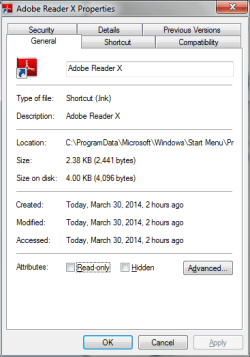
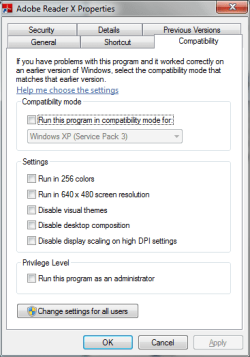
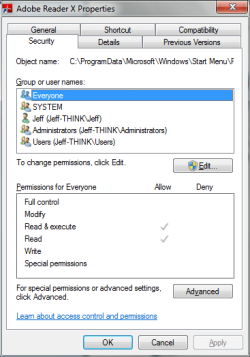
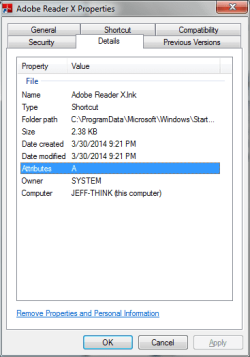
Images attached. The shortcut works fine. You can see the Target field is grayed out and merely has a description of Reader, rather than the file path.

I am the administrator, in that I am the sole owner of this PC. I already contacted myself, and since I didn't know what to tell me, I posted here.
 

Attachments

  • Reader_General.PNG
    Reader_General.PNG
    11.7 KB · Views: 23
  • Reader_Shortcut.PNG
    Reader_Shortcut.PNG
    10.5 KB · Views: 23
  • Reader_Compatibility.PNG
    Reader_Compatibility.PNG
    12.7 KB · Views: 23
  • Reader_Security.PNG
    Reader_Security.PNG
    13.1 KB · Views: 23
  • Reader_Details.PNG
    Reader_Details.PNG
    10.8 KB · Views: 23

My Computer

Computer type
PC/Desktop
Computer Manufacturer/Model Number
Lenovo/2757CTO Thinkpad W700
OS
Microsoft Windows 7 Professional 64-bit 7601 Multiprocessor Free Service Pack 1
CPU
AMD A6-5350M APU with Radeon(tm) HD Graphics
Motherboard
LENOVO 20B20011US
Memory
16.00 GB
Graphics Card(s)
AMD Radeon HD 8450G
Sound Card
(1) AMD High Definition Audio Device (2) Conexant 20671 Sm
Monitor(s) Displays
??
Screen Resolution
1366 x 768 x 32 bits (4294967296 colors) @ 60 Hz
Hard Drives
HGST HTS 545032A7E380 SATA Disk Device
Mouse
Microsoft Optical Wheel Mouse
Other Info
BIOS: Ver 1.00PARTTBLX
Carwiz I believe this is what they are talking about. Adobe shortcut points to app data folder not program file folder.
 

Attachments

  • Capture1.PNG
    Capture1.PNG
    13.3 KB · Views: 23
  • Capture2.PNG
    Capture2.PNG
    12.4 KB · Views: 23

My Computer

Computer type
PC/Desktop
Computer Manufacturer/Model Number
Custom Build MPCBS AMII
OS
Windows 7 Professional x64
CPU
AMD Athlon II x4 3.00 GHz
Motherboard
MSI GF615M-p33
Memory
16GB Kingston DDR3
Graphics Card(s)
Nvidia 8600 (dual DVI out for 2 monitors)
Sound Card
Onboard
Monitor(s) Displays
Acer H233H 23", ASUS 23"
Screen Resolution
1366 x 768
Hard Drives
(2) WD Blue 1 TB 3 partitions, (1) Seagate 7200 500GB with 2 partitions for useless and frequently deleted data Looking forward do an ssd for os soon.
PSU
Corsair 1100Watt
Case
Apevia HAF
Cooling
HAF AMD High Profile Heat sink and fan
Keyboard
wireless Logitech
Mouse
wireless Logitech
Internet Speed
16 mbps
Antivirus
eSet, AVG, Clam and Clamwin (depends on machine)
Browser
Firefox
Other Info
(9) Win 7 machines all x64 (POS Updated to Windows 7 pro YEA), (4) Linux machines x64 and x86 including a v3000 compaq lappy brought back to life with Mint 9 used to scan drives, (1) Linux Machine dual boot XP Pro (for testing and destroying), (1) Win 7 pro x64/Win 8.1 Lenovo Laptop Dual Boot.
perhaps this will help answer the question. link

So there's a new folder (aka 'directory') called AppData which keeps information about installed programs. I'm not sure how that relates.
 

My Computer

Computer type
PC/Desktop
Computer Manufacturer/Model Number
Lenovo/2757CTO Thinkpad W700
OS
Microsoft Windows 7 Professional 64-bit 7601 Multiprocessor Free Service Pack 1
CPU
AMD A6-5350M APU with Radeon(tm) HD Graphics
Motherboard
LENOVO 20B20011US
Memory
16.00 GB
Graphics Card(s)
AMD Radeon HD 8450G
Sound Card
(1) AMD High Definition Audio Device (2) Conexant 20671 Sm
Monitor(s) Displays
??
Screen Resolution
1366 x 768 x 32 bits (4294967296 colors) @ 60 Hz
Hard Drives
HGST HTS 545032A7E380 SATA Disk Device
Mouse
Microsoft Optical Wheel Mouse
Other Info
BIOS: Ver 1.00PARTTBLX
Where are you located? That MUI (Multilingual User Interface) may have something to do with why the links aren't direct. I'm not familiar with MUI so I'll just watch. :o
 

My Computer

Computer type
PC/Desktop
Computer Manufacturer/Model Number
Built 2/11/2011
OS
Windows 7 Pro-x64
CPU
i7-2600 3.4GHz - 3.8GHz Turbo
Motherboard
Intel DH67BL-B3
Memory
8Gb - 2x4GB, Muskin 991770 PC3-1333
Graphics Card(s)
Integrated Intel HD 2000
Sound Card
Integrated Intel 10.1 HD, RealTek ALC892
Monitor(s) Displays
Asus LCD VH222H, Haier HL24XSL2a
Screen Resolution
1920x1080, 1920x1080
Hard Drives
Crucial SSD C300-128Gb,
Western Digital WD5002AALX - 500Gb,
Western Digital WD7501AALS - 750Gb
PSU
Seasonic 650W 80+ Gold Modular
Case
Rosewill Defender
Cooling
Stock CPU, Four 120mm case fans, PCH fan added
Keyboard
Logitech EX100 Y-RBH94 Wireless
Mouse
Logitech EX100 M-RCE95 Wireless
Internet Speed
3.0/1.5 Mbs
Antivirus
Microsoft Security Essentials
Browser
Microsoft Internet Explorer 11
Other Info
Antec Veris Premier-Multimedia IR Station,
Cyber Accoustics-3602 Speakers,
AFT XM-5U Card Reader,
Hauppauge TV-HVR-2250,
Sony LX300 USB Turntable
Did you check Control Panel>Programs and Features to see if this Nitro program you don't want opening .pdf's is there so you can Uninstall it?

Have you checked Control Panel>Default Programs>Set Default Program or Associate File Type to see if Adobe REader has all of its defaults, and .pdf only allows Adobe Reader?

This is how defaults are set and maintained, not by doing anything with an .exe unless you've found Support for this issue that specifies doing something with the .exe. Can you help us to help you by saying why you want to access the .exe for a solution?
 
perhaps this will help answer the question. link

So there's a new folder (aka 'directory') called AppData which keeps information about installed programs. I'm not sure how that relates.

To quote "AppData or Application data is a hidden folder in Windows 7. It is to protect user data and settings from any unwanted change or deletion. It contains many important data such as program settings, IE cookies, toolbar settings, IE browsing history, temporary files created by applications, Libraries, send to items, templates and many more."

The shortcuts you and I posted about are pointing to "App Data" folder. I guess it would take someone more familiar with Microsoft whys and why not's to find out answer that question totally.

To quote Ztrucker "One easy way to find it is to open a PDF with Adobe, then start Task Manager, right click on Adobe Reader and select Open file location." will show you faster.

I cannot add to this and since I am not really looking for an answer to Microsoft's idiosyncrasies I am out of this one. Good Luck
 

My Computer

Computer type
PC/Desktop
Computer Manufacturer/Model Number
Custom Build MPCBS AMII
OS
Windows 7 Professional x64
CPU
AMD Athlon II x4 3.00 GHz
Motherboard
MSI GF615M-p33
Memory
16GB Kingston DDR3
Graphics Card(s)
Nvidia 8600 (dual DVI out for 2 monitors)
Sound Card
Onboard
Monitor(s) Displays
Acer H233H 23", ASUS 23"
Screen Resolution
1366 x 768
Hard Drives
(2) WD Blue 1 TB 3 partitions, (1) Seagate 7200 500GB with 2 partitions for useless and frequently deleted data Looking forward do an ssd for os soon.
PSU
Corsair 1100Watt
Case
Apevia HAF
Cooling
HAF AMD High Profile Heat sink and fan
Keyboard
wireless Logitech
Mouse
wireless Logitech
Internet Speed
16 mbps
Antivirus
eSet, AVG, Clam and Clamwin (depends on machine)
Browser
Firefox
Other Info
(9) Win 7 machines all x64 (POS Updated to Windows 7 pro YEA), (4) Linux machines x64 and x86 including a v3000 compaq lappy brought back to life with Mint 9 used to scan drives, (1) Linux Machine dual boot XP Pro (for testing and destroying), (1) Win 7 pro x64/Win 8.1 Lenovo Laptop Dual Boot.
Did you check Control Panel>Programs and Features to see if this Nitro program you don't want opening .pdf's is there so you can Uninstall it?

Have you checked Control Panel>Default Programs>Set Default Program or Associate File Type to see if Adobe REader has all of its defaults, and .pdf only allows Adobe Reader?

This is how defaults are set and maintained, not by doing anything with an .exe unless you've found Support for this issue that specifies doing something with the .exe. Can you help us to help you by saying why you want to access the .exe for a solution?

hey Greg the defaults are set correctly but evidently the program she is working in has options for PDF programs that are able to be modified from within said program.

I believe the "original" question of where is the exe has been answered. as well as how to find it. now it is a question of why Microsoft or adobe or whomever is using a "hidden" link file in app data to open adobe reader. I don't know why and truthfully have no desire to find out.

Have a good eve
 

My Computer

Computer type
PC/Desktop
Computer Manufacturer/Model Number
Custom Build MPCBS AMII
OS
Windows 7 Professional x64
CPU
AMD Athlon II x4 3.00 GHz
Motherboard
MSI GF615M-p33
Memory
16GB Kingston DDR3
Graphics Card(s)
Nvidia 8600 (dual DVI out for 2 monitors)
Sound Card
Onboard
Monitor(s) Displays
Acer H233H 23", ASUS 23"
Screen Resolution
1366 x 768
Hard Drives
(2) WD Blue 1 TB 3 partitions, (1) Seagate 7200 500GB with 2 partitions for useless and frequently deleted data Looking forward do an ssd for os soon.
PSU
Corsair 1100Watt
Case
Apevia HAF
Cooling
HAF AMD High Profile Heat sink and fan
Keyboard
wireless Logitech
Mouse
wireless Logitech
Internet Speed
16 mbps
Antivirus
eSet, AVG, Clam and Clamwin (depends on machine)
Browser
Firefox
Other Info
(9) Win 7 machines all x64 (POS Updated to Windows 7 pro YEA), (4) Linux machines x64 and x86 including a v3000 compaq lappy brought back to life with Mint 9 used to scan drives, (1) Linux Machine dual boot XP Pro (for testing and destroying), (1) Win 7 pro x64/Win 8.1 Lenovo Laptop Dual Boot.
Never heard of that. Wanted to make sure she checked both places in Default Programs since .pdf file defaults may overrule a program's preferences.

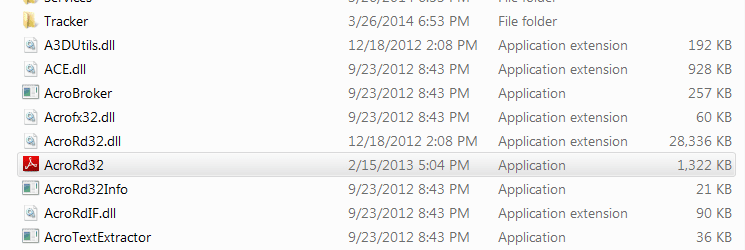
Absent that then Reader .exe is AcroRd32 below: Capture.PNG

The reader may still be listed in Programs and Features similar to Itunes' Bonjour which also runs best when uninstalled.

Does the PC have a http://www.sevenforums.com/tutorial...all-factory-oem-windows-7-a.html#post1839164? I have a Lenovo Core i5 laptop which works great without any bloatware. I do use the Power Mgmt battery feature that limits charge to 60% to prolong the battery which I'm not traveling.
 
Where are you located? That MUI (Multilingual User Interface) may have something to do with why the links aren't direct. I'm not familiar with MUI so I'll just watch. :o
I'm in the US (New Jersey, to be exact). Not sure what MUI you're talking about, but it's probably just so that Reader can display documents in other languages.

Did you check Control Panel>Programs and Features to see if this Nitro program you don't want opening .pdf's is there so you can Uninstall it?

Have you checked Control Panel>Default Programs>Set Default Program or Associate File Type to see if Adobe REader has all of its defaults, and .pdf only allows Adobe Reader?

This is how defaults are set and maintained, not by doing anything with an .exe unless you've found Support for this issue that specifies doing something with the .exe. Can you help us to help you by saying why you want to access the .exe for a solution?
All of that is set correctly. Nitro is in Programs and will be uninstalled shortly. PDFs are associated with Adobe Reader. But my other program, TXC, sends several commands to Reader. I now have TXC setup correctly, so that's no longer an issue

I am curious, in general, how to find the program that a Start Menu shortcut points to when the shortcut's properties box won't give any information about it. I often have this issue -- not just now. For example, let's say I want to use the "Open with..." dialog box for some unusual file types which I want to associate with Reader (or maybe Excel). Then I have to go and find the executable, and it's often hard to find and the Start Menu shortcuts often hide the target file's location.
 

My Computer

Computer type
PC/Desktop
Computer Manufacturer/Model Number
Lenovo/2757CTO Thinkpad W700
OS
Microsoft Windows 7 Professional 64-bit 7601 Multiprocessor Free Service Pack 1
CPU
AMD A6-5350M APU with Radeon(tm) HD Graphics
Motherboard
LENOVO 20B20011US
Memory
16.00 GB
Graphics Card(s)
AMD Radeon HD 8450G
Sound Card
(1) AMD High Definition Audio Device (2) Conexant 20671 Sm
Monitor(s) Displays
??
Screen Resolution
1366 x 768 x 32 bits (4294967296 colors) @ 60 Hz
Hard Drives
HGST HTS 545032A7E380 SATA Disk Device
Mouse
Microsoft Optical Wheel Mouse
Other Info
BIOS: Ver 1.00PARTTBLX
Where are you located? That MUI (Multilingual User Interface) may have something to do with why the links aren't direct. I'm not familiar with MUI so I'll just watch. :o
I'm in the US (New Jersey, to be exact). Not sure what MUI you're talking about, but it's probably just so that Reader can display documents in other languages.

Did you check Control Panel>Programs and Features to see if this Nitro program you don't want opening .pdf's is there so you can Uninstall it?

Have you checked Control Panel>Default Programs>Set Default Program or Associate File Type to see if Adobe REader has all of its defaults, and .pdf only allows Adobe Reader?

This is how defaults are set and maintained, not by doing anything with an .exe unless you've found Support for this issue that specifies doing something with the .exe. Can you help us to help you by saying why you want to access the .exe for a solution?
All of that is set correctly. Nitro is in Programs and will be uninstalled shortly. PDFs are associated with Adobe Reader. But my other program, TXC, sends several commands to Reader. I now have TXC setup correctly, so that's no longer an issue

I am curious, in general, how to find the program that a Start Menu shortcut points to when the shortcut's properties box won't give any information about it. I often have this issue -- not just now. For example, let's say I want to use the "Open with..." dialog box for some unusual file types which I want to associate with Reader (or maybe Excel). Then I have to go and find the executable, and it's often hard to find and the Start Menu shortcuts often hide the target file's location.

Ztrucker answered that question already "

On my Win 8 X64 system, Adobe Reader is in

"C:\Program Files (x86)\Adobe\Reader 10.0\Reader\AcroRd32.exe"

Should be the same in Windows 7. If you have 32 bit then I think it would be:

"C:\Program Files\Adobe\Reader 10.0\Reader\AcroRd32.exe"

One easy way to find it is to open a PDF with Adobe, then start Task Manager, right click on Adobe Reader and select Open file location. " should work with most files if you know what program you want to use. open it then open task manager, right click, select open file location.

:p
 

My Computer

Computer type
PC/Desktop
Computer Manufacturer/Model Number
Custom Build MPCBS AMII
OS
Windows 7 Professional x64
CPU
AMD Athlon II x4 3.00 GHz
Motherboard
MSI GF615M-p33
Memory
16GB Kingston DDR3
Graphics Card(s)
Nvidia 8600 (dual DVI out for 2 monitors)
Sound Card
Onboard
Monitor(s) Displays
Acer H233H 23", ASUS 23"
Screen Resolution
1366 x 768
Hard Drives
(2) WD Blue 1 TB 3 partitions, (1) Seagate 7200 500GB with 2 partitions for useless and frequently deleted data Looking forward do an ssd for os soon.
PSU
Corsair 1100Watt
Case
Apevia HAF
Cooling
HAF AMD High Profile Heat sink and fan
Keyboard
wireless Logitech
Mouse
wireless Logitech
Internet Speed
16 mbps
Antivirus
eSet, AVG, Clam and Clamwin (depends on machine)
Browser
Firefox
Other Info
(9) Win 7 machines all x64 (POS Updated to Windows 7 pro YEA), (4) Linux machines x64 and x86 including a v3000 compaq lappy brought back to life with Mint 9 used to scan drives, (1) Linux Machine dual boot XP Pro (for testing and destroying), (1) Win 7 pro x64/Win 8.1 Lenovo Laptop Dual Boot.
Back
Top