I get chump-change once a month as an income where most other people get at least 4 times that amount in a month. I need to go with the free versions of software.
Or I can stick with the "old reliable" pen and paper
I prefer the free versions that doesn't require internet to perform its capabilities
My Computer
Computer type
Laptop
Computer Manufacturer/Model Number
Acer Aspire E1-532
OS
Microsoft Windows 7 Home Premium 64-bit 7601 Multiprocessor Free Service Pack 1
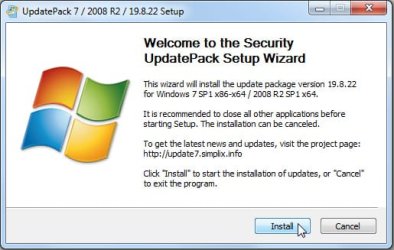
Please provide where this version of Simplix is free for personal use.
Googling Simplix, Free Simplix and Simplix Free provides results for a paid, a free for venders, a font download, pornography, etc. None of my Google results are about a free Simplix version like what you mention.
My Computer
Computer type
Laptop
Computer Manufacturer/Model Number
Acer Aspire E1-532
OS
Microsoft Windows 7 Home Premium 64-bit 7601 Multiprocessor Free Service Pack 1
getting annoyed at seeing all these posts, types of unhelpful 1 line posts- I apologise in advance if it is just me... But seriously -
* Telling someone to use a random app (even if it is good based on popular belief) - is not always a great idea.
* There is a huge lack of consideration for windows updates in these forums and i think it is time i plastered some info around whilst i wait for an experienced and sensibel member to solve teh issues i posted elsewhere.
* Here's but a few examples of why never to mass update windows, especially using an app, when a user has specficially requiested a more detailed Q/4 reponse.
0. Not everyoen uses the same version of windows, there is a stupid number of different Win7 versions
1. Not everyone uses the same PC/ AMD/ Intel - thus downlaoding on mass AMD upates for an intel PC is completely pointless
2. Not everyone has teh internet data to support 700mb downlaods
3. Noone actually needs all updates.
4. Updates need to be applied in the correct order (maybe simplix does this)
5. a language pack installation can kill many uipdates if not doen in the right order, requiring re-installtion.
Update info: --- Just examples - -not a full list
To find update info- becuase no1 has bothered to do it..
Go to MS catelog and read the associated Knowledge based articles.
Code:
------------------------
Install Before SP1:
------------------------

kb2533552    prevents "0xC0000034" error when installing Windows 7 SP1


------------------------
Before service stack updates:
------------------------

 install Service Pack 1 for Windows 7


------------------------
Install After SP1
------------------------
kb2670838    Platform update for Windows 7 SP1

kb2574819    adds support for DTLS


------------------------
DO NOT INSTALL:    "Your Windows 7 PC is out of support":
------------
kb3163589


------------------------
Install Before Windows 10:
------------------------

kb3046480        helps upgrade .NET 1.1 when upgrading to Win10
                only relevant to .NET framework 1.1 (Thus deprecated?)


------------------------
NOTES:
------------------------
kb976902    only for vista upgrading to win7??
            - and once installed, users are stuck with it
KB976902    This article replaes Knowledge Base article 976902.
[URL]https://support.microsoft.com/en-gb/help/2533552/an-update-that-prevents-a-0xc0000034-error-message-when-you-try-to-ins[/URL]

------------------------
Important:        Vulnerability Fixes security issue
------------------------
kb3035126
kb2479943
2491683
     KB2506014        An issue has been identified that could allow a user with administrative permissions to load an unsigned driver.
- I do not know if adding upodates to ISO via dism ensures the correct install order of windows updates, but i have neevr seen anyone say
"simplix does it in the correct order and gives full user control for adding or removing updates"
Rollups explianed:
Windows 7 SP1 convenience rollup
contains all the security and non-security fixes released since the release of Windows 7 SP1 that are suitable for general distribution, up through April 2016. Install this one update, and then you only need new updates released after April 2016.
AMD64-all-windows6.1-kb3125574-v4-x64_2dafb1d203c8964239af3048b5dd4b1264cd93b9
^^ maybe there is an intel 1
--------------------------------
Packages to Add:
--------------------------------
Servicing Stack Update
System Update Readiness Tool for Windows 7
SP1
HotFixes / Fixes for future updates

KB2533552    [SP1]

KB2990941    Requirement for NVMe, SSD. Install First
KB3087873    Requirement for NVMe, SSD. Install Second

KB3020369    [Servicing Stack Update for Windows 7 for x64-based Systems] rollup
KB3125574    [Windows Server 2008 R2 x64 Edition] rollup
KB3172605
kb3185330    [2016 Security Monthly Quality Rollup for Windows 7 for x64-based Systems]
KB4530677
KB947821
IE11_CAB
Intenet explorere 11:
google it, if u want to inject it into an iso use the followign cmd to extract the update file
Code:
IE11-Windows6.1-x64-en-us.exe /X:C:\IE11\IE11_CAB
some updates come in ".exe" and thus cannot be added to an iso and must be installed from OS, i assume simplix does not include these.
If you download unwanted EOS notifications, uninstall or ...:
Code:
The downloadable .reg files below will modify the DWORD value in the registry keys below.

HKEY_CURRENT_USER\Software\Microsoft\Windows\CurrentVersion\EOSNotify

HKEY_LOCAL_MACHINE\SOFTWARE\Microsoft\Windows\CurrentVersion\EOSNotify

DiscontinueEOS DWORD

0 = Enable
1 = Disable


Also check task scheduler
The C:\Windows\System32\EOSNotify.exe file is what loads the full screen notifaction, and is launched by two scheduled tasks named EOSNotify and EOSNotify2 located under Microsoft > Windows > Setup in Task Scheduler.

The EOSNotify task is launched any time a user logs into Windows 7 and the EOSNotify2 task is run daily at 12 PM.

This tutorial will show you how to disable the Your Windows 7 PC is Out of Support full screen notification in Windows 7.
Microsoft Update KB971033
Windows Activation Technologies
can be disabled in in task scheduler
Code:
KB3020369 - Windows updat eagent KB3020369
KB3004469
KB3163589 - missing from windows catelog
KB976932 - SP1
KB2998812
KB3046480
KB2562937
KB3015428  - missing from windows catelog
KB979538
KB980408
KB976422 - SD cards over 32GB
KB977074    - AMD stability
KB980846    - legacy support for apps
KB982670    - dotNET Framework 4
KB976422
KB979099
KB2748349
KB2454826
KB2467023
- I was plannign on makign thes enotes tidy/ organised but since i cannto even get an OS to install on my Laptop i am screwed, so sorry in advance for the 'hard to read/ spam formatting'- my intention is to help..
...- I was plannign on makign thes enotes tidy/ organised but since i cannto even get an OS to install on my Laptop i am screwed, so sorry in advance for the 'hard to read/ spam formatting'- my intention is to help..