Solved How do I find the parent file

froggie36

New member
Local time
7:12 AM
Messages
9
Location
Peachtree City
I need to remove "WMPNetworkSvc" from a number of programs & files. Cannot trace back how I linked or shared this Media file in the first place. Was changing permissions so I could open other restored files. Unable to remove it now as it inherited permission from its parent. So, how can I find the parent?
I have another problem but need to resolve this first before posting another thread.:banghead:
 

My Computer My Computer

OS
Win 7 32
WMPNetworkSvc (Windows Media Player Network Sharing Service) is a Windows service. You can disable it if you do not need to share your WMP media libraries over the network or homegroup.

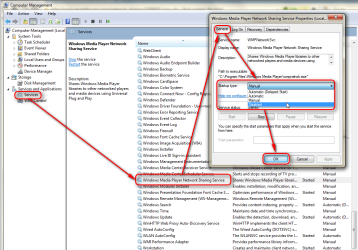
To disable it, right click Computer icon on desktop or Start Menu and select Manage, go to Services in management console, double click Windows Media Player Network Sharing Service, and on properties window that opens, select Disable from drop down menu:

Disable_Service.PNG

To temporarily stop the service, you can also type net stop WMPNetworkSvc to elevated command prompt and hit Enter.

Kari
 

My Computer My Computer

Computer type
Laptop
Computer Manufacturer/Model Number
HP ENVY 17-1150eg
OS
Windows 10 Pro x64 EN-GB
CPU
1.6 GHz Intel Core i7-720QM Processor
Memory
6 GB
Graphics Card(s)
ATI Mobility Radeon HD 5850 Graphics
Sound Card
Beats sound system with integrated subwoofer
Monitor(s) Displays
17" laptop display, 22" LED and 32" Full HD TV through HDMI
Screen Resolution
1600*900 (1), 1920*1080 (2&3)
Hard Drives
Internal: 2 x 500 GB SATA Hard Disk Drive 7200 rpm
External: 2TB for backups, 3TB USB3 network drive for media
Cooling
As Envy runs a bit warm, I have it on a Cooler Master pad
Keyboard
Logitech diNovo Media Desktop Laser (bluetooth)
Mouse
Logitech Performance Mouse MX
Internet Speed
50/10 Mbps VDSL
Antivirus
Windows Defender 4.3.9431.0
Browser
Maxthon 3.5.2., IE11
  • Like
Reactions: 2xg
Kari, thanks very much for your response. Seems like my problem is deeper then I first thought. When I follow your steps I can only get as far as right clicking on MANAGE. Immediately a window pops up titled:" Viewing Downloads- Windows Internet Explorer." In the body of the window it lists Computer Manage..lnk. When I click on open it, it flashes as if it is going to open but it will not.
Earlier when I was messing around with the permissions in my restored files so I could access them I was successful to get all but my picture files. Then I started playing around by trying to open a picture file with Window Media player which was a mistake on my part and that's where I got the WMPNetworkSvc attached to all my files on the desktop and in my programs. Trying some more I managed to get all my files on my desktop and all my programs with the IE icon and everytime I click on a file I get the "Viewing Downloads Windows Internet Explorer Window" popup.
I cannot even get to System Restore as it gives me the same results as mentioned above.
 

My Computer My Computer

OS
Win 7 32
That sounds weird.

For the first, I think you need to run Windows System File Checker (sfc) to fix possible errors on your system files. Follow instructions on this tutorial: http://www.sevenforums.com/tutorials/1538-sfc-scannow-command-system-file-checker.html. Please do as told in Option 2.

You can also open Windows 7 Computer Management from command line. Type compmgmt.msc in Start Menu > Search, click Computer Management in search results, or type services.msc and select Services to go straight to the Services module.

Kari

EDIT: Please check your computer for malware, too! You can use for instance Malwarebytes Anti-Malware.
 
Last edited:

My Computer My Computer

Computer type
Laptop
Computer Manufacturer/Model Number
HP ENVY 17-1150eg
OS
Windows 10 Pro x64 EN-GB
CPU
1.6 GHz Intel Core i7-720QM Processor
Memory
6 GB
Graphics Card(s)
ATI Mobility Radeon HD 5850 Graphics
Sound Card
Beats sound system with integrated subwoofer
Monitor(s) Displays
17" laptop display, 22" LED and 32" Full HD TV through HDMI
Screen Resolution
1600*900 (1), 1920*1080 (2&3)
Hard Drives
Internal: 2 x 500 GB SATA Hard Disk Drive 7200 rpm
External: 2TB for backups, 3TB USB3 network drive for media
Cooling
As Envy runs a bit warm, I have it on a Cooler Master pad
Keyboard
Logitech diNovo Media Desktop Laser (bluetooth)
Mouse
Logitech Performance Mouse MX
Internet Speed
50/10 Mbps VDSL
Antivirus
Windows Defender 4.3.9431.0
Browser
Maxthon 3.5.2., IE11
Kari, the only way I could get to the Command Prompt was to use the Repair option in the Win 7 installation disk. However when I finally got to the C prompt it did not recognize the scf command. I used the System Restore option from the menu in the System Recovery Panel. This removed all the garbage files and I'm once again able to use my PC almost as normal. There are still image files (JPEG) that when I try to open them give me the following message: "Windows Photo Viewer can't open this picture because you don't have the correct permissions to access the file location." From the properties panel I did change the permission to "Full" for this file but that did not help. Any ideas? You have been most helpful and I appreciate it very much, Thanks once again.
 

My Computer My Computer

OS
Win 7 32
Back
Top