How do I force windows to use a driver it doesn't list?

kinkinkijkin

New member
Local time
6:49 AM
Messages
7
Hello, I have a microphone that needs the Generic USB Audio driver, and it displays it as malfunctioned(I heard from some people that it usually does that at first with this kind of mic), so I went ahead and tried to use the update driver function. I went ahead and into browse drivers, unchecked compatible drivers only, and looked for the Generic USB audio driver. It wasn't where I thought it would be on the manufacturer menu, so I looked through them all. It wasn't there. I tried using the search for driver in x location by grabbing the Generic USB Audio driver file from my windows directory and placing it in a new folder, then setting it to look in the new folder. Didn't work. I've searched quite a little bit for a solution and even asked aforementioned people how to fix it. Everything told me to do the first thing I did. I tried each step again. I tried unplugging the mic then plugging it back in then trying again. No luck. So, now I'm desperate, considering my voice is my job, and MY computer my workplace. Could someone please help me with this? I'm even up for directly editing files related to this I'm so desperate.
 

My Computer My Computer

Computer Manufacturer/Model Number
HP p6604f
OS
Windows 7 Home Premium 64Bit
Monitor(s) Displays
2
Who manufactured the mic? Have you tried downloading the driver from their site and installing fresh?
You might have to uninstall first in Device manager. It sounds as though you know how to get there since you tried update driver.
I think the generic usb audio driver is dependent on other services - you can check those inside device mgr (or maybe inside services) - look at dependencies and see if those services are running

Peace!
 

My Computer My Computer

Computer type
Laptop
Computer Manufacturer/Model Number
HP Pavilion dv6-6c10us
OS
x64 (6.3.9600) Win8.1 Pro & soon dual boot x64 (6.1.7601) Win7_SP1 HomePrem
CPU
AMD A6-3420M APU with Radeon(tm) HD Graphics
Motherboard
Hewlett-Packard 1805
Memory
6.00 GB
Graphics Card(s)
AMD Radeon(TM) HD 6520G
Sound Card
(1) AMD High Definition Audio Device (2) IDT High Definiti
Monitor(s) Displays
HP W2072a 20" LCD (1600 x 900) @ 60 Hz
Screen Resolution
1366 x 768 x 32 bits (4294967296 colors) @ 60 Hz
Hard Drives
ST640LM0 00 HM641JI SATA Disk Device
Keyboard
Logitech k520 wireless KB
Mouse
Logitech m320 wireless mouse (bundled with KB)
Internet Speed
15/5 | 54 MB Wireless 'n'
Antivirus
Realtime: Defender or Avast | On-demand: Malwarebytes, ESET
Browser
IE 11 on Win8, IE 10 on win 7
Other Info
Media: [Gimp, Audacity, VLC] || Comm: [WEmail 2012, Skype] || Productivity: [OpenOffice,| Textpad] || Utils: [Sysinternals, cCleaner, Speccy, Defraggler]
It uses the Generic USB Audio driver that comes with windows.

I tried uninstalling it, but you cannot uninstall unrecognized device.

I don't see what you mean by check dependencies of Generic USB Audio. I tried looking for it in services and can't seem to find it, so I think I'm doing something wrong here.
 

My Computer My Computer

Computer Manufacturer/Model Number
HP p6604f
OS
Windows 7 Home Premium 64Bit
Monitor(s) Displays
2
ok, I was a bit confused and I think I confused you.
You mentioned "...and it displays it as malfunctioned(I heard from some people that it usually does that at first with this kind of mic), so I went ahead and tried to use the update driver function."

I assumed that you were in device mgr when you tried to "use the update driver function". You can uninstall instead of update the driver. Try that first - then plug the mic in and see if Windows loads the driver.

I was lazy when I spoke about services - sorry. There are a few services associated with audio that I know of (maybe 3). Look for services that reference audio; Windows Audio and Windows Audio End Builder both should be running. If not check the dependencies there. Ah - also Audio service all should be running, Qwave isn't as important as the others.

Peace!
 

My Computer My Computer

Computer type
Laptop
Computer Manufacturer/Model Number
HP Pavilion dv6-6c10us
OS
x64 (6.3.9600) Win8.1 Pro & soon dual boot x64 (6.1.7601) Win7_SP1 HomePrem
CPU
AMD A6-3420M APU with Radeon(tm) HD Graphics
Motherboard
Hewlett-Packard 1805
Memory
6.00 GB
Graphics Card(s)
AMD Radeon(TM) HD 6520G
Sound Card
(1) AMD High Definition Audio Device (2) IDT High Definiti
Monitor(s) Displays
HP W2072a 20" LCD (1600 x 900) @ 60 Hz
Screen Resolution
1366 x 768 x 32 bits (4294967296 colors) @ 60 Hz
Hard Drives
ST640LM0 00 HM641JI SATA Disk Device
Keyboard
Logitech k520 wireless KB
Mouse
Logitech m320 wireless mouse (bundled with KB)
Internet Speed
15/5 | 54 MB Wireless 'n'
Antivirus
Realtime: Defender or Avast | On-demand: Malwarebytes, ESET
Browser
IE 11 on Win8, IE 10 on win 7
Other Info
Media: [Gimp, Audacity, VLC] || Comm: [WEmail 2012, Skype] || Productivity: [OpenOffice,| Textpad] || Utils: [Sysinternals, cCleaner, Speccy, Defraggler]
I cannot seem to find any services related to audio. I have a feeling this might not be good.
 

My Computer My Computer

Computer Manufacturer/Model Number
HP p6604f
OS
Windows 7 Home Premium 64Bit
Monitor(s) Displays
2
Did you try to uninstall whatever "it displays it as malfunctioned......so I went ahead and tried to use the update driver function" was?

Again, I'm assuming that you're seeing "it displayed as malfunctioned" in device mgr and you were still in device mgr when you "tried to use the update function". If you're not in device mgr, please elaborate.

About the services - Don't panic!

Does audio play - say thru Media Player? If so then audio is fine, if not well that's another issue. Let's focus on the mic on this thread. But I'm betting that you do have audio playback.

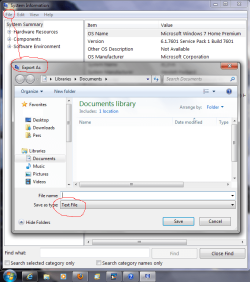
Run system information, export it to a text file, then post it in a reply - that will help.
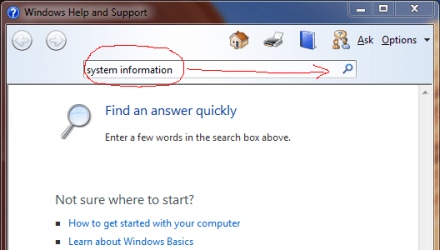
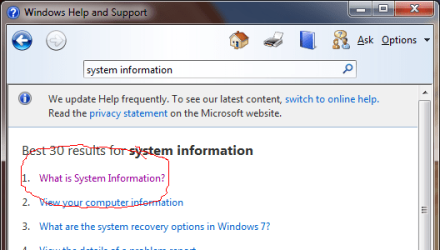
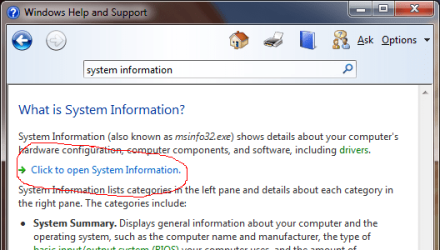
open Windows help (fn 1 any empty area of your desktop) -> search for system information - > click on open system information then from the sysinfo file menu select export (to a text file). Attach that output to a reply here.

I'll be off for tonight 2300 est here. but will check back in the morning. That should give you some time to collect the Sysinfo and post it. Use the paperclip on the reply window to attach your output.

Peace!
 

My Computer My Computer

Computer type
Laptop
Computer Manufacturer/Model Number
HP Pavilion dv6-6c10us
OS
x64 (6.3.9600) Win8.1 Pro & soon dual boot x64 (6.1.7601) Win7_SP1 HomePrem
CPU
AMD A6-3420M APU with Radeon(tm) HD Graphics
Motherboard
Hewlett-Packard 1805
Memory
6.00 GB
Graphics Card(s)
AMD Radeon(TM) HD 6520G
Sound Card
(1) AMD High Definition Audio Device (2) IDT High Definiti
Monitor(s) Displays
HP W2072a 20" LCD (1600 x 900) @ 60 Hz
Screen Resolution
1366 x 768 x 32 bits (4294967296 colors) @ 60 Hz
Hard Drives
ST640LM0 00 HM641JI SATA Disk Device
Keyboard
Logitech k520 wireless KB
Mouse
Logitech m320 wireless mouse (bundled with KB)
Internet Speed
15/5 | 54 MB Wireless 'n'
Antivirus
Realtime: Defender or Avast | On-demand: Malwarebytes, ESET
Browser
IE 11 on Win8, IE 10 on win 7
Other Info
Media: [Gimp, Audacity, VLC] || Comm: [WEmail 2012, Skype] || Productivity: [OpenOffice,| Textpad] || Utils: [Sysinternals, cCleaner, Speccy, Defraggler]
I cannot seem to find what you mean. I press F1, search system information, can't find open system information exactly, click the closest thing to that, it opens windows performance index, no "sysinfo file menu", not really any file menus at all...
 

My Computer My Computer

Computer Manufacturer/Model Number
HP p6604f
OS
Windows 7 Home Premium 64Bit
Monitor(s) Displays
2
Sound Card

What kind of sound "card" do you have? Is it after market or is it built in to the mother board? You may need to tweak the settings in what ever control panels that you have.
 

My Computer My Computer

Computer Manufacturer/Model Number
BGC (Bob's Garage Crew)
OS
win 7 X64 Ultimate SP1
CPU
I3770K
Motherboard
Asus P8Z77-V Deluxe
Memory
G Skill F3-14900CL9-4GBXL x 4
Graphics Card(s)
NVIDIA GeForce GTX670 + Intel 4000
Sound Card
Realtek HD 5.1 (MOB)
Monitor(s) Displays
Asus VW224T (1)
Screen Resolution
1920 x 1080
Hard Drives
SATA Corsair Force GT 2.5" 180GB (System) Sata 3
OCZ Vertex3 120GB
OCZ Vertex 2 120GB 2.5" SATA II
ST31000524AS 1000.2GB
WD15EARS (External)
PSU
CoolerMaster 1000 Watt
Case
CoolerMaster HAF X
Cooling
CPU -- CoolerMaster 520N
Keyboard
MS Wireless 3000 V2
Mouse
MS Wireless 3000 V2
Internet Speed
Cable
Antivirus
Norton Internet Security
Browser
IE9
Other Info
AMI Bios 1805
OC'd 3%
Okay, but how does tweaking the minimal settings of my sound card have anything to do with windows not recognizing a USB driver?
 

My Computer My Computer

Computer Manufacturer/Model Number
HP p6604f
OS
Windows 7 Home Premium 64Bit
Monitor(s) Displays
2
Let me start again, then
You will not find a generic USB audio driver to update
MSDN Generic USB Audio Device

1) Who manufactured your microphone?

2) Can you uninstall what you refer to as "malfunctioned"?

3) Provide System Information see attached images for help on howto
 

Attachments

  • Help sysinfo-0.PNG
    Help sysinfo-0.PNG
    15.6 KB · Views: 12
  • Help sysinfo-1.PNG
    Help sysinfo-1.PNG
    16.9 KB · Views: 10
  • Help sysinfo-2.PNG
    Help sysinfo-2.PNG
    17.6 KB · Views: 13
  • SIexport.png
    SIexport.png
    55.4 KB · Views: 13

My Computer My Computer

Computer type
Laptop
Computer Manufacturer/Model Number
HP Pavilion dv6-6c10us
OS
x64 (6.3.9600) Win8.1 Pro & soon dual boot x64 (6.1.7601) Win7_SP1 HomePrem
CPU
AMD A6-3420M APU with Radeon(tm) HD Graphics
Motherboard
Hewlett-Packard 1805
Memory
6.00 GB
Graphics Card(s)
AMD Radeon(TM) HD 6520G
Sound Card
(1) AMD High Definition Audio Device (2) IDT High Definiti
Monitor(s) Displays
HP W2072a 20" LCD (1600 x 900) @ 60 Hz
Screen Resolution
1366 x 768 x 32 bits (4294967296 colors) @ 60 Hz
Hard Drives
ST640LM0 00 HM641JI SATA Disk Device
Keyboard
Logitech k520 wireless KB
Mouse
Logitech m320 wireless mouse (bundled with KB)
Internet Speed
15/5 | 54 MB Wireless 'n'
Antivirus
Realtime: Defender or Avast | On-demand: Malwarebytes, ESET
Browser
IE 11 on Win8, IE 10 on win 7
Other Info
Media: [Gimp, Audacity, VLC] || Comm: [WEmail 2012, Skype] || Productivity: [OpenOffice,| Textpad] || Utils: [Sysinternals, cCleaner, Speccy, Defraggler]
I usually ask the "stupid question" first, but have you checked to see if the mic is compatible with Windows 7?It might not be on the list, but it's a good thing to know when trouble shooting. solving takes some extra steps, if it can be solved. A lot of unknowns right now. so please help and provide some information about your microphone and your system - thanks.
 

My Computer My Computer

Computer type
Laptop
Computer Manufacturer/Model Number
HP Pavilion dv6-6c10us
OS
x64 (6.3.9600) Win8.1 Pro & soon dual boot x64 (6.1.7601) Win7_SP1 HomePrem
CPU
AMD A6-3420M APU with Radeon(tm) HD Graphics
Motherboard
Hewlett-Packard 1805
Memory
6.00 GB
Graphics Card(s)
AMD Radeon(TM) HD 6520G
Sound Card
(1) AMD High Definition Audio Device (2) IDT High Definiti
Monitor(s) Displays
HP W2072a 20" LCD (1600 x 900) @ 60 Hz
Screen Resolution
1366 x 768 x 32 bits (4294967296 colors) @ 60 Hz
Hard Drives
ST640LM0 00 HM641JI SATA Disk Device
Keyboard
Logitech k520 wireless KB
Mouse
Logitech m320 wireless mouse (bundled with KB)
Internet Speed
15/5 | 54 MB Wireless 'n'
Antivirus
Realtime: Defender or Avast | On-demand: Malwarebytes, ESET
Browser
IE 11 on Win8, IE 10 on win 7
Other Info
Media: [Gimp, Audacity, VLC] || Comm: [WEmail 2012, Skype] || Productivity: [OpenOffice,| Textpad] || Utils: [Sysinternals, cCleaner, Speccy, Defraggler]
Some Software

Some Software will let you turn off specific inputs such as a mic. But if your device manager shows a problem. You probably have driver problems.
 

My Computer My Computer

Computer Manufacturer/Model Number
BGC (Bob's Garage Crew)
OS
win 7 X64 Ultimate SP1
CPU
I3770K
Motherboard
Asus P8Z77-V Deluxe
Memory
G Skill F3-14900CL9-4GBXL x 4
Graphics Card(s)
NVIDIA GeForce GTX670 + Intel 4000
Sound Card
Realtek HD 5.1 (MOB)
Monitor(s) Displays
Asus VW224T (1)
Screen Resolution
1920 x 1080
Hard Drives
SATA Corsair Force GT 2.5" 180GB (System) Sata 3
OCZ Vertex3 120GB
OCZ Vertex 2 120GB 2.5" SATA II
ST31000524AS 1000.2GB
WD15EARS (External)
PSU
CoolerMaster 1000 Watt
Case
CoolerMaster HAF X
Cooling
CPU -- CoolerMaster 520N
Keyboard
MS Wireless 3000 V2
Mouse
MS Wireless 3000 V2
Internet Speed
Cable
Antivirus
Norton Internet Security
Browser
IE9
Other Info
AMI Bios 1805
OC'd 3%
It exceeds the maximum file size four and a half times...

EDIT: The exact problem I have is I know the EXACT driver I need to use for it, and it is built in to windows and has worked before, but it isn't allowing me to use the driver for anything anymore and so I have to force it, but do not know how when it is not even acknowledging said driver's existence anymore.

To go farther into this I have a logitech microphone that uses that driver, but windows stopped even knowing when it was plugged in, and I had this mic lying around, so I decided to use it. This mic has also worked before, but now it doesn't anymore, and I am going to blame it somewhat on this driver being denied. The people I went to for help before couldn't help, so I came here where I know I am sure to eventually be helped into my problem being solved.

The driver it uses is USBaudio.sys, and I even tried updating the driver to see if a recent security update might have messed it up and not gotten a new driver version, but that didn't help at all.

I'm sorry for being a little too vague, I was very tired and was busy with something else when I was posting earlier.

I noticed windows also automatically took me out of test mode recently, which may be a contributor, but it can't be the entire problem, because I've been trying this microphone for months.
 
Last edited:

My Computer My Computer

Computer Manufacturer/Model Number
HP p6604f
OS
Windows 7 Home Premium 64Bit
Monitor(s) Displays
2
Sorry I can't be of more help KinKin. The best I can do is point you to the only real information you have given me.

Logitech Headphones / Headsets / Microphones

You can try to locate AsYetTobeIdentifiedMicrophone that's giving you problems in Device Manager and remove it (or them) and restart your machine. But that's all I can suggest.

Good luck.
 

My Computer My Computer

Computer type
Laptop
Computer Manufacturer/Model Number
HP Pavilion dv6-6c10us
OS
x64 (6.3.9600) Win8.1 Pro & soon dual boot x64 (6.1.7601) Win7_SP1 HomePrem
CPU
AMD A6-3420M APU with Radeon(tm) HD Graphics
Motherboard
Hewlett-Packard 1805
Memory
6.00 GB
Graphics Card(s)
AMD Radeon(TM) HD 6520G
Sound Card
(1) AMD High Definition Audio Device (2) IDT High Definiti
Monitor(s) Displays
HP W2072a 20" LCD (1600 x 900) @ 60 Hz
Screen Resolution
1366 x 768 x 32 bits (4294967296 colors) @ 60 Hz
Hard Drives
ST640LM0 00 HM641JI SATA Disk Device
Keyboard
Logitech k520 wireless KB
Mouse
Logitech m320 wireless mouse (bundled with KB)
Internet Speed
15/5 | 54 MB Wireless 'n'
Antivirus
Realtime: Defender or Avast | On-demand: Malwarebytes, ESET
Browser
IE 11 on Win8, IE 10 on win 7
Other Info
Media: [Gimp, Audacity, VLC] || Comm: [WEmail 2012, Skype] || Productivity: [OpenOffice,| Textpad] || Utils: [Sysinternals, cCleaner, Speccy, Defraggler]
You can try System File Checker (SFC) to make sure your system files are where they belong. This takes a while, so sit back and enjoy your evening.

Start Menu ==> All Programs ==> Accessories

Right click on Command Prompt -> answer yes to UAC dialog

in the Command Prompt window type:

SFC /scannow

Run SFC a few times in a row - someone recommended thrice
Run SFC a few times, restart machine between each run - someone recommended thrice

If this doesn't get you up and running, I'm out of ideas.

Your system information (It exceeds the maximum file size four and a half times...)?
Open the SysInfo report in a texr editor and crop the bottom - Windows Error Reporting (WER) is probably making the thing huge!
The max is 1MB for text. If removing the WER makes it less than 1MB please upload it. If it still exceeds the upload limit, could you break it down into smaller chunks. Try to make the breaks at a section.
 
Last edited:

My Computer My Computer

Computer type
Laptop
Computer Manufacturer/Model Number
HP Pavilion dv6-6c10us
OS
x64 (6.3.9600) Win8.1 Pro & soon dual boot x64 (6.1.7601) Win7_SP1 HomePrem
CPU
AMD A6-3420M APU with Radeon(tm) HD Graphics
Motherboard
Hewlett-Packard 1805
Memory
6.00 GB
Graphics Card(s)
AMD Radeon(TM) HD 6520G
Sound Card
(1) AMD High Definition Audio Device (2) IDT High Definiti
Monitor(s) Displays
HP W2072a 20" LCD (1600 x 900) @ 60 Hz
Screen Resolution
1366 x 768 x 32 bits (4294967296 colors) @ 60 Hz
Hard Drives
ST640LM0 00 HM641JI SATA Disk Device
Keyboard
Logitech k520 wireless KB
Mouse
Logitech m320 wireless mouse (bundled with KB)
Internet Speed
15/5 | 54 MB Wireless 'n'
Antivirus
Realtime: Defender or Avast | On-demand: Malwarebytes, ESET
Browser
IE 11 on Win8, IE 10 on win 7
Other Info
Media: [Gimp, Audacity, VLC] || Comm: [WEmail 2012, Skype] || Productivity: [OpenOffice,| Textpad] || Utils: [Sysinternals, cCleaner, Speccy, Defraggler]
Ok, To get better answers this really should have been put in the sound & audio. But you focused on the driver, hence where it is.

To get quick help, people really need to search for answers on their own. But since I started helping, I decided to follow up on this. I think your answer is here - if that doens't do it, you know where to look. People over there have far more detailed experience in sound & audio. I'm certain they'll have a more direct solution.

Good Luck.
 

My Computer My Computer

Computer type
Laptop
Computer Manufacturer/Model Number
HP Pavilion dv6-6c10us
OS
x64 (6.3.9600) Win8.1 Pro & soon dual boot x64 (6.1.7601) Win7_SP1 HomePrem
CPU
AMD A6-3420M APU with Radeon(tm) HD Graphics
Motherboard
Hewlett-Packard 1805
Memory
6.00 GB
Graphics Card(s)
AMD Radeon(TM) HD 6520G
Sound Card
(1) AMD High Definition Audio Device (2) IDT High Definiti
Monitor(s) Displays
HP W2072a 20" LCD (1600 x 900) @ 60 Hz
Screen Resolution
1366 x 768 x 32 bits (4294967296 colors) @ 60 Hz
Hard Drives
ST640LM0 00 HM641JI SATA Disk Device
Keyboard
Logitech k520 wireless KB
Mouse
Logitech m320 wireless mouse (bundled with KB)
Internet Speed
15/5 | 54 MB Wireless 'n'
Antivirus
Realtime: Defender or Avast | On-demand: Malwarebytes, ESET
Browser
IE 11 on Win8, IE 10 on win 7
Other Info
Media: [Gimp, Audacity, VLC] || Comm: [WEmail 2012, Skype] || Productivity: [OpenOffice,| Textpad] || Utils: [Sysinternals, cCleaner, Speccy, Defraggler]
Linked thread is no help, since the problem is not really my microphone. I was again vague.

Windows acknowledges it's existence, to the point of it being something in the usb port that might be usable. By default, though, it is using the "Unknown Device" driver for it. While trying to change the driver to the proper driver, which is built into windows, I found there not to be said driver in the driver list, even though it actually exists as a file in the folder where all the drivers are. I know it used to work, because I used to use a USB headset and recently had a Logitech microphone, which uses that driver, but that broke, some kind of short in the USB cord causing windows not even to notice it being plugged in. But we aren't talking about that microphone, are we? I'm currently(trying to) using a microphone that uses the USB audio driver that comes with windows, and worked at some time in the past. Right now, though, windows is refusing to acknowledge the existence of said driver. This is a question about how to force an unlisted driver because that's what I need to do, and that's what I know I need to do. This microphone is like any other USB device; it uses a driver, and if the driver is not picked up by windows, you cannot use it. The problem boiled down to it's simplest terms is a driver is there, windows used to know that, it doesn't know that anymore, I need to know how to force this driver that windows doesn't know exists anymore.

If you still feel like trying to solve the problem at it's core instead of at it's solution, like you have been trying to do, I recently uninstalled then reinstalled a driver, but this problem arose AFTER that, so it's unlikely that's the cause. There have also been a high amount of BSOD crashes quite a while ago, but the Logitech microphone had been working quite a little while after that and windows found it to work, so I'm just gonna rule that off as well.
 

My Computer My Computer

Computer Manufacturer/Model Number
HP p6604f
OS
Windows 7 Home Premium 64Bit
Monitor(s) Displays
2
the Unknown Device seems to be getting in the way - remove it in Device Manager

did you run SFC?

Too many guesses for me to be of any help. sorry we couldn't find a resolution.
 

My Computer My Computer

Computer type
Laptop
Computer Manufacturer/Model Number
HP Pavilion dv6-6c10us
OS
x64 (6.3.9600) Win8.1 Pro & soon dual boot x64 (6.1.7601) Win7_SP1 HomePrem
CPU
AMD A6-3420M APU with Radeon(tm) HD Graphics
Motherboard
Hewlett-Packard 1805
Memory
6.00 GB
Graphics Card(s)
AMD Radeon(TM) HD 6520G
Sound Card
(1) AMD High Definition Audio Device (2) IDT High Definiti
Monitor(s) Displays
HP W2072a 20" LCD (1600 x 900) @ 60 Hz
Screen Resolution
1366 x 768 x 32 bits (4294967296 colors) @ 60 Hz
Hard Drives
ST640LM0 00 HM641JI SATA Disk Device
Keyboard
Logitech k520 wireless KB
Mouse
Logitech m320 wireless mouse (bundled with KB)
Internet Speed
15/5 | 54 MB Wireless 'n'
Antivirus
Realtime: Defender or Avast | On-demand: Malwarebytes, ESET
Browser
IE 11 on Win8, IE 10 on win 7
Other Info
Media: [Gimp, Audacity, VLC] || Comm: [WEmail 2012, Skype] || Productivity: [OpenOffice,| Textpad] || Utils: [Sysinternals, cCleaner, Speccy, Defraggler]
Did you find a solution for this? I had something similar happen to me before thats if your driver started messing up after a BSOD. Sometimes it would work if i changed the cable/usb slot and now just nothing.
 

My Computer My Computer

OS
Windows 7 Ultimate x64
Back
Top