
You are using an out of date browser. It may not display this or other websites correctly.
You should upgrade or use an alternative browser.
You should upgrade or use an alternative browser.
how do i format my hard drive
- Thread starter JH17
- Start date

- Local time
- 2:56 AM
- Messages
- 35,002
Welcome aboard, JH17 
You may follow the steps :
It may work.
Edit: You may also see :ar: http://www.sevenforums.com/tutorials/52129-disk-clean-clean-all-diskpart-command.html
You may follow the steps :
- Open http://www.sevenforums.com/tutorials/682-command-prompt-startup.html
- Type: diskpart > enter
- Type: list volume > enter
- Type: select volume > enter (the volume that is write protected)
- Type: attributes disk clear readonly > enter
It may work.
Edit: You may also see :ar: http://www.sevenforums.com/tutorials/52129-disk-clean-clean-all-diskpart-command.html
My Computer
- Computer type
- PC/Desktop
- Computer Manufacturer/Model Number
- Self Assembled
- OS
- Microsoft Windows 10 Pro Insider Preview 64-bit
- CPU
- Intel(R) Core(TM) i3-4130 CPU @ 3.40GHz
- Motherboard
- Gigabyte Technology Co., Ltd. B85M-D3H
- Memory
- Corsair Vengence 4GB x2 (8.00GB Dual-Channel DDR3 @ 798MHz)
- Graphics Card(s)
- 2047MB GeForce GTS 450 (ZOTAC International)
- Sound Card
- Onboard (Realtek High Definition Audio)
- Monitor(s) Displays
- LG Flatron E2040T
- Screen Resolution
- 1600x900
- Hard Drives
- Western Digital 1 TB
Seagate 500 GB
- PSU
- Corsair VS550
- Case
- Cooler Master K380
- Cooling
- Cooler Master Seidon 120V Plus
- Keyboard
- Logitech MK260r
- Mouse
- Logitech MK260r
- Internet Speed
- PMPL Broadband
- Antivirus
- Windows Defender + MBAM
- Browser
- Firefox
- Other Info
- Dell Studio 15" Laptop
thx but my hard drive isnt coming up in my computer so the first thing u sent didnt work but i tried the link u sent but the hard drive kept coming up as unallocated and when eva i tried to something it came up media is write protected
My Computer
- OS
- Windows 7 Professional 32bit
- Local time
- 2:56 AM
- Messages
- 35,002
Hello JH17 . You said that your hard drive is showing up in disk management ?
Does it work now ? Or still write protected ?
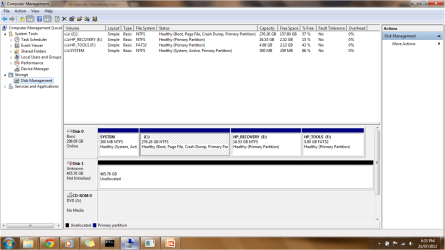
EDIT : may we have a snipshot of your disk management window ?
- Open a http://www.sevenforums.com/tutorials/682-command-prompt-startup.html
- Type : diskpart > enter
- Type : list disk > enter
- Type : select disk > enter
- Type : attributes disk clear readonly> enter
Does it work now ? Or still write protected ?
EDIT : may we have a snipshot of your disk management window ?
My Computer
- Computer type
- PC/Desktop
- Computer Manufacturer/Model Number
- Self Assembled
- OS
- Microsoft Windows 10 Pro Insider Preview 64-bit
- CPU
- Intel(R) Core(TM) i3-4130 CPU @ 3.40GHz
- Motherboard
- Gigabyte Technology Co., Ltd. B85M-D3H
- Memory
- Corsair Vengence 4GB x2 (8.00GB Dual-Channel DDR3 @ 798MHz)
- Graphics Card(s)
- 2047MB GeForce GTS 450 (ZOTAC International)
- Sound Card
- Onboard (Realtek High Definition Audio)
- Monitor(s) Displays
- LG Flatron E2040T
- Screen Resolution
- 1600x900
- Hard Drives
- Western Digital 1 TB
Seagate 500 GB
- PSU
- Corsair VS550
- Case
- Cooler Master K380
- Cooling
- Cooler Master Seidon 120V Plus
- Keyboard
- Logitech MK260r
- Mouse
- Logitech MK260r
- Internet Speed
- PMPL Broadband
- Antivirus
- Windows Defender + MBAM
- Browser
- Firefox
- Other Info
- Dell Studio 15" Laptop
- Local time
- 2:56 AM
- Messages
- 35,002
You Type select disk 1 (not disk 1 only) and try again .
My Computer
- Computer type
- PC/Desktop
- Computer Manufacturer/Model Number
- Self Assembled
- OS
- Microsoft Windows 10 Pro Insider Preview 64-bit
- CPU
- Intel(R) Core(TM) i3-4130 CPU @ 3.40GHz
- Motherboard
- Gigabyte Technology Co., Ltd. B85M-D3H
- Memory
- Corsair Vengence 4GB x2 (8.00GB Dual-Channel DDR3 @ 798MHz)
- Graphics Card(s)
- 2047MB GeForce GTS 450 (ZOTAC International)
- Sound Card
- Onboard (Realtek High Definition Audio)
- Monitor(s) Displays
- LG Flatron E2040T
- Screen Resolution
- 1600x900
- Hard Drives
- Western Digital 1 TB
Seagate 500 GB
- PSU
- Corsair VS550
- Case
- Cooler Master K380
- Cooling
- Cooler Master Seidon 120V Plus
- Keyboard
- Logitech MK260r
- Mouse
- Logitech MK260r
- Internet Speed
- PMPL Broadband
- Antivirus
- Windows Defender + MBAM
- Browser
- Firefox
- Other Info
- Dell Studio 15" Laptop
- Local time
- 2:56 AM
- Messages
- 35,002
Is the disk an external one ? If so, is it within the warranty period ?
You may try to recover the the partition table of the disk, by using TestDisk
You may try to recover the the partition table of the disk, by using TestDisk
My Computer
- Computer type
- PC/Desktop
- Computer Manufacturer/Model Number
- Self Assembled
- OS
- Microsoft Windows 10 Pro Insider Preview 64-bit
- CPU
- Intel(R) Core(TM) i3-4130 CPU @ 3.40GHz
- Motherboard
- Gigabyte Technology Co., Ltd. B85M-D3H
- Memory
- Corsair Vengence 4GB x2 (8.00GB Dual-Channel DDR3 @ 798MHz)
- Graphics Card(s)
- 2047MB GeForce GTS 450 (ZOTAC International)
- Sound Card
- Onboard (Realtek High Definition Audio)
- Monitor(s) Displays
- LG Flatron E2040T
- Screen Resolution
- 1600x900
- Hard Drives
- Western Digital 1 TB
Seagate 500 GB
- PSU
- Corsair VS550
- Case
- Cooler Master K380
- Cooling
- Cooler Master Seidon 120V Plus
- Keyboard
- Logitech MK260r
- Mouse
- Logitech MK260r
- Internet Speed
- PMPL Broadband
- Antivirus
- Windows Defender + MBAM
- Browser
- Firefox
- Other Info
- Dell Studio 15" Laptop

If you have a Seven CD, boot from the CD and then while you install format. You must boot from the CD and not the installed OS.
My Computer
- Computer type
- PC/Desktop
- Computer Manufacturer/Model Number
- Dell XPS 420
- OS
- Windows 10, Home Clean Install
- CPU
- Intel Core2 processsor Q8200(2.33Ghz 1333FSB) Quad Core Tech
- Motherboard
- Dell
- Memory
- 6 gb
- Graphics Card(s)
- ATI Radeon 256MB HD3650
- Sound Card
- Intergrated 7.1 Channel Audio
- Monitor(s) Displays
- Dell SP2009W 20"
- Hard Drives
- 640 GB Serial ATA Hard drive
- Cooling
- Fan
- Keyboard
- Dell USB Keyboard
- Mouse
- Dell Premium Optical USB
- Internet Speed
- DSL 2.85
- Local time
- 2:56 AM
- Messages
- 35,002
JH17, are you able to remove the case of the external drive and connect it directly to the sata ports of the computer as it is an internal disk ?
If so, you can use either TestDisk or MiniTool Free Partition Manager Home Edition to salvage the partition table on it.
And, if you have an access to an older hardware , say a computer with USB2 or earlier ports, you mmay try the external there.
If the disk is not password protected (that I learned in a similar thread a couple of weeks ago) , might be the usb is not compatible there.
If so, you can use either TestDisk or MiniTool Free Partition Manager Home Edition to salvage the partition table on it.
And, if you have an access to an older hardware , say a computer with USB2 or earlier ports, you mmay try the external there.
If the disk is not password protected (that I learned in a similar thread a couple of weeks ago) , might be the usb is not compatible there.
My Computer
- Computer type
- PC/Desktop
- Computer Manufacturer/Model Number
- Self Assembled
- OS
- Microsoft Windows 10 Pro Insider Preview 64-bit
- CPU
- Intel(R) Core(TM) i3-4130 CPU @ 3.40GHz
- Motherboard
- Gigabyte Technology Co., Ltd. B85M-D3H
- Memory
- Corsair Vengence 4GB x2 (8.00GB Dual-Channel DDR3 @ 798MHz)
- Graphics Card(s)
- 2047MB GeForce GTS 450 (ZOTAC International)
- Sound Card
- Onboard (Realtek High Definition Audio)
- Monitor(s) Displays
- LG Flatron E2040T
- Screen Resolution
- 1600x900
- Hard Drives
- Western Digital 1 TB
Seagate 500 GB
- PSU
- Corsair VS550
- Case
- Cooler Master K380
- Cooling
- Cooler Master Seidon 120V Plus
- Keyboard
- Logitech MK260r
- Mouse
- Logitech MK260r
- Internet Speed
- PMPL Broadband
- Antivirus
- Windows Defender + MBAM
- Browser
- Firefox
- Other Info
- Dell Studio 15" Laptop

- Local time
- 2:56 AM
- Messages
- 5,915
Have a look at this thread http://www.sevenforums.com/hardware-devices/75961-write-protected-external-sata-drive.html
The third option of notsograymatter's post no. 2 resolved the issue for the OP. Try it.
The third option of notsograymatter's post no. 2 resolved the issue for the OP. Try it.
My Computer
- OS
- Windows 7 Home Premium 32 bit
u mean like a windows 7 operating system disk or a recovery disk cause they r the only 2 i got
i cant take off the casing its like glue together or something ay there are no screw in the thing
i tried the third option like u said but i couldnt find some of the stuff was the thread u told me to look at from a differnt version of windows?
i cant take off the casing its like glue together or something ay there are no screw in the thing
i tried the third option like u said but i couldnt find some of the stuff was the thread u told me to look at from a differnt version of windows?
My Computer
- OS
- Windows 7 Professional 32bit
If you have, or can borrow (but must have your Product Key Number) you can install, if you boot from the CD and format, too. You must have an installation CD and not the CD that comes with the computer, when Seven is preinstalled.If you have a Seven CD, boot from the CD and then while you install format. You must boot from the CD and not the installed OS.
My Computer
- Computer type
- PC/Desktop
- Computer Manufacturer/Model Number
- Dell XPS 420
- OS
- Windows 10, Home Clean Install
- CPU
- Intel Core2 processsor Q8200(2.33Ghz 1333FSB) Quad Core Tech
- Motherboard
- Dell
- Memory
- 6 gb
- Graphics Card(s)
- ATI Radeon 256MB HD3650
- Sound Card
- Intergrated 7.1 Channel Audio
- Monitor(s) Displays
- Dell SP2009W 20"
- Hard Drives
- 640 GB Serial ATA Hard drive
- Cooling
- Fan
- Keyboard
- Dell USB Keyboard
- Mouse
- Dell Premium Optical USB
- Internet Speed
- DSL 2.85
Arc has mentioned quite a few great suggestions. Did you try a bootable CD with:
Best Free Partition Manager Freeware and free partition magic for Windows 7, Windows 8, Windows Vista and Windows XP 32 bit & 64 bit. MiniTool Free Partition Manager Software Home Edition.
Or did you try the version that runs on Windows? You ought to try the bootable version to see how it sees the drive (without any interference from Windows).
If it still shows up as 'not initalized' when using the bootable Partition Wizard, boot back into Windows, open a command prompt and:
And if you're absolutely sure you've got the correct disk selected (you can do another list disk; the * on the left denotes the selected disk) and there are absolutely no files on it that you need, enter one more command in Diskpart:
Best Free Partition Manager Freeware and free partition magic for Windows 7, Windows 8, Windows Vista and Windows XP 32 bit & 64 bit. MiniTool Free Partition Manager Software Home Edition.
Or did you try the version that runs on Windows? You ought to try the bootable version to see how it sees the drive (without any interference from Windows).
If it still shows up as 'not initalized' when using the bootable Partition Wizard, boot back into Windows, open a command prompt and:
- Type: diskpart > enter
- Type: list disk > enter
- Type: select disk # > enter (where # is the appropriate disk number)
- Type: detail disk> enter
And if you're absolutely sure you've got the correct disk selected (you can do another list disk; the * on the left denotes the selected disk) and there are absolutely no files on it that you need, enter one more command in Diskpart:
- Type: clean> enter
My Computer
- OS
- Windows 7 Ultimate x64
- Local time
- 2:56 AM
- Messages
- 35,002
JH17 can you get the external hdd out of its case, and connect it to the computers sata ports as it is an internal one ?
I doubt it is the probled due to the usb ports, most probably. The HDDs usb port is not being recognized by the computers input. Well that is a guess though.
I doubt it is the probled due to the usb ports, most probably. The HDDs usb port is not being recognized by the computers input. Well that is a guess though.
My Computer
- Computer type
- PC/Desktop
- Computer Manufacturer/Model Number
- Self Assembled
- OS
- Microsoft Windows 10 Pro Insider Preview 64-bit
- CPU
- Intel(R) Core(TM) i3-4130 CPU @ 3.40GHz
- Motherboard
- Gigabyte Technology Co., Ltd. B85M-D3H
- Memory
- Corsair Vengence 4GB x2 (8.00GB Dual-Channel DDR3 @ 798MHz)
- Graphics Card(s)
- 2047MB GeForce GTS 450 (ZOTAC International)
- Sound Card
- Onboard (Realtek High Definition Audio)
- Monitor(s) Displays
- LG Flatron E2040T
- Screen Resolution
- 1600x900
- Hard Drives
- Western Digital 1 TB
Seagate 500 GB
- PSU
- Corsair VS550
- Case
- Cooler Master K380
- Cooling
- Cooler Master Seidon 120V Plus
- Keyboard
- Logitech MK260r
- Mouse
- Logitech MK260r
- Internet Speed
- PMPL Broadband
- Antivirus
- Windows Defender + MBAM
- Browser
- Firefox
- Other Info
- Dell Studio 15" Laptop
Similar threads
- Replies
- 1
- Views
- 4K
- Replies
- 2
- Views
- 3K
- Replies
- 3
- Views
- 6K
- Replies
- 5
- Views
- 4K
