

- Local time
- 7:43 PM
- Messages
- 5,915
I have two oft-repeated suggestions. Try these.
1. Download the HP USB Disk Storage Format Tool, http://download.cnet.com/HP-USB-Disk-Storage-Format-Tool/3000-2094_4-10974082.html run it as an administrator and format your external HDD.
2. If the above suggestion fails, download the HDD Low Level Format Tool - only the Windows Executable that does not require installation - HDDGURU: HDD LLF Low Level Format Tool, click on the .exe file and run it to reinitialize your HDD to the factory state. If successful, you will be required to do a regular format.
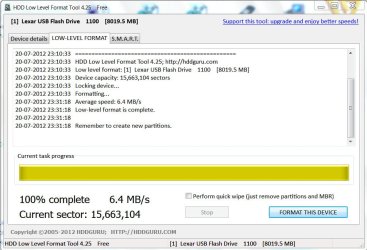
( It will take quite sometime to write zeroes to each and every sector. So be patient. On my 8 GB pendrive it took almost 20 minutes on my PC at the rate of around 6MB/sec.)
1. Download the HP USB Disk Storage Format Tool, http://download.cnet.com/HP-USB-Disk-Storage-Format-Tool/3000-2094_4-10974082.html run it as an administrator and format your external HDD.
2. If the above suggestion fails, download the HDD Low Level Format Tool - only the Windows Executable that does not require installation - HDDGURU: HDD LLF Low Level Format Tool, click on the .exe file and run it to reinitialize your HDD to the factory state. If successful, you will be required to do a regular format.
( It will take quite sometime to write zeroes to each and every sector. So be patient. On my 8 GB pendrive it took almost 20 minutes on my PC at the rate of around 6MB/sec.)
Last edited:
My Computer
- OS
- Windows 7 Home Premium 32 bit

 )
)
