Solved How do i get back windows 7 when i updated to windows 8

ok i got it now its installing windows :D :D :D :D SO HAPPY FINALLY well ty for all your help if i need anything else il post on this thread
 

My Computer My Computer

At a glance

Windows 7
OS
Windows 7
I'm very proud of how well you did. :thumbsup:. You should stick around and help others.

Follow the steps to get a perfect reinstall this time and you'll never have to do it again: Clean Reinstall Windows 7 Factory OEM

Because when it's set up and running great you can save a WIn7 backup image, then you never have to reinstall again. Just boot the DVD to Recover Using An Image and reimage the HD or it's replacement in 20 minutes.

Keep us posted on how it goes and feel free to ask back any questions.
 
:thumbsup: Wonderful work in this thread Greg.

Its great to read your posts and learn something new always.
 

My Computer My Computer

At a glance

Windows 8 Prointel i3 2.40 Ghz6 GB RAMIntegrated Intel HD
Computer Manufacturer/Model Number
DELL
OS
Windows 8 Pro
CPU
intel i3 2.40 Ghz
Motherboard
DELL inc
Memory
6 GB RAM
Graphics Card(s)
Integrated Intel HD
Sound Card
Realtek high definition SRS surround sound
Screen Resolution
1366*768
Hard Drives
320 GB
Internet Speed
1Mbps
oh umm its asking for my product key and i dont have my box or anything anymore
 

My Computer My Computer

At a glance

Windows 7
OS
Windows 7
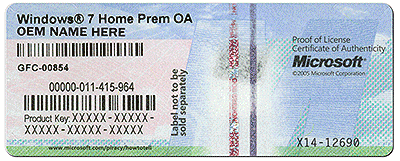
Are you following the steps I gave you? If this is the OS which came with the laptop then the Product Key is on the COA sticker on the bottom of the laptop.

Power down, close the lid and turn it over carefully to write down the Product Key from the sticker that looks like this:
coa-stickers.gif

Then click the pop-up box asking to Activate or go to Control Panel>System to insert Key. Be careful to type the characters correctly.

As it says in the steps you're not reading, it may require a robocall to MS to trade a series of numbers to set it up in their computers.

You do not need to do this now, so wait until you're rested and take your time to get it all accurate. There is no chance it will not work if done correctly.
 
Ty so much your the best helper EVER!!! :D
 

My Computer My Computer

At a glance

Windows 7
OS
Windows 7
oh btw why does my computer not find any networks and my wireless is on
 

My Computer My Computer

At a glance

Windows 7
OS
Windows 7
Rightclick the connection icon in bottom right System Tray to Troubleshoot Problems.
 
it cant find the problem
 

My Computer My Computer

At a glance

Windows 7
OS
Windows 7
If you left click the Connection Icon does it find any networks?

Do you have an ethernet wire to plug in so I can connect and troubleshoot?
 
no it does not find any networks and i dont think i could plug an ethernet in there i couldnt reach it cuz its in my desktop and my desktops under a really concealed table
 

My Computer My Computer

At a glance

Windows 7
OS
Windows 7
Is the wireless switch on the laptop turned on, displaying the LED light?

Type Device Manager in Start Search box. Does the Wireless Network Adapter have its driver installed and working? If not, go to the Sony Support Downloads webpage for your model to download and install it.
 
yes it is
 

My Computer My Computer

At a glance

Windows 7
OS
Windows 7
Type Device Manager in Start Search box. Does the Wireless Network Adapter have its driver installed and working? If not, go to the Sony Support Downloads webpage for your model to download and install it.
 
i dont see a wireless network adapter and how would i download it if i had no internet?
 

My Computer My Computer

At a glance

Windows 7
OS
Windows 7
Do you have access to another computer from which you can download the necessary drivers? If so do that and then it's only a matter of transferring the drivers over to your PC via flash drive.

By the way, pokomo, I must admit that I'm pleasantly surprised you stuck through this whole process of troubleshooting. Not many kids your age would have the patience to learn something new. Just so you know, many of us didn't want to interfere with Greg's attempt to help you, but many of us were cheering you get your problems sorted in the background ;)
 

My Computer My Computer

At a glance

Windows 7 Home Premium x64Intel Core i5 2500K8GB DDR3nVidia GeForce GTX650 Ti BOOST
Computer type
Laptop
Computer Manufacturer/Model Number
Custom
OS
Windows 7 Home Premium x64
CPU
Intel Core i5 2500K
Motherboard
MSI MS-7750
Memory
8GB DDR3
Graphics Card(s)
nVidia GeForce GTX650 Ti BOOST
Sound Card
Realtek
Monitor(s) Displays
21' Philips
Screen Resolution
Full HD
Hard Drives
1TB
PSU
500W
What is listed under Network Adapters?

What other Devices are in error and don't have their drivers?

How are you online now? Can you not download a file?

This was one of the steps in Clean Reinstall Windows 7 Factory OEM to put your wireless Adapter driver on a stick or CD to get online quickly after reinstall. Why are you completely ignoring those steps?? If you had questions about the steps you could have asked after I posted them the first ten times.
 
listed under network adapters:
Bluetooth Device(Personal Area Network)
Bluetooth Device(RFCOMM Protocol TDI)
Microsoft ISATAP Adapter
WAN Miniport(IKEv2)
WAN Miniport(IP)
WAN Miniport(IPv6)
WAN Miniport(L2TP)
WAN Miniport(Network Monitor)
WAN Miniport(PPPOE)
WAN Miniport(PPTP)
WAN Miniport(SSTP)
and theres 2 more USB drivers that dont work
im on the computer used with all of the things until now and yes i can download a file
and im sorry i must have misread that on the installation
 

My Computer My Computer

At a glance

Windows 7
OS
Windows 7
Do you have access to another computer from which you can download the necessary drivers? If so do that and then it's only a matter of transferring the drivers over to your PC via flash drive.

By the way, pokomo, I must admit that I'm pleasantly surprised you stuck through this whole process of troubleshooting. Not many kids your age would have the patience to learn something new. Just so you know, many of us didn't want to interfere with Greg's attempt to help you, but many of us were cheering you get your problems sorted in the background ;)

Haha ty im not the smartest or fastest to learn but i do learn overtime :)
 

My Computer My Computer

At a glance

Windows 7
OS
Windows 7
Back
Top