How do I interpret these TestDisk results?

wherbjr35

New member
Local time
11:49 AM
Messages
6
Hello Forum:

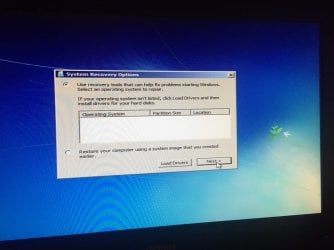
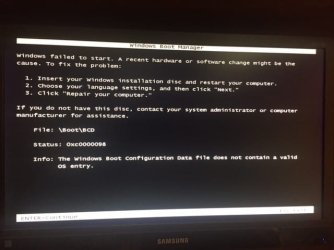
I am troubleshooting a boot error on my Win 7 desktop. The boot error seems to be common, the classic "Windows failed to start" See file \Boot\BCD (See screenshot # 1) booterror_98.JPG
In researching this so far, I tried the Win recovery options of chkdsk 3 times, bootsec /fixboot, /fixmbr, and bootsect /nt60 C: /mbr...nothing has helped.

I ran NeoSmart RE (it claims to not be able to find an OS), I've run surface tests and everything is 100% healthy, and lastly, I am now using UBCD to run TestDisk.

The reason for my post is that I am not sure how to interpret the results from TD (see screenshot # 2) TD-results-1.JPG TD appears to have found the partitions and the boot and Primary flag seem correct, but I have no clue how to proceed.
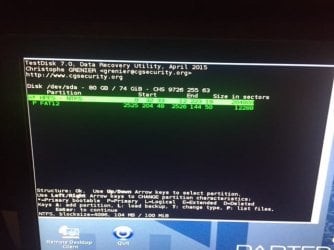
Also, when I access the recovery console using a pre-built recovery disk, I get the "unknown on unknown (Local Disk)" very stressful message.

Here is the list of files for the found partition. (See screenshot #3) TD-listfiles-2.JPG
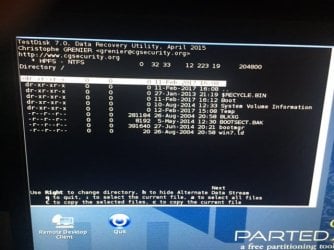
The reality of the situation (according to the webs) is that the drive may just be faulty now. I just haven't found anything that convinces me...so thanks for any advice.

wherbjr35
 

My Computer

Computer type
Laptop
Computer Manufacturer/Model Number
Dell
OS
Win 7 Home Premium x64
Boot from a Win 7 installation disk, go to repair.
On a CMD window type chkdsk c: /f

If the disk has no errors, make a startup repair.
 

My Computers

System One System Two

  • Computer type
    PC/Desktop
    Computer Manufacturer/Model Number
    custom build
    OS
    Windows 7 HP 64
    CPU
    i5 6600K - 800MHz to 4200MHz
    Motherboard
    GA-Z170-HD3P
    Memory
    4+4G GSkill DDR4 3000
    Graphics Card(s)
    IG - Intel 530
    Monitor(s) Displays
    Samsung 226BW
    Screen Resolution
    1680x1050
    Hard Drives
    (1) -1 SM951 – 128GB M.2 AHCI PCIe SSD drive for Windows 7 and Lubuntu
    (2) -1 WD SATA 3 - 1T for Data
    (3) -1 WD SATA 3 - 1T for backup
    PSU
    Thermaltake 450W TR2 gold
    Keyboard
    Old and good Chicony mechanical keyboard
    Mouse
    Logitech mX performance - 9 buttons (had to disable some)
    Internet Speed
    500Mb/s
    Browser
    Firefox 64
    Other Info
    TinyWall firewall
  • Computer type
    Laptop
    System Manufacturer/Model Number
    Asus Q550LF
    OS
    Windows 7 Pro
    CPU
    i7-4500U 800MHz to 3.0GHz
    Motherboard
    Asus Q550LF
    Memory
    (4+4)G DDR3 1600
    Graphics Card(s)
    IG intel 4400 + NVIDIA GeForce GT 745M
    Sound Card
    Realtek
    Monitor(s) Displays
    LG Display LP156WF4-SPH1
    Screen Resolution
    1920 x 1080
    Hard Drives
    BX500 120G SSD for Windows and programs +
    1T HDD for data
    Internet Speed
    500 Mb/s
    Browser
    Firefox
    Other Info
    TinyWall firewall
@ MegaHertz:

Thank you for the post. I previously attempted chkdsk with a recovery disk, but received the error about the drive locked. Is the expectation that using a full install disk to load windows will allow chkdsk to perform its duty? I am looking forward to finding out. I will update again soon.
 

My Computer

Computer type
Laptop
Computer Manufacturer/Model Number
Dell
OS
Win 7 Home Premium x64
Do you have any disk encryption, like Bitlocker?
 

My Computers

System One System Two

  • Computer type
    PC/Desktop
    Computer Manufacturer/Model Number
    custom build
    OS
    Windows 7 HP 64
    CPU
    i5 6600K - 800MHz to 4200MHz
    Motherboard
    GA-Z170-HD3P
    Memory
    4+4G GSkill DDR4 3000
    Graphics Card(s)
    IG - Intel 530
    Monitor(s) Displays
    Samsung 226BW
    Screen Resolution
    1680x1050
    Hard Drives
    (1) -1 SM951 – 128GB M.2 AHCI PCIe SSD drive for Windows 7 and Lubuntu
    (2) -1 WD SATA 3 - 1T for Data
    (3) -1 WD SATA 3 - 1T for backup
    PSU
    Thermaltake 450W TR2 gold
    Keyboard
    Old and good Chicony mechanical keyboard
    Mouse
    Logitech mX performance - 9 buttons (had to disable some)
    Internet Speed
    500Mb/s
    Browser
    Firefox 64
    Other Info
    TinyWall firewall
  • Computer type
    Laptop
    System Manufacturer/Model Number
    Asus Q550LF
    OS
    Windows 7 Pro
    CPU
    i7-4500U 800MHz to 3.0GHz
    Motherboard
    Asus Q550LF
    Memory
    (4+4)G DDR3 1600
    Graphics Card(s)
    IG intel 4400 + NVIDIA GeForce GT 745M
    Sound Card
    Realtek
    Monitor(s) Displays
    LG Display LP156WF4-SPH1
    Screen Resolution
    1920 x 1080
    Hard Drives
    BX500 120G SSD for Windows and programs +
    1T HDD for data
    Internet Speed
    500 Mb/s
    Browser
    Firefox
    Other Info
    TinyWall firewall
No encryption is/was installed.

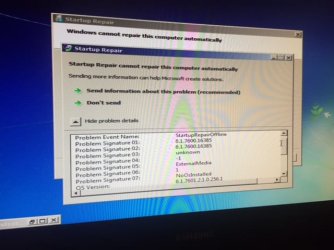
So after booting from the install disk, I was able to run chkdsk as you specified. All 3 stages completed and no errors were found.

IMG_0628.JPG
IMG_0629.JPG

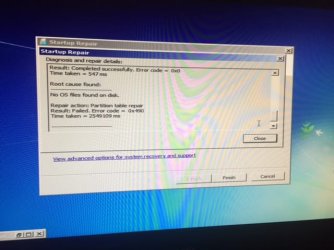
I then moved on to startup repair. Again, the behavior when using the install disk vs. a recovery disk was different, so i really thought i was getting somewhere. Whereas before startup repair was over within minutes, this time it ran for nearly 30 before ending with the same error, no os found.

IMG_0630.JPG

Lastly, i forgot in my OP that i also used the Partition Wizard bootable to run a surface check and tried the repair MBR option, with no luck.
 

My Computer

Computer type
Laptop
Computer Manufacturer/Model Number
Dell
OS
Win 7 Home Premium x64
And lastly, here is my output from startup repair. Hope I'm not up the creek....:cry:

IMG_0631.JPG
 

My Computer

Computer type
Laptop
Computer Manufacturer/Model Number
Dell
OS
Win 7 Home Premium x64
the drive may just be faulty now. I just haven't found anything that convinces me...so thanks for any advice.
The UBCD should include the HDAT2 program. Run that and have it scan/repair bad sectors. That should give you an idea of the drive's health.


Re: your screenshot #2 in the first post: was that after a TD Quick Search, or was it after a "Deeper Search"? If it was after a deep search, then you're most likely up a creek.

Your disk evidently had a 100MB System Reserved Partition, followed by one or more large partitions. That's normal. However, screenshot #2 is reporting it's found only the SRP and nothing else. Screenshot #1 is consistent with that, as is reply #6 and the third screenshot in reply #5.

Screenshot #3 and the second screenshot in reply #5 are not relevant, as they are examining the SRP and finding nothing wrong with it. But it's not the SRP you're after, you're trying to find the missing OS partition. Chkdsk is of no use to you because you can't chkdsk a missing partition.

That second entry (the FAT12) TD found is probably a ghost--not a real partition, but just a string of bytes TD came across that looks like it might possibly resemble a partition table entry, so TD is flagging it for you to decide if it means anything. It's partition type (FAT12 = floppy disk), location (CHS 2525/204/48 = about 20GB into the disk), and partition size (12288 sectors = about 6MB) all suggest it's just a coincidental string of bytes TD found buried in some sector during its search.

Do you happen to remember how many partitions you had? Some OEMs might have included one or more partitions for their OEM Recovery stuff, besides the main Win7 partition. If it was an OEM system, that would complicate things because it's harder to figure out if the manufacturer put the OS in partition 2, 3, or wherever. If you were the one who installed Win7 yourself, then the chances are better that the OS would have been in partition 2, right behind the SRP.

If the OS partition is still intact but just missing from the partition table, a TD deep search should be able to find either the NTFS partition boot sector or the backup boot sector. Your screenshot #2 shows it found no such sector, so if that was after a deep search that's not good. That would suggest the missing partition is no longer intact and is beyond recovery.
 

My Computer

Computer type
PC/Desktop
Computer Manufacturer/Model Number
Dell Optiplex 7050
OS
Windows 7/8.1/10 multiboot
CPU
Intel Core i7-7700
Motherboard
Dell, Intel Q270 chipset
Memory
48GB (2x16GB Crucial DDR4-3200 + 2x8GB Hynix DDR4-2400)
Graphics Card(s)
Intel HD630 + AMD Radeon R7 450 PCIe
Monitor(s) Displays
Asus VC279 (27")
Screen Resolution
1920x1080
Hard Drives
Toshiba M.2 NVMe (256GB),
Samsung 960 Evo (500GB),
WD Red Plus 80EFBX (8TB)
The UBCD should include the HDAT2 program. Run that and have it scan/repair bad sectors. That should give you an idea of the drive's health.

Good thought here..not a bad idea to dig deeper into disk health..i will run that prog this morning and post an update this evening.

Do you happen to remember how many partitions you had? Some OEMs might have included one or more partitions for their OEM Recovery stuff, besides the main Win7 partition. If it was an OEM system, that would complicate things because it's harder to figure out if the manufacturer put the OS in partition 2, 3, or wherever. If you were the one who installed Win7 yourself, then the chances are better that the OS would have been in partition 2, right behind the SRP.

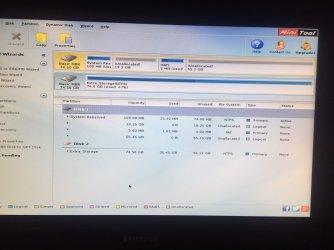
Per PW, it shows i have (2) 80 GB physical drives. As you suggested dg, I do have a 100 MB system partition at the beginning of my primary drive, then from what i recall, the OS and everything else is the second partition. Your assessment is very accurate.

The unallocated and FAT space should be one consolidated partition

The second drive is just a data drive, but i did have a small partition setup to run my PortableApps suite, the rest was truly data storage.

IMG_0633.JPG

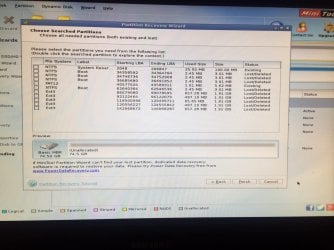
Before signing off last night, i booted up PW again and ran a lost partition recovery search. The results were interesting to say the least.

IMG_0632.JPG
 

My Computer

Computer type
Laptop
Computer Manufacturer/Model Number
Dell
OS
Win 7 Home Premium x64
Mini tool PW shows you have two unallocated partitions and a small Fat12 partition(?).
Partition recovery shows 4 NTFS deleted partitions and 5 Ext3, so you had Linux on the computer.
In other words, your disk is a big, huge mess.

I would do a clean install.
 

My Computers

System One System Two

  • Computer type
    PC/Desktop
    Computer Manufacturer/Model Number
    custom build
    OS
    Windows 7 HP 64
    CPU
    i5 6600K - 800MHz to 4200MHz
    Motherboard
    GA-Z170-HD3P
    Memory
    4+4G GSkill DDR4 3000
    Graphics Card(s)
    IG - Intel 530
    Monitor(s) Displays
    Samsung 226BW
    Screen Resolution
    1680x1050
    Hard Drives
    (1) -1 SM951 – 128GB M.2 AHCI PCIe SSD drive for Windows 7 and Lubuntu
    (2) -1 WD SATA 3 - 1T for Data
    (3) -1 WD SATA 3 - 1T for backup
    PSU
    Thermaltake 450W TR2 gold
    Keyboard
    Old and good Chicony mechanical keyboard
    Mouse
    Logitech mX performance - 9 buttons (had to disable some)
    Internet Speed
    500Mb/s
    Browser
    Firefox 64
    Other Info
    TinyWall firewall
  • Computer type
    Laptop
    System Manufacturer/Model Number
    Asus Q550LF
    OS
    Windows 7 Pro
    CPU
    i7-4500U 800MHz to 3.0GHz
    Motherboard
    Asus Q550LF
    Memory
    (4+4)G DDR3 1600
    Graphics Card(s)
    IG intel 4400 + NVIDIA GeForce GT 745M
    Sound Card
    Realtek
    Monitor(s) Displays
    LG Display LP156WF4-SPH1
    Screen Resolution
    1920 x 1080
    Hard Drives
    BX500 120G SSD for Windows and programs +
    1T HDD for data
    Internet Speed
    500 Mb/s
    Browser
    Firefox
    Other Info
    TinyWall firewall
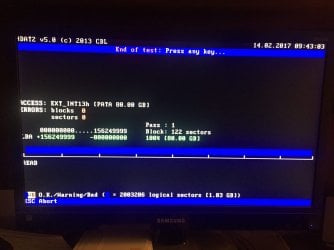
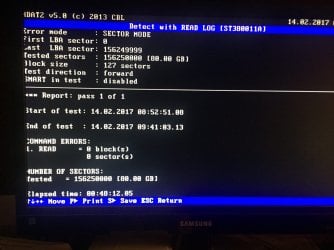
UPDATE: the scan from HDAT2 came back with no errors of any kind. Given the age of this machine and hardware, i am very surprised. So i will be moving on to another TD run this evening...gotta run now b/c i am late for cube city as it is, but its been well worth it to move forward. Thanks dg and MegaHertz for the input thus far. The insights have been spot on.

IMG_0634.JPG

IMG_0635.JPG
 

My Computer

Computer type
Laptop
Computer Manufacturer/Model Number
Dell
OS
Win 7 Home Premium x64
Back
Top