

- Local time
- 12:09 PM
- Messages
- 1,258
Before I start, maybe if I explain how it works with Internet Explorer, you'd get a clearer idea of what I want.
With Internet Explorer, when I save a web page to disk, there are four options:
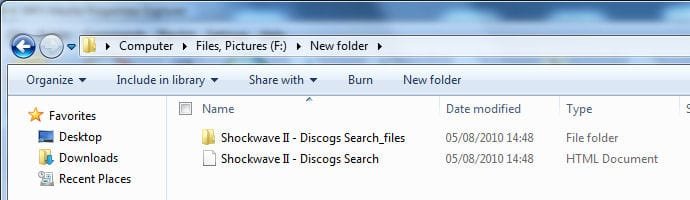
Now, if I delete the file named "Shockwave II - Discogs Search.htm", then the folder "Shockwave II - Discogs Search_files" gets deleted also, even if it wasn't selected to begin with. This is expected behavior, and is what I want.
NOW to my question.
The media center attached to my TV gets it's media over the network (via normal file sharing, not Media Player streamed). When using the Media Center for videos, it looks for three files: Videos, Images and Text, like this:
Final Destination 1.avi
Final Destination 1.jpg
Final Destination 1.txt
It uses the JPG file to display a thumbnail preview of the video, and the TXT file that can be used to display such things as movie creaits, description, etc. The actual JPG and TXT files are filtered out of the actual file list, and are not visible, even if the hidden attribute is not set.
Now, to make the Windows Explorer view look the same, I've set the hidden attribute for the JPG and TXT files, so that they do not show in the list of Windows Explorer. The trouble is, sometimes when I move my videos to other folders, I forget to unhide hidden files first, and I therefore don't copy the hidden JPG and TXT files.
What I want to know is this:
Is there a way for me to "link" the associated JPG and TXT files to the AVI within Windows Explorer so that if I move or delete one of them, then others go with it, even if they are not selected?
And I really don't want to have to unhide hidden files every time, or to permanently have hidden files visible.
Even if I need to use the command line to do it, I'd really appreciate any tips anyone can give me...
With Internet Explorer, when I save a web page to disk, there are four options:
- Web page, complete
- Web Archive, single file
- Web page, HTML only
- Text File
Now, if I delete the file named "Shockwave II - Discogs Search.htm", then the folder "Shockwave II - Discogs Search_files" gets deleted also, even if it wasn't selected to begin with. This is expected behavior, and is what I want.
NOW to my question.
The media center attached to my TV gets it's media over the network (via normal file sharing, not Media Player streamed). When using the Media Center for videos, it looks for three files: Videos, Images and Text, like this:
Final Destination 1.avi
Final Destination 1.jpg
Final Destination 1.txt
It uses the JPG file to display a thumbnail preview of the video, and the TXT file that can be used to display such things as movie creaits, description, etc. The actual JPG and TXT files are filtered out of the actual file list, and are not visible, even if the hidden attribute is not set.
Now, to make the Windows Explorer view look the same, I've set the hidden attribute for the JPG and TXT files, so that they do not show in the list of Windows Explorer. The trouble is, sometimes when I move my videos to other folders, I forget to unhide hidden files first, and I therefore don't copy the hidden JPG and TXT files.
What I want to know is this:
Is there a way for me to "link" the associated JPG and TXT files to the AVI within Windows Explorer so that if I move or delete one of them, then others go with it, even if they are not selected?
And I really don't want to have to unhide hidden files every time, or to permanently have hidden files visible.
Even if I need to use the command line to do it, I'd really appreciate any tips anyone can give me...
Last edited:
My Computer
At a glance
Windows 7 Professional 32-bit SP1AMD A4/A63.00GB EDOVMware SVGA 3D
- Computer type
- PC/Desktop
- Computer Manufacturer/Model Number
- Virtual Machine
- OS
- Windows 7 Professional 32-bit SP1
- CPU
- AMD A4/A6
- Motherboard
- Intel Corporation 440BX Desktop Reference Platform
- Memory
- 3.00GB EDO
- Graphics Card(s)
- VMware SVGA 3D
- Sound Card
- High Definition Audio Device
- Monitor(s) Displays
- Generic Non-PnP Monitor on VMware SVGA 3D
- Screen Resolution
- 1440x900
- Hard Drives
- 1 x 60GB VMware Virtual SATA Hard Drive ATA Device
- Antivirus
- Kaspersky Total Security


