
Solved How do I make PC boot faster, startup empty folder

miwa5

New member
Local time
2:40 PM
Messages
6
I am discover that when I booting my PC, the screen is very slow and in a light blue screen and sometimes black with a cursor.

Then, I discover that from the window logo start, I navigate to "All Programs" and I found two folders included "Startup" and "Tablet PC" are empty.

When I open and navigate to the window explorer just like the followings:

C:\Users\MyUserName\AppData\Roaming\Microsoft\Windows\Start Menu\Programs\Startup

C:\ProgramData\Microsoft\Windows\Start Menu\Programs\Startup

Both of these startup folders also are empty, I was wondering if this is normal or should be like this?

I am hoping to boot my PC faster because it wastes my time to do my task.
 

Attachments
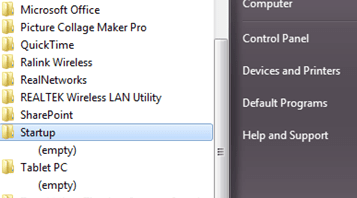
  • startup.png
    startup.png
    35.7 KB · Views: 39

My Computer

Computer type
Laptop
Computer Manufacturer/Model Number
HP
OS
Window 7 Professional x64
There are many places in Windows that can start an application on boot. This free AutoRuns utility will list them all. Not just the startup folders:

Autoruns for Windows

Edit: Note that it is not always the fact that running too many startup programs slows down boot. Another thing that can happen is that drivers that belong to programs that have been uninstalled are still in the load list for bootup. I had this happen when I removed Norton AV from my machine. Each time the system tries to load a driver that is no longer there(the file was deleted) it waits until a specified time-out period before it gives up on that file. If the time-out is 15 seconds and 4 non-existent files are in the driver load list, one minute is wasted waiting.

You can turn on boot logging using msconfig.exe. It will save the log to a file named Ntbtlog.txt in the Windows folder. If you see waits where the file was never loaded you may need to run a cleanup tool such as Wise Registry Cleaner Free. Before running any registry cleanup tool it is a good idea to back up the Registry. The Registry backup included in this free utility is excellent:
Tweaking.com - Windows Repair Free/Pro

Just go through the steps as if you are going to do the Windows Repair. It will automatically back up the Registry. Then quit without selecting or running any repairs. I would read the info with the utility to find out how to restore the Registry from the backup just in case. But I have been using Wise Registry Cleaner for over 6 months and I haven't had an issue that caused an error yet. The suite Wise Cleaner 365 Pro is often on giveaway sites. If you look around you can likely get a one year license to the Pro version for free.
 

My Computer

Computer Manufacturer/Model Number
HP Media Center
OS
Windows 7 32 bit
CPU
AMD 5200+ dual core
Memory
2 GB
Graphics Card(s)
NVidia GeForce 6150SE 128 MB
Monitor(s) Displays
CRT
Screen Resolution
1280x1024
Hard Drives
500 GB Sata internal :

SIIG USB 3.0 docking stations w/WD Caviar Black 6 Gb/s drives
Keyboard
PS/2
Mouse
PS/2 Wheel Mouse
Other Info
SIIG USB 3.0 PCIexpress card.
Yes, you are right, recently I am uninstalling some programs in my PC.

I am wondering if these programs did not uninstalling properly.

So I use CCleaner free version to check the startup programs and I found some of the programs did not uninstall completely.

CCleaner>Tools > Startup > Context Menu > Advanced SystemCare (This directory/drive/file still enabled even I had uninstall it and this program is set to run when the computer starts)

Then, I tried to use msconfig.exe to check any startup programs and I found only one selective program was checked.

I backup all the registry and use wise care 365 pro software giveaway from dailysoftwaregiveaway.com website.

Now my boot up time from 56sec to 30sec. Thanks for your great response.
 

My Computer

Computer type
Laptop
Computer Manufacturer/Model Number
HP
OS
Window 7 Professional x64
You are welcome. I am glad it worked out for you. :)
 

My Computer

Computer Manufacturer/Model Number
HP Media Center
OS
Windows 7 32 bit
CPU
AMD 5200+ dual core
Memory
2 GB
Graphics Card(s)
NVidia GeForce 6150SE 128 MB
Monitor(s) Displays
CRT
Screen Resolution
1280x1024
Hard Drives
500 GB Sata internal :

SIIG USB 3.0 docking stations w/WD Caviar Black 6 Gb/s drives
Keyboard
PS/2
Mouse
PS/2 Wheel Mouse
Other Info
SIIG USB 3.0 PCIexpress card.
Back
Top