
I am discover that when I booting my PC, the screen is very slow and in a light blue screen and sometimes black with a cursor.
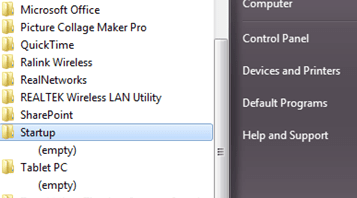
Then, I discover that from the window logo start, I navigate to "All Programs" and I found two folders included "Startup" and "Tablet PC" are empty.
When I open and navigate to the window explorer just like the followings:
C:\Users\MyUserName\AppData\Roaming\Microsoft\Windows\Start Menu\Programs\Startup
C:\ProgramData\Microsoft\Windows\Start Menu\Programs\Startup
Both of these startup folders also are empty, I was wondering if this is normal or should be like this?
I am hoping to boot my PC faster because it wastes my time to do my task.
Then, I discover that from the window logo start, I navigate to "All Programs" and I found two folders included "Startup" and "Tablet PC" are empty.
When I open and navigate to the window explorer just like the followings:
C:\Users\MyUserName\AppData\Roaming\Microsoft\Windows\Start Menu\Programs\Startup
C:\ProgramData\Microsoft\Windows\Start Menu\Programs\Startup
Both of these startup folders also are empty, I was wondering if this is normal or should be like this?
I am hoping to boot my PC faster because it wastes my time to do my task.
Attachments
My Computer
- Computer type
- Laptop
- Computer Manufacturer/Model Number
- HP
- OS
- Window 7 Professional x64


