
How Do I Move Windows and Programs to a New Partition?

Michael33

New member
Local time
10:39 AM
Messages
42
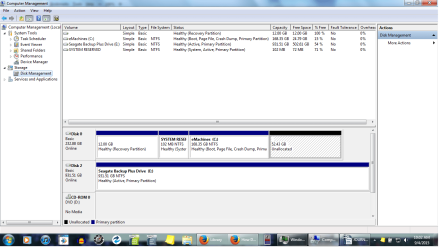
Hi - basically I want to maximize my data storage and yet leave enough for Windows and programs. Can anyone tell me the easiest/best way to move Windows and programs to the now unallocated space, leaving the rest for data? I'm a novice. I know the new C: would have to be bootable, but I don't know how to do it. Thanks, M33.
 

Attachments
  • Untitled.png
    Untitled.png
    56.4 KB · Views: 10

My Computer My Computer

At a glance

Microsoft Windows 7 Home Premium 64-bit 7601 ...Pentium(R) Dual-Core CPU T4400 @ 2.20GHz4.00 GB(1) Mobile Intel(R) 4 Series Express Chipset ...
Computer type
Laptop
OS
Microsoft Windows 7 Home Premium 64-bit 7601 Multiprocessor Free Service Pack 1
CPU
Pentium(R) Dual-Core CPU T4400 @ 2.20GHz
Motherboard
eMachines eMachines E725
Memory
4.00 GB
Graphics Card(s)
(1) Mobile Intel(R) 4 Series Express Chipset Family (2) Mo
Sound Card
Realtek High Definition Audio
Screen Resolution
1366 x 768 x 32 bits (4294967296 colors) @ 59 Hz
Hard Drives
(1) WDC WD2500BEVT-22A23T0 (2) Msft Virtual Disk SCSI Disk Device (3) Seagate BUP Slim BK USB Device
Do you have backups of your user files (data=music, video, documents and similar stuff) somewhere? If so, instead of trying to move Windows, just delete your user files from C, then use Partition Wizard free to resize C - shrink the partition and then create a new partition in the unallocated space and copy back your data.
 

My Computer My Computer

At a glance

Windows 7 Ultimate x64 SP1AMD Phenom 2 1090T2x8GB Kingston HyperX Fury Black 1600Mhz Unga...MSI GTX 970 Gaming 4G
Computer type
PC/Desktop
Computer Manufacturer/Model Number
Custom Build
OS
Windows 7 Ultimate x64 SP1
CPU
AMD Phenom 2 1090T
Motherboard
Gigabyte GA-890FXA-UD5
Memory
2x8GB Kingston HyperX Fury Black 1600Mhz Unganged
Graphics Card(s)
MSI GTX 970 Gaming 4G
Sound Card
Realtek On-Board HD 7.1 Audio / Logitech G35
Monitor(s) Displays
3xAcer GD245HQ
Screen Resolution
1920x1080
Hard Drives
Samsung 850 Pro 512GB SSD - OS /
WD Caviar Black SATA 3 - 1 TBx2 - Dynamic RAID 0 /
WD Caviar Green SATA 2 - 640GBx2 - Dynamic RAID 0 /
WD Caviar Green SATA 2 - 640GB - Internal Backup /
Seagate Barracude SATA 3 - 3TB - External Backup/ Sync
PSU
HighPower 1000W
Case
Cooler Master HAF 932
Cooling
Noctua NH-D14
Keyboard
Logitech G19
Mouse
Logitech G500
Internet Speed
100/4 Mbit Cable (100GB quota)
Antivirus
ZoneAlarm Extreme Security / MBAM Pro / MBAE Free / SAS Free
Browser
IE 11 - Firefox - Chrome
Other Info
Logitech F710/ G27/ G940/ Z5500 // TrackIR 5 // Nvidia 3D Surround Vision
I have already shrunk C: It was 220 GB, now it's 168+ GB.

I don't want to move the data - that's already in the larger partition, where I want it to be. I want to move the OS/Programs to the smaller unallocated partition and leave the larger one for data only. Thanks.
 

My Computer My Computer

At a glance

Microsoft Windows 7 Home Premium 64-bit 7601 ...Pentium(R) Dual-Core CPU T4400 @ 2.20GHz4.00 GB(1) Mobile Intel(R) 4 Series Express Chipset ...
Computer type
Laptop
OS
Microsoft Windows 7 Home Premium 64-bit 7601 Multiprocessor Free Service Pack 1
CPU
Pentium(R) Dual-Core CPU T4400 @ 2.20GHz
Motherboard
eMachines eMachines E725
Memory
4.00 GB
Graphics Card(s)
(1) Mobile Intel(R) 4 Series Express Chipset Family (2) Mo
Sound Card
Realtek High Definition Audio
Screen Resolution
1366 x 768 x 32 bits (4294967296 colors) @ 59 Hz
Hard Drives
(1) WDC WD2500BEVT-22A23T0 (2) Msft Virtual Disk SCSI Disk Device (3) Seagate BUP Slim BK USB Device
Your "C" partition with Windows 7 is already as small as it should be. You only have 15% free space as it is now.

I would also for testing, shutdown your computer and unhook Disk #2.
If your system still boots that is good.
Shut down your computer and hook Disk #2 up again.
Then take the system/active flag off of Disk #2 partition "E".

System Reserve on Disk# 0 is the only partition that needs to be Active so you can boot.
 

My Computer My Computer

At a glance

Windows 10 Pro. 64/ version 1709 Windows 7 Pr...Intel i7-6800K @ 4.3Corsair Platinum 16 gig @2400EVGA GTX 1070 OC
Computer type
PC/Desktop
Computer Manufacturer/Model Number
Home made Desktop
OS
Windows 10 Pro. 64/ version 1709 Windows 7 Pro/64
CPU
Intel i7-6800K @ 4.3
Motherboard
ASUS X-99 Deluxe II
Memory
Corsair Platinum 16 gig @2400
Graphics Card(s)
EVGA GTX 1070 OC
Monitor(s) Displays
Asus 27" LED LCD/VE278Q
Screen Resolution
1920-1080 or 1280-720 HDMI
Hard Drives
INTEL SSD 730-240 Gb Sata 3.0/
PSU
EVGA Platium 1200W
Case
Phanteks Luxe Tempered Glass 8 fans/ one radiator
Cooling
XSPC/ Water Cooled CPU
Keyboard
Das 4 Professional
Mouse
Logitech M705/MX Anywhere 2-S
Internet Speed
100 mbits
Antivirus
Microsoft Security Essentials/ Malwarebytes Premium 3.0/ SAS
Browser
I.E. 11 default/Firefox/ ISP Time Warner Cable/Spectrum
Other Info
LG BluRay Burner/
Sound system-KLipsch-THX/
Icy Dock ssd Hot Swap bays.
168 GB for Windows and Programs is not small at all. I have a large C and it is 60 GB (100 total with 40 free). There clearly are some data files left on it. Get WizTree (has a portable version too) and scan C, expand the larger folders (top ones) then perhaps take a screenshot of it.
 

My Computer My Computer

At a glance

Windows 7 Ultimate x64 SP1AMD Phenom 2 1090T2x8GB Kingston HyperX Fury Black 1600Mhz Unga...MSI GTX 970 Gaming 4G
Computer type
PC/Desktop
Computer Manufacturer/Model Number
Custom Build
OS
Windows 7 Ultimate x64 SP1
CPU
AMD Phenom 2 1090T
Motherboard
Gigabyte GA-890FXA-UD5
Memory
2x8GB Kingston HyperX Fury Black 1600Mhz Unganged
Graphics Card(s)
MSI GTX 970 Gaming 4G
Sound Card
Realtek On-Board HD 7.1 Audio / Logitech G35
Monitor(s) Displays
3xAcer GD245HQ
Screen Resolution
1920x1080
Hard Drives
Samsung 850 Pro 512GB SSD - OS /
WD Caviar Black SATA 3 - 1 TBx2 - Dynamic RAID 0 /
WD Caviar Green SATA 2 - 640GBx2 - Dynamic RAID 0 /
WD Caviar Green SATA 2 - 640GB - Internal Backup /
Seagate Barracude SATA 3 - 3TB - External Backup/ Sync
PSU
HighPower 1000W
Case
Cooler Master HAF 932
Cooling
Noctua NH-D14
Keyboard
Logitech G19
Mouse
Logitech G500
Internet Speed
100/4 Mbit Cable (100GB quota)
Antivirus
ZoneAlarm Extreme Security / MBAM Pro / MBAE Free / SAS Free
Browser
IE 11 - Firefox - Chrome
Other Info
Logitech F710/ G27/ G940/ Z5500 // TrackIR 5 // Nvidia 3D Surround Vision
> "Your "C" partition with Windows 7 is already as small as it should be. You only have 15% free space as it is now."

That's because my data is still there! I'm not sure why I'm having a difficult time getting my point across! Let me try again. I want to divide my data from my programs and Windows. My data is larger (and will obviously get larger). Right now it's on C: at about 100 GB. My OS/programs will stay relatively static. Right now they are about 40 GB (yes, I know that will increase, but drastically less than data). For the time being there's plenty of space in the unallocated partition for the OS/programs, leaving the larger partition for data only. I know it's possible to move OS/programs, I just don't know how to do it without screwing up my system.

Why do I want to do this? To make my backup images smaller. Have one basically static, not-often updated image of my OS/programs, while I daily image my ever-changing data files.


> "168 GB for Windows and Programs is not small at all. I have a large C and it is 60 GB (100 total with 40 free). There clearly are some data files left on it."

For who? Who uses even remotely that much space for Windows and programs? As I mentioned, my OS/programs are about 40 GB. I will never need that much space for just OS/programs. And doesn't the fact there are still data files with your OS/programs kind of make my point about freeing up space?


"I would also for testing, shutdown your computer and unhook Disk #2.
If your system still boots that is good.
Shut down your computer and hook Disk #2 up again.
Then take the system/active flag off of Disk #2 partition "E".

System Reserve on Disk# 0 is the only partition that needs to be Active so you can boot."


What does that have to do with anything?! It has to be bootable so I can restore images from there.


Can anyone give me a straight answer? Ahhhhhhhhhhhhhhhh!!!!! :banghead:
 

My Computer My Computer

At a glance

Microsoft Windows 7 Home Premium 64-bit 7601 ...Pentium(R) Dual-Core CPU T4400 @ 2.20GHz4.00 GB(1) Mobile Intel(R) 4 Series Express Chipset ...
Computer type
Laptop
OS
Microsoft Windows 7 Home Premium 64-bit 7601 Multiprocessor Free Service Pack 1
CPU
Pentium(R) Dual-Core CPU T4400 @ 2.20GHz
Motherboard
eMachines eMachines E725
Memory
4.00 GB
Graphics Card(s)
(1) Mobile Intel(R) 4 Series Express Chipset Family (2) Mo
Sound Card
Realtek High Definition Audio
Screen Resolution
1366 x 768 x 32 bits (4294967296 colors) @ 59 Hz
Hard Drives
(1) WDC WD2500BEVT-22A23T0 (2) Msft Virtual Disk SCSI Disk Device (3) Seagate BUP Slim BK USB Device
No one is telling you it is impossible to move OS and Programs, but you fail to understand that for your case you have to seperate them from the data because your space is limited. But then again, if you could seperate them why move OS when you could only move data?

What I am saying is get rid of the data from C (backup them)
Shrink C to: future C size + 15% free space (with Partition Wizard free if Disk Management can't)
Make a new partition for data on the larger unallocated space
Copy data to new partition

Same in essence as what you want to do. If what I am proposing is wrong/ unnecessary, friends here will show a better method. Can an answer get any more straight?
 

My Computer My Computer

At a glance

Windows 7 Ultimate x64 SP1AMD Phenom 2 1090T2x8GB Kingston HyperX Fury Black 1600Mhz Unga...MSI GTX 970 Gaming 4G
Computer type
PC/Desktop
Computer Manufacturer/Model Number
Custom Build
OS
Windows 7 Ultimate x64 SP1
CPU
AMD Phenom 2 1090T
Motherboard
Gigabyte GA-890FXA-UD5
Memory
2x8GB Kingston HyperX Fury Black 1600Mhz Unganged
Graphics Card(s)
MSI GTX 970 Gaming 4G
Sound Card
Realtek On-Board HD 7.1 Audio / Logitech G35
Monitor(s) Displays
3xAcer GD245HQ
Screen Resolution
1920x1080
Hard Drives
Samsung 850 Pro 512GB SSD - OS /
WD Caviar Black SATA 3 - 1 TBx2 - Dynamic RAID 0 /
WD Caviar Green SATA 2 - 640GBx2 - Dynamic RAID 0 /
WD Caviar Green SATA 2 - 640GB - Internal Backup /
Seagate Barracude SATA 3 - 3TB - External Backup/ Sync
PSU
HighPower 1000W
Case
Cooler Master HAF 932
Cooling
Noctua NH-D14
Keyboard
Logitech G19
Mouse
Logitech G500
Internet Speed
100/4 Mbit Cable (100GB quota)
Antivirus
ZoneAlarm Extreme Security / MBAM Pro / MBAE Free / SAS Free
Browser
IE 11 - Firefox - Chrome
Other Info
Logitech F710/ G27/ G940/ Z5500 // TrackIR 5 // Nvidia 3D Surround Vision
My understanding is you want to move Windows 7, the operating system and other data/programs.

The title of your thread.
How Do I Move Windows and Programs to a New Partition?

What we are suggestions is leave Windows 7 where it's at and just move the other data/programs that is on the "C" partition as you see fit.

Once you have room on your "C" (Windows 7) partition you can shrink it down with about 15% free space.

How much space your programs take up depends entirely on what you have installed. You will have to decide what should not be on partition "C". Just leave Windows 7 alone is my suggestion.

Of course you can do as you see fit, it's your computer.
 

My Computer My Computer

At a glance

Windows 10 Pro. 64/ version 1709 Windows 7 Pr...Intel i7-6800K @ 4.3Corsair Platinum 16 gig @2400EVGA GTX 1070 OC
Computer type
PC/Desktop
Computer Manufacturer/Model Number
Home made Desktop
OS
Windows 10 Pro. 64/ version 1709 Windows 7 Pro/64
CPU
Intel i7-6800K @ 4.3
Motherboard
ASUS X-99 Deluxe II
Memory
Corsair Platinum 16 gig @2400
Graphics Card(s)
EVGA GTX 1070 OC
Monitor(s) Displays
Asus 27" LED LCD/VE278Q
Screen Resolution
1920-1080 or 1280-720 HDMI
Hard Drives
INTEL SSD 730-240 Gb Sata 3.0/
PSU
EVGA Platium 1200W
Case
Phanteks Luxe Tempered Glass 8 fans/ one radiator
Cooling
XSPC/ Water Cooled CPU
Keyboard
Das 4 Professional
Mouse
Logitech M705/MX Anywhere 2-S
Internet Speed
100 mbits
Antivirus
Microsoft Security Essentials/ Malwarebytes Premium 3.0/ SAS
Browser
I.E. 11 default/Firefox/ ISP Time Warner Cable/Spectrum
Other Info
LG BluRay Burner/
Sound system-KLipsch-THX/
Icy Dock ssd Hot Swap bays.
I was operating under the assumption PW couldn't bypass the restrictions on partition shrinking imposed by Disk Management, but apparently it can. Didn't realize that. That's why we weren't on the same page. Sorry for getting testy.

I looked at the video tutorial on moving/resizing partitions with PW. Does it matter how much space I leave before and after resized C:? I don't want to screw this up royally...
 

My Computer My Computer

At a glance

Microsoft Windows 7 Home Premium 64-bit 7601 ...Pentium(R) Dual-Core CPU T4400 @ 2.20GHz4.00 GB(1) Mobile Intel(R) 4 Series Express Chipset ...
Computer type
Laptop
OS
Microsoft Windows 7 Home Premium 64-bit 7601 Multiprocessor Free Service Pack 1
CPU
Pentium(R) Dual-Core CPU T4400 @ 2.20GHz
Motherboard
eMachines eMachines E725
Memory
4.00 GB
Graphics Card(s)
(1) Mobile Intel(R) 4 Series Express Chipset Family (2) Mo
Sound Card
Realtek High Definition Audio
Screen Resolution
1366 x 768 x 32 bits (4294967296 colors) @ 59 Hz
Hard Drives
(1) WDC WD2500BEVT-22A23T0 (2) Msft Virtual Disk SCSI Disk Device (3) Seagate BUP Slim BK USB Device
By the way (for your info) if you did have space, you could have imaged C to D, then use EasyBCD to add D to OS list, boot to new OS, and remove old C. Then delete OS and Programs from C while deleting Data from D. (D would change to C once you boot to the new partition).
 

My Computer My Computer

At a glance

Windows 7 Ultimate x64 SP1AMD Phenom 2 1090T2x8GB Kingston HyperX Fury Black 1600Mhz Unga...MSI GTX 970 Gaming 4G
Computer type
PC/Desktop
Computer Manufacturer/Model Number
Custom Build
OS
Windows 7 Ultimate x64 SP1
CPU
AMD Phenom 2 1090T
Motherboard
Gigabyte GA-890FXA-UD5
Memory
2x8GB Kingston HyperX Fury Black 1600Mhz Unganged
Graphics Card(s)
MSI GTX 970 Gaming 4G
Sound Card
Realtek On-Board HD 7.1 Audio / Logitech G35
Monitor(s) Displays
3xAcer GD245HQ
Screen Resolution
1920x1080
Hard Drives
Samsung 850 Pro 512GB SSD - OS /
WD Caviar Black SATA 3 - 1 TBx2 - Dynamic RAID 0 /
WD Caviar Green SATA 2 - 640GBx2 - Dynamic RAID 0 /
WD Caviar Green SATA 2 - 640GB - Internal Backup /
Seagate Barracude SATA 3 - 3TB - External Backup/ Sync
PSU
HighPower 1000W
Case
Cooler Master HAF 932
Cooling
Noctua NH-D14
Keyboard
Logitech G19
Mouse
Logitech G500
Internet Speed
100/4 Mbit Cable (100GB quota)
Antivirus
ZoneAlarm Extreme Security / MBAM Pro / MBAE Free / SAS Free
Browser
IE 11 - Firefox - Chrome
Other Info
Logitech F710/ G27/ G940/ Z5500 // TrackIR 5 // Nvidia 3D Surround Vision
Example; if you think C will grow to max of 50 GB (1.15% of that would be 57,5 GB). But it is better if you play it safer and keep C as 70 GB (max C of 60 GB) -apparently you will decide about this.

If I understood you wrong, if you mean unallocated before and after the partition, then you don't need to leave any space. So D will start rigth at where C finish.
 

My Computer My Computer

At a glance

Windows 7 Ultimate x64 SP1AMD Phenom 2 1090T2x8GB Kingston HyperX Fury Black 1600Mhz Unga...MSI GTX 970 Gaming 4G
Computer type
PC/Desktop
Computer Manufacturer/Model Number
Custom Build
OS
Windows 7 Ultimate x64 SP1
CPU
AMD Phenom 2 1090T
Motherboard
Gigabyte GA-890FXA-UD5
Memory
2x8GB Kingston HyperX Fury Black 1600Mhz Unganged
Graphics Card(s)
MSI GTX 970 Gaming 4G
Sound Card
Realtek On-Board HD 7.1 Audio / Logitech G35
Monitor(s) Displays
3xAcer GD245HQ
Screen Resolution
1920x1080
Hard Drives
Samsung 850 Pro 512GB SSD - OS /
WD Caviar Black SATA 3 - 1 TBx2 - Dynamic RAID 0 /
WD Caviar Green SATA 2 - 640GBx2 - Dynamic RAID 0 /
WD Caviar Green SATA 2 - 640GB - Internal Backup /
Seagate Barracude SATA 3 - 3TB - External Backup/ Sync
PSU
HighPower 1000W
Case
Cooler Master HAF 932
Cooling
Noctua NH-D14
Keyboard
Logitech G19
Mouse
Logitech G500
Internet Speed
100/4 Mbit Cable (100GB quota)
Antivirus
ZoneAlarm Extreme Security / MBAM Pro / MBAE Free / SAS Free
Browser
IE 11 - Firefox - Chrome
Other Info
Logitech F710/ G27/ G940/ Z5500 // TrackIR 5 // Nvidia 3D Surround Vision
Yeah the tut. over at PW showed entries for adjusting space before and after the partition itself. So these could be set to zero with no potentially troubling implications, if I'm understanding you correctly?
 

My Computer My Computer

At a glance

Microsoft Windows 7 Home Premium 64-bit 7601 ...Pentium(R) Dual-Core CPU T4400 @ 2.20GHz4.00 GB(1) Mobile Intel(R) 4 Series Express Chipset ...
Computer type
Laptop
OS
Microsoft Windows 7 Home Premium 64-bit 7601 Multiprocessor Free Service Pack 1
CPU
Pentium(R) Dual-Core CPU T4400 @ 2.20GHz
Motherboard
eMachines eMachines E725
Memory
4.00 GB
Graphics Card(s)
(1) Mobile Intel(R) 4 Series Express Chipset Family (2) Mo
Sound Card
Realtek High Definition Audio
Screen Resolution
1366 x 768 x 32 bits (4294967296 colors) @ 59 Hz
Hard Drives
(1) WDC WD2500BEVT-22A23T0 (2) Msft Virtual Disk SCSI Disk Device (3) Seagate BUP Slim BK USB Device
Yes true. Sometimes though it is possible there will be some little space left unallocated (30-40 MB, seen as low as 8) no matter what you do. Leave that as it is if you encounter it.
 

My Computer My Computer

At a glance

Windows 7 Ultimate x64 SP1AMD Phenom 2 1090T2x8GB Kingston HyperX Fury Black 1600Mhz Unga...MSI GTX 970 Gaming 4G
Computer type
PC/Desktop
Computer Manufacturer/Model Number
Custom Build
OS
Windows 7 Ultimate x64 SP1
CPU
AMD Phenom 2 1090T
Motherboard
Gigabyte GA-890FXA-UD5
Memory
2x8GB Kingston HyperX Fury Black 1600Mhz Unganged
Graphics Card(s)
MSI GTX 970 Gaming 4G
Sound Card
Realtek On-Board HD 7.1 Audio / Logitech G35
Monitor(s) Displays
3xAcer GD245HQ
Screen Resolution
1920x1080
Hard Drives
Samsung 850 Pro 512GB SSD - OS /
WD Caviar Black SATA 3 - 1 TBx2 - Dynamic RAID 0 /
WD Caviar Green SATA 2 - 640GBx2 - Dynamic RAID 0 /
WD Caviar Green SATA 2 - 640GB - Internal Backup /
Seagate Barracude SATA 3 - 3TB - External Backup/ Sync
PSU
HighPower 1000W
Case
Cooler Master HAF 932
Cooling
Noctua NH-D14
Keyboard
Logitech G19
Mouse
Logitech G500
Internet Speed
100/4 Mbit Cable (100GB quota)
Antivirus
ZoneAlarm Extreme Security / MBAM Pro / MBAE Free / SAS Free
Browser
IE 11 - Firefox - Chrome
Other Info
Logitech F710/ G27/ G940/ Z5500 // TrackIR 5 // Nvidia 3D Surround Vision
OK, thanks for the help. I'll let you know if I encounter any snags.
 

My Computer My Computer

At a glance

Microsoft Windows 7 Home Premium 64-bit 7601 ...Pentium(R) Dual-Core CPU T4400 @ 2.20GHz4.00 GB(1) Mobile Intel(R) 4 Series Express Chipset ...
Computer type
Laptop
OS
Microsoft Windows 7 Home Premium 64-bit 7601 Multiprocessor Free Service Pack 1
CPU
Pentium(R) Dual-Core CPU T4400 @ 2.20GHz
Motherboard
eMachines eMachines E725
Memory
4.00 GB
Graphics Card(s)
(1) Mobile Intel(R) 4 Series Express Chipset Family (2) Mo
Sound Card
Realtek High Definition Audio
Screen Resolution
1366 x 768 x 32 bits (4294967296 colors) @ 59 Hz
Hard Drives
(1) WDC WD2500BEVT-22A23T0 (2) Msft Virtual Disk SCSI Disk Device (3) Seagate BUP Slim BK USB Device
Back
Top