How do I overclock my computer, and is it needed?

Daqueh

New member
Local time
7:19 AM
Messages
14
Hey, a guy recommended me to overclock my computer. He said it would make it even better, would it?

And if I should overclock it, how do I do it?

Thank you!
 

My Computer My Computer

Computer Manufacturer/Model Number
ASUSTeK Computer INC / Maximus IV Extreme-Z
OS
Windows 7 64bit
CPU
Intel Core i7 2700k @ 3.50 GHz
Motherboard
ASUSTeK Computer INC / Maximus IV Extreme-Z
Memory
12GB Corsair Dominator 1600Mhz
Graphics Card(s)
2 x Asus Radeon HD 6990 2GB Crossfire
Sound Card
On board
Monitor(s) Displays
24" Samsung SyncMaster S24B300 LCD
Screen Resolution
1920X1080
Hard Drives
160 GB Corsair Force 3 SSD + 500GB 7200Rpm
PSU
Corsair HX 1050W
Case
Corsair 650D Midi Tower
Keyboard
Gaming Keyboard G110
Mouse
Logitech® MX™518 Optical Gaming Mouse
Internet Speed
9 Download / 1 Upload
Other Info
It's a Desktop PC.
You should have no problems with overclocking. It's just a matter of taking your time and not exceeding the limit imposed by the components in your computer (even though others with identical computers might manage more than you).

First of all, and this is very important before you attempt to overclock: Is your system 100% stable at stock speeds? If not, you need to address those issues first. Please post back if this is the case, and we'll endeavour to get your system running stably.

I've found this video that might help you:


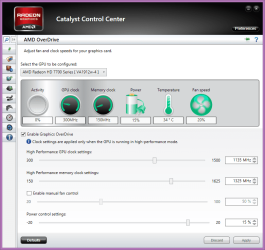
You should have no problem with overclocking your graphics cards. This is done through the Catalyst Control Center. Select Performance and then click on AMD Overdrive. When you have accepted the warning, you can proceed. This is what I have achieved with mine (both cards set identically):

Capture.PNG
 

My Computer My Computer

Computer type
PC/Desktop
Computer Manufacturer/Model Number
Dwarf Dwf/11/2012 r09/2013
OS
Windows 8.1 Pro RTM x64
CPU
Intel Core-i5-3570K 4-core @ 3.4GHz (Ivy Bridge) (OC 4.4GHz)
Motherboard
ASRock Z77 Extreme4-M
Memory
4 x 4GB DDR3-1600 Corsair Vengeance CMZ8GX3M2A1600C9B (16GB)
Graphics Card(s)
MSI GeForce GTX770 Gaming OC 2GB
Sound Card
Realtek High Definition on board solution (ALC 898)
Monitor(s) Displays
ViewSonic VA1912w Widescreen (VGA)
Screen Resolution
1440x900
Hard Drives
OCZ Agility 3 SSD 120GB SATA III x2 (RAID 0)
Samsung HD501LJ 500GB SATA II x2
Hitachi HDS721010CLA332 1TB SATA II
Iomega 1.5TB Ext USB 2.0
WD 2.0TB Ext USB 3.0
PSU
XFX Pro Series 850W Semi-Modular
Case
Gigabyte IF233
Cooling
1 x 120mm Front Inlet 1 x 120mm Rear Exhaust
Keyboard
Microsoft Comfort Curve Keyboard 3000 (USB)
Mouse
Microsoft Comfort Mouse 3000 for Business (USB)
Internet Speed
NetGear DG834Gv3 ADSL Modem/Router (Ethernet) ~4.0 Mb/s (O2)
Antivirus
Avast! 8.0.1497
Browser
IE 11
Other Info
Optical Drive: HL-DT-ST BD-RE BH10LS30 SATA Bluray
Lexmark S305 Printer/Scanner/Copier (USB)
WEI Score: 8.1/8.1/8.5/8.5/8.25
Asus Eee PC 1011PX Netbook (Windows 7 x86 Starter)
The next thing you want to address is are you running stock cooling and would you consider an upgraded CPU cooler?
 

My Computer My Computer

Computer type
PC/Desktop
Computer Manufacturer/Model Number
A blend of brains, brawn and dumb luck.
OS
Windows 7 Ultimate 64
CPU
i7 3770k OC'd 4.6 @ 1.17v, also FX 8120 & i5 miniITX
Motherboard
MSI P67A-GD80 b3
Memory
32 gb G.Skill Sniper DDR3 10-12-12-31 @ 2133
Graphics Card(s)
XFX Radeon 7870 2GB DDR5
Sound Card
Sound Blaster Z Series Card
Monitor(s) Displays
(2) LG LED 23" 1920 x 1080 2ms Monitors via mini d-port
Screen Resolution
1680 X 1050 p
Hard Drives
Samsung 256 gb 830 SSD sata III
(1) 1 tb WD Black
(2) 1 tb Hitachi deskmates/sata II
(2) 1 tb WD green/sata II
(2) 3 tb Seagate Barracuda
(1) 120 gb OCZ Vertex SS
(1) Drobo 5N w/5 Seagate 3tb
PSU
EVGA modular 1000G2 80% gold rating & APC 1200 RS
Case
CoolerMaster Storm Styker
Cooling
7 case fans 140mm & 120mm, NZXT Kraken X60
Keyboard
(2) Logitech Illuminated Keyboards (1) usb (1) wireless
Mouse
Logitech G700 & T-BC21 - nano nx for the laptop
Internet Speed
Basic 120mbps down
Antivirus
Trend Micro Titanium Max Security & Malwarebytes Premium
Browser
Chrome and IE 10
Other Info
5 Noctua case fans + 3 Noctua in p/p on NZXT cooler
Integrated hot swap drive bays for 2.5" Drives
(2) Lite-on dvd/cd/Blu Ray optical 22X
Integrated fan controller and led on/off
HP Officejet Pro 8630 all-n-one
Hot-swappable 3.5" hard drive bay
Netgear Nighthawk router
Asus USB 3 & sata 6 PCIe card
Vantec IDE to sata adptr./Ultra sata adptr
Lenovo L420 i5 lappy with m sata
Drobo 5N advanced NAS
While it is true overclocking will give you faster performance, the question should be do you really need it? Usually, the only people who really need the increased speed (note that I said need, not want) are serious gamers. The need the fastest machines possible to stay competitive. People who use their computers for web surfing, emails, social media, or office type applications will not significantly benefit from overclocking.

Overclocking is not without its risks. It puts more stress on your components (hence the need for more cooling that others have mentioned in this thread) which can cause shorter component life. It's trickier than using the stock settings because it is easy to push your components too far and frying them so you have to pay attention to what you are doing unless you have a MOBO that watches it for you. Also, many CPUs are locked to prevent overclocking (mostly to ensure longer life) so, unless your CPU and GPU are unlocked (with Intel CPUs, the part number will end with a K), you wouldn't be able to overclock anyway.

If all you need is to boot up your computer and programs faster, adding an SSD and putting only the OS and programs on it and keeping data on a conventional HDD will give you much faster results than overclocking without the risks associated with overclocking.
 

My Computer My Computer

Computer type
PC/Desktop
Computer Manufacturer/Model Number
Custom Build
OS
Win 7 Ultimate 64 bit
CPU
Intel i7-3930K
Motherboard
ASUS P9X79 WS
Memory
Kingston HyperX Genesis 32GB Kit (8x4GB Modules) 1600MHz DDR
Graphics Card(s)
MSI R7850 Twin Frozr 2GD5/OC Radeon HD 7850 2GB 256-bit GDDR
Sound Card
Asus Xonar Essence STX
Monitor(s) Displays
3x Asus VG248QE 24", Vizio 32" TV
Screen Resolution
1920 x 1080, ?
Hard Drives
Samsung 128GB 840 Pro SSD (1),
Samsung 4TB 850 EVO SSDs (4)
Samsung 4TB 850 EVO SSDs (16) external backup drives used in 2.5" hot swap bays in the computer.
PSU
Corsair HX750w
Case
Antec Two Hundred v2 (modified)
Cooling
Cooler Master GeminII S524 120mm (fan replaced with a 140mm)
Keyboard
Logitech G510s
Mouse
Logitech M525 (two in use)
Internet Speed
=< 32Mbps down, 8Mbps up
Antivirus
AVAST!, MBAM, SAS, Spybot S&D (all but MBAM free) Glary Util
Browser
IE11
Other Info
LSI 9211-8i HBA card (8 SATA III ports), 2.5" & 3.5" Hot Swap Bays, HooToo HT-CR001 PCI-E to USB 3.0 Internal Hub + 6 Slot Card Reader, and LG Model CH12LS28 BD-ROM Optical Drive. Also, ScanSnap S1500 ADF duplexing scanner, Canon 9000F flat bed scanner, Corsair SP2500 2.1 speakers, Samsung CLP 415nw laser color printer, Cyberpower PP2200SW UPS
Back
Top