
How Do I Pause a Copy operation?

green elephant

New member
Local time
5:20 AM
Messages
60
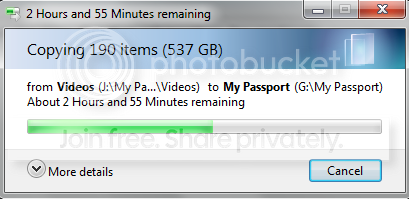
I am copying 537gbs from one drive to another and want to turn off my computer to uninstall and install ram sticks, but don't want to wait almost 3 hours till it finishes. Is there a way to pause it or cancel it without files being corrupt or something?
 

My Computer My Computer

Computer type
PC/Desktop
Computer Manufacturer/Model Number
lenovo v570
OS
windows 7 home premium
Memory
6gb
Hard Drives
552gb
2tb (external
500gb (external
Antivirus
microsoft security
Browser
google chrome
If the files are important, then I wouldn't take the chance! :shock:
 

My Computer My Computer

Computer type
PC/Desktop
Computer Manufacturer/Model Number
Bruce ... somewhere in his 40's
OS
Windows 7 Ultimate 32bit SP1
CPU
Intel(R) Core(TM)2 Quad CPU @ 2.40GHz, 2400 MHz
Motherboard
INTEL/D975XBX2
Memory
4 GB
Graphics Card(s)
ATI Radeon HD 2600 Pro
Monitor(s) Displays
Samsung SyncMaster 914v
Screen Resolution
1280 x 1024
Hard Drives
2/500GB each ... ST3500630AS ATA Device.
One is not connected
PSU
Rocketfish 700 W
Case
G.Skill Gigabyte Chassis
Keyboard
Standard PS/2 Keyboard
Mouse
Microsoft PS/2 Mouse
Internet Speed
DSL
Antivirus
Avira Internet Security
Browser
IE 11
Other Info
ATI HDMI Audio
If the files are important, then I wouldn't take the chance! :shock:
well they are important but all im doing is backing them up
 

My Computer My Computer

Computer type
PC/Desktop
Computer Manufacturer/Model Number
lenovo v570
OS
windows 7 home premium
Memory
6gb
Hard Drives
552gb
2tb (external
500gb (external
Antivirus
microsoft security
Browser
google chrome
To answer your question: No, Windows's copy procedures aren't sophisticated enough that they handle pausing it.

A copy operation can be cancelled with no ill effects though, any files that were in the process of being copied will not be copied while files that were already copied will stay copied. You won't get any handy indicators of what was copied and what wasn't without comparing the files yourself though.

Personally if I were you, I'd just wait and let Windows finish doing its thing.
 

My Computer My Computer

Computer type
PC/Desktop
Computer Manufacturer/Model Number
N/A (custom-built)
OS
Windows 7 Ultimate x64 SP1
CPU
Intel Core i7 2700K @ 3.5GHz (TurboBoost disabled)
Motherboard
ASUS P8Z68-V/GEN3
Memory
16GB (4x4GB) Kingston HyperX DDR3 1600MHz @ 1333MHz
Graphics Card(s)
Nvidia EVGA GeForce GTX 1060 6GB
Sound Card
Realtek High Definition Audio (motherboard integrated)
Monitor(s) Displays
NEC Multisync EX231W
Screen Resolution
1920x1080 @ 60Hz via DVI-D
Hard Drives
2x Western Digital 1TB SATA3 Caviar Black Internal HDD // 1x WD 500GB USB 3.0 "My Passport Essential" External HDD // 1x WD 1TB USB 3.0 "My Passport Essential" External HDD // 2x WD 2TB USB 3.0 "My Passport Essential" External HDD
PSU
Corsair Professional Series Gold AX850
Case
Antec 300
Cooling
Air-cooling
Keyboard
Steelseries 6Gv2
Mouse
Steelseries Sensei RAW Glossy, Logitech M500
Internet Speed
DSL (AT&T)
Antivirus
Microsoft Security Essentials
Browser
Pale Moon, Mozilla Firefox 12, Opera 12, Chromium, IE9
Other Info
Virtual Machines (VirtualBox):
* Japanese Windows XP Professional SP3
* Japanese Windows 7 Professional SP1
Back
Top