
Solved How do I remove a boot flag from a device?

BigBrother

New member
Member
Local time
10:44 AM
Messages
29
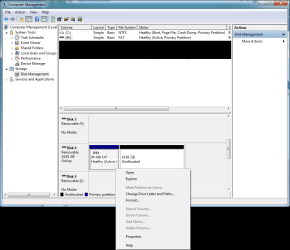
I'm trying to reformat an SD that I used for a Raspberry Pi but the main partition has a boot flag. Windows thinks the user is an idiot so I can't delete that partition so I can join it up with the other 14.81GB. I do not want to shutdown and boot into GParted just for this one thing- that's silly.
 

Attachments
  • winderps.png
    winderps.png
    30.9 KB · Views: 15

My Computer

OS
Windows 7 Ultimate, final build
CPU
AMD Phenom ii x4 3.6GHz
Motherboard
ASUS M4A79
Memory
Wintec 4GB dual-channel kit x2
Graphics Card(s)
ASUS 4890 TOP/XFX 4890
Sound Card
integrated
Monitor(s) Displays
ASUS V242H 23.6"
Screen Resolution
1920x1080
Hard Drives
WD Black 640GB x2 |
WD Green 1TB | -- HDDs
Seagate 1TB |
WD Green 1.5TB x4 (NAS)
Kingston 128GB SSD
PSU
Corsair 750tx
Case
Cool Master HAF Full
Cooling
Corsair H50
Keyboard
SK-9920
Mouse
Logitech G5 or G9
Internet Speed
12mbit/down, 1.5mbit up
Use diskpart from the command line and use "clean" after selecting the drive. Be sure to select the correct drive before using clean!
 

My Computer

Computer type
PC/Desktop
Computer Manufacturer/Model Number
Alienware Aurora ALX R4
OS
Windows 10 Pro (x64)
CPU
Intel Core i7-3930K (3.2GHz - 4.5GHz)
Motherboard
Alienware Aurora-R4 x79
Memory
4x Samsung 4GB PC3-12800 DDR3 (16GB 1600MHz)
Graphics Card(s)
Nvidia Geforce GTX 690
Sound Card
SteelSeries Siberia Elite
Monitor(s) Displays
Dell UltraSharp U3011
Screen Resolution
2560x1600
Hard Drives
Samsung 850 Pro 256 GB, Seagate 1TB Desktop Hybrid HDD, 2x Western Digital 4TB Green HDD
PSU
875W Some Dell PSU <.<
Case
Alienware Aurora ALX
Cooling
Custom Liquid Cooling (EK CPU & GPU blocks) dual EK 480RAD
Keyboard
Logitech G710+ Mechanical
Mouse
Logitech G700s
Internet Speed
Verizon Fios (50 mbps average)
Other Info
Server: Intel NUC D54250WYK: i5-4250U, 16GB, 256 GB mSATA, Windows Server 2012 R2
Use diskpart from the command line and use "clean" after selecting the drive. Be sure to select the correct drive before using clean!
Having to use the command line when Windows is predominantly GUI-based. Oh, Microsoft... will you ever get it right?

How do I do it?
Code:
cd H:\
diskpart
clean
or
Code:
diskpart
clean H:\
 

My Computer

OS
Windows 7 Ultimate, final build
CPU
AMD Phenom ii x4 3.6GHz
Motherboard
ASUS M4A79
Memory
Wintec 4GB dual-channel kit x2
Graphics Card(s)
ASUS 4890 TOP/XFX 4890
Sound Card
integrated
Monitor(s) Displays
ASUS V242H 23.6"
Screen Resolution
1920x1080
Hard Drives
WD Black 640GB x2 |
WD Green 1TB | -- HDDs
Seagate 1TB |
WD Green 1.5TB x4 (NAS)
Kingston 128GB SSD
PSU
Corsair 750tx
Case
Cool Master HAF Full
Cooling
Corsair H50
Keyboard
SK-9920
Mouse
Logitech G5 or G9
Internet Speed
12mbit/down, 1.5mbit up
In an "elevated" (run as administrator) command prompt, you type diskpart

After it loads, type list disk. See what # the disk is that you want to work on.
Then type select disk #, plugging in that #.

When diskpart tells you that the disk is selected, type clean
 

My Computer

Computer Manufacturer/Model Number
8 home-builds from the 80's into 2004
OS
W7 Home Premium 32bit
In an "elevated" (run as administrator) command prompt, you type diskpart

After it loads, type list disk. See what # the disk is that you want to work on.
Then type select disk #, plugging in that #.

When diskpart tells you that the disk is selected, type clean
thanks, it worked. :D
 

My Computer

OS
Windows 7 Ultimate, final build
CPU
AMD Phenom ii x4 3.6GHz
Motherboard
ASUS M4A79
Memory
Wintec 4GB dual-channel kit x2
Graphics Card(s)
ASUS 4890 TOP/XFX 4890
Sound Card
integrated
Monitor(s) Displays
ASUS V242H 23.6"
Screen Resolution
1920x1080
Hard Drives
WD Black 640GB x2 |
WD Green 1TB | -- HDDs
Seagate 1TB |
WD Green 1.5TB x4 (NAS)
Kingston 128GB SSD
PSU
Corsair 750tx
Case
Cool Master HAF Full
Cooling
Corsair H50
Keyboard
SK-9920
Mouse
Logitech G5 or G9
Internet Speed
12mbit/down, 1.5mbit up
Back
Top