Solved How do I remove a doubly installed Windows7

ewv

New member
Local time
6:04 AM
Messages
24
Hello all,

I need to remove one of the OS on my DELL Inspiron laptop. When I start it up it gives me the black screen (BIOS?) and I have to choose between Windows 7 & Windows 7...

I looked at the tutorial "How to Properly Delete a OS in a Dual Boot" by whs, and I get stuck at the first step:

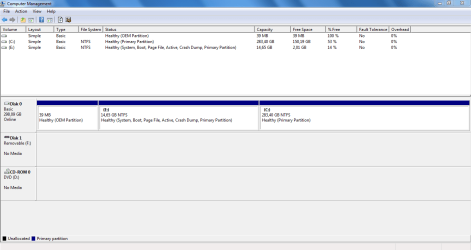
When I go to Disk Management, there are the 3 partitions:
OEM partition
C: Primary partition
E: the System, Boot, Page File, Active, Crash Dump, Primary Partition

But it doesn't show 2x Windows 7 on there. So how do I get this solved? I just want it to start Windows 7 straight away when I start the computer, not have it ask me which one to start...

Thanks for your help!
(I'm not an expert, so would help if answer doesn't have too many technical terms... :confused: Thanks!)
 

My Computer

Computer type
Laptop
Computer Manufacturer/Model Number
Toshiba
OS
Windows 10 Home 64bit
CPU
Intel(R) Core(TM) i5-5200U
Memory
8GB
Antivirus
AVG Free, SuperAntiSpyware, Malwarebytes Anti-Malware
Browser
Google Chrome

My Computer

Computer type
PC/Desktop
Computer Manufacturer/Model Number
Custom assembled by me :}
OS
Win-7-Pro64bit 7-H-Prem-64bit
CPU
i7-5930K 2nd i9-9940x both water blocked VRM's too
Motherboard
ASUS SABERTOOTH X99 2nd ASUS x299 Apex
Memory
Trident-z 3200C14 2nd Trident-z 3600C16
Graphics Card(s)
EVGA 1080ti ftw3 2nd Titan Xp both water blocked
Sound Card
Built-in Realtek
Monitor(s) Displays
1-AOC G2460PG 24"G-Sync 144Hz/ 2nd 1-ASUS VG248QE 24" 144Hz
Screen Resolution
1920 x 1080 144Hz
Hard Drives
2-Samsung M.2 Evo & Evo Plus
2-Samsung 850 EVO 500GB SSD's/ 3-2.5 W.D. Black 1tb-&3-1tb/3-3.5 WD Black 1tb hdd's
PSU
EVGA SuperNOVA 1000-P2 2nd 1200-P2
Case
2-Corsair Obsidian Series 450D Black ATX Mid Tower
Cooling
Custom water loops
Keyboard
Logitech G710+/ 2nd Logitech G910
Mouse
2-RedDragon M901 Perdition 16400 dpi Gaming mouse = wired
Internet Speed
Comcast Ping 19ms 89.31mbps download speed 6.12mbps upload
Antivirus
Malwarebytes Pro/ Superantispyware Pro
Browser
FireFox & Pale moon
Other Info
2nd ASUS X299 Apex/Intel i9-9940x with Custom water loop/7H-Prem-x64/Corsair 450D case/Ram Trident-z 3600C16 4x8gb / Samsung970Evo plus 500gb SSD/Dual ssd EZ swap evo/PSU EVGA SuperNova 1200w-P2 80+Platinum/GPU Titan Xp /8-ML-140 on push-pull on 2-280GTX rads
Here is the screen shot of Disk Management
 

Attachments

  • Disk management.PNG
    Disk management.PNG
    21.2 KB · Views: 13

My Computer

Computer type
Laptop
Computer Manufacturer/Model Number
Toshiba
OS
Windows 10 Home 64bit
CPU
Intel(R) Core(TM) i5-5200U
Memory
8GB
Antivirus
AVG Free, SuperAntiSpyware, Malwarebytes Anti-Malware
Browser
Google Chrome
You just need to delete one of the Win 7 bootloader entries.
I would use free EasyBCD, you don't have to register to download it.
EasyBCD - NeoSmart Technologies

Make sure you don't delete the Win 7 boot menu item for the one that boots the PC.
Or,
On the Edit Boot menu window you could set the default OS to the correct one, and set Count down from to 0.
 

My Computer

Computer type
PC/Desktop
Computer Manufacturer/Model Number
home built
OS
Multi-Boot W7_Pro_x64 W8.1_Pro_x64 W10_Pro_x64 +Linux_VMs +Chromium_VM
CPU
AMD Athlon II x4 620
Motherboard
Gigabyte GA-MA785G-UD3H
Memory
6GB GSkill DDR2 800
Graphics Card(s)
AMD 4670 GPU + AMD 4200 IGP
Sound Card
on board Realtek ALC889A
Monitor(s) Displays
RCA 40" LCD TV, Insignia 32" LCD TV, HP 15" LCD monitor
Screen Resolution
1680 x 1050
Hard Drives
OCZ Vertex 3 120GB,
Samsung F3 1TB (3),
Several others - WD, Seagate, Hitachi, ...
PSU
Corsair 500 W
Case
Rosewill mid tower
Cooling
CM 90mm rifle
Keyboard
Gyration wireless, Logitech wireless, Dell USB wired
Mouse
Gyration wireless, Logitech wireless, V7 USB wired
Internet Speed
Spectrum - 100Mbps D / 10Mbps U
Antivirus
Avast, MBAM3, EMET, WinPatrol
Browser
Pale Moon, Firefox, IE
Other Info
2 multi-boot PC's
Mainly HTPC/Office/Gen purpose (no gaming).
Trendnet USB KVM.
LG DVD burner/Blue Ray Player.
Tray system for removable SATA backup drives.

Not currently OCd, under-volted.
I use Hybrid sleep, rarely re-boot or shutdown.

Hauppauge HD-PVR, Avermedia PCIe TV Tuner, Hauppauge PCI TV Tuner.
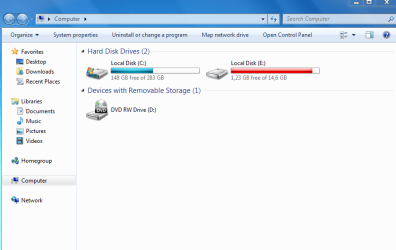
I got it!!! :D It's starting straight up. I deleted one of them, then set the count to 0 for the other and it's all good! :)

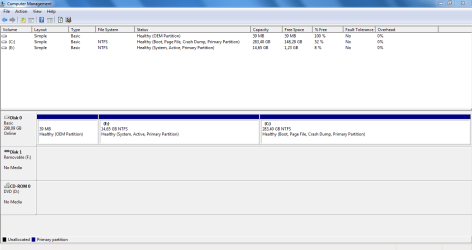
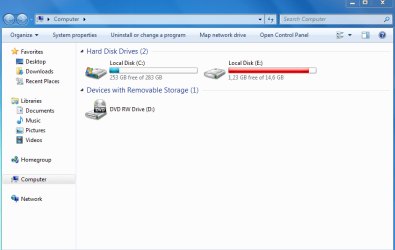
But somehow I feel something is not quite right in the division of the partitions & what's stored/how it's stored on them. It all just seems to be taking a lot of memory -I haven't put back the pictures, documents or any programs yet. And it's also quite slow -definitely when starting up..

Am I right? And if so what to do about it? Or is it OK the way it is?
 

Attachments

  • Computer.PNG
    Computer.PNG
    25.9 KB · Views: 2
  • Disk Management 2.PNG
    Disk Management 2.PNG
    21.1 KB · Views: 4

My Computer

Computer type
Laptop
Computer Manufacturer/Model Number
Toshiba
OS
Windows 10 Home 64bit
CPU
Intel(R) Core(TM) i5-5200U
Memory
8GB
Antivirus
AVG Free, SuperAntiSpyware, Malwarebytes Anti-Malware
Browser
Google Chrome

My Computer

Computer type
PC/Desktop
Computer Manufacturer/Model Number
home built
OS
Multi-Boot W7_Pro_x64 W8.1_Pro_x64 W10_Pro_x64 +Linux_VMs +Chromium_VM
CPU
AMD Athlon II x4 620
Motherboard
Gigabyte GA-MA785G-UD3H
Memory
6GB GSkill DDR2 800
Graphics Card(s)
AMD 4670 GPU + AMD 4200 IGP
Sound Card
on board Realtek ALC889A
Monitor(s) Displays
RCA 40" LCD TV, Insignia 32" LCD TV, HP 15" LCD monitor
Screen Resolution
1680 x 1050
Hard Drives
OCZ Vertex 3 120GB,
Samsung F3 1TB (3),
Several others - WD, Seagate, Hitachi, ...
PSU
Corsair 500 W
Case
Rosewill mid tower
Cooling
CM 90mm rifle
Keyboard
Gyration wireless, Logitech wireless, Dell USB wired
Mouse
Gyration wireless, Logitech wireless, V7 USB wired
Internet Speed
Spectrum - 100Mbps D / 10Mbps U
Antivirus
Avast, MBAM3, EMET, WinPatrol
Browser
Pale Moon, Firefox, IE
Other Info
2 multi-boot PC's
Mainly HTPC/Office/Gen purpose (no gaming).
Trendnet USB KVM.
LG DVD burner/Blue Ray Player.
Tray system for removable SATA backup drives.

Not currently OCd, under-volted.
I use Hybrid sleep, rarely re-boot or shutdown.

Hauppauge HD-PVR, Avermedia PCIe TV Tuner, Hauppauge PCI TV Tuner.
The E: drive is probably the recovery partition.
 

My Computer

Computer type
PC/Desktop
Computer Manufacturer/Model Number
Lenovo IdeaCenter 450
OS
Windows 10 Pro X64
CPU
Intel Quad Core i7-4770 @ 3.4Ghz
Memory
16.0GB PC3-12800 DDR3 SDRAM 1600 MHz
Graphics Card(s)
Intel Integrated HD Graphics
Sound Card
Realtek HD Audio
Monitor(s) Displays
HP 22" LCD
Screen Resolution
1680 x 1050
Hard Drives
250GB Samsung EVO SATA-3 SSD
2TB Seagate ST2000DM001 SATA-2
1.5TB Seagate ST3150041AS SATA
Keyboard
Dell USB
Mouse
Lenovo USB
Internet Speed
Cable via Road Runner 3MB Upload, 30MB Download
Antivirus
Windows Defender, MBAM Pro, MBAE
Browser
Seamonkey
Other Info
UEFI/GPT
PLDS DVD-RW DH16AERSH
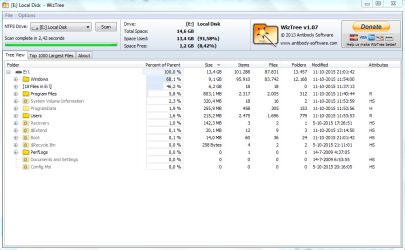
The E drive does have Recovery Files.
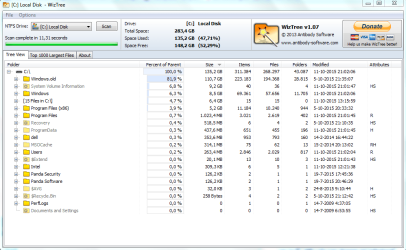
C is also only about 50% free which seems little to me when there is nothing yet on the computer. So I ran that one too.
 

Attachments

  • WizTree Local Disk E.PNG
    WizTree Local Disk E.PNG
    35.5 KB · Views: 3
  • WizTree Local Disk C.PNG
    WizTree Local Disk C.PNG
    41.3 KB · Views: 3

My Computer

Computer type
Laptop
Computer Manufacturer/Model Number
Toshiba
OS
Windows 10 Home 64bit
CPU
Intel(R) Core(TM) i5-5200U
Memory
8GB
Antivirus
AVG Free, SuperAntiSpyware, Malwarebytes Anti-Malware
Browser
Google Chrome

My Computer

Computer type
PC/Desktop
Computer Manufacturer/Model Number
home built
OS
Multi-Boot W7_Pro_x64 W8.1_Pro_x64 W10_Pro_x64 +Linux_VMs +Chromium_VM
CPU
AMD Athlon II x4 620
Motherboard
Gigabyte GA-MA785G-UD3H
Memory
6GB GSkill DDR2 800
Graphics Card(s)
AMD 4670 GPU + AMD 4200 IGP
Sound Card
on board Realtek ALC889A
Monitor(s) Displays
RCA 40" LCD TV, Insignia 32" LCD TV, HP 15" LCD monitor
Screen Resolution
1680 x 1050
Hard Drives
OCZ Vertex 3 120GB,
Samsung F3 1TB (3),
Several others - WD, Seagate, Hitachi, ...
PSU
Corsair 500 W
Case
Rosewill mid tower
Cooling
CM 90mm rifle
Keyboard
Gyration wireless, Logitech wireless, Dell USB wired
Mouse
Gyration wireless, Logitech wireless, V7 USB wired
Internet Speed
Spectrum - 100Mbps D / 10Mbps U
Antivirus
Avast, MBAM3, EMET, WinPatrol
Browser
Pale Moon, Firefox, IE
Other Info
2 multi-boot PC's
Mainly HTPC/Office/Gen purpose (no gaming).
Trendnet USB KVM.
LG DVD burner/Blue Ray Player.
Tray system for removable SATA backup drives.

Not currently OCd, under-volted.
I use Hybrid sleep, rarely re-boot or shutdown.

Hauppauge HD-PVR, Avermedia PCIe TV Tuner, Hauppauge PCI TV Tuner.
Yeah! That took care of the C drive.

What do I go about removing the Recovery files from the E drive? Just go to computer/E, find the recovery file & delete it? Or am I thinking too simple here...:huh: (clean up of E, system files only get me the Recycle Bin so that's not the way)
 

Attachments

  • Computer 2.PNG
    Computer 2.PNG
    26.9 KB · Views: 2

My Computer

Computer type
Laptop
Computer Manufacturer/Model Number
Toshiba
OS
Windows 10 Home 64bit
CPU
Intel(R) Core(TM) i5-5200U
Memory
8GB
Antivirus
AVG Free, SuperAntiSpyware, Malwarebytes Anti-Malware
Browser
Google Chrome
I don't know what you can do about cleaning up the E: Recovery partition.
Maybe someone with Dell Recovery partition experience will post with advice ?

I would leave it as is for now, until you can find out for sure.
It is your Active System partition meaning it contains the bootloader.
It that gets messed up the PC won't boot without a Repair.

Also the Recovery might not work if you delete something needed for that.
It might not work now, after the "re-install", but I'm not sure.

Why was a re-install done ?
 

My Computer

Computer type
PC/Desktop
Computer Manufacturer/Model Number
home built
OS
Multi-Boot W7_Pro_x64 W8.1_Pro_x64 W10_Pro_x64 +Linux_VMs +Chromium_VM
CPU
AMD Athlon II x4 620
Motherboard
Gigabyte GA-MA785G-UD3H
Memory
6GB GSkill DDR2 800
Graphics Card(s)
AMD 4670 GPU + AMD 4200 IGP
Sound Card
on board Realtek ALC889A
Monitor(s) Displays
RCA 40" LCD TV, Insignia 32" LCD TV, HP 15" LCD monitor
Screen Resolution
1680 x 1050
Hard Drives
OCZ Vertex 3 120GB,
Samsung F3 1TB (3),
Several others - WD, Seagate, Hitachi, ...
PSU
Corsair 500 W
Case
Rosewill mid tower
Cooling
CM 90mm rifle
Keyboard
Gyration wireless, Logitech wireless, Dell USB wired
Mouse
Gyration wireless, Logitech wireless, V7 USB wired
Internet Speed
Spectrum - 100Mbps D / 10Mbps U
Antivirus
Avast, MBAM3, EMET, WinPatrol
Browser
Pale Moon, Firefox, IE
Other Info
2 multi-boot PC's
Mainly HTPC/Office/Gen purpose (no gaming).
Trendnet USB KVM.
LG DVD burner/Blue Ray Player.
Tray system for removable SATA backup drives.

Not currently OCd, under-volted.
I use Hybrid sleep, rarely re-boot or shutdown.

Hauppauge HD-PVR, Avermedia PCIe TV Tuner, Hauppauge PCI TV Tuner.
OK. Hope someone can tell me.
But E is not the boot drive, that's on the C.

I re-installed just to clear up everything on the computer & with that make it a little faster again. I've done that many times on different laptops, including this one. But this has never happened before! Instead of overwriting the old one, it kept it & installed a second one. I really don't get it...
And it happened with 2 laptops... The other one is also a DELL but it's 8yrs old & no longer a DELL on the inside (replaced hard drive & upgraded memory). That one, I need to clear as much as possible coz it's going for recycling -in that case, maybe deleting both will just clear the whole thing...? :D
 

My Computer

Computer type
Laptop
Computer Manufacturer/Model Number
Toshiba
OS
Windows 10 Home 64bit
CPU
Intel(R) Core(TM) i5-5200U
Memory
8GB
Antivirus
AVG Free, SuperAntiSpyware, Malwarebytes Anti-Malware
Browser
Google Chrome
In Windows Disk Management the Boot partition shows where Windows is installed and running from.
The System/Active partition is where the bootloader is located.
Windows won't start if the bootloader gets messed up.
 

My Computer

Computer type
PC/Desktop
Computer Manufacturer/Model Number
home built
OS
Multi-Boot W7_Pro_x64 W8.1_Pro_x64 W10_Pro_x64 +Linux_VMs +Chromium_VM
CPU
AMD Athlon II x4 620
Motherboard
Gigabyte GA-MA785G-UD3H
Memory
6GB GSkill DDR2 800
Graphics Card(s)
AMD 4670 GPU + AMD 4200 IGP
Sound Card
on board Realtek ALC889A
Monitor(s) Displays
RCA 40" LCD TV, Insignia 32" LCD TV, HP 15" LCD monitor
Screen Resolution
1680 x 1050
Hard Drives
OCZ Vertex 3 120GB,
Samsung F3 1TB (3),
Several others - WD, Seagate, Hitachi, ...
PSU
Corsair 500 W
Case
Rosewill mid tower
Cooling
CM 90mm rifle
Keyboard
Gyration wireless, Logitech wireless, Dell USB wired
Mouse
Gyration wireless, Logitech wireless, V7 USB wired
Internet Speed
Spectrum - 100Mbps D / 10Mbps U
Antivirus
Avast, MBAM3, EMET, WinPatrol
Browser
Pale Moon, Firefox, IE
Other Info
2 multi-boot PC's
Mainly HTPC/Office/Gen purpose (no gaming).
Trendnet USB KVM.
LG DVD burner/Blue Ray Player.
Tray system for removable SATA backup drives.

Not currently OCd, under-volted.
I use Hybrid sleep, rarely re-boot or shutdown.

Hauppauge HD-PVR, Avermedia PCIe TV Tuner, Hauppauge PCI TV Tuner.

My Computer

Computer type
PC/Desktop
Computer Manufacturer/Model Number
home built
OS
Multi-Boot W7_Pro_x64 W8.1_Pro_x64 W10_Pro_x64 +Linux_VMs +Chromium_VM
CPU
AMD Athlon II x4 620
Motherboard
Gigabyte GA-MA785G-UD3H
Memory
6GB GSkill DDR2 800
Graphics Card(s)
AMD 4670 GPU + AMD 4200 IGP
Sound Card
on board Realtek ALC889A
Monitor(s) Displays
RCA 40" LCD TV, Insignia 32" LCD TV, HP 15" LCD monitor
Screen Resolution
1680 x 1050
Hard Drives
OCZ Vertex 3 120GB,
Samsung F3 1TB (3),
Several others - WD, Seagate, Hitachi, ...
PSU
Corsair 500 W
Case
Rosewill mid tower
Cooling
CM 90mm rifle
Keyboard
Gyration wireless, Logitech wireless, Dell USB wired
Mouse
Gyration wireless, Logitech wireless, V7 USB wired
Internet Speed
Spectrum - 100Mbps D / 10Mbps U
Antivirus
Avast, MBAM3, EMET, WinPatrol
Browser
Pale Moon, Firefox, IE
Other Info
2 multi-boot PC's
Mainly HTPC/Office/Gen purpose (no gaming).
Trendnet USB KVM.
LG DVD burner/Blue Ray Player.
Tray system for removable SATA backup drives.

Not currently OCd, under-volted.
I use Hybrid sleep, rarely re-boot or shutdown.

Hauppauge HD-PVR, Avermedia PCIe TV Tuner, Hauppauge PCI TV Tuner.
OK, the E is active. Confusing though, since in Disk Management it says
C: Book, Page File, Crash Dump, Primary Partition
E: System, Active, Primary Partition

But I'll leave it for now! And wait for someone to inform me on the Recovery files.


For the other laptop, which I'd rather format completely, would I achieve that by using EasyBCD to delete Windows 7? (I already deleted its double). Or would it leave Windows somewhere in the background & just not boot it? I might just try your last suggestion on this old one, don't care if it goes completely wrong!! :p
Last question for today! Time to get some sleep on this side of the world.
 

My Computer

Computer type
Laptop
Computer Manufacturer/Model Number
Toshiba
OS
Windows 10 Home 64bit
CPU
Intel(R) Core(TM) i5-5200U
Memory
8GB
Antivirus
AVG Free, SuperAntiSpyware, Malwarebytes Anti-Malware
Browser
Google Chrome

My Computer

Computer type
PC/Desktop
Computer Manufacturer/Model Number
home built
OS
Multi-Boot W7_Pro_x64 W8.1_Pro_x64 W10_Pro_x64 +Linux_VMs +Chromium_VM
CPU
AMD Athlon II x4 620
Motherboard
Gigabyte GA-MA785G-UD3H
Memory
6GB GSkill DDR2 800
Graphics Card(s)
AMD 4670 GPU + AMD 4200 IGP
Sound Card
on board Realtek ALC889A
Monitor(s) Displays
RCA 40" LCD TV, Insignia 32" LCD TV, HP 15" LCD monitor
Screen Resolution
1680 x 1050
Hard Drives
OCZ Vertex 3 120GB,
Samsung F3 1TB (3),
Several others - WD, Seagate, Hitachi, ...
PSU
Corsair 500 W
Case
Rosewill mid tower
Cooling
CM 90mm rifle
Keyboard
Gyration wireless, Logitech wireless, Dell USB wired
Mouse
Gyration wireless, Logitech wireless, V7 USB wired
Internet Speed
Spectrum - 100Mbps D / 10Mbps U
Antivirus
Avast, MBAM3, EMET, WinPatrol
Browser
Pale Moon, Firefox, IE
Other Info
2 multi-boot PC's
Mainly HTPC/Office/Gen purpose (no gaming).
Trendnet USB KVM.
LG DVD burner/Blue Ray Player.
Tray system for removable SATA backup drives.

Not currently OCd, under-volted.
I use Hybrid sleep, rarely re-boot or shutdown.

Hauppauge HD-PVR, Avermedia PCIe TV Tuner, Hauppauge PCI TV Tuner.
If you no longer want the recovery partition, delete it in Disk Management then expand C: to encompass the now free space.
 

My Computer

Computer type
PC/Desktop
Computer Manufacturer/Model Number
Lenovo IdeaCenter 450
OS
Windows 10 Pro X64
CPU
Intel Quad Core i7-4770 @ 3.4Ghz
Memory
16.0GB PC3-12800 DDR3 SDRAM 1600 MHz
Graphics Card(s)
Intel Integrated HD Graphics
Sound Card
Realtek HD Audio
Monitor(s) Displays
HP 22" LCD
Screen Resolution
1680 x 1050
Hard Drives
250GB Samsung EVO SATA-3 SSD
2TB Seagate ST2000DM001 SATA-2
1.5TB Seagate ST3150041AS SATA
Keyboard
Dell USB
Mouse
Lenovo USB
Internet Speed
Cable via Road Runner 3MB Upload, 30MB Download
Antivirus
Windows Defender, MBAM Pro, MBAE
Browser
Seamonkey
Other Info
UEFI/GPT
PLDS DVD-RW DH16AERSH
To format and re-install Windows on the other laptop, see this tutorial:
http://www.sevenforums.com/tutorials/219487-clean-reinstall-factory-oem-windows-7-a.html

Thanks. This is exactly what I did on the re-install, for both laptops. It's always worked & this time for some reason it kept the older version, instead of replacing it with a clean version...
One needs to be reset/reinstalled properly, so it can be used again.
The other I want to clear completely. Even if Windows is gone, it doesn't matter coz it needs to go for recycling so the emptier the beter.
 

My Computer

Computer type
Laptop
Computer Manufacturer/Model Number
Toshiba
OS
Windows 10 Home 64bit
CPU
Intel(R) Core(TM) i5-5200U
Memory
8GB
Antivirus
AVG Free, SuperAntiSpyware, Malwarebytes Anti-Malware
Browser
Google Chrome
If you no longer want the recovery partition, delete it in Disk Management then expand C: to encompass the now free space.

It's not that I don't want the recovery partition, it's probably a useful thing to have (no?). The issue I have is that it's completely full, mainly with Recovery files. Was hoping to just clear that. Or is this the only option?
I posted thumbnails from the system with how full each partition is and from the Wiztree program showing what's on there. C: is taken care of. Nothing been done about E:
 

My Computer

Computer type
Laptop
Computer Manufacturer/Model Number
Toshiba
OS
Windows 10 Home 64bit
CPU
Intel(R) Core(TM) i5-5200U
Memory
8GB
Antivirus
AVG Free, SuperAntiSpyware, Malwarebytes Anti-Malware
Browser
Google Chrome
It's supposed to be full, or nearly full. Nothing should be writing to that partition.

Check System Restore settings and make sure it's disabled for that partition. It should be on for C: but disabled for E:.
 

My Computer

Computer type
PC/Desktop
Computer Manufacturer/Model Number
Lenovo IdeaCenter 450
OS
Windows 10 Pro X64
CPU
Intel Quad Core i7-4770 @ 3.4Ghz
Memory
16.0GB PC3-12800 DDR3 SDRAM 1600 MHz
Graphics Card(s)
Intel Integrated HD Graphics
Sound Card
Realtek HD Audio
Monitor(s) Displays
HP 22" LCD
Screen Resolution
1680 x 1050
Hard Drives
250GB Samsung EVO SATA-3 SSD
2TB Seagate ST2000DM001 SATA-2
1.5TB Seagate ST3150041AS SATA
Keyboard
Dell USB
Mouse
Lenovo USB
Internet Speed
Cable via Road Runner 3MB Upload, 30MB Download
Antivirus
Windows Defender, MBAM Pro, MBAE
Browser
Seamonkey
Other Info
UEFI/GPT
PLDS DVD-RW DH16AERSH
Back
Top