
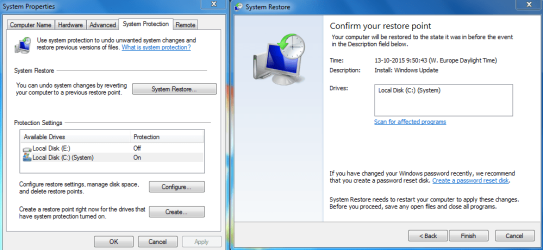
OK, thanks for that. I found the Recovery Point & on which partition it is set (I'm learning a lot here, thank you for that!!) and made sure it was on C: I also deleted the previous recovery points, there is only the Install left -makes sense since that is the last thing I did besides figuring all this out! 
Can you confirm I got it right?
And then a different question on Re-Install. My new laptop didn't come with the OS CD but doing all this I realised that it doesn't even have a Windows sticker on it that 'proves' that I have a legitimate version of it... It came with Windows 8 installed, and upgrade to Windows 10 when available which was a couple of days later. I read on the forum that I can create a System Image Backup and use that for a re-install. Guess that would be the answer but I'm worried about not having any 'official papers/sticker'. Should I be worried?
THANK YOU FOR ALL YOUR HELP!!! I got it sorted and learned lots, without your help I would not have managed so thank you.
Can you confirm I got it right?
And then a different question on Re-Install. My new laptop didn't come with the OS CD but doing all this I realised that it doesn't even have a Windows sticker on it that 'proves' that I have a legitimate version of it... It came with Windows 8 installed, and upgrade to Windows 10 when available which was a couple of days later. I read on the forum that I can create a System Image Backup and use that for a re-install. Guess that would be the answer but I'm worried about not having any 'official papers/sticker'. Should I be worried?
THANK YOU FOR ALL YOUR HELP!!! I got it sorted and learned lots, without your help I would not have managed so thank you.
Attachments
My Computer
At a glance
Windows 10 Home 64bitIntel(R) Core(TM) i5-5200U8GB
- Computer type
- Laptop
- Computer Manufacturer/Model Number
- Toshiba
- OS
- Windows 10 Home 64bit
- CPU
- Intel(R) Core(TM) i5-5200U
- Memory
- 8GB
- Antivirus
- AVG Free, SuperAntiSpyware, Malwarebytes Anti-Malware
- Browser
- Google Chrome


 And learned lots


