how do i remove a shortcut from the games folder

spud

New member
Local time
2:01 AM
Messages
9
i have a game in my games folder that will not remove from the folder, can somone tell me how i go about removing it
 

My Computer My Computer

OS
w7
CPU
intel E6700
Motherboard
Asus Striker Extreme II
Memory
4gig 6400 corsair
Graphics Card(s)
8800ultra
Sound Card
creative xf-i elite
Monitor(s) Displays
2 22" acer P224w
Hard Drives
2 raptor 150
2 wd 200
PSU
750watt
Case
cooler master case
Using admin privileges, right click and delete?
am at work atm so cant check.
 

My Computer My Computer

Computer Manufacturer/Model Number
Home made
OS
Windows 7 RC 7100 x64
CPU
Intel E8400 @ 3.0GHz
Motherboard
GA EP35-DS3
Memory
2 x 2GB DDR2 800MHz Corsair
Graphics Card(s)
1GB GigaByte ATi Radeon HD4870 PCI-e
Sound Card
Creative Sound Blaster XF-i XtremeGamer
Monitor(s) Displays
AOC 22" LCD
Screen Resolution
1650*1080
Hard Drives
1 x WD 200GB sata I (primary)
1 x Seagate 200GB IDE
1 x WD 500GB sata II
PSU
500watt Basiq
Case
iCute - 0408SL Series
Cooling
1 x 12cm front intake fan, 1 x 8cm side intake fan
Keyboard
Logitech G15 (blue)
Mouse
Logitech MX518
Internet Speed
Cable (12MB down <--good!, 256k up <--sucks!)
Hello Spud,

You might check to see if you may beable to right click on it and click "Delete" to remove it from the hidden folder below.

C:\ProgramData\Microsoft\Windows\Start Menu\Programs\Games

Hope this helps,
Shawn
 

My Computer My Computer

Computer type
PC/Desktop
Computer Manufacturer/Model Number
Self built custom
OS
64-bit Windows 11 Pro for Workstations
CPU
Intel i7-8700K OC'd to 5 GHz
Motherboard
ASUS ROG Maximus XI Formula Z390
Memory
64 GB (4x16GB) G.SKILL TridentZ RGB DDR4 3600 MHz
Graphics Card(s)
ASUS ROG-STRIX-GTX1080TI-O11G-GAMING
Sound Card
Integrated
Monitor(s) Displays
2 x Samsung Odyssey G7 27"
Screen Resolution
2560x1440
Hard Drives
1TB Samsung 990 PRO M.2,
4TB Samsung 990 PRO PRO M.2,
TerraMaster F8 SSD Plus NAS
PSU
Seasonic Prime Titanium 850W
Case
Thermaltake Core P3
Cooling
Corsair Hydro H115i
Keyboard
Logitech wireless K800
Mouse
Logitech MX Master 4
Internet Speed
2 Gb/s Download and 100 Mb/s Upload
Antivirus
Malwarebyte Anti-Malware Premium
Browser
Google Chrome
Other Info
Logitech Z625 speaker system,
Logitech BRIO 4K Pro webcam,
HP Color LaserJet Pro MFP M477fdn,
APC SMART-UPS RT 1000 XL - SURT1000XLI,
Galaxy S23 Plus phone
ok i found that folder thx lot for that, but its still there even after a reset, i cant right clcik it at all so cant get admin privy on it
 

My Computer My Computer

OS
w7
CPU
intel E6700
Motherboard
Asus Striker Extreme II
Memory
4gig 6400 corsair
Graphics Card(s)
8800ultra
Sound Card
creative xf-i elite
Monitor(s) Displays
2 22" acer P224w
Hard Drives
2 raptor 150
2 wd 200
PSU
750watt
Case
cooler master case
Hi spud,

I take it that you found the folder.
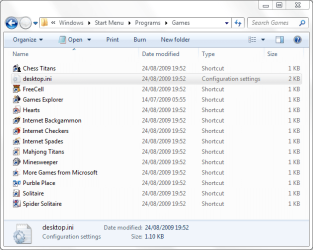
Capture.PNG
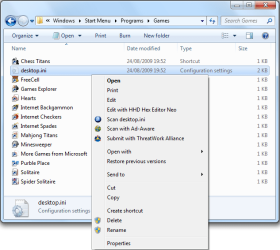
Do you mean to say that when you right-click nothing happens and you don't get the menu of options as shown below?
Capture1.PNG
 

My Computer My Computer

Computer type
PC/Desktop
Computer Manufacturer/Model Number
Dwarf Dwf/11/2012 r09/2013
OS
Windows 8.1 Pro RTM x64
CPU
Intel Core-i5-3570K 4-core @ 3.4GHz (Ivy Bridge) (OC 4.4GHz)
Motherboard
ASRock Z77 Extreme4-M
Memory
4 x 4GB DDR3-1600 Corsair Vengeance CMZ8GX3M2A1600C9B (16GB)
Graphics Card(s)
MSI GeForce GTX770 Gaming OC 2GB
Sound Card
Realtek High Definition on board solution (ALC 898)
Monitor(s) Displays
ViewSonic VA1912w Widescreen (VGA)
Screen Resolution
1440x900
Hard Drives
OCZ Agility 3 SSD 120GB SATA III x2 (RAID 0)
Samsung HD501LJ 500GB SATA II x2
Hitachi HDS721010CLA332 1TB SATA II
Iomega 1.5TB Ext USB 2.0
WD 2.0TB Ext USB 3.0
PSU
XFX Pro Series 850W Semi-Modular
Case
Gigabyte IF233
Cooling
1 x 120mm Front Inlet 1 x 120mm Rear Exhaust
Keyboard
Microsoft Comfort Curve Keyboard 3000 (USB)
Mouse
Microsoft Comfort Mouse 3000 for Business (USB)
Internet Speed
NetGear DG834Gv3 ADSL Modem/Router (Ethernet) ~4.0 Mb/s (O2)
Antivirus
Avast! 8.0.1497
Browser
IE 11
Other Info
Optical Drive: HL-DT-ST BD-RE BH10LS30 SATA Bluray
Lexmark S305 Printer/Scanner/Copier (USB)
WEI Score: 8.1/8.1/8.5/8.5/8.25
Asus Eee PC 1011PX Netbook (Windows 7 x86 Starter)
Spud,

If it's one of the default games that come with Windows 7, then you can use Windows Features to removed the game.
 

My Computer My Computer

Computer type
PC/Desktop
Computer Manufacturer/Model Number
Self built custom
OS
64-bit Windows 11 Pro for Workstations
CPU
Intel i7-8700K OC'd to 5 GHz
Motherboard
ASUS ROG Maximus XI Formula Z390
Memory
64 GB (4x16GB) G.SKILL TridentZ RGB DDR4 3600 MHz
Graphics Card(s)
ASUS ROG-STRIX-GTX1080TI-O11G-GAMING
Sound Card
Integrated
Monitor(s) Displays
2 x Samsung Odyssey G7 27"
Screen Resolution
2560x1440
Hard Drives
1TB Samsung 990 PRO M.2,
4TB Samsung 990 PRO PRO M.2,
TerraMaster F8 SSD Plus NAS
PSU
Seasonic Prime Titanium 850W
Case
Thermaltake Core P3
Cooling
Corsair Hydro H115i
Keyboard
Logitech wireless K800
Mouse
Logitech MX Master 4
Internet Speed
2 Gb/s Download and 100 Mb/s Upload
Antivirus
Malwarebyte Anti-Malware Premium
Browser
Google Chrome
Other Info
Logitech Z625 speaker system,
Logitech BRIO 4K Pro webcam,
HP Color LaserJet Pro MFP M477fdn,
APC SMART-UPS RT 1000 XL - SURT1000XLI,
Galaxy S23 Plus phone
yes Dwarf i found the folder removed the shotcut from the folder but when i go back to the games Folder in the start menu its still there, its also not one of the windows games
 

My Computer My Computer

OS
w7
CPU
intel E6700
Motherboard
Asus Striker Extreme II
Memory
4gig 6400 corsair
Graphics Card(s)
8800ultra
Sound Card
creative xf-i elite
Monitor(s) Displays
2 22" acer P224w
Hard Drives
2 raptor 150
2 wd 200
PSU
750watt
Case
cooler master case
Have you uninstalled the game in question? What is the game?
 

My Computer My Computer

Computer type
PC/Desktop
Computer Manufacturer/Model Number
Dwarf Dwf/11/2012 r09/2013
OS
Windows 8.1 Pro RTM x64
CPU
Intel Core-i5-3570K 4-core @ 3.4GHz (Ivy Bridge) (OC 4.4GHz)
Motherboard
ASRock Z77 Extreme4-M
Memory
4 x 4GB DDR3-1600 Corsair Vengeance CMZ8GX3M2A1600C9B (16GB)
Graphics Card(s)
MSI GeForce GTX770 Gaming OC 2GB
Sound Card
Realtek High Definition on board solution (ALC 898)
Monitor(s) Displays
ViewSonic VA1912w Widescreen (VGA)
Screen Resolution
1440x900
Hard Drives
OCZ Agility 3 SSD 120GB SATA III x2 (RAID 0)
Samsung HD501LJ 500GB SATA II x2
Hitachi HDS721010CLA332 1TB SATA II
Iomega 1.5TB Ext USB 2.0
WD 2.0TB Ext USB 3.0
PSU
XFX Pro Series 850W Semi-Modular
Case
Gigabyte IF233
Cooling
1 x 120mm Front Inlet 1 x 120mm Rear Exhaust
Keyboard
Microsoft Comfort Curve Keyboard 3000 (USB)
Mouse
Microsoft Comfort Mouse 3000 for Business (USB)
Internet Speed
NetGear DG834Gv3 ADSL Modem/Router (Ethernet) ~4.0 Mb/s (O2)
Antivirus
Avast! 8.0.1497
Browser
IE 11
Other Info
Optical Drive: HL-DT-ST BD-RE BH10LS30 SATA Bluray
Lexmark S305 Printer/Scanner/Copier (USB)
WEI Score: 8.1/8.1/8.5/8.5/8.25
Asus Eee PC 1011PX Netbook (Windows 7 x86 Starter)
Have you uninstalled the game in question? What is the game?
He wants to remove a shortcut for the game, not uninstall it.
 

My Computer My Computer

Computer Manufacturer/Model Number
Home made
OS
Windows 7 RC 7100 x64
CPU
Intel E8400 @ 3.0GHz
Motherboard
GA EP35-DS3
Memory
2 x 2GB DDR2 800MHz Corsair
Graphics Card(s)
1GB GigaByte ATi Radeon HD4870 PCI-e
Sound Card
Creative Sound Blaster XF-i XtremeGamer
Monitor(s) Displays
AOC 22" LCD
Screen Resolution
1650*1080
Hard Drives
1 x WD 200GB sata I (primary)
1 x Seagate 200GB IDE
1 x WD 500GB sata II
PSU
500watt Basiq
Case
iCute - 0408SL Series
Cooling
1 x 12cm front intake fan, 1 x 8cm side intake fan
Keyboard
Logitech G15 (blue)
Mouse
Logitech MX518
Internet Speed
Cable (12MB down <--good!, 256k up <--sucks!)
there is two short cuts in the folder and i want to remove one but when i remove it from the folder that was linked me one is still present

as u can see in this pic Football manager the one on the right is the original but it never worked so i put in my one one and im trying to remove the Original one in teh game folder
 

Attachments

  • folder.png
    folder.png
    149.2 KB · Views: 79

My Computer My Computer

OS
w7
CPU
intel E6700
Motherboard
Asus Striker Extreme II
Memory
4gig 6400 corsair
Graphics Card(s)
8800ultra
Sound Card
creative xf-i elite
Monitor(s) Displays
2 22" acer P224w
Hard Drives
2 raptor 150
2 wd 200
PSU
750watt
Case
cooler master case
Spud,

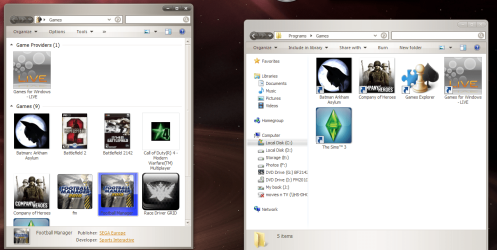
Are you able to right click on the game in "Games" Explorer, and click on "Hide This Game"?
games.jpg
You can unhide it by clicking on Options (toolbar) and Unhide games.
 

My Computer My Computer

Computer type
PC/Desktop
Computer Manufacturer/Model Number
Self built custom
OS
64-bit Windows 11 Pro for Workstations
CPU
Intel i7-8700K OC'd to 5 GHz
Motherboard
ASUS ROG Maximus XI Formula Z390
Memory
64 GB (4x16GB) G.SKILL TridentZ RGB DDR4 3600 MHz
Graphics Card(s)
ASUS ROG-STRIX-GTX1080TI-O11G-GAMING
Sound Card
Integrated
Monitor(s) Displays
2 x Samsung Odyssey G7 27"
Screen Resolution
2560x1440
Hard Drives
1TB Samsung 990 PRO M.2,
4TB Samsung 990 PRO PRO M.2,
TerraMaster F8 SSD Plus NAS
PSU
Seasonic Prime Titanium 850W
Case
Thermaltake Core P3
Cooling
Corsair Hydro H115i
Keyboard
Logitech wireless K800
Mouse
Logitech MX Master 4
Internet Speed
2 Gb/s Download and 100 Mb/s Upload
Antivirus
Malwarebyte Anti-Malware Premium
Browser
Google Chrome
Other Info
Logitech Z625 speaker system,
Logitech BRIO 4K Pro webcam,
HP Color LaserJet Pro MFP M477fdn,
APC SMART-UPS RT 1000 XL - SURT1000XLI,
Galaxy S23 Plus phone
I had the same problem as Spud. I was able to get access to the unresponsive game link to hide it by temporarily turning off UAC.


  • Control Panel\All Control Panel Items\User Accounts\Change User Account Control settings
 

My Computer My Computer

Computer Manufacturer/Model Number
Acer Revo 3610
OS
Windows 7 Home Premium x64
CPU
Intel Atom 330 @ 1.6 GHz
Memory
4 GB
Graphics Card(s)
Onboard NVIDIA ION, plus USB VGA adapter
Monitor(s) Displays
Samsung 22BW, 19", Samsung LE32B450
Screen Resolution
1680x1050, 1280x1024, 1366x768
Hard Drives
Internal 250Gb, 3 x Buffalo 1TB LinkStation DLNA/NAS
Internet Speed
50meg cable
Other Info
Windows Experience Index 3.3
Hi,

I'm having a similar problem to this.

I have a shortcut to 'Call of duty' which I have uninstalled.
Clicking on this icon does nothing. I cannot delete it, I can copy it and delete the copy but not the original, if I right click the icon nothing happens. I am not given a context menu like if I right click any other game/file/program.

I have checked in the start menu folders
(C:\Users\James\AppData\Roaming\Microsoft\Windows\Start Menu\Programs\Games)

And also in the program data folder
(C:\ProgramData\Microsoft\Windows\Start Menu\Programs\Games)

But there is no icon in either folder for call of duty. The only place it appears is within the games folder/menu in the start menu.

Is there any way I can get rid of this?
Is it a case of finding the registry entry and deleting it?

Thanks in advance
James

 

My Computer My Computer

OS
Windows 7
Hello James,

Check in the registry at the location below.

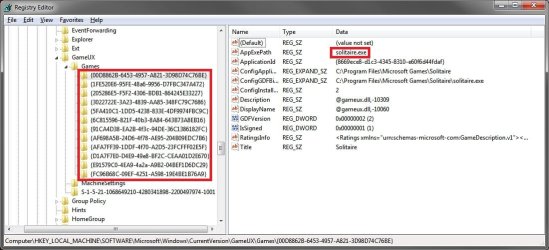
HKEY_LOCAL_MACHINE\SOFTWARE\Microsoft\Windows\CurrentVersion\GameUX\Games

In the Games key (left pane) select each long number subkey to see what game it is for (right pane). If you find one for "Call of Duty", then delete the long number key (left pane) for it.

Registry.jpg

Hope this helps,
Shawn
 

My Computer My Computer

Computer type
PC/Desktop
Computer Manufacturer/Model Number
Self built custom
OS
64-bit Windows 11 Pro for Workstations
CPU
Intel i7-8700K OC'd to 5 GHz
Motherboard
ASUS ROG Maximus XI Formula Z390
Memory
64 GB (4x16GB) G.SKILL TridentZ RGB DDR4 3600 MHz
Graphics Card(s)
ASUS ROG-STRIX-GTX1080TI-O11G-GAMING
Sound Card
Integrated
Monitor(s) Displays
2 x Samsung Odyssey G7 27"
Screen Resolution
2560x1440
Hard Drives
1TB Samsung 990 PRO M.2,
4TB Samsung 990 PRO PRO M.2,
TerraMaster F8 SSD Plus NAS
PSU
Seasonic Prime Titanium 850W
Case
Thermaltake Core P3
Cooling
Corsair Hydro H115i
Keyboard
Logitech wireless K800
Mouse
Logitech MX Master 4
Internet Speed
2 Gb/s Download and 100 Mb/s Upload
Antivirus
Malwarebyte Anti-Malware Premium
Browser
Google Chrome
Other Info
Logitech Z625 speaker system,
Logitech BRIO 4K Pro webcam,
HP Color LaserJet Pro MFP M477fdn,
APC SMART-UPS RT 1000 XL - SURT1000XLI,
Galaxy S23 Plus phone
Back
Top