Solved How do I stop updates from installing on shutdown?

Staffy

New member
Local time
11:20 PM
Messages
14
Hi,

My setting for Windows Updates is "Download updates but let me choose whether to install them". When I get updates and shut down my PC, I get the exclamation mark icon next to the "Shut down" button indicating that updates will be installed on shutdown. How do I shutdown my PC without installing the downloaded updates?

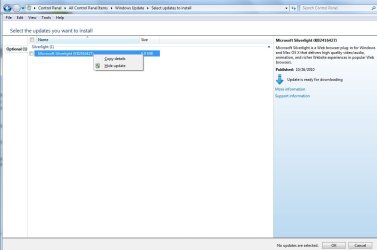
In the past, I would go to the Windows Update window to see what was downloaded and uncheck the updates that had a tick in the checkbox. This worked until today i.e. updates that weren't ticked, weren't installed.

I had IE9 downloaded for quite a while now and I always unchecked it from being installed as I wasn't ready to use it yet. Today, I did the same thing but the exclamation mark icon on the "Shut down" button wouldn't go away. I tried several times to uncheck it on the Windows Update screen but the icon on the "Shut down" button wouldn't disappear. In the end, I thought I risk it and shutdown the PC. It then proceeded to install IE9!

I thought that by going to the Windows Update window and unchecking the checkbox against the downloaded updates meant that they won't be installed when the PC is shutdown. In XP, there used to be a shutdown but don't install updates option when shutting down the PC. Is there an equivalent on W7 as I can't see it.

Thanks.
 

My Computer My Computer

OS
Windows 7 Home Premium 64bit

My Computer My Computer

Computer type
PC/Desktop
Computer Manufacturer/Model Number
Self built custom
OS
64-bit Windows 11 Pro for Workstations
CPU
Intel i7-8700K OC'd to 5 GHz
Motherboard
ASUS ROG Maximus XI Formula Z390
Memory
64 GB (4x16GB) G.SKILL TridentZ RGB DDR4 3600 MHz
Graphics Card(s)
ASUS ROG-STRIX-GTX1080TI-O11G-GAMING
Sound Card
Integrated
Monitor(s) Displays
2 x Samsung Odyssey G7 27"
Screen Resolution
2560x1440
Hard Drives
1TB Samsung 990 PRO M.2,
4TB Samsung 990 PRO PRO M.2,
TerraMaster F8 SSD Plus NAS
PSU
Seasonic Prime Titanium 850W
Case
Thermaltake Core P3
Cooling
Corsair Hydro H115i
Keyboard
Logitech wireless K800
Mouse
Logitech MX Master 4
Internet Speed
2 Gb/s Download and 100 Mb/s Upload
Antivirus
Malwarebyte Anti-Malware Premium
Browser
Google Chrome
Other Info
Logitech Z625 speaker system,
Logitech BRIO 4K Pro webcam,
HP Color LaserJet Pro MFP M477fdn,
APC SMART-UPS RT 1000 XL - SURT1000XLI,
Galaxy S23 Plus phone
Thanks, Brink. That was a fast reply!

I'll give it a shot and see what happens :)
 

My Computer My Computer

OS
Windows 7 Home Premium 64bit

Attachments

  • WinUpdate.jpg
    WinUpdate.jpg
    46 KB · Views: 172

My Computer My Computer

Computer type
PC/Desktop
Computer Manufacturer/Model Number
Dell Inspiron 530
OS
Windows 7 Professional SP1 64-bit
CPU
Intel Core 2 Duo Processor E8300 @ 2.83GHz
Motherboard
Dell Inc. 0RY007 (Socket 775)
Memory
4.00 GB Dual-Channel DDR2 @ 332MHz (5-5-5-15)
Graphics Card(s)
Intel(R) G33/G31 Express Chipset Family
Sound Card
Integrated 7.1 Channel Audio
Monitor(s) Displays
Acer G245HQL 23.6" LED(1920x1080@60Hz)
Screen Resolution
1920 x 1080
Hard Drives
Disk 0 HITACHI 1TB OS Installed - Disk 1 HITACHI 1TB For Backups
Keyboard
Dell USB Keyboard
Mouse
Dell Optical USB Mouse
Internet Speed
DSL 10 meg
Antivirus
Symantec(SEP)
Browser
Pale Moon
You're welcome Staffy. Please let us know how it went. :)
 

My Computer My Computer

Computer type
PC/Desktop
Computer Manufacturer/Model Number
Self built custom
OS
64-bit Windows 11 Pro for Workstations
CPU
Intel i7-8700K OC'd to 5 GHz
Motherboard
ASUS ROG Maximus XI Formula Z390
Memory
64 GB (4x16GB) G.SKILL TridentZ RGB DDR4 3600 MHz
Graphics Card(s)
ASUS ROG-STRIX-GTX1080TI-O11G-GAMING
Sound Card
Integrated
Monitor(s) Displays
2 x Samsung Odyssey G7 27"
Screen Resolution
2560x1440
Hard Drives
1TB Samsung 990 PRO M.2,
4TB Samsung 990 PRO PRO M.2,
TerraMaster F8 SSD Plus NAS
PSU
Seasonic Prime Titanium 850W
Case
Thermaltake Core P3
Cooling
Corsair Hydro H115i
Keyboard
Logitech wireless K800
Mouse
Logitech MX Master 4
Internet Speed
2 Gb/s Download and 100 Mb/s Upload
Antivirus
Malwarebyte Anti-Malware Premium
Browser
Google Chrome
Other Info
Logitech Z625 speaker system,
Logitech BRIO 4K Pro webcam,
HP Color LaserJet Pro MFP M477fdn,
APC SMART-UPS RT 1000 XL - SURT1000XLI,
Galaxy S23 Plus phone
Just a quick feedback. Before changing registry entries with Brink's suggestion, I thought I'd try the option that Flatiron has his set to. This did what I wanted. I was notifed of updates and the exclamation mark icon wasn't present next to the "Shut down" button. This meant (I assume) that I could shut down without installing any updates.

I had to wait a few days to get notified of updates before I could tell if this did what I wanted. I installed all the updates that I was notfied of but with hindsight, I should have left one off just to see if it was still reported on re-boot. I'll have to wait for the next lot of updates but it seems that this option does what I want :) I misunderstood the option I originally had mine set to and should have chosen the one that Flatiron suggested instead :o
 

My Computer My Computer

OS
Windows 7 Home Premium 64bit
Tha'ts great news Staffy. Thank you for posting back. :)
 

My Computer My Computer

Computer type
PC/Desktop
Computer Manufacturer/Model Number
Self built custom
OS
64-bit Windows 11 Pro for Workstations
CPU
Intel i7-8700K OC'd to 5 GHz
Motherboard
ASUS ROG Maximus XI Formula Z390
Memory
64 GB (4x16GB) G.SKILL TridentZ RGB DDR4 3600 MHz
Graphics Card(s)
ASUS ROG-STRIX-GTX1080TI-O11G-GAMING
Sound Card
Integrated
Monitor(s) Displays
2 x Samsung Odyssey G7 27"
Screen Resolution
2560x1440
Hard Drives
1TB Samsung 990 PRO M.2,
4TB Samsung 990 PRO PRO M.2,
TerraMaster F8 SSD Plus NAS
PSU
Seasonic Prime Titanium 850W
Case
Thermaltake Core P3
Cooling
Corsair Hydro H115i
Keyboard
Logitech wireless K800
Mouse
Logitech MX Master 4
Internet Speed
2 Gb/s Download and 100 Mb/s Upload
Antivirus
Malwarebyte Anti-Malware Premium
Browser
Google Chrome
Other Info
Logitech Z625 speaker system,
Logitech BRIO 4K Pro webcam,
HP Color LaserJet Pro MFP M477fdn,
APC SMART-UPS RT 1000 XL - SURT1000XLI,
Galaxy S23 Plus phone
Thanks for your help :)
 

My Computer My Computer

OS
Windows 7 Home Premium 64bit
Back
Top