How do I use 'Search'?

martinlest

New member
Power User
VIP
Local time
12:41 AM
Messages
661
I was looking for a tutorial, but haven't found one that helps. Maybe someone can advise?

In XP I was used to being able to search for, say, the phrase "Windows XP" in any type of document I chose, e.g. pdf, doc, ini .. etc. I cannot see how to do the same thing in Windows 7.

Moreover, when I go to a folder and use the search box in the top right-hand corner, files that I can clearly see are in that folder (or one of its subfolders) do not come up in the results. For instance, I have a file called "AES-VHHH-LIB.BGL" in a subfolder (3 or 4 deep from the 'root' folder I am searching). But searching for VHHH, or *VHHH* or *VHHH*.bgl does not include the file in the results. Even worse, the long list of files it identifies do not have VHHH in their title, they just happen to be in a folder called VHHH.

No doubt this is my fault, but I'd really appreciate some help because as it is the search function is totally useless to me.

Thanks,

Martin
 

My Computer

Computer type
PC/Desktop
Computer Manufacturer/Model Number
Custom Build
OS
Windows 7 Home Premium SP1 64-bit
CPU
Intel Core i7-4790K CPU @ 4.5GHz
Motherboard
Asus H97I-PLUS
Memory
16GB KINGSTON HYPER-X FURY DUAL-DDR3 1600MHz
Graphics Card(s)
8GB NVIDIA GEFORCE GTX 1070
Monitor(s) Displays
HannsG 28" & Dell 24"
Screen Resolution
1920x1200
Hard Drives
1 x 2TB Samsung Evo 860 SSD
2 x 500GB Samsung Evo 850 SSD
PSU
CORSAIR 650W CS SERIES
Case
Thermaltake Core V1 Mini ITX Cube
Cooling
NOCTUA NH-L12
Browser
Firefox
Other Info
Custom PC used for X-Plane 11
Hi, martinlest! :)

This issue has been discussed quite a bit here. Have a look here and here for some of the latest discussion.
 

My Computer

Computer Manufacturer/Model Number
Toshiba L355D
OS
Windows 7 Ultimate x64 SP1
CPU
Core2 Duo
Motherboard
Intel
Memory
4 GB
Graphics Card(s)
GM965 on-board
Sound Card
RealTek on-board
Monitor(s) Displays
19"+17"(laptop)
Screen Resolution
1440x900 (x 2)
Hard Drives
500GB Ext. 200GB Internal
PSU
N/A
Case
N/A
Cooling
N/A

My Computer

Computer type
PC/Desktop
Computer Manufacturer/Model Number
Virtual Machine
OS
Windows 7 Professional 32-bit SP1
CPU
AMD A4/A6
Motherboard
Intel Corporation 440BX Desktop Reference Platform
Memory
3.00GB EDO
Graphics Card(s)
VMware SVGA 3D
Sound Card
High Definition Audio Device
Monitor(s) Displays
Generic Non-PnP Monitor on VMware SVGA 3D
Screen Resolution
1440x900
Hard Drives
1 x 60GB VMware Virtual SATA Hard Drive ATA Device
Antivirus
Kaspersky Total Security
Will look at all those links and post back here if I have any further questions.

Thank you..

Martin
 

My Computer

Computer type
PC/Desktop
Computer Manufacturer/Model Number
Custom Build
OS
Windows 7 Home Premium SP1 64-bit
CPU
Intel Core i7-4790K CPU @ 4.5GHz
Motherboard
Asus H97I-PLUS
Memory
16GB KINGSTON HYPER-X FURY DUAL-DDR3 1600MHz
Graphics Card(s)
8GB NVIDIA GEFORCE GTX 1070
Monitor(s) Displays
HannsG 28" & Dell 24"
Screen Resolution
1920x1200
Hard Drives
1 x 2TB Samsung Evo 860 SSD
2 x 500GB Samsung Evo 850 SSD
PSU
CORSAIR 650W CS SERIES
Case
Thermaltake Core V1 Mini ITX Cube
Cooling
NOCTUA NH-L12
Browser
Firefox
Other Info
Custom PC used for X-Plane 11
I am amazed at how spectacularly useless the search feature is in Windows 7. I need to check that I have only one example of a particular dll file (eSellerateEngine.dll) on my C Drive. I know there is one example in a folder all on its own in a subfolder of C:\Program data. I have gone into Indexing Options and made sure that C:\Program data is indexed (but surely the file should be found even in unindexed folders - just more slowly?), but the file isn't found. Even when I open the subfolder containing the dll file and search that, Windows claims not to have found the file. It's like me giving a student a book (I am a teacher) and he immediately saying he can't find it, even though I can see he's holding it in his hands!

I am reading the information in the links here, but can't yet see anything that will explain this. Is there a good (freeware) replacement search programme that I could install (does anyone know?) so that I can bypass the Windows 7 search function altogether?

Thanks,

Martin
 

My Computer

Computer type
PC/Desktop
Computer Manufacturer/Model Number
Custom Build
OS
Windows 7 Home Premium SP1 64-bit
CPU
Intel Core i7-4790K CPU @ 4.5GHz
Motherboard
Asus H97I-PLUS
Memory
16GB KINGSTON HYPER-X FURY DUAL-DDR3 1600MHz
Graphics Card(s)
8GB NVIDIA GEFORCE GTX 1070
Monitor(s) Displays
HannsG 28" & Dell 24"
Screen Resolution
1920x1200
Hard Drives
1 x 2TB Samsung Evo 860 SSD
2 x 500GB Samsung Evo 850 SSD
PSU
CORSAIR 650W CS SERIES
Case
Thermaltake Core V1 Mini ITX Cube
Cooling
NOCTUA NH-L12
Browser
Firefox
Other Info
Custom PC used for X-Plane 11

My Computer

Computer type
PC/Desktop
Computer Manufacturer/Model Number
Custom Build
OS
Windows 7 Home Premium SP1 64-bit
CPU
Intel Core i7-4790K CPU @ 4.5GHz
Motherboard
Asus H97I-PLUS
Memory
16GB KINGSTON HYPER-X FURY DUAL-DDR3 1600MHz
Graphics Card(s)
8GB NVIDIA GEFORCE GTX 1070
Monitor(s) Displays
HannsG 28" & Dell 24"
Screen Resolution
1920x1200
Hard Drives
1 x 2TB Samsung Evo 860 SSD
2 x 500GB Samsung Evo 850 SSD
PSU
CORSAIR 650W CS SERIES
Case
Thermaltake Core V1 Mini ITX Cube
Cooling
NOCTUA NH-L12
Browser
Firefox
Other Info
Custom PC used for X-Plane 11
A number of posters have recommended Agent Ransack - Free File Searching Utility - a free 64 bit Windows 7 file searcher - Apparently it's very good, very fast and is similar to XP's search. However Agent Ransack was designed as a power tool and is not as user friendly or easy to use as some others. Your NirSoft app may be a bit easier to use.
 

My Computer

Computer Manufacturer/Model Number
HP Pavillion dv5t (generation 1)
OS
Vista 64 bit and 32 bit (SP2)
CPU
Intel(R) Core(TM)2 Duo Processor T9400 (2.53 GHz
Memory
4GB DDR2 System Memory (2 Dimm)
Graphics Card(s)
512 MB NVIDIA GeForce 9600M GT
Monitor(s) Displays
15.4" diagonal WSXGA+ High-Definition HP BrightView Widescre
Screen Resolution
1680 x 1050
Hard Drives
320GB 5400RPM SATA Hard Drive with HP ProtectSmart Hard Drive Protection
Keyboard
Built-in HP
Mouse
Built in - Synaptics TouchPad V6.5 on PS/2 Port
Internet Speed
Max
Other Info
~ Intel Next-Gen Wireless-N Mini-card w/Bluetooth ~ Blu-Ray ROM DVD+/-R/RW ~ Integ. HDTV Hybrid Tuner ~ 12 Cell Battery ~ MS Office (Home Premium) 2007 ~
I am amazed at how spectacularly useless the search feature is in Windows 7. I need to check that I have only one example of a particular dll file (eSellerateEngine.dll) on my C Drive. I know there is one example in a folder all on its own in a subfolder of C:\Program data. I have gone into Indexing Options and made sure that C:\Program data is indexed (but surely the file should be found even in unindexed folders - just more slowly?), but the file isn't found. Even when I open the subfolder containing the dll file and search that, Windows claims not to have found the file.
That is how it works, sorry to say. It boggles my mind how many people claim to have issues with the search, without even doing some quick troubleshooting. Is the file hidden? Do you have UAC enabled, which might prevent access to such a folder?

One of the best features of Windows 7 is how well the search works, and how useful it is. I can search for a text string and it will even find it buried in an e-mail from several years ago. If it didn't work for me, and I did the troubleshooting, I'd reload the OS, and not muck with any of the "tweaks" and settings that I shouldn't.

I've seen people complain about the search being useless...and once they start thinking rationally again, and reload the base OS again...it works. It has always been a user "tweak" that has caused the issue.
 

My Computer

OS
Windows 7 Ultimate x64 SP1
CPU
Intel Core i7-2600
Motherboard
Gigabyte GA-P67A-UD3P-B3
Memory
12 GB Patriot Extreme DDR3-1333
Graphics Card(s)
Nvidia GTX 470
Monitor(s) Displays
Dell UltraSharp 2209WA
Hard Drives
OCZ Agility3 240 GB, WD5001AALS, WD7501AALS
PSU
OCZ ModStream 700W
Case
CoolerMaster HAF 912 Advanced
Cooling
CoolerMaster Hyper 212 Plus
No, the file is not hidden. I spent some time 'trobleshooting, including reading the posts linked here: there comes a time when one thinks 'this is a waste of time'. This PC is one week old and the Windows 7 is virtually 'out-of-the-box', I've tweaked nothing. I say the search function is useless because even when I search for a file directly in its containing folder, Win7 search can't find it. XP search was excellent. This one isn't. Well, that's my experience; great if yours is different. The replacement I installed today works superbly and very fast. I shall use it for all my searches in future.

Why Microsoft felt the need to change what was a good search feature in XP is beyond me...

Martin
 

My Computer

Computer type
PC/Desktop
Computer Manufacturer/Model Number
Custom Build
OS
Windows 7 Home Premium SP1 64-bit
CPU
Intel Core i7-4790K CPU @ 4.5GHz
Motherboard
Asus H97I-PLUS
Memory
16GB KINGSTON HYPER-X FURY DUAL-DDR3 1600MHz
Graphics Card(s)
8GB NVIDIA GEFORCE GTX 1070
Monitor(s) Displays
HannsG 28" & Dell 24"
Screen Resolution
1920x1200
Hard Drives
1 x 2TB Samsung Evo 860 SSD
2 x 500GB Samsung Evo 850 SSD
PSU
CORSAIR 650W CS SERIES
Case
Thermaltake Core V1 Mini ITX Cube
Cooling
NOCTUA NH-L12
Browser
Firefox
Other Info
Custom PC used for X-Plane 11
No, the file is not hidden. I spent some time 'trobleshooting, including reading the posts linked here: there comes a time when one thinks 'this is a waste of time'. This PC is one week old and the Windows 7 is virtually 'out-of-the-box', I've tweaked nothing. I say the search function is useless because even when I search for a file directly in its containing folder, Win7 search can't find it. XP search was excellent. This one isn't. Well, that's my experience; great if yours is different. The replacement I installed today works superbly and very fast. I shall use it for all my searches in future.

Why Microsoft felt the need to change what was a good search feature in XP is beyond me...

Martin


Martin, is your index up to date?
  1. Click the Start Orb :orb:
  2. Type "index" (without quotes) in the search box, then select "Indexing Options" from the results
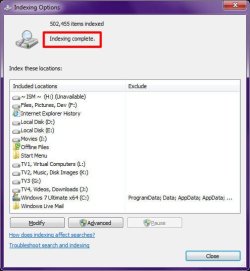
  3. At the top of the "Indexing Options" screen, does it indicate "Indexing complete"?
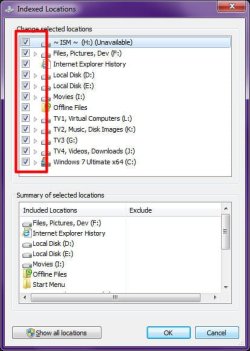
  4. If you click "Modify" in the "Indexing Options" screen, are all you drives selected for indexing?
Image1.jpg
Indexing Complete​

Image2.jpg
Indexed Drives​

It may be that you just haven't given the index time to initialize it's database, the process of which will be slowed down while you are using your computer. I find that leaving my computer on over night at least once gets the job done of indexing over 500,000 files.

Once you've allowed the index to create its database for the firt time, it updates itself in less than 2 seconds after modifying a file.

Give it a go?

EDIT:

You will notice in my first screenshot that the "ProgramData" is excluded by default from the index. Along with the "AppData" and "Windows" folders. There is nothing of any particular use in those folders anyway. At least nothing usefull for us mere mortals...
 
Last edited:

My Computer

Computer type
PC/Desktop
Computer Manufacturer/Model Number
Virtual Machine
OS
Windows 7 Professional 32-bit SP1
CPU
AMD A4/A6
Motherboard
Intel Corporation 440BX Desktop Reference Platform
Memory
3.00GB EDO
Graphics Card(s)
VMware SVGA 3D
Sound Card
High Definition Audio Device
Monitor(s) Displays
Generic Non-PnP Monitor on VMware SVGA 3D
Screen Resolution
1440x900
Hard Drives
1 x 60GB VMware Virtual SATA Hard Drive ATA Device
Antivirus
Kaspersky Total Security
Thanks Dzomlija. :D
 

My Computer

Computer Manufacturer/Model Number
Hopalong/ Godzilla
OS
Windows7 Pro 64bit SP-1; Windows XP Pro 32bit
CPU
Intel Core i7-870 Lynnfield 2.93GHz LGA 1156 95W Quad-Core
Motherboard
ASUS P7P55D-E PRO
Memory
8GB@1400MHz Crucial Ballistix DDR3-1600 4x2GB
Graphics Card(s)
ASUS ENGTX460 DirectCU/2DI/1GD5 1GB 256-bit GDDR5
Sound Card
VIA Onboard
Monitor(s) Displays
Asus VS248H-P 24"; Samsung SyncMaster 941BW 19"ws
Screen Resolution
1920x1080; 1440x900
Hard Drives
Samsung 830 120GB SSD
Intel 320 120GB SSD
Western Digital Caviar Black WD7501AALS 750GB 7200 RPM SATA 3.0Gb/s
Western Digital Caviar Black WD6401AALS 640GB 7200 RPM SATA 3.0Gb/s
PSU
COOLER MASTER Silent Pro RS850-AMBAJ3-US 850W Modular
Case
COOLER MASTER HAF 932 RC-932-KKN5-GP Black
Cooling
Scythe "Mugen-2 Rev.B" (2 ScytheKaze-Jyuni PWM fans)
Keyboard
Logitech K-320
Mouse
Kensington
Antivirus
Avast Inernet Suite
Browser
IE 9 ; Chrome
Thanks for the reply - I'll have to look at this tomorrow now, and I'll post back then. But the indexing of my C:\ drive is complete, yes (and that's where the file I was looking for is).

Martin
 

My Computer

Computer type
PC/Desktop
Computer Manufacturer/Model Number
Custom Build
OS
Windows 7 Home Premium SP1 64-bit
CPU
Intel Core i7-4790K CPU @ 4.5GHz
Motherboard
Asus H97I-PLUS
Memory
16GB KINGSTON HYPER-X FURY DUAL-DDR3 1600MHz
Graphics Card(s)
8GB NVIDIA GEFORCE GTX 1070
Monitor(s) Displays
HannsG 28" & Dell 24"
Screen Resolution
1920x1200
Hard Drives
1 x 2TB Samsung Evo 860 SSD
2 x 500GB Samsung Evo 850 SSD
PSU
CORSAIR 650W CS SERIES
Case
Thermaltake Core V1 Mini ITX Cube
Cooling
NOCTUA NH-L12
Browser
Firefox
Other Info
Custom PC used for X-Plane 11
Why Microsoft felt the need to change what was a good search feature in XP is beyond me...
Again, it's been said a thousand times, but it hasn't stuck. When a feature doesn't work as expected on one computer, for one person...it is hardly the fault of Microsoft. If none of us could get search working, then your comment would apply. If you drive a Honda, and drive it into a tree....is Honda to blame? Let's use common sense here.

The file should be found..yes, we all agree. However, if it is not for you...find out why for you. Likely...there's a setting change, or a third-party app that is causing an issue. Since it was a new install, the first thing I'd do is reinstall clean...and then test the search right away.

As an FYI, it shouldn't need to be said anymore either, but this is why a person should never enter the license key in during the install. Always give yourself the 30 days to make sure everything is working properly. I'm not accusing you of this, I'm mentioning it for anyone reading.

I have done over 100 installs of Windows 7 so far, and not one person has had an issue with the search not working. There have been a number of resolutions to threads just like this. If it was me, I'd prefer to solve the issue, rather than band-aid it.
 

My Computer

OS
Windows 7 Ultimate x64 SP1
CPU
Intel Core i7-2600
Motherboard
Gigabyte GA-P67A-UD3P-B3
Memory
12 GB Patriot Extreme DDR3-1333
Graphics Card(s)
Nvidia GTX 470
Monitor(s) Displays
Dell UltraSharp 2209WA
Hard Drives
OCZ Agility3 240 GB, WD5001AALS, WD7501AALS
PSU
OCZ ModStream 700W
Case
CoolerMaster HAF 912 Advanced
Cooling
CoolerMaster Hyper 212 Plus
Again, it's been said a thousand times, but it hasn't stuck. When a feature doesn't work as expected on one computer, for one person...it is hardly the fault of Microsoft. ...

That is almost true. There are plenty of folks who blame Microsoft for everything. There are also plenty who think MS never makes mistakes (or at least so they claim). But you should not imply that the OP is the only one with "search" issues in Windows7.

There are plenty of us, many just suffer quietly. I frequently need 30 seconds or so to search, I attribute that to doing an upgrade-install from Vista, but my computer is on the "replace by Christmas" list not worth a reinstall, so I just meditate for those 30 seconds. (I actually had good results with Vista search after I found the setting to search file-names only, and was disappointed when that feature was removed in 7.) I have also had the result where the search tool lists every file that contains the search string in its path, and that looks, at least to me, to be the fault of Microsoft.
 

My Computer

Computer Manufacturer/Model Number
Dell XPS17 laptop
OS
Windows 7 Pro 64
CPU
i7 2760QM 2.4GHz
Memory
8GB
Graphics Card(s)
Intel HD/Nvidia GeForce 555M
Sound Card
RealTek
Monitor(s) Displays
Ntrig DuoSense digitzer, touchscreen
Hard Drives
750GB
Mouse
Synaptics touchpad
Why Microsoft felt the need to change what was a good search feature in XP is beyond me...
Again, it's been said a thousand times, but it hasn't stuck. When a feature doesn't work as expected on one computer, for one person...it is hardly the fault of Microsoft. If none of us could get search working, then your comment would apply.

Of course, it's not just one person who is complaining about search, nor are all complaints from unskilled newbies. There are numerous complaints, enough to understand that if there is not an inherent problem in Search itself, then certainly in the targeted market's inability to understand its use, which is a problem.

Reading some of the many threads on the topic, however, reveal that even those who properly apply AQS are having issues. It seems that Search has consistency issues across different machines.

Your speculation that it is a 3rd party app or setting change, etc. is valid, but surely is only that...speculation. And certainly, these theories apply in some cases, but not all. And, given the number of complaints, wouldn’t this indicate a widespread compatibility issue?

One problem with Search, IMO, is that MS has made it too complicated for the average, non-power user, and I believe that there are other issues as well (that I have experienced firsthand, as you may remember from other threads).

It's been written that MS recognizes the problems and complexities of Search, knew this beforehand and consider it a work in progress. Can't blame them for that. I happen to fall outside of the groups you name...I don't blame MS (I'm actually one of the faithful). I'm just a guy who has been testing, using & building technology systems and networks for many years in my business and just because I enjoy it. And, I have problems with Win7 search. Even though recent info has resulted in improvements, accuracy of returns is not consistent (here).

I guess the point is that just because a segment of users don’t experience problems doesn't mean that others don’t, or that their complaints are invalid. Sometimes, it is the Honda's fault. Or the road’s fault. Or the weather, or…


James
 

My Computer

OS
Win7U 64 RTM
CPU
Q9550
Motherboard
GA-EP45-UD3R
Memory
8GB Gskill
Graphics Card(s)
ASUS|EAH4850/HTDI/1GD3/A
Sound Card
xfi Plat
Monitor(s) Displays
Dell 2405fpw
Screen Resolution
1920x1200
Hard Drives
Seagate & WD sata Drives
PSU
Antec
Case
Antec
Keyboard
MS Natural Ergonomic 4000
Mouse
Logitech MX610 USB Cordless
And at least the OP did post under "How do I use 'Search'?" which is significant for the newbie here, and great responds from some "gurus" arounds!!:)
 

My Computer

Computer type
PC/Desktop
Computer Manufacturer/Model Number
Custom Build
OS
Windows 7 Professional SP1 - x64 [Non-UEFI Boot]
CPU
Ivy Bridge Core i5 3570K (Delidded)
Motherboard
Asus P8Z77-V LE PLUS
Memory
G.Skill "Ares" DDR3 PC3-12800 - 1600MHz (16Gb)
Graphics Card(s)
Asus Dual-RX480-O4G
Sound Card
Creative Sound Blaster Z w/5.1 sound system
Monitor(s) Displays
Asus IPS 23"
Screen Resolution
16/9
Hard Drives
Internal:
500Go Sata 6Gb/s (x2)
500Go Sata 3Gb/s (x2)
SSD 60Go Sata 6Gb/s
PSU
In Win C 900W Series 80+ Platinum
Case
Thermaltake Chaser A71
Cooling
Custom Water Cooling Loop
Keyboard
Cooler Master QuickFire XTi
Mouse
Razer Imperator 2012 (4G)
Antivirus
MSE
Browser
IE 11.0.xxx Rtm
Other Info
"Raid0" with Intel Smart Response Technology (HDD/SSD)
But you should not imply that the OP is the only one with "search" issues in Windows7.
No one implied it was just one individual, unless you shut your brain off and assume I'm an idiot. It shouldn't need to be spelled out, but the point is, when you encounter an error or issue on your computer, you should have the ability to figure out if the problem is unique to your setup (issue, any number of culprits) or if the problem exists for everyone (bug, blame lies at the developer). That's just common sense.

If you have a flat tire, who's fault is it? Could be the driver, could be road debris, could be the tire manufacturer. If everyone with that model tire had a flat...it becomes clear who's to blame.
 

My Computer

OS
Windows 7 Ultimate x64 SP1
CPU
Intel Core i7-2600
Motherboard
Gigabyte GA-P67A-UD3P-B3
Memory
12 GB Patriot Extreme DDR3-1333
Graphics Card(s)
Nvidia GTX 470
Monitor(s) Displays
Dell UltraSharp 2209WA
Hard Drives
OCZ Agility3 240 GB, WD5001AALS, WD7501AALS
PSU
OCZ ModStream 700W
Case
CoolerMaster HAF 912 Advanced
Cooling
CoolerMaster Hyper 212 Plus
There's still a trick around...

"How to search un-indexed libraries and network location files from Start Menu search box" : HERE
 

My Computer

Computer type
PC/Desktop
Computer Manufacturer/Model Number
Custom Build
OS
Windows 7 Professional SP1 - x64 [Non-UEFI Boot]
CPU
Ivy Bridge Core i5 3570K (Delidded)
Motherboard
Asus P8Z77-V LE PLUS
Memory
G.Skill "Ares" DDR3 PC3-12800 - 1600MHz (16Gb)
Graphics Card(s)
Asus Dual-RX480-O4G
Sound Card
Creative Sound Blaster Z w/5.1 sound system
Monitor(s) Displays
Asus IPS 23"
Screen Resolution
16/9
Hard Drives
Internal:
500Go Sata 6Gb/s (x2)
500Go Sata 3Gb/s (x2)
SSD 60Go Sata 6Gb/s
PSU
In Win C 900W Series 80+ Platinum
Case
Thermaltake Chaser A71
Cooling
Custom Water Cooling Loop
Keyboard
Cooler Master QuickFire XTi
Mouse
Razer Imperator 2012 (4G)
Antivirus
MSE
Browser
IE 11.0.xxx Rtm
Other Info
"Raid0" with Intel Smart Response Technology (HDD/SSD)
A number of posters have recommended Agent Ransack - Free File Searching Utility - a free 64 bit Windows 7 file searcher - Apparently it's very good, very fast and is similar to XP's search. However Agent Ransack was designed as a power tool and is not as user friendly or easy to use as some others. Your NirSoft app may be a bit easier to use.
This great program is now known as FileLocator Lite which is free. The commercial world use FileLocator Pro.
One of the good things is you can use it effectively at a number of levels of complexity. Even with the "Expert User" box ticked it is quite intuitive when using the basic features. Start using some of the Boolean search to get even more powerful searches. But you don't need to bother with this "geeky" stuff if you don't want to.
At the other extreme untick the "Expert User" box and you get a search wizard.
 

My Computer

Computer type
PC/Desktop
Computer Manufacturer/Model Number
Own build
OS
Windows 7x64 Home Premium SP1
CPU
Intel i7 2600k
Motherboard
ASUS P8Z68 Deluxe
Memory
G.Skill Ripjaws (DDR3-1600) 2x4GB
Graphics Card(s)
Nvidia GeForce GTS 450; Intel HD Graphics 3000(GT2+)
Monitor(s) Displays
Dell Ultrasharp IPS panel U2311H, Samsung SyncMaster P2350
Screen Resolution
1920x1080
Hard Drives
Samsung 850 Pro SSD 256GB, Samsung SSD 840 120GB, Seagates 1TB Barracuda ST31000528AS x2
PSU
Seasonic M12II 520W
Case
Lian Li Lancool PC-K60
Cooling
Case: 1x120mm, 3x140mm CPU: Hyper 212+
Keyboard
Logitech MK520 (wireless)
Mouse
Logitech MK520
Internet Speed
6-7 Mbps
Antivirus
Norton Security Premium, Malwarebytes on 2 (MSE on 3rd PC)
Browser
FireFox
Other Info
Audio: Logitech Z523 2.1
I'm still reading through the various links: I see that, unlike XP, Win7 search will not find anything in unindexed folders.

For now (and probably for the future too) I use a programme called 'search My Files' which is fast, customisable and thorough (and free). I've pinned a shortcut to it on my taskbar so I probably have no need to use Win7 search at all (but I will read all the links people have posted here, out of interest). Yes, possible that once I get used to the Win7 Search function, I will use it again, but I agree with James that it is not intuitive at all for someone fairly new to Win7 - and to be honest I consider myself anything but a PC software beginner: I am involved in programming and there is very little now 'under the hood' of WinXP that I am not able to fix or modify.

Thanks again for the input,

Martin
 

My Computer

Computer type
PC/Desktop
Computer Manufacturer/Model Number
Custom Build
OS
Windows 7 Home Premium SP1 64-bit
CPU
Intel Core i7-4790K CPU @ 4.5GHz
Motherboard
Asus H97I-PLUS
Memory
16GB KINGSTON HYPER-X FURY DUAL-DDR3 1600MHz
Graphics Card(s)
8GB NVIDIA GEFORCE GTX 1070
Monitor(s) Displays
HannsG 28" & Dell 24"
Screen Resolution
1920x1200
Hard Drives
1 x 2TB Samsung Evo 860 SSD
2 x 500GB Samsung Evo 850 SSD
PSU
CORSAIR 650W CS SERIES
Case
Thermaltake Core V1 Mini ITX Cube
Cooling
NOCTUA NH-L12
Browser
Firefox
Other Info
Custom PC used for X-Plane 11
Back
Top