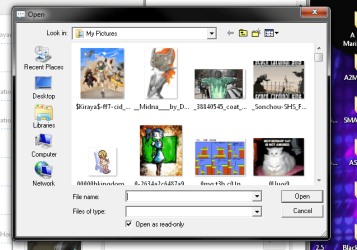
How does one modify the Navigation Pane?

Xirix

New member
Member
Local time
5:50 PM
Messages
43
I believe that's what it's called, in Windows Explorer there's a load of Shortcuts on the left, how can I edit them, I'd like to remove unneeded things as well.

Also can you modify the shortcuts in the download pane? It has I believe 5 shortcuts on the left which I'd like to customise. In Xp I just used TweakUI to do that, but I don't know anything about Windows 7.
 

My Computer

Computer type
PC/Desktop
Computer Manufacturer/Model Number
Custom Build
OS
Windows 7 Ultimate 64
CPU
Intel(R) Core(TM) i5 CPU 750 @ 2.67GHz
Motherboard
ASUSTeK Computer INC. P7P55D-E LX
Memory
12.00 GB
Graphics Card(s)
ATI Radeon HD 5700 Series (1 gig I think)
Sound Card
(1) M-Audio Revolution 5.1 (2) AMD High Definition Audio D
Monitor(s) Displays
Asus VE278H 27"
Screen Resolution
1920x1080
Hard Drives
(1) MAXTOR STM3250310AS ATA Device (2) ST2000DM001-1CH164 ATA Device (3) ST2000DM001-1ER164 ATA Device (4) WDC WD10EARS-22Y5B1 ATA Device (5) Generic USB SD Reader USB Device
PSU
OCZ700
Make a screenshot of it. And show which ones you want to change.

Do you mean folder %userprofile%\links ?
 

My Computer

Computer type
Laptop
Computer Manufacturer/Model Number
ACER ASPIRE 5742G
OS
Microsoft Windows 7 Home Premium 64-bits 7601 Multiprocessor Free Service Pack 1
CPU
Intel(R) Core(TM) i3 CPU M 370 @ 2.40GHz
Motherboard
Acer Aspire 5742G
Memory
4,00 GB
Graphics Card(s)
ATI Mobility Radeon HD 5400 Series
Sound Card
(1) AMD High Definition Audio Device (2) Realtek High Defi
Screen Resolution
1366 x 768 x 32 bits (4294967296 colors) @ 60 Hz
Hard Drives
WDC WD5000BEVT-22ZAT0
I assume I do, it starts with Favourites, it also has Libraries, Homegroup, Computer and Network, all in the left pane in any given explorer window open.
 

My Computer

Computer type
PC/Desktop
Computer Manufacturer/Model Number
Custom Build
OS
Windows 7 Ultimate 64
CPU
Intel(R) Core(TM) i5 CPU 750 @ 2.67GHz
Motherboard
ASUSTeK Computer INC. P7P55D-E LX
Memory
12.00 GB
Graphics Card(s)
ATI Radeon HD 5700 Series (1 gig I think)
Sound Card
(1) M-Audio Revolution 5.1 (2) AMD High Definition Audio D
Monitor(s) Displays
Asus VE278H 27"
Screen Resolution
1920x1080
Hard Drives
(1) MAXTOR STM3250310AS ATA Device (2) ST2000DM001-1CH164 ATA Device (3) ST2000DM001-1ER164 ATA Device (4) WDC WD10EARS-22Y5B1 ATA Device (5) Generic USB SD Reader USB Device
PSU
OCZ700

My Computer

Computer type
PC/Desktop
Computer Manufacturer/Model Number
Self built custom
OS
64-bit Windows 11 Pro for Workstations
CPU
Intel i7-8700K OC'd to 5 GHz
Motherboard
ASUS ROG Maximus XI Formula Z390
Memory
64 GB (4x16GB) G.SKILL TridentZ RGB DDR4 3600 MHz
Graphics Card(s)
ASUS ROG-STRIX-GTX1080TI-O11G-GAMING
Sound Card
Integrated
Monitor(s) Displays
2 x Samsung Odyssey G7 27"
Screen Resolution
2560x1440
Hard Drives
1TB Samsung 990 PRO M.2,
4TB Samsung 990 PRO PRO M.2,
TerraMaster F8 SSD Plus NAS
PSU
Seasonic Prime Titanium 850W
Case
Thermaltake Core P3
Cooling
Corsair Hydro H115i
Keyboard
Logitech wireless K800
Mouse
Logitech MX Master 4
Internet Speed
2 Gb/s Download and 100 Mb/s Upload
Antivirus
Malwarebyte Anti-Malware Premium
Browser
Google Chrome
Other Info
Logitech Z625 speaker system,
Logitech BRIO 4K Pro webcam,
HP Color LaserJet Pro MFP M477fdn,
APC SMART-UPS RT 1000 XL - SURT1000XLI,
Galaxy S23 Plus phone
I assume I do, it starts with Favourites, it also has Libraries, Homegroup, Computer and Network, all in the left pane in any given explorer window open.
What part of it do you want to modify? Why didn't you post a screenshot?
 

My Computer

Computer type
Laptop
Computer Manufacturer/Model Number
ACER ASPIRE 5742G
OS
Microsoft Windows 7 Home Premium 64-bits 7601 Multiprocessor Free Service Pack 1
CPU
Intel(R) Core(TM) i3 CPU M 370 @ 2.40GHz
Motherboard
Acer Aspire 5742G
Memory
4,00 GB
Graphics Card(s)
ATI Mobility Radeon HD 5400 Series
Sound Card
(1) AMD High Definition Audio Device (2) Realtek High Defi
Screen Resolution
1366 x 768 x 32 bits (4294967296 colors) @ 60 Hz
Hard Drives
WDC WD5000BEVT-22ZAT0
I'm a little busy sorting out everything. ^^ That's one of the things I wanted to modify, the other is here... it only shows up for certain programs and I'd like to edit the links on the left.
 

Attachments

  • Untitled.png
    Untitled.png
    181.6 KB · Views: 11

My Computer

Computer type
PC/Desktop
Computer Manufacturer/Model Number
Custom Build
OS
Windows 7 Ultimate 64
CPU
Intel(R) Core(TM) i5 CPU 750 @ 2.67GHz
Motherboard
ASUSTeK Computer INC. P7P55D-E LX
Memory
12.00 GB
Graphics Card(s)
ATI Radeon HD 5700 Series (1 gig I think)
Sound Card
(1) M-Audio Revolution 5.1 (2) AMD High Definition Audio D
Monitor(s) Displays
Asus VE278H 27"
Screen Resolution
1920x1080
Hard Drives
(1) MAXTOR STM3250310AS ATA Device (2) ST2000DM001-1CH164 ATA Device (3) ST2000DM001-1ER164 ATA Device (4) WDC WD10EARS-22Y5B1 ATA Device (5) Generic USB SD Reader USB Device
PSU
OCZ700
Hi,
What program is opening this page you posted ?
That is not a built in Windows program,
It looks like a search and upload files dialog Not Windows explorer,
Now that you've posted a screen shot,
Repeat the process and take how ever many it takes to get a complete list of your Uninstall a program list,
Cheers.
 

My Computer

Computer type
PC/Desktop
Computer Manufacturer/Model Number
Custom assembled by me :}
OS
Win-7-Pro64bit 7-H-Prem-64bit
CPU
i7-5930K 2nd i9-9940x both water blocked VRM's too
Motherboard
ASUS SABERTOOTH X99 2nd ASUS x299 Apex
Memory
Trident-z 3200C14 2nd Trident-z 3600C16
Graphics Card(s)
EVGA 1080ti ftw3 2nd Titan Xp both water blocked
Sound Card
Built-in Realtek
Monitor(s) Displays
1-AOC G2460PG 24"G-Sync 144Hz/ 2nd 1-ASUS VG248QE 24" 144Hz
Screen Resolution
1920 x 1080 144Hz
Hard Drives
2-Samsung M.2 Evo & Evo Plus
2-Samsung 850 EVO 500GB SSD's/ 3-2.5 W.D. Black 1tb-&3-1tb/3-3.5 WD Black 1tb hdd's
PSU
EVGA SuperNOVA 1000-P2 2nd 1200-P2
Case
2-Corsair Obsidian Series 450D Black ATX Mid Tower
Cooling
Custom water loops
Keyboard
Logitech G710+/ 2nd Logitech G910
Mouse
2-RedDragon M901 Perdition 16400 dpi Gaming mouse = wired
Internet Speed
Comcast Ping 19ms 89.31mbps download speed 6.12mbps upload
Antivirus
Malwarebytes Pro/ Superantispyware Pro
Browser
FireFox & Pale moon
Other Info
2nd ASUS X299 Apex/Intel i9-9940x with Custom water loop/7H-Prem-x64/Corsair 450D case/Ram Trident-z 3600C16 4x8gb / Samsung970Evo plus 500gb SSD/Dual ssd EZ swap evo/PSU EVGA SuperNova 1200w-P2 80+Platinum/GPU Titan Xp /8-ML-140 on push-pull on 2-280GTX rads

My Computer

Computer type
PC/Desktop
Computer Manufacturer/Model Number
Self built custom
OS
64-bit Windows 11 Pro for Workstations
CPU
Intel i7-8700K OC'd to 5 GHz
Motherboard
ASUS ROG Maximus XI Formula Z390
Memory
64 GB (4x16GB) G.SKILL TridentZ RGB DDR4 3600 MHz
Graphics Card(s)
ASUS ROG-STRIX-GTX1080TI-O11G-GAMING
Sound Card
Integrated
Monitor(s) Displays
2 x Samsung Odyssey G7 27"
Screen Resolution
2560x1440
Hard Drives
1TB Samsung 990 PRO M.2,
4TB Samsung 990 PRO PRO M.2,
TerraMaster F8 SSD Plus NAS
PSU
Seasonic Prime Titanium 850W
Case
Thermaltake Core P3
Cooling
Corsair Hydro H115i
Keyboard
Logitech wireless K800
Mouse
Logitech MX Master 4
Internet Speed
2 Gb/s Download and 100 Mb/s Upload
Antivirus
Malwarebyte Anti-Malware Premium
Browser
Google Chrome
Other Info
Logitech Z625 speaker system,
Logitech BRIO 4K Pro webcam,
HP Color LaserJet Pro MFP M477fdn,
APC SMART-UPS RT 1000 XL - SURT1000XLI,
Galaxy S23 Plus phone
Back
Top