How long to repair disk errors?

ziggy925

New member
Local time
5:12 AM
Messages
2
I'm trying to repair a crashed Win 7 computer. I booted off the installation disc and ask it to do a repair. Currently it's "Attempting repairs... Repairing disk errors..." It says this may take over an hour and it's been doing this for just over two hours (blue bars running across the screen). How long should I give it before throwing in the towel?

Thanks.
 

My Computer

OS
windows 7
It is probably rebuilding the file system which can take awhile, especially with a large HD.

There are timeouts built into Repair so that it can't take forever - it will throw up a fail message in that case.

I would wait. If I absolutely had to bail out I would immediately boot the HD maker's full diag/repair CD scan to see if repairing surface errors can get the Disk Check test to complete correctly afterward. http://www.tacktech.com/display.cfm?ttid=287

Because Startup Repair conducts dozens of tests and repairs it may have others to run before the job is finished, as well.
 
It is probably rebuilding the file system which can take awhile, especially with a large HD.

There are timeouts built into Repair so that it can't take forever - it will throw up a fail message in that case.

I would wait. If I absolutely had to bail out I would immediately boot the HD maker's full diag/repair CD scan to see if repairing surface errors can get the Disk Check test to complete correctly afterward. Hard Drive Diagnostics Tools and Utilities (Storage) - TACKtech Corp.

Because Startup Repair conducts dozens of tests and repairs it may have others to run before the job is finished, as well.

Thanks for the prompt reply. It's just sitting on the coffee table and doing its thing. I guess I can assume if it's still doing its thing tomorrow morning I'm going to need a bigger hammer. :eek:
 

My Computer

OS
windows 7
so how long did it take for the windows to recover? I know its been ages perhaps you remember :D
 

My Computer

Computer Manufacturer/Model Number
Fujitsu Lifebook AH530/GFX
OS
windows 7 64 bit
Graphics Card(s)
ATI Mobility Radeon HD550v
Hard Drives
Hitachi
Hello mended and welcome to Seven Forums.

Heard a rumor that 'ol ziggy is still waiting. Here's what he looks like today.

thumbnail.aspx
 

My Computer

Computer type
Laptop
Computer Manufacturer/Model Number
Sony Vaio VPCEB47GM Laptop
OS
Win 7 Pro 64-bit
CPU
Intel i5 2.4 Ghz
Memory
8GB DDR3
Graphics Card(s)
Intel HD 3000
Sound Card
IDT High Definition
Monitor(s) Displays
15.6 WGXA Anti-Glare LED
Screen Resolution
1280x800
Hard Drives
640Gb 7200rpm
Antivirus
MSE
Browser
Opera (primary) with IE9 backup

My Computer

OS
ME/XP/Vista/Win7
i think he was just interested in some feedback which is useful information
 

My Computer

Computer Manufacturer/Model Number
Hewlett packard/p6512uk
OS
Microsoft Windows 7 Home Premium 64-bit 7600
CPU
IIx4 amd athelon 635 processor
Motherboard
FOXCONN 2AA9
Memory
2x2gb
Graphics Card(s)
ati radeon HD 5450
Sound Card
(1) Realtek High Definition Audio (2) AMD High Definition
Monitor(s) Displays
samsung lcd tv 32"
Screen Resolution
1360x 768
Hard Drives
(1) WDC WD10 01FAES-60Z2A0 SATA Disk Device (2) Maxtor OneTouch USB Device (3) ST310003 33AS USB Device (4) WD My Book 1111 USB Device
PSU
?
Cooling
air!
Keyboard
wireless hp
Mouse
wireless Hp,optical
Internet Speed
1.10mb/s
Antivirus
MSE
Browser
Firefox
Windows not starting? even with boot CD

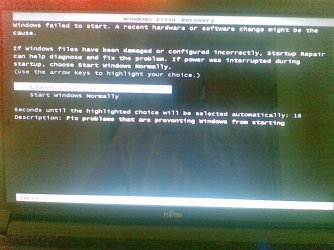
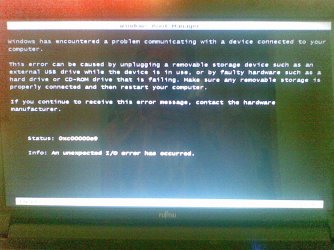
So this is what happened? My laptop took a slight fall, from a low chair. It was on at the time, so when i checked it everything was working, msn was on, chatting etc - then i noticed the battery was dying so i tried shutting it down - it wouldnt shut down and then msn just froze. I kept on clicking shut down and it wouldnt - msn still forzen. I use a usb internet device - so i disconnected that via the disconnect menu and in that time the computer shut off due to low battery. After that I switched it on, windows would load - and it kept giving the error message attached. I tried booting with the recovery CD but it didnt work. It attempted to fix repairs for 24 hours and then I just shut it off. I then tried rebooting to a point earlier in time, that just froze and nothing happened. Went to the bios and my hard disk is present there...so i dont think the hard disk is failing. Someone things theres a loose connection in the hardware..... blah.... maybe i should make a new post of this :(
 

Attachments

  • E2.jpg
    E2.jpg
    358.5 KB · Views: 278
  • Error.jpg
    Error.jpg
    377.2 KB · Views: 273

My Computer

Computer Manufacturer/Model Number
Fujitsu Lifebook AH530/GFX
OS
windows 7 64 bit
Graphics Card(s)
ATI Mobility Radeon HD550v
Hard Drives
Hitachi
What are the results when you run Startup Repair?

Test the HD with maker's diagnostic/repair extended CD scan to be sure: HD Diagnostic

However it could indeed be a loose connection or the HD has become unseated so consider whether you want to try reseating it yourself.


I would also check the RAM to see if it has been damaged: RAM - Test with Memtest86+ Then reseat the RAM, similar to this:


The HD and RAM are the easiest to access. You'll need a professional or much determination to learn how to go over the rest of the hardware for loose connections, damage, etc. Fill out your System Specs so we can help you better.
 
Would be worth reseating the CD/DVD drive aswell.
 

My Computer

OS
ME/XP/Vista/Win7
Thanks greg for the videos, really appreciate it. When I ran the start up repair the Window Boot Manager error came up (pic). Ill definitely try the HD thing and see if I can get professional help with the other hardware components, ie CD/DVD ROM etc.
Will also update computer specs and status of my pc. Thanks again guys.
 
Last edited:

My Computer

Computer Manufacturer/Model Number
Fujitsu Lifebook AH530/GFX
OS
windows 7 64 bit
Graphics Card(s)
ATI Mobility Radeon HD550v
Hard Drives
Hitachi
I'm kind of in this boat now. I closed my laptop (USUALLY I put it in hibernate mode) before I put it on my backpack, got on my bike and road back from my meeting to my office (like I do all the time). Upon re-opening my laptop and MS Outlook was frozen and I had no control of the cursor. I attempted a Ctl-Alt-Del but at that point it just hung up. Needed a hard boot but then the OS wouldn't boot (it would get stuck at the "dark" windows screen). In eventually okayed startup repair. It's been at it now for almost 8 hours.

8 Hours seem excessive. I have trouble believing it's still making headway.

I did run a memory diagnostic from the repair menu and it found no errors (but I'm aware that isn't the most "aggressive" diagnostic and have seen it miss other errors.

It's an Acer Aspire 5745G. It has an I3 Intel processor and a 500GB drive (not sure the manufacturer) right now. From everything I've read if it takes more than a couple of hours I should give up on the repair. Luckily I have external drive connections on my desktop so I can diagnose my laptop drive remotely. I expect I'll finally get to the point of downloading a utility from the manufacturer and running a diagnostic on the HD.
 

My Computer

Computer type
Laptop
Computer Manufacturer/Model Number
Acer
OS
Windows Home 64 bit
CPU
Intel I3 370M
Memory
4GB
Graphics Card(s)
NVidea GeForce GT 420M
Hard Drives
500GB
Antivirus
Norton
You're on the right track checking the HD first. Is it even detected in BIOS? If so run the maker's HD Diagnostic extended CD scan. If not try reseating it or replace it.

Then there are these steps for Troubleshooting Windows 7 Failure to Start

Yes it's the HD.

First off, yes the bios sees it. It was seated fined (though I did reseat it). Also, I have an old HD with a functioning OS I keep for just such occasions. I put that in and that boots just fine.

I've extracted the bad HD, connected it to my desktop and run a few different utilities (including one from the manufacturer). It is a Toshiba 500GB Travelstar 500K500.B. Most utilities seem to go on and on and on....(many hours) without completing or failing. This included Windows error checking run from my desktop.

I did try to run some surface tests and yes that failed, but I have seen "stable" HD's with just a couple of bad sectors fail those too. That plus the slow speed running any diagnostic really made the HD seem bad.

For grins (because I'm and engineering physicist and I cannot leave things alone) I ran a generic HD utility named "HD Tune". It's been at it an hour and is only ~20% done (and slowing down progress-wise). so far 10% of the blocks are reading bad...and that is TOTAL (not of just what has run so far).

I just found it weird that instead of failing most of the utilizes just got slower....and slower....and slllllooooowwweeeerrrrr when I threw them at the HD.

So yeah, it's the HD. I do find it weird that many blocks suddenly went bad. And that the various tests and utilities don't bomb-out but just get really slow. I suppose it is possible something went wrong with the read and/or write heads.

So now I either get a new laptop or a new HD. Since the machine is ~4 years old I'm thinking of getting a whole new machine.
 

My Computer

Computer type
Laptop
Computer Manufacturer/Model Number
Acer
OS
Windows Home 64 bit
CPU
Intel I3 370M
Memory
4GB
Graphics Card(s)
NVidea GeForce GT 420M
Hard Drives
500GB
Antivirus
Norton
Back
Top