How move files to win7 that installed in VMware ?

Alexnoj

Banned
Local time
1:21 PM
Messages
6
I installed win7 in VMware and I can't see my drivers...
How can I move some files to win7?
 

My Computer My Computer

At a glance

Windows 7 32 bit
OS
Windows 7 32 bit

My Computer My Computer

At a glance

Windows 8.1 ; Windows 7 x86 (Dec2008-Jan2013)
Computer type
PC/Desktop
OS
Windows 8.1 ; Windows 7 x86 (Dec2008-Jan2013)
Other Info
"The scale icon at the top right of a post or tutorial is how you can give rep to the member."
win7(VMware) dont identify the network card(Marvell Yukon).
 

My Computer My Computer

At a glance

Windows 7 32 bit
OS
Windows 7 32 bit

My Computer My Computer

At a glance

Windows 8.1 ; Windows 7 x86 (Dec2008-Jan2013)
Computer type
PC/Desktop
OS
Windows 8.1 ; Windows 7 x86 (Dec2008-Jan2013)
Other Info
"The scale icon at the top right of a post or tutorial is how you can give rep to the member."
Hi there.
You don't need a "Real" Network card in a VM running under vmware or vbox. The "Virtual Network adapter" installed when you create the machine will handle all the network stuff. This is all done at Creation time of the Virtual Machine automatically provided you enabled Networking in the setup / configuration file.

You can add it in afterwards if you forgot it.

(Some commercial servers can connect physical NIC's to VM's via a "Vswitch" or PCI pass through but for home applications this is usually overkill - VBOX / VMWARE desktop products don't need this capability so you can ignore it).

so :

Ensure that

1) you have at least "Host Only" networking enabled ( in the configuration file for the VM)

2) Folders / directories / drives are marked as SHARED on the relevant machines (including the VM's) and you have access (read / write or whatever)

3) Ensure Firewall access doesn't prevent you from connecting to the relevant machine

4) You need to have an account AND password (usually) on the machines you want to access the devices from.

Then it all works fine

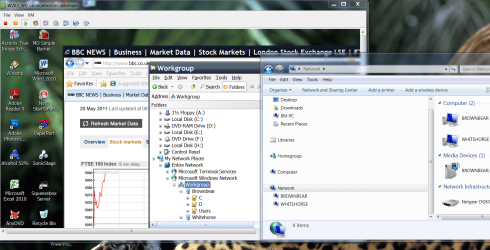
Here's an example of a W7 Host accessing a W2K3 server Virtual Machine


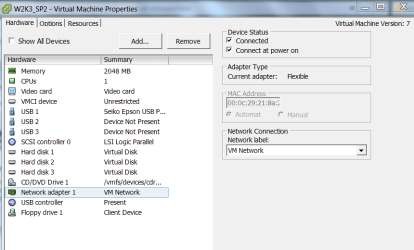
I've also shown an image of the configuration file -- I'm using vmware's ESXi so the configuratiuon is slightly different to what you will see but you should definitly see a Virtual Network adapter


Cheers
jimbo

 

Attachments

  • shared.png
    shared.png
    257.6 KB · Views: 110
  • vmnet.png
    vmnet.png
    26.6 KB · Views: 80

My Computer My Computer

At a glance

Linux CENTOS 7 / various Windows OS'es and se...Intel i7 Intel i58GB, 16GBOn Motherboard
Computer type
PC/Desktop
Computer Manufacturer/Model Number
Custom built, several laptops HP/ASUS
OS
Linux CENTOS 7 / various Windows OS'es and servers
CPU
Intel i7 Intel i5
Memory
8GB, 16GB
Graphics Card(s)
On Motherboard
Sound Card
Realtek HD audio
Monitor(s) Displays
Apple Cinema display, Samsung LCD
Screen Resolution
1920 X 1080
Hard Drives
4 X 1TB SATA
Mouse
Toshiba wireless laser
Internet Speed
> 20MB up
Back
Top