Solved How much disk space is needed for System Restore?

2harts4ever

New member
Member
Local time
7:14 AM
Messages
87
Location
Pennsylvania
Hi,

After running WinXP for almost 7 years I took the plunge last week and bought a new computer with Win 7 Home Premium. Today I upgraded it to Win 7 Professional.

Now my computer specs are:
[FONT=Arial, sans-serif]HP p7-1157c AMD A6-3600 APU w/Radeon ™ HD Graphics 2.10GHz[/FONT]
[FONT=Arial, sans-serif]8 Gbs of Memory[/FONT]
[FONT=Arial, sans-serif]64-bit running Windows 7 Pro w/Internet Explorer 9.[/FONT]

Today while still exploring the features of Win 7 I noticed all my previous Restore Points except for two that were created today were gone. It seems all the ones created before my last reboot had been deleted.

I think I found out why after checking the Restore configuration settings for the drive.

Only 1 % of the 919 GB drive was being allotted for Restore Points. So I changed that to 20 % for the time being.

Now I am trying to find out how much space should I actually set aside for restore points for the size of my hard drive?

Thanks and regards,

2harts4ever
 

My Computer My Computer

Computer Manufacturer/Model Number
HP Pavilion p7-1157c
OS
Windows 7 Pro x64 SP1
CPU
AMD A6-3600
Motherboard
Pagatron 2ACF 1.01
Memory
8 GBs
Graphics Card(s)
AMD Radeon HD
Sound Card
Realtec High Definition Audio
Monitor(s) Displays
HP 2311 Wide LCD
Screen Resolution
1920 x 1080
Keyboard
HID Keyboard Device
Mouse
Microsoft USB Wireless Mouse (IntelliPoint)
Other Info
BIOS: AMI 7.06
I have 5G physically allocated and have about 20 restore points.
 

My Computer My Computer

Computer type
PC/Desktop
Computer Manufacturer/Model Number
Custom
OS
Windows 7
CPU
AMD Phenom II X2 (dual-core)
Motherboard
GA-MA785GM-US2H
Memory
4G
Graphics Card(s)
integrated ATI HD 4200
Sound Card
integrated
Monitor(s) Displays
Samsung 24"
Screen Resolution
1920x1080
Hard Drives
1 SSD - Samsung 840 - 500 GB - OS and DATA partitions
1 SSD - Intel 320 - 120 GB (used for backups) - Misc/BACKUP
1 SATA HD - WD, 500 GB - BACKUP
PSU
Ultra X4 500W
Case
Ultra X-blaster
Keyboard
Microsoft Digital Media Pro
Mouse
Logitech WIRED!
Internet Speed
15 Mbps FIOS

My Computer My Computer

Computer Manufacturer/Model Number
HP, Dell, Gateway, Toshiba - 4 laptops and 2 desktops
OS
Vista, Windows7, Mint Mate, Zorin, Windows 8
CPU
from 1.6GHz Duo to i7
Monitor(s) Displays
2x HP w2207
Hard Drives
5x HDD, 7x SSD, 12x Externals
Keyboard
with trackball - no mices
Mouse
Trackball mice
Internet Speed
DSL 6000
Jim and whs,

I appreciate both your responses. :) I think I will try giving 10 % for Restore Points and see how that goes.

The suggestion of putting my user data on a seperate partition and give that 5GB for the restore points makes sense but unfortunately that is a little more than my 69-year-old 'brain housing group' can understand right now ...lol

However, I will try to check out how to make a partition.

Thanks and regards,

2harts4ever
 

My Computer My Computer

Computer Manufacturer/Model Number
HP Pavilion p7-1157c
OS
Windows 7 Pro x64 SP1
CPU
AMD A6-3600
Motherboard
Pagatron 2ACF 1.01
Memory
8 GBs
Graphics Card(s)
AMD Radeon HD
Sound Card
Realtec High Definition Audio
Monitor(s) Displays
HP 2311 Wide LCD
Screen Resolution
1920 x 1080
Keyboard
HID Keyboard Device
Mouse
Microsoft USB Wireless Mouse (IntelliPoint)
Other Info
BIOS: AMI 7.06

My Computer My Computer

Computer Manufacturer/Model Number
HP, Dell, Gateway, Toshiba - 4 laptops and 2 desktops
OS
Vista, Windows7, Mint Mate, Zorin, Windows 8
CPU
from 1.6GHz Duo to i7
Monitor(s) Displays
2x HP w2207
Hard Drives
5x HDD, 7x SSD, 12x Externals
Keyboard
with trackball - no mices
Mouse
Trackball mice
Internet Speed
DSL 6000
whs,

I will check out your links 'old-timer' ...lol

Thanks and regards,

2harts4ever
 

My Computer My Computer

Computer Manufacturer/Model Number
HP Pavilion p7-1157c
OS
Windows 7 Pro x64 SP1
CPU
AMD A6-3600
Motherboard
Pagatron 2ACF 1.01
Memory
8 GBs
Graphics Card(s)
AMD Radeon HD
Sound Card
Realtec High Definition Audio
Monitor(s) Displays
HP 2311 Wide LCD
Screen Resolution
1920 x 1080
Keyboard
HID Keyboard Device
Mouse
Microsoft USB Wireless Mouse (IntelliPoint)
Other Info
BIOS: AMI 7.06
20% of that big drive is too much. Anything between 10 and 20GB would be ample. Restore points take up to 1GB per shot, but they can be smaller depending what you have on C:

Also I suggest to put your user data on a seperate partition and give that 5GB for the restore points. Is handy if you lost a file and want to retrieve it. http://www.sevenforums.com/tutorials/132087-shadowexplorer-recover-lost-files-folders.html

Shadow explorer is good but you don't need it. Just use Windows built in previous versions which can be found in the properties dialogue..
 

My Computer My Computer

Computer type
Laptop
Computer Manufacturer/Model Number
Hewlett-Packard/G62-107SA Notebook
OS
Microsoft Windows 7 Home Premium 64-bit Service Pack 1
CPU
Intel(R) Core(TM) i3 CPU M 330 @ 2.13GHz
Motherboard
Hewlett-Packard 1425
Memory
8 GB DDR3
Graphics Card(s)
Intel(R) HD Graphics
Sound Card
Realtek High Definition Audio
Monitor(s) Displays
Builtin
Screen Resolution
1366 x 768 x 32 bits (4294967296 colors) @ 60 Hz
Hard Drives
250 GB SATA Hard Disk Drive 7200 rpm
2TB Seagate GoFlex USB 2 Drive
1TB Iomega Prestige USB 2 Drive
1.5TB Iomega Prestige USB 2 Drive (Samsung)
2TB WD MyBook Live NAS.
Mouse
Logitech Anywhere MX
Internet Speed
152 Mbs download 10 Mbs upload
Antivirus
Norton 360
Browser
Chrome

My Computer My Computer

Computer Manufacturer/Model Number
HP Pavilion Elite 495UK
OS
Windows 7 Ultimate SP1 64-Bit
CPU
Intel Core i7 870 @ 2.93GHz
Motherboard
MSI 2A9C (CPU1)
Memory
8Gb Dual-Channel DDR3 @ 664MHz
Graphics Card(s)
nVidia GeForce GTX 460 1024MB dedicated RAM
Sound Card
Realtek HD Audio
Monitor(s) Displays
HP2310i
Screen Resolution
1920 x 1080
Hard Drives
1x1954GB Hitachi HDS22020ALA 330 (RAID), 1x1954GB Hitachi External for backup and storage
PSU
460W
Case
HP Elite
Cooling
Air cooled
Keyboard
Logitech K750 solar-powered keyboard
Mouse
Logitech Wireless M180 mouse
Internet Speed
2Mb
Other Info
Pure Avanti Flow Internet Radio with iPod Dock, 64Gb iPod, HP USB Speakers, Sony MDR-V500 Headphones, Sony Vaio F-Series Laptop
Now I am trying to find out how much space should I actually set aside for restore points for the size of my hard drive?

Set it fairly "high" and then monitor it for a few weeks. Then maybe readjust it to a lower number.

I like to have 2 or 3 weeks worth of Restore Points.

I currently have a maximum of 7.45 GB allotted and 7.06 GB used. That currently gives me 11 restore points dating back to November 21, exactly 3 weeks.

Some say to make it larger, so you have restore points dating back several months. To each his own, but I have never found myself in a situation where I wanted to restore to 60 or 90 days ago--I very rarely need a restore point more than a week old. And I use it regularly--at least once a month on average.
 

My Computer My Computer

Computer type
PC/Desktop
Computer Manufacturer/Model Number
Ignatz Special; 4 speed manual gearbox; factory air conditioning; one of one
OS
Windows 7 Home Premium SP1, 64-bit
CPU
Intel Skylake i5-6600K, not overclocked
Motherboard
AsRock Z170M Extreme 4, micro ATX
Memory
8 GB HyperX DDR4-2666 (2 x 4 GB)
Graphics Card(s)
none; graphics are integrated on CPU
Sound Card
onboard: Realtek ALC1150; external: USB Behringer UF0-202
Monitor(s) Displays
Dell S2340M 23 inch IPS
Screen Resolution
1600 x 900
Hard Drives
System: Crucial MX100 series SSD, 128 GB;
Data: Samsung Spinpoint 103SJ, 1 TB;
Backup: WD Caviar Green WD30EZRX-00D8PB0, 3 TB
PSU
Rosewill SilentNight 500 watt fanless, semi-modular
Case
Antec Solo II
Cooling
Noctua NH-U12S; Noctua F12 intake, Noctua S12A exhaust
Keyboard
Microsoft 200 6JH-00001 USB
Mouse
Dell or Microsoft optical wired; USB
Antivirus
Microsoft Security Essentials and Malwarebytes Premium
Browser
Pale Moon
Other Info
All fans PWM; speeds at idle: CPU circa 500 rpm; intake circa 600 rpm; exhaust circa 600 rpm; CPU temps 27 idle and 47 C load in a warm room (27 C/81 F) when running Intel Extreme Tuning Utility stress test.
Good morning ignatzatsonic, seavixen32 and kado897,

I appreciate you all taking the time to respond. :)

@kado897: could you explain what you mean when you said: Just use Windows built in previous versions which can be found in the properties dialogue..

@ignatzatsonic: how large is your drive?

Thanks and regards,

2harts4ever
 

My Computer My Computer

Computer Manufacturer/Model Number
HP Pavilion p7-1157c
OS
Windows 7 Pro x64 SP1
CPU
AMD A6-3600
Motherboard
Pagatron 2ACF 1.01
Memory
8 GBs
Graphics Card(s)
AMD Radeon HD
Sound Card
Realtec High Definition Audio
Monitor(s) Displays
HP 2311 Wide LCD
Screen Resolution
1920 x 1080
Keyboard
HID Keyboard Device
Mouse
Microsoft USB Wireless Mouse (IntelliPoint)
Other Info
BIOS: AMI 7.06

My Computer My Computer

Computer type
PC/Desktop
Computer Manufacturer/Model Number
Ignatz Special; 4 speed manual gearbox; factory air conditioning; one of one
OS
Windows 7 Home Premium SP1, 64-bit
CPU
Intel Skylake i5-6600K, not overclocked
Motherboard
AsRock Z170M Extreme 4, micro ATX
Memory
8 GB HyperX DDR4-2666 (2 x 4 GB)
Graphics Card(s)
none; graphics are integrated on CPU
Sound Card
onboard: Realtek ALC1150; external: USB Behringer UF0-202
Monitor(s) Displays
Dell S2340M 23 inch IPS
Screen Resolution
1600 x 900
Hard Drives
System: Crucial MX100 series SSD, 128 GB;
Data: Samsung Spinpoint 103SJ, 1 TB;
Backup: WD Caviar Green WD30EZRX-00D8PB0, 3 TB
PSU
Rosewill SilentNight 500 watt fanless, semi-modular
Case
Antec Solo II
Cooling
Noctua NH-U12S; Noctua F12 intake, Noctua S12A exhaust
Keyboard
Microsoft 200 6JH-00001 USB
Mouse
Dell or Microsoft optical wired; USB
Antivirus
Microsoft Security Essentials and Malwarebytes Premium
Browser
Pale Moon
Other Info
All fans PWM; speeds at idle: CPU circa 500 rpm; intake circa 600 rpm; exhaust circa 600 rpm; CPU temps 27 idle and 47 C load in a warm room (27 C/81 F) when running Intel Extreme Tuning Utility stress test.
Thank you for the added information.:)
 

My Computer My Computer

Computer Manufacturer/Model Number
HP Pavilion p7-1157c
OS
Windows 7 Pro x64 SP1
CPU
AMD A6-3600
Motherboard
Pagatron 2ACF 1.01
Memory
8 GBs
Graphics Card(s)
AMD Radeon HD
Sound Card
Realtec High Definition Audio
Monitor(s) Displays
HP 2311 Wide LCD
Screen Resolution
1920 x 1080
Keyboard
HID Keyboard Device
Mouse
Microsoft USB Wireless Mouse (IntelliPoint)
Other Info
BIOS: AMI 7.06
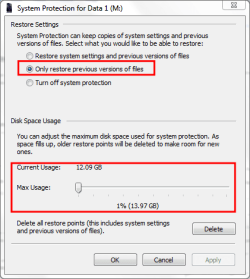
I have most of my data on an external drive M: and have turned on system protection for that drive. I have also set up a scheduled task to make sure I have at least one RP per day.

screenshot70_2011-12-12.png

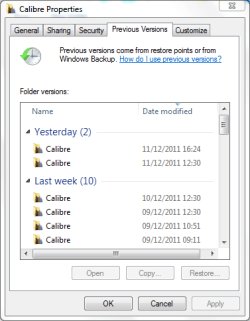
If you right click on a folder or file and open properties. On the Previous versions tab you get a list of dates for which previous versions exist.

screenshot71_2011-12-12.png

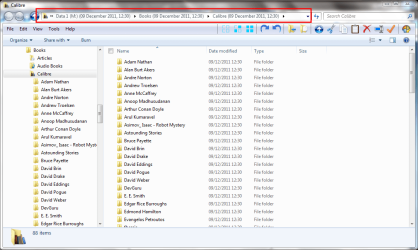
If you open one of these for a folder it opens in explorer from where you can access and copy any file you chose or the complete folder if you wish. It gives the state of that folder when the RP was taken.

screenshot72_2011-12-12.png
 

My Computer My Computer

Computer type
Laptop
Computer Manufacturer/Model Number
Hewlett-Packard/G62-107SA Notebook
OS
Microsoft Windows 7 Home Premium 64-bit Service Pack 1
CPU
Intel(R) Core(TM) i3 CPU M 330 @ 2.13GHz
Motherboard
Hewlett-Packard 1425
Memory
8 GB DDR3
Graphics Card(s)
Intel(R) HD Graphics
Sound Card
Realtek High Definition Audio
Monitor(s) Displays
Builtin
Screen Resolution
1366 x 768 x 32 bits (4294967296 colors) @ 60 Hz
Hard Drives
250 GB SATA Hard Disk Drive 7200 rpm
2TB Seagate GoFlex USB 2 Drive
1TB Iomega Prestige USB 2 Drive
1.5TB Iomega Prestige USB 2 Drive (Samsung)
2TB WD MyBook Live NAS.
Mouse
Logitech Anywhere MX
Internet Speed
152 Mbs download 10 Mbs upload
Antivirus
Norton 360
Browser
Chrome
kado897,

Thanks for the explanation. While on the subject of System Restore am I correct in my understanding that unless you use Task Scheduler a Restore Point will only be created every 7 days by Windows?

Thanks and regards,

2harts4ever
 

My Computer My Computer

Computer Manufacturer/Model Number
HP Pavilion p7-1157c
OS
Windows 7 Pro x64 SP1
CPU
AMD A6-3600
Motherboard
Pagatron 2ACF 1.01
Memory
8 GBs
Graphics Card(s)
AMD Radeon HD
Sound Card
Realtec High Definition Audio
Monitor(s) Displays
HP 2311 Wide LCD
Screen Resolution
1920 x 1080
Keyboard
HID Keyboard Device
Mouse
Microsoft USB Wireless Mouse (IntelliPoint)
Other Info
BIOS: AMI 7.06

My Computer My Computer

Computer type
Laptop
Computer Manufacturer/Model Number
Hewlett-Packard/G62-107SA Notebook
OS
Microsoft Windows 7 Home Premium 64-bit Service Pack 1
CPU
Intel(R) Core(TM) i3 CPU M 330 @ 2.13GHz
Motherboard
Hewlett-Packard 1425
Memory
8 GB DDR3
Graphics Card(s)
Intel(R) HD Graphics
Sound Card
Realtek High Definition Audio
Monitor(s) Displays
Builtin
Screen Resolution
1366 x 768 x 32 bits (4294967296 colors) @ 60 Hz
Hard Drives
250 GB SATA Hard Disk Drive 7200 rpm
2TB Seagate GoFlex USB 2 Drive
1TB Iomega Prestige USB 2 Drive
1.5TB Iomega Prestige USB 2 Drive (Samsung)
2TB WD MyBook Live NAS.
Mouse
Logitech Anywhere MX
Internet Speed
152 Mbs download 10 Mbs upload
Antivirus
Norton 360
Browser
Chrome
kado897,

Thanks for the explanation. While on the subject of System Restore am I correct in my understanding that unless you use Task Scheduler a Restore Point will only be created every 7 days by Windows?

Thanks and regards,

2harts4ever

I think I have read that is true, but..........restore points are also made during Windows Updates and can also be made manually at will.

Looking over my list of restore points, most were made automatically when I did a Windows Update of some type--or manually. None appear to have been made by the one-per-week automatic process.
 

My Computer My Computer

Computer type
PC/Desktop
Computer Manufacturer/Model Number
Ignatz Special; 4 speed manual gearbox; factory air conditioning; one of one
OS
Windows 7 Home Premium SP1, 64-bit
CPU
Intel Skylake i5-6600K, not overclocked
Motherboard
AsRock Z170M Extreme 4, micro ATX
Memory
8 GB HyperX DDR4-2666 (2 x 4 GB)
Graphics Card(s)
none; graphics are integrated on CPU
Sound Card
onboard: Realtek ALC1150; external: USB Behringer UF0-202
Monitor(s) Displays
Dell S2340M 23 inch IPS
Screen Resolution
1600 x 900
Hard Drives
System: Crucial MX100 series SSD, 128 GB;
Data: Samsung Spinpoint 103SJ, 1 TB;
Backup: WD Caviar Green WD30EZRX-00D8PB0, 3 TB
PSU
Rosewill SilentNight 500 watt fanless, semi-modular
Case
Antec Solo II
Cooling
Noctua NH-U12S; Noctua F12 intake, Noctua S12A exhaust
Keyboard
Microsoft 200 6JH-00001 USB
Mouse
Dell or Microsoft optical wired; USB
Antivirus
Microsoft Security Essentials and Malwarebytes Premium
Browser
Pale Moon
Other Info
All fans PWM; speeds at idle: CPU circa 500 rpm; intake circa 600 rpm; exhaust circa 600 rpm; CPU temps 27 idle and 47 C load in a warm room (27 C/81 F) when running Intel Extreme Tuning Utility stress test.
It actually checks daily but only creates one if there have not been any in the last week. I have had it happen only the once that I am aware of and that was when I had done an image restore (which removes RPs) just before the check was due to run.
 

My Computer My Computer

Computer type
Laptop
Computer Manufacturer/Model Number
Hewlett-Packard/G62-107SA Notebook
OS
Microsoft Windows 7 Home Premium 64-bit Service Pack 1
CPU
Intel(R) Core(TM) i3 CPU M 330 @ 2.13GHz
Motherboard
Hewlett-Packard 1425
Memory
8 GB DDR3
Graphics Card(s)
Intel(R) HD Graphics
Sound Card
Realtek High Definition Audio
Monitor(s) Displays
Builtin
Screen Resolution
1366 x 768 x 32 bits (4294967296 colors) @ 60 Hz
Hard Drives
250 GB SATA Hard Disk Drive 7200 rpm
2TB Seagate GoFlex USB 2 Drive
1TB Iomega Prestige USB 2 Drive
1.5TB Iomega Prestige USB 2 Drive (Samsung)
2TB WD MyBook Live NAS.
Mouse
Logitech Anywhere MX
Internet Speed
152 Mbs download 10 Mbs upload
Antivirus
Norton 360
Browser
Chrome
Everyone,

So much information ... so much to absorb ...lol

Seriously I appreciate all the comments and suggestions.

Thanks and regards,

2harts4ever
 

My Computer My Computer

Computer Manufacturer/Model Number
HP Pavilion p7-1157c
OS
Windows 7 Pro x64 SP1
CPU
AMD A6-3600
Motherboard
Pagatron 2ACF 1.01
Memory
8 GBs
Graphics Card(s)
AMD Radeon HD
Sound Card
Realtec High Definition Audio
Monitor(s) Displays
HP 2311 Wide LCD
Screen Resolution
1920 x 1080
Keyboard
HID Keyboard Device
Mouse
Microsoft USB Wireless Mouse (IntelliPoint)
Other Info
BIOS: AMI 7.06
You are welcome 2harts4ever. You will get lots of good advice here.
 

My Computer My Computer

Computer type
Laptop
Computer Manufacturer/Model Number
Hewlett-Packard/G62-107SA Notebook
OS
Microsoft Windows 7 Home Premium 64-bit Service Pack 1
CPU
Intel(R) Core(TM) i3 CPU M 330 @ 2.13GHz
Motherboard
Hewlett-Packard 1425
Memory
8 GB DDR3
Graphics Card(s)
Intel(R) HD Graphics
Sound Card
Realtek High Definition Audio
Monitor(s) Displays
Builtin
Screen Resolution
1366 x 768 x 32 bits (4294967296 colors) @ 60 Hz
Hard Drives
250 GB SATA Hard Disk Drive 7200 rpm
2TB Seagate GoFlex USB 2 Drive
1TB Iomega Prestige USB 2 Drive
1.5TB Iomega Prestige USB 2 Drive (Samsung)
2TB WD MyBook Live NAS.
Mouse
Logitech Anywhere MX
Internet Speed
152 Mbs download 10 Mbs upload
Antivirus
Norton 360
Browser
Chrome
Just by searching this forum it is making the switch from XP to 7 a lot easier. Glad I found it!
 

My Computer My Computer

Computer Manufacturer/Model Number
HP Pavilion p7-1157c
OS
Windows 7 Pro x64 SP1
CPU
AMD A6-3600
Motherboard
Pagatron 2ACF 1.01
Memory
8 GBs
Graphics Card(s)
AMD Radeon HD
Sound Card
Realtec High Definition Audio
Monitor(s) Displays
HP 2311 Wide LCD
Screen Resolution
1920 x 1080
Keyboard
HID Keyboard Device
Mouse
Microsoft USB Wireless Mouse (IntelliPoint)
Other Info
BIOS: AMI 7.06
Back
Top