Solved How much disk space is needed for System Restore?

The tutorials section was what drew me when I got 7 first.
 

My Computer My Computer

Computer type
Laptop
Computer Manufacturer/Model Number
Hewlett-Packard/G62-107SA Notebook
OS
Microsoft Windows 7 Home Premium 64-bit Service Pack 1
CPU
Intel(R) Core(TM) i3 CPU M 330 @ 2.13GHz
Motherboard
Hewlett-Packard 1425
Memory
8 GB DDR3
Graphics Card(s)
Intel(R) HD Graphics
Sound Card
Realtek High Definition Audio
Monitor(s) Displays
Builtin
Screen Resolution
1366 x 768 x 32 bits (4294967296 colors) @ 60 Hz
Hard Drives
250 GB SATA Hard Disk Drive 7200 rpm
2TB Seagate GoFlex USB 2 Drive
1TB Iomega Prestige USB 2 Drive
1.5TB Iomega Prestige USB 2 Drive (Samsung)
2TB WD MyBook Live NAS.
Mouse
Logitech Anywhere MX
Internet Speed
152 Mbs download 10 Mbs upload
Antivirus
Norton 360
Browser
Chrome
WOW! That (Tutorials) is a gold-mine! I will check that out in earnest! :D
Thanks ...
 

My Computer My Computer

Computer Manufacturer/Model Number
HP Pavilion p7-1157c
OS
Windows 7 Pro x64 SP1
CPU
AMD A6-3600
Motherboard
Pagatron 2ACF 1.01
Memory
8 GBs
Graphics Card(s)
AMD Radeon HD
Sound Card
Realtec High Definition Audio
Monitor(s) Displays
HP 2311 Wide LCD
Screen Resolution
1920 x 1080
Keyboard
HID Keyboard Device
Mouse
Microsoft USB Wireless Mouse (IntelliPoint)
Other Info
BIOS: AMI 7.06
20% of that big drive is too much. Anything between 10 and 20GB would be ample. Restore points take up to 1GB per shot, but they can be smaller depending what you have on C:

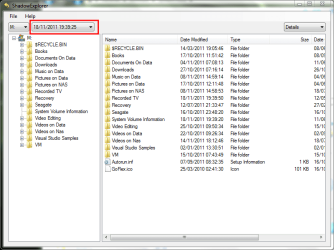
Also I suggest to put your user data on a seperate partition and give that 5GB for the restore points. Is handy if you lost a file and want to retrieve it. http://www.sevenforums.com/tutorials/132087-shadowexplorer-recover-lost-files-folders.html

Shadow explorer is good but you don't need it. Just use Windows built in previous versions which can be found in the properties dialogue..
True, provided it works and that you want the version last stored. But if you want to go back a couple of weeks, you can get there only with Shadow Explorer. That is why I prefer SE - I see what I am doing.
 

My Computer My Computer

Computer Manufacturer/Model Number
HP, Dell, Gateway, Toshiba - 4 laptops and 2 desktops
OS
Vista, Windows7, Mint Mate, Zorin, Windows 8
CPU
from 1.6GHz Duo to i7
Monitor(s) Displays
2x HP w2207
Hard Drives
5x HDD, 7x SSD, 12x Externals
Keyboard
with trackball - no mices
Mouse
Trackball mice
Internet Speed
DSL 6000
As with Shadow Explorer you can go back as far as you have valid RPs.

screenshot75_2011-12-12.png

screenshot74_2011-12-12.png
 

My Computer My Computer

Computer type
Laptop
Computer Manufacturer/Model Number
Hewlett-Packard/G62-107SA Notebook
OS
Microsoft Windows 7 Home Premium 64-bit Service Pack 1
CPU
Intel(R) Core(TM) i3 CPU M 330 @ 2.13GHz
Motherboard
Hewlett-Packard 1425
Memory
8 GB DDR3
Graphics Card(s)
Intel(R) HD Graphics
Sound Card
Realtek High Definition Audio
Monitor(s) Displays
Builtin
Screen Resolution
1366 x 768 x 32 bits (4294967296 colors) @ 60 Hz
Hard Drives
250 GB SATA Hard Disk Drive 7200 rpm
2TB Seagate GoFlex USB 2 Drive
1TB Iomega Prestige USB 2 Drive
1.5TB Iomega Prestige USB 2 Drive (Samsung)
2TB WD MyBook Live NAS.
Mouse
Logitech Anywhere MX
Internet Speed
152 Mbs download 10 Mbs upload
Antivirus
Norton 360
Browser
Chrome
But if you want to go back a couple of weeks, you can get there only with Shadow Explorer.
No, you can get there with RPs also, but it takes EVERYTHING "back there" whereas Shadow Explorer does not. It appears that SE allows you to look-into any of your RPs and pick/choose specific files you might wish to recover. I'm going to try it myself, thanks whs.
 

My Computer My Computer

Computer type
Laptop
Computer Manufacturer/Model Number
Dell Latitude E6540 Laptop
OS
Windows 7 Professional 64bit
CPU
Intel Core i7 4600M @ 2.90GHz
Motherboard
Dell Inc. 0CYT5F (SOCKET 0)
Memory
16.0GB Dual-Channel DDR3 @ 797MHz (11-11-11-28)
Graphics Card(s)
Intel HD Graphics 4600 (Dell) 2048MB ATI AMD Radeon HD 8790M
Sound Card
Realtek High Definition Audio
Monitor(s) Displays
HP ZR30w (2560x1600@60Hz)
Hard Drives
256GB LITEONIT LMT-256M6M-41 mm SATA (SSD)
1TB Samsung SSD 860 EVO mSATA SATA (SSD)
2TB USB 3.0 USB Device
115GB SanDisk Ultra Fit USB
Other Info
Multiple Dell E-Port Plus II Port Replicator/Docking Stations 0Y72NH USB 3.0 + 130W AC Adapters
But if you want to go back a couple of weeks, you can get there only with Shadow Explorer.
No, you can get there with RPs also, but it takes EVERYTHING "back there" whereas Shadow Explorer does not. It appears that SE allows you to look-into any of your RPs and pick/choose specific files you might wish to recover. I'm going to try it myself, thanks whs.

If you open the Previous Version of a folder you have access to it all in Windows Explorer.

screenshot76_2011-12-12.png
 

My Computer My Computer

Computer type
Laptop
Computer Manufacturer/Model Number
Hewlett-Packard/G62-107SA Notebook
OS
Microsoft Windows 7 Home Premium 64-bit Service Pack 1
CPU
Intel(R) Core(TM) i3 CPU M 330 @ 2.13GHz
Motherboard
Hewlett-Packard 1425
Memory
8 GB DDR3
Graphics Card(s)
Intel(R) HD Graphics
Sound Card
Realtek High Definition Audio
Monitor(s) Displays
Builtin
Screen Resolution
1366 x 768 x 32 bits (4294967296 colors) @ 60 Hz
Hard Drives
250 GB SATA Hard Disk Drive 7200 rpm
2TB Seagate GoFlex USB 2 Drive
1TB Iomega Prestige USB 2 Drive
1.5TB Iomega Prestige USB 2 Drive (Samsung)
2TB WD MyBook Live NAS.
Mouse
Logitech Anywhere MX
Internet Speed
152 Mbs download 10 Mbs upload
Antivirus
Norton 360
Browser
Chrome
If you open the Previous Version of a folder you have access to it all in Windows Explorer.
My goodness, I had no idea about that feature of W7, at least not for folders/files! Proving once again "you learn something new every day!" thank you!!!

Is there an easy way to access old Registry entries in Shadow Copies? NM, I found a link to something that I should be able to follow:

http://www.howtogeek.com/howto/31136/how-to-restore-previous-versions-of-the-registry-in-windows-7/
 
Last edited:

My Computer My Computer

Computer type
Laptop
Computer Manufacturer/Model Number
Dell Latitude E6540 Laptop
OS
Windows 7 Professional 64bit
CPU
Intel Core i7 4600M @ 2.90GHz
Motherboard
Dell Inc. 0CYT5F (SOCKET 0)
Memory
16.0GB Dual-Channel DDR3 @ 797MHz (11-11-11-28)
Graphics Card(s)
Intel HD Graphics 4600 (Dell) 2048MB ATI AMD Radeon HD 8790M
Sound Card
Realtek High Definition Audio
Monitor(s) Displays
HP ZR30w (2560x1600@60Hz)
Hard Drives
256GB LITEONIT LMT-256M6M-41 mm SATA (SSD)
1TB Samsung SSD 860 EVO mSATA SATA (SSD)
2TB USB 3.0 USB Device
115GB SanDisk Ultra Fit USB
Other Info
Multiple Dell E-Port Plus II Port Replicator/Docking Stations 0Y72NH USB 3.0 + 130W AC Adapters
Thanks guys, I got it. Education never stops, LOL.
 

My Computer My Computer

Computer Manufacturer/Model Number
HP, Dell, Gateway, Toshiba - 4 laptops and 2 desktops
OS
Vista, Windows7, Mint Mate, Zorin, Windows 8
CPU
from 1.6GHz Duo to i7
Monitor(s) Displays
2x HP w2207
Hard Drives
5x HDD, 7x SSD, 12x Externals
Keyboard
with trackball - no mices
Mouse
Trackball mice
Internet Speed
DSL 6000
If you open the Previous Version of a folder you have access to it all in Windows Explorer.
My goodness, I had no idea about that feature of W7, at least not for folders/files! Proving once again "you learn something new every day!" thank you!!!

Is there an easy way to access old Registry entries in Shadow Copies? NM, I found a link to something that I should be able to follow:

How to Restore Previous Versions of the Registry in Windows 7 - How-To Geek

I didn't know that but having seen it it is obvious. We learn something new every day.
 

My Computer My Computer

Computer type
Laptop
Computer Manufacturer/Model Number
Hewlett-Packard/G62-107SA Notebook
OS
Microsoft Windows 7 Home Premium 64-bit Service Pack 1
CPU
Intel(R) Core(TM) i3 CPU M 330 @ 2.13GHz
Motherboard
Hewlett-Packard 1425
Memory
8 GB DDR3
Graphics Card(s)
Intel(R) HD Graphics
Sound Card
Realtek High Definition Audio
Monitor(s) Displays
Builtin
Screen Resolution
1366 x 768 x 32 bits (4294967296 colors) @ 60 Hz
Hard Drives
250 GB SATA Hard Disk Drive 7200 rpm
2TB Seagate GoFlex USB 2 Drive
1TB Iomega Prestige USB 2 Drive
1.5TB Iomega Prestige USB 2 Drive (Samsung)
2TB WD MyBook Live NAS.
Mouse
Logitech Anywhere MX
Internet Speed
152 Mbs download 10 Mbs upload
Antivirus
Norton 360
Browser
Chrome
I didn't know that but having seen it it is obvious. We learn something new every day.
Funny you would post about this today--I was having a problem with a program I had to reinstall, and was thinking "I'll BET the registry settings got blown away". Once I found the day-it-last-worked, I used the "Previous Versions" feature of W7 to find the old C:\Users\Max\ntuser.dat hive, copy it out and mount it with Regedit, and use regedit to export its key, then just double-clicked on it and all is well again.

Finding this makes System Restore so much more useful--rather than agonizing over whether to revert to a month-old Restore Point (all all that implies) I could just fix my specific problem using the Previous Versions method.

You are my hero today, thanks again! :cool:
 

My Computer My Computer

Computer type
Laptop
Computer Manufacturer/Model Number
Dell Latitude E6540 Laptop
OS
Windows 7 Professional 64bit
CPU
Intel Core i7 4600M @ 2.90GHz
Motherboard
Dell Inc. 0CYT5F (SOCKET 0)
Memory
16.0GB Dual-Channel DDR3 @ 797MHz (11-11-11-28)
Graphics Card(s)
Intel HD Graphics 4600 (Dell) 2048MB ATI AMD Radeon HD 8790M
Sound Card
Realtek High Definition Audio
Monitor(s) Displays
HP ZR30w (2560x1600@60Hz)
Hard Drives
256GB LITEONIT LMT-256M6M-41 mm SATA (SSD)
1TB Samsung SSD 860 EVO mSATA SATA (SSD)
2TB USB 3.0 USB Device
115GB SanDisk Ultra Fit USB
Other Info
Multiple Dell E-Port Plus II Port Replicator/Docking Stations 0Y72NH USB 3.0 + 130W AC Adapters
As with anything to do with the registry you need to know what you are doing and to backup first but yes it sounds useful.
 

My Computer My Computer

Computer type
Laptop
Computer Manufacturer/Model Number
Hewlett-Packard/G62-107SA Notebook
OS
Microsoft Windows 7 Home Premium 64-bit Service Pack 1
CPU
Intel(R) Core(TM) i3 CPU M 330 @ 2.13GHz
Motherboard
Hewlett-Packard 1425
Memory
8 GB DDR3
Graphics Card(s)
Intel(R) HD Graphics
Sound Card
Realtek High Definition Audio
Monitor(s) Displays
Builtin
Screen Resolution
1366 x 768 x 32 bits (4294967296 colors) @ 60 Hz
Hard Drives
250 GB SATA Hard Disk Drive 7200 rpm
2TB Seagate GoFlex USB 2 Drive
1TB Iomega Prestige USB 2 Drive
1.5TB Iomega Prestige USB 2 Drive (Samsung)
2TB WD MyBook Live NAS.
Mouse
Logitech Anywhere MX
Internet Speed
152 Mbs download 10 Mbs upload
Antivirus
Norton 360
Browser
Chrome
I have most of my data on an external drive M: and have turned on system protection for that drive. I have also set up a scheduled task to make sure I have at least one RP per day.

View attachment 187912

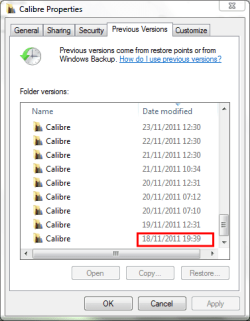
If you right click on a folder or file and open properties. On the Previous versions tab you get a list of dates for which previous versions exist.

View attachment 187913

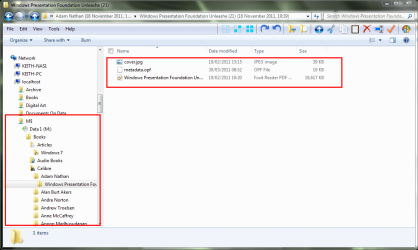
If you open one of these for a folder it opens in explorer from where you can access and copy any file you chose or the complete folder if you wish. It gives the state of that folder when the RP was taken.

View attachment 187914

Sorry, this is a super-old thread and my reply is unrelated (although the thread was helpful, as I'm having problems upgrading to Windows 10 and reverted back to Windows 7 and noticed I have no restore points, so I'm configuring System Restore), but I just wanted to say that your list of books is very cool. I just bought my brother a big bag of secondhand books at two stores across the street from each other in Bemidji, Minn., (Roy's Comics and Games; Books N More) and the latter store was not very organized but had about a dozen Andre Norton books at 50 cents each. The comic store books I bought were between 25 cents and $1.50. Gotta love used bookstores.

Laurie
 

My Computer My Computer

Computer type
PC/Desktop
Computer Manufacturer/Model Number
Gateway DX4860-UR14P
OS
Windows 7 Home Premium 64bit
CPU
Intel Core i5-3450 processor 3.1GHz (6MB Cache)
Memory
6GB SDRAM DDR3
Graphics Card(s)
Intel HD Graphics 2500
Hard Drives
Serial ATA 1TB
Antivirus
Avast Free
Browser
Firefox

My Computer My Computer

Computer Manufacturer/Model Number
HP, Dell, Gateway, Toshiba - 4 laptops and 2 desktops
OS
Vista, Windows7, Mint Mate, Zorin, Windows 8
CPU
from 1.6GHz Duo to i7
Monitor(s) Displays
2x HP w2207
Hard Drives
5x HDD, 7x SSD, 12x Externals
Keyboard
with trackball - no mices
Mouse
Trackball mice
Internet Speed
DSL 6000
Back
Top