How To Access BIOS (Win 7, 64 bit)

ve6tp

Banned
Local time
6:57 PM
Messages
12
Hi:

I hope I'm in the right section for posting my question. Actually, I have two questions.

When I start up my computer (I'm using Win 7, 64 bit) the computer monitor is blank and I know this is normal, but it is a matter of choice. For my preference, I like to see the text scrolling while it is loading up. Kinda gives me a bit of confidence that it's loading OK.

I recently had some work done on my computer and now the screen is blank while loading until the system is fully activated. If I recall correctly from days long ago, this action can be selected for "Off and On"on the BIOS menu. I suspect it is the same with Win 7?? But time has erased how I can open up and access BOIS.

I tried hitting the F-8, F-10, F2 and the Delete key while the system is loading to bring the BIOS up but this didn't work for me.

So my questions are:

1. How or what do I do to bring up the BIOS menu?

2. What are the exact steps and in what order, do I use so that I can change the options so that the "TEXT" shows when the system is loading.

Any help would be appreciated.
 

My Computer My Computer

OS
Windows 7 64 bit
What is the make & model of your computer, some use different keys to enter the BIOS setup ?
 

My Computer My Computer

Computer type
PC/Desktop
Computer Manufacturer/Model Number
Built them myself, Science Experiments !
OS
Win7 Enterprise, Win7 x86 (Ult 7600), Win7 x64 Ult 7600, TechNet RTM on AMD x64 (2.8Ghz)
CPU
AMD fx8350 4ghz, AMD-32 2400mhz, AMD-64 3200mhz, AMDx64 2.8G
Motherboard
SIS 755, ECS-K8M890M-M (Ult 7600), GigaByte & others
Memory
2gb, 4gb on the Ult 7600, 4gb on Technet RTM, 32gb on FX8350
Graphics Card(s)
Draw my own Graphics, several nVidia cards
Sound Card
on motherboard
Monitor(s) Displays
19" flat scr, 28" I-Inc widescr,22" Emprex Widescr, 23" Acer
Screen Resolution
1280 x 1024, 1440 x 900, 1920 x 1080
Hard Drives
6 pata Ide HD's & 2 Sata HD's
added 80gb external on Ult 7600 computer,
numerous extra 1tb, 2TB, 3Tb SATA HD's
A collection of ext HD Docks w/ HDs
PSU
430w, 550w, 600w, 700, 800, etc
Case
All Generic Full Towers
Cooling
Open Air & a few fans, some w/ colored LEDs
Keyboard
Compaq & Dell recycled from GoodWill
Mouse
Made in China Optical Wired Mouse
Internet Speed
Fast Cable InterNet
Antivirus
AVG Free on 24 different Desktops, NO Problems!
Browser
IE 8 is preferred, but use FireFox sometimes
Other Info
Linksys Routers, switches, & Hubs
Too Many USB Flash Drives to count, Biggest is 64GB !
Eight computers in my home network.
Sixteen computers at my business network.
Linked via TeamViewer !
Lots of old used spare computer parts everywhere!
Usually DEL or F2 key, I would hit those repeatedly about 2 secs after hitting the power button.

BIOS settings wise should be pretty obvious on the BOOT menu, can't know for sure, there are literally thousands of BIOS versions.
 

My Computer My Computer

Computer type
PC/Desktop
Computer Manufacturer/Model Number
Self Built Custom
OS
Windows 7 Ultimate Retail Box (64-bit installed) + Service Pack 1
CPU
AMD FX-8350 CPU v1.15 (or 1.0F) BIOS was required!
Motherboard
MSI 890FXA-GD70
Memory
8G CAS-7 G-Skill DDR3 @1333 (2 fours) [mobo nonOC max rec'd]
Graphics Card(s)
Radeon HD 7950 [3 gigs of GDDR5] MSI Twin Frozr model
Sound Card
Realtek High Definition Audio (onboard mobo, ALC-889 chip)
Monitor(s) Displays
2 WS LED Monitors: One LG One Viewsonic
Screen Resolution
1920 by 1080
Hard Drives
SSD for OS: Samsung 840 Pro
SSD for VM and utilities: Adata SX900
7200 RPM SATA HDs for the rest: Hitachi and Seagate
PSU
Corsair TX850 - 850W max, in service since August 2010.
Case
Thermaltake Armor A90
Cooling
Thermaltake Spin Q CPU Cooler, in service since August 2010
Keyboard
Logitech G11
Mouse
Logitech M310 Wireless
Internet Speed
100 Megabit broadband supposedly upgraded from 50 (Cable)
Antivirus
Bitdefender Internet Security 2014 suite
Browser
Pale Moon 64-bit main, also IceDragon, Opera, and Maxthon.
Other Info
CompTIA A+ certified (220-800 series) in July 2013.
Hi:

My computer is not a pre-assembled package. I selected all the components when it was put together.

If you mean what operating system, I'm using Windows 7 Home Premium with Service Package 1.
 

My Computer My Computer

OS
Windows 7 64 bit

My Computer My Computer

Computer type
PC/Desktop
Computer Manufacturer/Model Number
Built them myself, Science Experiments !
OS
Win7 Enterprise, Win7 x86 (Ult 7600), Win7 x64 Ult 7600, TechNet RTM on AMD x64 (2.8Ghz)
CPU
AMD fx8350 4ghz, AMD-32 2400mhz, AMD-64 3200mhz, AMDx64 2.8G
Motherboard
SIS 755, ECS-K8M890M-M (Ult 7600), GigaByte & others
Memory
2gb, 4gb on the Ult 7600, 4gb on Technet RTM, 32gb on FX8350
Graphics Card(s)
Draw my own Graphics, several nVidia cards
Sound Card
on motherboard
Monitor(s) Displays
19" flat scr, 28" I-Inc widescr,22" Emprex Widescr, 23" Acer
Screen Resolution
1280 x 1024, 1440 x 900, 1920 x 1080
Hard Drives
6 pata Ide HD's & 2 Sata HD's
added 80gb external on Ult 7600 computer,
numerous extra 1tb, 2TB, 3Tb SATA HD's
A collection of ext HD Docks w/ HDs
PSU
430w, 550w, 600w, 700, 800, etc
Case
All Generic Full Towers
Cooling
Open Air & a few fans, some w/ colored LEDs
Keyboard
Compaq & Dell recycled from GoodWill
Mouse
Made in China Optical Wired Mouse
Internet Speed
Fast Cable InterNet
Antivirus
AVG Free on 24 different Desktops, NO Problems!
Browser
IE 8 is preferred, but use FireFox sometimes
Other Info
Linksys Routers, switches, & Hubs
Too Many USB Flash Drives to count, Biggest is 64GB !
Eight computers in my home network.
Sixteen computers at my business network.
Linked via TeamViewer !
Lots of old used spare computer parts everywhere!
Hi Doc:

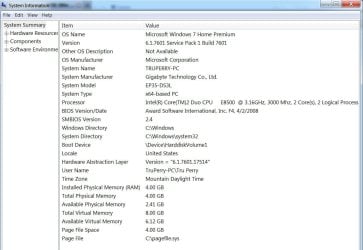
I don't use Internet Explorer but I took this screenshot. Hope it is the info you are asking me for.

Just as additional information, before my CPU hospital worked on this computer, if I had (for example) a floppy disk in the Floppy drive, it would stop loading and bring up the BIOS (I think that's what it was). But now, that no longer happens. It just stays blank.

Hope I've attached the screenshot picture OK.
 

Attachments

  • System Summary.jpg
    System Summary.jpg
    86 KB · Views: 11

My Computer My Computer

OS
Windows 7 64 bit
As Faladu said hitting the Del Key repeatedly after the power button should work with your Gigabyte MB. Sounds like your computer hospital changed things. They probaby set the floopy to last in the boot sequence. How about a non bootable CD in the CD/DVD drive ?
 

My Computer My Computer

Computer type
PC/Desktop
Computer Manufacturer/Model Number
Built them myself, Science Experiments !
OS
Win7 Enterprise, Win7 x86 (Ult 7600), Win7 x64 Ult 7600, TechNet RTM on AMD x64 (2.8Ghz)
CPU
AMD fx8350 4ghz, AMD-32 2400mhz, AMD-64 3200mhz, AMDx64 2.8G
Motherboard
SIS 755, ECS-K8M890M-M (Ult 7600), GigaByte & others
Memory
2gb, 4gb on the Ult 7600, 4gb on Technet RTM, 32gb on FX8350
Graphics Card(s)
Draw my own Graphics, several nVidia cards
Sound Card
on motherboard
Monitor(s) Displays
19" flat scr, 28" I-Inc widescr,22" Emprex Widescr, 23" Acer
Screen Resolution
1280 x 1024, 1440 x 900, 1920 x 1080
Hard Drives
6 pata Ide HD's & 2 Sata HD's
added 80gb external on Ult 7600 computer,
numerous extra 1tb, 2TB, 3Tb SATA HD's
A collection of ext HD Docks w/ HDs
PSU
430w, 550w, 600w, 700, 800, etc
Case
All Generic Full Towers
Cooling
Open Air & a few fans, some w/ colored LEDs
Keyboard
Compaq & Dell recycled from GoodWill
Mouse
Made in China Optical Wired Mouse
Internet Speed
Fast Cable InterNet
Antivirus
AVG Free on 24 different Desktops, NO Problems!
Browser
IE 8 is preferred, but use FireFox sometimes
Other Info
Linksys Routers, switches, & Hubs
Too Many USB Flash Drives to count, Biggest is 64GB !
Eight computers in my home network.
Sixteen computers at my business network.
Linked via TeamViewer !
Lots of old used spare computer parts everywhere!
Thanks for all the fast replies Doc. Very much appreciated and I know it's taking up a lot of your time.

I have tried hitting (while it's loading) the F-1, F-5, F-10, F-7, F-8, ESCAPE KEY, DELETE KEY. nothing changes. Still stays as a blank screen. This isn't significant or important but it is something I would like to change.

I think the obvious and best thing for me to do now is to go to the Tech and ask him what he did and how I can correct it.

You have spent a lot of time on trying to resolve this for me, that I will post a reply with the results of my talking with the Tech. Just give me a couple days and I'll get back to you.

Till then, take care and thanks again.
 

My Computer My Computer

OS
Windows 7 64 bit
There are BIOS options for "fast boot" and "full screen logo" that will effect what gets displayed during boot up. Turning fast boot off will give you more detailed boot info during the POST. Even with it set to off though there should still be a short POST message on screen. The full screen logo is just basically a big advertisement for the motherboard manufacturer. Mine also lists the keys pressed for BIOS entry and the quick boot menu. From what you describe you just see a blank screen. You should also see the Video cards post screen. If your video card has more than one output I would try the other connector. If you have a cable that fits that is. Another option is to reset the BIOS to defaults. It's been my experience that the default settings are for POST messages to be displayed. The BIOS can be reset by use of a motherboard jumper, follow the procedure in your motherboard manual. Or by removing the CMOS battery for say 5 or 10 minutes, and then replacing it.
 

My Computer My Computer

Computer type
PC/Desktop
Computer Manufacturer/Model Number
Home Built
OS
Windows 10 Education 64 bit
CPU
AMD Phenom II X4 980 Black Edition Deneb 3.7GHz
Motherboard
Asus M4N68T-M V2 µATX Motherboard
Memory
8GB 4GBx2 Kingston PC10600 DDR3 1333 Memory
Graphics Card(s)
Zotac NVIDIA Geforce GT640 2 Gig DDR3 PCIe
Sound Card
VIA VT1708s High Definition Audio 8-channel Onboard
Monitor(s) Displays
22" LG E2242 1080p and 2 19" I-INC AG191D
Screen Resolution
1280x1024 - 1920x1080 - 1280x1024
Hard Drives
Crucial M100 256 GB SSD and 500 GB WD Blue SATA
PSU
Thermaltake TR 620
Case
Power Up Black ATX Mid-Tower Case
Cooling
Stock heatsink and fan
Keyboard
Logitech Wireless K350 Wave
Mouse
Logitech Wireless M570 Trackman Wheel
Internet Speed
80 Mbps Down 30 Mbps Up
Antivirus
Windows Defender
Browser
Internet Explorer 11
Other Info
HP DVD1040e Lightscribe - External USB2
Back
Top