How to add music in FLAC to WMP 12 library?

Thanks for the reply. A lot of people recommend Foobar, it seems to be the best FLAC player, but I've put a lot of effort into maintaining my WMP library and I'd be a bit lost without it. I guess for the albums that need gapless playback the most, I will play in Foobar until I solve this issue.
 

My Computer My Computer

At a glance

Windows 7Celeron Dual-Core3 GB
Computer Manufacturer/Model Number
HP Compaq Presario CQ61
OS
Windows 7
CPU
Celeron Dual-Core
Memory
3 GB
The only slight problem is the track's lengths don't always come up which makes seeking a problem. But I can deal with it!
To get the lengths of the FLAC files in the library (and full tag support), install the WMP Tag Plus plug-in and re-add the files.

I've got another problem now.
When playing FLAC in WMP 12 there is an annoying gap as the track changes. Albums that have segued tracks sound really jarring between tracks as a result.
Does anyone know if there is a fix giving gapless FLAC playback in WMP12?
As far as I know, gapless playback in WMP isn't possible for formats that aren't supported by default, and that need to be played by the use of a DirectShow filter. The same applies to WMP's crossfading in general.
 

My Computer My Computer

At a glance

Windows 10
Computer type
PC/Desktop
OS
Windows 10
But there are a couple problems:
- Length does not show on FLAC music
- Cannot seek FLAC music

WMP Tag Plus is a new tag support plug-in that will fix these problems:

BM-productions WMP Tag Plus

To prevent conflicts, it is recommended to uninstall or disable all other WMP tag support plug-ins before installing WMP Tag Plus.
thank you very much for this info my wmp library has never looked fuller ,ive even got cover art too...wayhay!
 

My Computer My Computer

At a glance

Microsoft Windows 7 Home Premium 64-bit 7600IIx4 amd athelon 635 processor2x2gbati radeon HD 5450
Computer Manufacturer/Model Number
Hewlett packard/p6512uk
OS
Microsoft Windows 7 Home Premium 64-bit 7600
CPU
IIx4 amd athelon 635 processor
Motherboard
FOXCONN 2AA9
Memory
2x2gb
Graphics Card(s)
ati radeon HD 5450
Sound Card
(1) Realtek High Definition Audio (2) AMD High Definition
Monitor(s) Displays
samsung lcd tv 32"
Screen Resolution
1360x 768
Hard Drives
(1) WDC WD10 01FAES-60Z2A0 SATA Disk Device (2) Maxtor OneTouch USB Device (3) ST310003 33AS USB Device (4) WD My Book 1111 USB Device
PSU
?
Cooling
air!
Keyboard
wireless hp
Mouse
wireless Hp,optical
Internet Speed
1.10mb/s
Antivirus
MSE
Browser
Firefox
They should now be listed under unknown artist as depicted in the attached screenshot


Anyone know how to get them out of unknown artist?. I am now able to play them but have 1100+ song under unknown artist :huh:
 

My Computer My Computer

At a glance

Windows 7 Professional 64 bitCore i3 2100Corsair Vengance Blue 8GBZotac Geforce GT430 Zone Edition
OS
Windows 7 Professional 64 bit
CPU
Core i3 2100
Motherboard
Asrock H67M-ITX/HT
Memory
Corsair Vengance Blue 8GB
Graphics Card(s)
Zotac Geforce GT430 Zone Edition
Monitor(s) Displays
Panasonic TH-P58X20A
Hard Drives
Corsair Force 60GB SSD
WD Green 2TB
PSU
Silverstone 400W Fanless
Case
Silverstone LC17
Cooling
Scythe Shuriken Low Profile Rev B
redtrigger: you need a tag support plug-in such as WMP Tag Plus (also discussed above). After installing WMP Tag Plus, re-add the FLAC files to WMP's library and you should now see the correct artists, provided that the FLAC files have been tagged correctly.
 

My Computer My Computer

At a glance

Windows 10
Computer type
PC/Desktop
OS
Windows 10
Woo Hoo!!!!!!! GOT IT! Finally!!!! Hell Yeah!! Album titles were tagged incorrectly, track numbers where missing, hence the alphabetical listing, and it appears that WMP runs 32 bit from the Start Menu and 64 bit from the Task Bar. (Note to self, need to use the 32 bit.) Definitely needed several things to solve this equation. WMP Tag Plus v1.2, codecs from xiph.org, Mp3Tag and most certainly the great people here at sevenforums. Thanks again boohbah, noobvious and Tim De Baets for developing such useful software! Thanks again everyone!
 

My Computer My Computer

At a glance

Windows 7 64 bit
OS
Windows 7 64 bit
no prob, glad to have helped.
 

My Computer My Computer

At a glance

Microsoft Windows 7 Home Premium 64-bit 7600IIx4 amd athelon 635 processor2x2gbati radeon HD 5450
Computer Manufacturer/Model Number
Hewlett packard/p6512uk
OS
Microsoft Windows 7 Home Premium 64-bit 7600
CPU
IIx4 amd athelon 635 processor
Motherboard
FOXCONN 2AA9
Memory
2x2gb
Graphics Card(s)
ati radeon HD 5450
Sound Card
(1) Realtek High Definition Audio (2) AMD High Definition
Monitor(s) Displays
samsung lcd tv 32"
Screen Resolution
1360x 768
Hard Drives
(1) WDC WD10 01FAES-60Z2A0 SATA Disk Device (2) Maxtor OneTouch USB Device (3) ST310003 33AS USB Device (4) WD My Book 1111 USB Device
PSU
?
Cooling
air!
Keyboard
wireless hp
Mouse
wireless Hp,optical
Internet Speed
1.10mb/s
Antivirus
MSE
Browser
Firefox
Woo Hoo!!!!!!! GOT IT! Finally!!!! Hell Yeah!! Album titles were tagged incorrectly, track numbers where missing, hence the alphabetical listing, and it appears that WMP runs 32 bit from the Start Menu and 64 bit from the Task Bar. (Note to self, need to use the 32 bit.) Definitely needed several things to solve this equation. WMP Tag Plus v1.2, codecs from xiph.org, Mp3Tag and most certainly the great people here at sevenforums. Thanks again boohbah, noobvious and Tim De Baets for developing such useful software! Thanks again everyone!

Good to hear, and you're welcome :)

I suggest that you unpin the current WMP shortcut from the task bar and pin the one in the Start Menu, so that you don't accidentally launch the 64-bit version again.
 

My Computer My Computer

At a glance

Windows 10
Computer type
PC/Desktop
OS
Windows 10
OOPS! Here we go again! Tried to restore media library and everything went back to UNKNOWN again and I do mean EVERYTHING! I had deep reservations about that.
 

My Computer My Computer

At a glance

Windows 7 64 bit
OS
Windows 7 64 bit
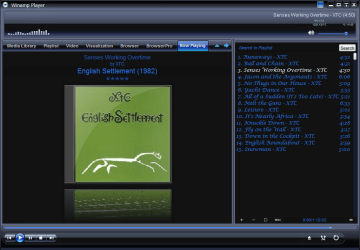
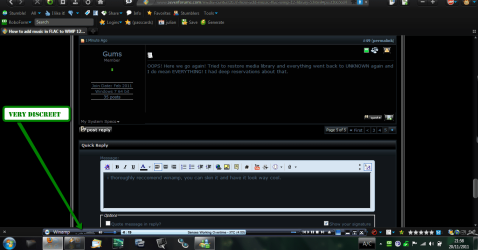
i thoroughly reccomend winamp, you can skin it and have it look way cool.

1.png
minimised
2.png

3.png

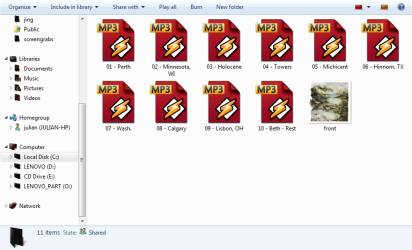
nice file icons plugin also
4.png
 

My Computer My Computer

At a glance

Microsoft Windows 7 Home Premium 64-bit 7600IIx4 amd athelon 635 processor2x2gbati radeon HD 5450
Computer Manufacturer/Model Number
Hewlett packard/p6512uk
OS
Microsoft Windows 7 Home Premium 64-bit 7600
CPU
IIx4 amd athelon 635 processor
Motherboard
FOXCONN 2AA9
Memory
2x2gb
Graphics Card(s)
ati radeon HD 5450
Sound Card
(1) Realtek High Definition Audio (2) AMD High Definition
Monitor(s) Displays
samsung lcd tv 32"
Screen Resolution
1360x 768
Hard Drives
(1) WDC WD10 01FAES-60Z2A0 SATA Disk Device (2) Maxtor OneTouch USB Device (3) ST310003 33AS USB Device (4) WD My Book 1111 USB Device
PSU
?
Cooling
air!
Keyboard
wireless hp
Mouse
wireless Hp,optical
Internet Speed
1.10mb/s
Antivirus
MSE
Browser
Firefox
Never mind, I guess I have to "Restore Media Library" TWICE in order for it to work. First to bring in the new or "Unknown" flac files then second to delete them and restore them into the "Known" or legitimate file. Sheesh! BTW, does anyone know if I can add album cover artwork as a tag using Mp3Tag? I hate having to keep pasting new cover art every time I restore the WMP Library.
 

My Computer My Computer

At a glance

Windows 7 64 bit
OS
Windows 7 64 bit
yes you can add album art,
add the album to mp3tag highlight it and then right click the album art box bottom left, select add cover ,
tip, have the album art in the album folder to start with then when the cover window opens it will have the cover art there to select.
then click save
 

My Computer My Computer

At a glance

Microsoft Windows 7 Home Premium 64-bit 7600IIx4 amd athelon 635 processor2x2gbati radeon HD 5450
Computer Manufacturer/Model Number
Hewlett packard/p6512uk
OS
Microsoft Windows 7 Home Premium 64-bit 7600
CPU
IIx4 amd athelon 635 processor
Motherboard
FOXCONN 2AA9
Memory
2x2gb
Graphics Card(s)
ati radeon HD 5450
Sound Card
(1) Realtek High Definition Audio (2) AMD High Definition
Monitor(s) Displays
samsung lcd tv 32"
Screen Resolution
1360x 768
Hard Drives
(1) WDC WD10 01FAES-60Z2A0 SATA Disk Device (2) Maxtor OneTouch USB Device (3) ST310003 33AS USB Device (4) WD My Book 1111 USB Device
PSU
?
Cooling
air!
Keyboard
wireless hp
Mouse
wireless Hp,optical
Internet Speed
1.10mb/s
Antivirus
MSE
Browser
Firefox
yes you can add album art,
add the album to mp3tag highlight it and then right click the album art box bottom left, select add cover ,
tip, have the album art in the album folder to start with then when the cover window opens it will have the cover art there to select.
then click save

Yeah, in practice it appeared to have gone off without a hitch, at least when using the Mp3Tag editor. However, when I did a restore on the Library the cover art is still left blank. Huh! Checking the directory on Mp3Tag shows that each track has the corresponding album cover art to go along with it. Just doesn't want to make the leap onto the WMP Library. I dunno...
 

My Computer My Computer

At a glance

Windows 7 64 bit
OS
Windows 7 64 bit
Yeah, in practice it appeared to have gone off without a hitch, at least when using the Mp3Tag editor. However, when I did a restore on the Library the cover art is still left blank. Huh! Checking the directory on Mp3Tag shows that each track has the corresponding album cover art to go along with it. Just doesn't want to make the leap onto the WMP Library. I dunno...
The current version of WMP Tag Plus doesn't support embedded album art yet - this will be added in the next major release. In the meantime, you could place the album art as Folder.jpg files in the album folders. Those should get picked up by WMP.

Never mind, I guess I have to "Restore Media Library" TWICE in order for it to work. First to bring in the new or "Unknown" flac files then second to delete them and restore them into the "Known" or legitimate file. Sheesh!
It's not really clear to me why you keep restoring the media library. This should be done only in extreme circumstances like library corruption. WMP should usually refresh songs' metadata automatically. If it doesn't, the supported way to refresh the metadata is by re-adding the songs, as I explained earlier. Nevertheless, I can't tell why the FLAC files keep getting added as Unknown. The only explanation I can currently give is that you're somehow still running the 64-bit version or that the plug-in keeps getting disabled.
 

My Computer My Computer

At a glance

Windows 10
Computer type
PC/Desktop
OS
Windows 10
Seems to be working fine now Tim! This might sound like a completely noobish question, but exactly how does folder.jpg work? Never used it before. I always used "paste" but I'd like to try your method. Seems more permanent. Thanks!

One more thing, when I pin WMP to either the desk top or task bar, it reverts to the 64-bit version. The 32-bit version is accessed only through the Start Menu. Is this an anomaly? If I use the 32-bit version everything works as planned. Best way to check which version is running is to check Tools>Plugins. If nothing is found, its 64 bit. Weird. Have you heard of this occurring before? If so, can anything be done to correct it?
 

My Computer My Computer

At a glance

Windows 7 64 bit
OS
Windows 7 64 bit
Seems to be working fine now Tim! This might sound like a completely noobish question, but exactly how does folder.jpg work? Never used it before. I always used "paste" but I'd like to try your method. Seems more permanent. Thanks!
Instead of copy-pasting the album art, you directly save it as a new JPEG file called Folder.jpg, to the same folder as the music files of the album you want to add album art for. All the songs in that folder should then get the Folder.jpg file as album art in WMP's library.

One more thing, when I pin WMP to either the desk top or task bar, it reverts to the 64-bit version. The 32-bit version is accessed only through the Start Menu. Is this an anomaly?
Are you pinning the shortcut in the Start Menu? You can also directly go to C:\Program Files (x86)\Windows Media Player and pin the wmplayer.exe file in that folder to the task bar.
 

My Computer My Computer

At a glance

Windows 10
Computer type
PC/Desktop
OS
Windows 10
Back
Top