Greetings to everyone!
First of all, let me thank everybody here for all the help you've given me as well as others. Often I have had a knotty problem and have done a web-search and found the answer already exists here.
 Trust me; It is not unnoticed and it is gratefully appreciated.
Jim (JR)
====================================================
Information about problem:
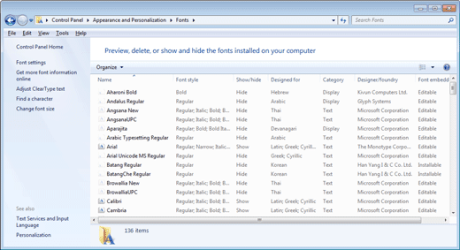
I often do typography, (WordPerfect ROCKS!), in various languages, as a result I have multiple fonts, in multiple languages, installed on my machine.
Unfortunately, the vast majority of these fonts have English-style names that have no relation to the language involved. (i.e. "Roman Sparkle" (a fake font name) might be a Cyrillic, Asian or other non-Latin font, but by looking at the name I have no clue. Many of these fonts were downloaded a while ago, and I forget which is which.
Issue / Question: ( :banghead: )
Is it possible to, somehow, categorize fonts in such a way that if I want a Vietnamese Japanese, Russian, or whatever type font, that I can find all those fonts as a grouping of that type and that type alone?
With any other type of file, I can create sub-folders to categorize the files by type-and-kind, making them easy to find. It would be damn convenient if I could do the same thing with fonts.
Note that I have found "font manager" software, but the question of how well it can help me within yet another program - like Word Perfect or Word - is unknown. I am not willing to download some unknown piece of software, just to experiment.
Any help or suggestions would be gratefully appreciated.
Jim (JR)
First of all, let me thank everybody here for all the help you've given me as well as others. Often I have had a knotty problem and have done a web-search and found the answer already exists here.
Trust me; It is not unnoticed and it is gratefully appreciated. Jim (JR)
====================================================
Information about problem:
I often do typography, (WordPerfect ROCKS!), in various languages, as a result I have multiple fonts, in multiple languages, installed on my machine.
Unfortunately, the vast majority of these fonts have English-style names that have no relation to the language involved. (i.e. "Roman Sparkle" (a fake font name) might be a Cyrillic, Asian or other non-Latin font, but by looking at the name I have no clue. Many of these fonts were downloaded a while ago, and I forget which is which.
Issue / Question: ( :banghead: )
Is it possible to, somehow, categorize fonts in such a way that if I want a Vietnamese Japanese, Russian, or whatever type font, that I can find all those fonts as a grouping of that type and that type alone?
With any other type of file, I can create sub-folders to categorize the files by type-and-kind, making them easy to find. It would be damn convenient if I could do the same thing with fonts.
Note that I have found "font manager" software, but the question of how well it can help me within yet another program - like Word Perfect or Word - is unknown. I am not willing to download some unknown piece of software, just to experiment.
Any help or suggestions would be gratefully appreciated.
Jim (JR)
My Computer
- Computer type
- PC/Desktop
- OS
- Two soup cans and some string.
- CPU
- Multi-Processor - TWO large rubber bands!
- Memory
- Huh? Wassit?! I don't remember. . .
- Monitor(s) Displays
- Etch-a-Sketch.
- Screen Resolution
- To have less glitches this year.
- Mouse
- Nope. Killed 'em all off last summer.
- Other Info
- I actually have several machines that all frustrate me. That's why I'm here, not to try and impress people with sordid tales of outrageous hardware.