
Hi, can anyone help me work out how to change the icon in the image?
normally when you select a file, it shows the icon for the program associated with it, for example, if i click a text file, a wee notepad++ icon shows.
But, if i click on a executable, i get the crappy old style exe icon, instead of the newer exe icon.
I know there is a simple fix out there somewhere, as i did it on a previous Win7 installation, but for the life of me, i can't find it again.
Its not a icon cache issue,
I think i remember it being a reg tweak of some sort i found on Ghacks, but don't hold me to that.
Should be..

But currently..
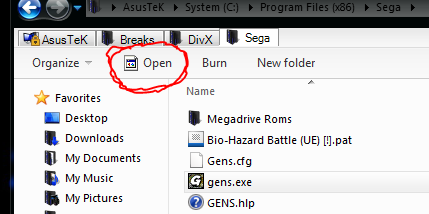
normally when you select a file, it shows the icon for the program associated with it, for example, if i click a text file, a wee notepad++ icon shows.
But, if i click on a executable, i get the crappy old style exe icon, instead of the newer exe icon.
I know there is a simple fix out there somewhere, as i did it on a previous Win7 installation, but for the life of me, i can't find it again.
Its not a icon cache issue,
I think i remember it being a reg tweak of some sort i found on Ghacks, but don't hold me to that.
Should be..
But currently..
My Computer
At a glance
Win7 Ultimate x64 7601AMD Phenom II x4 955 Black Ed @ 3.608 Gig KingstonnVidia 295GTX, nVidia 9800GT
- Computer Manufacturer/Model Number
- Moi
- OS
- Win7 Ultimate x64 7601
- CPU
- AMD Phenom II x4 955 Black Ed @ 3.60
- Motherboard
- ASUSTeK M3N72-D
- Memory
- 8 Gig Kingston
- Graphics Card(s)
- nVidia 295GTX, nVidia 9800GT
- Screen Resolution
- 1680x1050 + 1280x1024 x2 + 1280x768
- Hard Drives
- 500GB Spinpoint F3 x2 in Hardware RAID0
- PSU
- Thermaltake 850w
- Cooling
- Arctic Cooling
- Keyboard
- OCZ
- Mouse
- Ozone Smog


