
How to change default boot drive and reformat old drive.

akd835

New member
Local time
12:12 PM
Messages
1
How to change default boot drive and reformat the old one.

I installed a new 2TB drive and installed window 7. But for some reason win7 needs my old drive to boot. I have tried to unplug the old drive and boot with the win7dvd, but I get disk failure message please reboot over and over.

What are the steps to make the new drive the sole place for win7 to boot and then how can I reformat the old drive for storage?

Thanks for any help provided!
 

Attachments
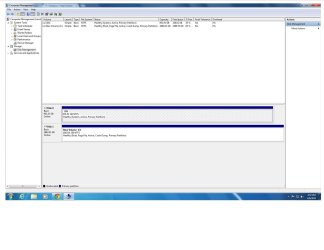
  • diskmanagement.jpg
    diskmanagement.jpg
    101.2 KB · Views: 6

My Computer My Computer

At a glance

Windows 7 64 professional
Computer type
PC/Desktop
Computer Manufacturer/Model Number
custom
OS
Windows 7 64 professional

My Computer My Computer

At a glance

Windows 7 Ultimate 32-Bit & Windows 7 Ultimat...Intel Core i7 CPU 950 @ 3.07GHzOCZ 6GB (3 x 2GB) 240-Pin DDR3 SDRAM DDR3 160...ATI Radeon HD 5700 Series
Computer Manufacturer/Model Number
Custom Built
OS
Windows 7 Ultimate 32-Bit & Windows 7 Ultimate 64-Bit
CPU
Intel Core i7 CPU 950 @ 3.07GHz
Motherboard
ASUS P6T DELUXE V2
Memory
OCZ 6GB (3 x 2GB) 240-Pin DDR3 SDRAM DDR3 1600 OCZ3X1600R2
Graphics Card(s)
ATI Radeon HD 5700 Series
Sound Card
OnBoard
Hard Drives
WD6400AACS-00M3B0 (640GB SATA )
PSU
CORSAIR 850w
Case
NZXT LEXA
Cooling
Intel Stock Heatsink Fan
Keyboard
Microsoft Wireless Laser Keyboard 7000
Mouse
Microsoft Wireless Laser Mouse 7000
You should have unplugged the old HD before install.

To move the System boot files to C so that it is fully functional with a Repair console on F8 Boot Tools menu, mark C Active now, power down to unplug the old HD and swap its cable to C so it is in Disk0, boot into Win7 DVD System Recovery Options or System Repair Disk to run Startup Repair - Run up to 3 Separate Times until Win7 boots and is marked System Active.

You can then plug back in the old HD making sure Win7 HD remains first to boot in BIOS setup.
 
Back
Top