How to clear jump lists for a SPECIFIC program ?

JordanJP

New member
Local time
11:36 PM
Messages
296
hey

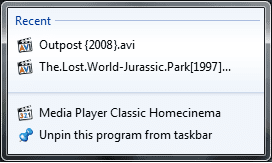
Just wondering If there would be a way for me to clear the recent (Jump List) for a specific program without having to delete all Jump lists for every program on the taskbar ?

(See the Second Screenshot down)

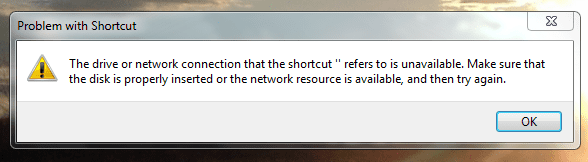
The recent list that I would like to clear is Media Player Classic only. Reason, is because some videos I watch, are stored on another external USB hard drive. And when I have that hard drive disconnected, I get the following message If I click on one of the files in the recent list :

(See the first Screenshot)

And basically I don't want to have a recent jump list pointing to a file that isn't available


Actually, now that I think of it, how do I prevent a specific program namely MEDIA PLAYER CLASSIC from even creating jump (recent) lists in the first place ?


Hope my questions make sense ! lol It's 1:20AM and I can't sleep :p


Thnx in advance
 

Attachments

  • ScreenShot 1.png
    ScreenShot 1.png
    5.6 KB · Views: 2,686
  • ScreenShot 2.PNG
    ScreenShot 2.PNG
    15.1 KB · Views: 59

My Computer

Computer Manufacturer/Model Number
HP Envy 17 4054ca
OS
Windows 7 baby ! : D
CPU
Intel Core i7 720QM @ 1.60GHz
Motherboard
Hewlett-Packard 1449 (CPU)
Memory
6.0GB Dual-Channel DDR3 @ 662MHz
Graphics Card(s)
ATI Mobility Radeon HD 5650
Sound Card
IDT High Definition Audio CODEC
Monitor(s) Displays
Generic PnP Monitor @ 1600x900
Screen Resolution
1600X900
Hard Drives
78.15GB INTEL SSDSA2M080G2GC ATA Device (IDE)
The recent list that I would like to clear is Media Player Classic only. Reason, is because some videos I watch, are stored on another external USB hard drive. And when I have that hard drive disconnected, I get the following message If I click on one of the files in the recent list

Hi JordanJP,

Maybe I'm not understanding correctly, but why would you click on an item in your MPC jumplist that you know isn't available because the drive is disconnected?

You can always just right-click on individual items in a jumplist and select "Remove from this list".

Cheers,

Walker
Windows Outreach Team
 
Last edited:

My Computer

Computer Manufacturer/Model Number
HP Pavilion dm3 (netbook) *** 27" iMac (Dual-Boot)
OS
Windows 7 Home Premium (64-bit) *** Windows XP SP3 (32-bit), OSX 10.6
CPU
AMD Athlon Neo X2 1.6GHz *** Intel Core i7 Quad Core 2.8GHz
Memory
4.00 GB *** 4.00 GB
Graphics Card(s)
ATI Radeon HD 3200, 384MB *** ATI Radeon HD 4850, 1GB
Sound Card
ATI High Definition Audio *** ATI High Definition Audio
Monitor(s) Displays
LG Flatron W2053TX
Screen Resolution
1600 x 900 (monitor), 1266 x 768 (laptop) *** 2560 x 1440
Hard Drives
300 GB SATA (internal), 500 GB HP SimpleSave (external) *** 1 TB SATA (internal), 160 GB LaCie (external)
Mouse
Logitech Cordless Optical Mouse for Notebooks
Internet Speed
Broadband
I have the same problem. I want to clear one jump list, not all jump lists. And I don't want to have to right click 10 or more items individually and then choose "Remove from this list" 10 times and then click "Are you sure you want to delete?/YES" 10 times and then pull up the jump list again 10 times and start over and then empty my recycle bin and then click "Yes I really really really want to delete this trash". :p

Seems like a simple request. Why can't they just let you right-click and choose "Clear Jump List" like you could do on the old Recent Files list?

Even navigating to a folder that shows the contents of an individual jump list would be better. Kind of like the way you could open the Quick Launch folder or the Recent Files lists in prior versions of Windows. At least, then you could select more than one shortcut at a time to delete.

Know of a solution?
 

My Computer

OS
Windows 7
Quite simple actually:
  1. Hit Win+R (Run) and enter:
    Code:
    %APPDATA%\Microsoft\Windows\Recent\AutomaticDestinations
  2. Sort the listed files by date modified.
  3. Manually remove ONE item from the program's jumplist; You'll see the date modified on one of the files change to the current time. That's the file you need to delete to clear that application's jumplist.
  4. Make note of the filename; That name will be the same every time that application recreates a jumplist. In my case, Media Player Classic creates "43578521d78096c6.automaticDestinations-ms" but it may be different on yours. Just remember that the filename will always be the same, no matter how many times it's recreated.
Now that you know where the files are stored, and can figure out which files belong to which applications with a little trial-and-error, you can write a simple batch script that will clear only specific jumplists.

Enjoy!
 

My Computer

Computer Manufacturer/Model Number
Fx X04c
OS
Windows 7 Build 7100 (x64)
CPU
AMD Phenom 9950 Black Edition
Motherboard
ASUS M3A78-EM
Memory
4GB (2x2GB) OCZ Reaper
Graphics Card(s)
Palit Nvidia GeForce 9800GT 512MB
Sound Card
Onboard from M3A78-EM
Monitor(s) Displays
LG L206W
Screen Resolution
1680x1050x32bpp
Hard Drives
2.8TB of storage across 3 HDDs.
PSU
450W RaidMax
Case
Custom black w/ bluelight/blacklight
Cooling
Forced air intake
Keyboard
Logitech G15 MKII
Mouse
Logitech G5 Gaming Laser Mouse
Internet Speed
15mb dn/1mb up
Other Info
Enough spare parts to build another couple Windows-7-capable machines.
Nice post dstruct2k, and a very easy method to use :thumbsup:

A Guy
 

My Computer

Computer type
PC/Desktop
OS
Windows 10 Home x64
CPU
INTEL Core i5-750 Quad-Core 3.37GHz
Motherboard
ASUS P7P55D
Memory
HyperX Fury Black Series 8GB (2 x 4GB) 1866Mhz
Graphics Card(s)
EVGA GeForce GTX 750 Superclocked 1GB 128-Bit GDDR5
Monitor(s) Displays
LG 32MA68HY 32" IPS
Screen Resolution
1920 x 1080
Hard Drives
Samsung 840 Evo 120GB, SEAGATE 500GB Barracuda® 7200.12, SATA 3 Gb/s, 7200 RPM, 16MB cache
PSU
ANTEC TruePower New TP-550, 80 PLUS, 550W
Case
ANTEC Three Hundred Illusion
Cooling
COOLER MASTER Hyper 212 Plus, 4 x 120mm 1 x 140mm Noctua's
Internet Speed
85 + Mbps
Antivirus
Avast
Browser
Vivaldi
"write a simple batch script" - can you please explain in detail how to do this.

Also, I currently have 35 files with "43578521d78096c6.automaticDestinations-ms" type names in that location. Will I need 35 different batch scripts? How do I invoke these batch scripts?
 

My Computer

OS
Windows 7
"write a simple batch script" - can you please explain in detail how to do this.

Also, I currently have 35 files with "43578521d78096c6.automaticDestinations-ms" type names in that location. Will I need 35 different batch scripts? How do I invoke these batch scripts?
No offense, but if the concept of a batch file being used to simplify an already-simple task is beyond you, then this method won't do you any good. Each file in the folder (or any other folder on any computer ever) will have a unique name and my method is to help you see which applications get assigned which IDs. I think this might be over your head, sorry.
 

My Computer

Computer Manufacturer/Model Number
Fx X04c
OS
Windows 7 Build 7100 (x64)
CPU
AMD Phenom 9950 Black Edition
Motherboard
ASUS M3A78-EM
Memory
4GB (2x2GB) OCZ Reaper
Graphics Card(s)
Palit Nvidia GeForce 9800GT 512MB
Sound Card
Onboard from M3A78-EM
Monitor(s) Displays
LG L206W
Screen Resolution
1680x1050x32bpp
Hard Drives
2.8TB of storage across 3 HDDs.
PSU
450W RaidMax
Case
Custom black w/ bluelight/blacklight
Cooling
Forced air intake
Keyboard
Logitech G15 MKII
Mouse
Logitech G5 Gaming Laser Mouse
Internet Speed
15mb dn/1mb up
Other Info
Enough spare parts to build another couple Windows-7-capable machines.
Thanks!

Ran across this old post after considerable frustration with this issue. Thanks, dstruck2k. Your method was easy to use and worked perfectly.

David :)
 

My Computer

OS
Windows 7 Home x64
Back
Top